
Home > Dashboard > Power Apps Dashboards
Download this articlePower Apps Dashboards
EnPower provides two container-level default dashboards for Power Apps, including:
Power Apps Overview Dashboard
The following are the report charts that can be managed on the default Power Apps overview dashboard. You can also add them to your custom Power Apps’ dashboards as gadgets. They are all container-level reports and can only be added to container-level dashboards.
Total Apps

The Total apps card shows the current total number of apps and the difference with the data of the last month in the specified containers.
Created This Month
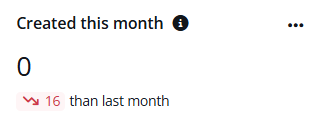
The Created this month card shows the number of apps created in this month and the difference with the data of the last month in the specified containers.
App Creators

The App creators card shows the current total number of users who have created apps and difference with the data of the last month in the specified containers.
App Creation Trend
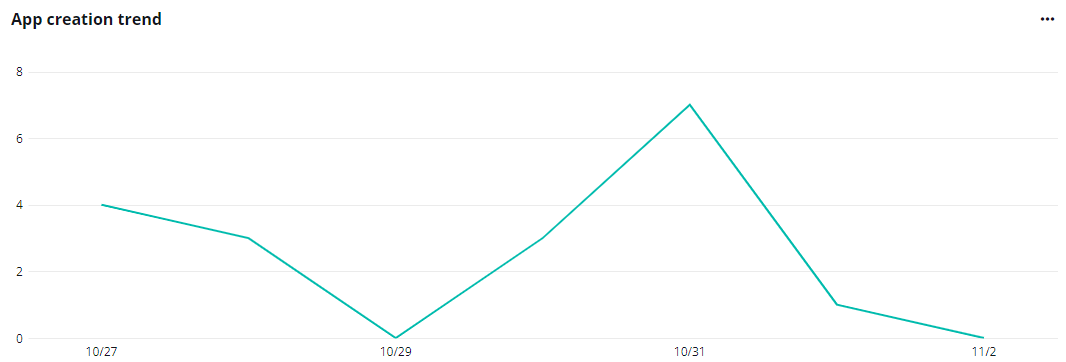
The App creation trend chart shows the changes of the number of canvas apps created on each day in the defined time range.
Hover your mouse over the line to view the detailed number of canvas apps created on a specific date.
Expand the action list in the upper-right corner of the chart. Then click View more to go to the Power Automate page to view the list of apps.
Total App Creators

The Total app creators chart shows the number of users who have created apps and users with creator permission but never created apps.
The creator permission applies to users with designated service plans. For the detailed service plan list, refer to the Service Plans for App Creator Permission section on this page.
Hover your mouse over the ring to view the detailed numbers of users. To hide the data of a specific type, click the corresponding data category below the chart.
App Creation in Departments

The App creation in departments chart shows the number of apps created for departments. The X-axis depicts the number of apps, and the Y-axis depicts the departments.
Hover your mouse over the bars to view the detailed number of apps created for each department.
Expand the action list in the upper-right corner of the chart. Then click View more to go to the Power Apps page to view the list of apps.
App rankings by Connectors/Users

The App rankings by connectors/users chart ranks apps by their number of connectors and users. You can switch the ranking tabs by clicking Connectors or Users on top of the chart.
The X-axis depicts the number of connectors and users. The Y-axis depicts the apps.
Hover your mouse over the bars to view the detailed numbers.
Expand the action list in the upper-right corner of the chart. Then click View more to go to the Power Apps page to view the list of apps.
Apps Created in Last 12 Months
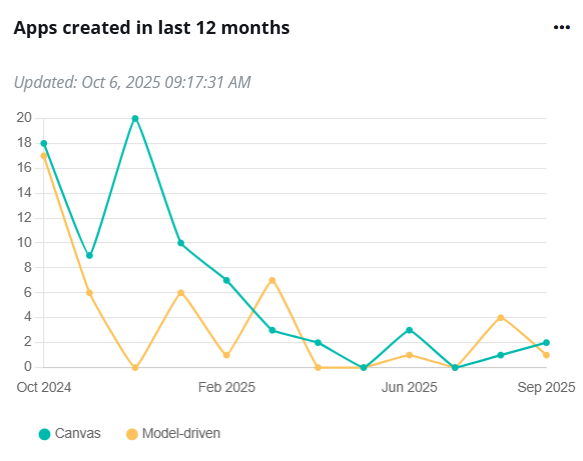
The Apps created in last 12 month chart shows the changes of the number of apps created in the last 12 months.
Hover your mouse over the line to view the detailed number of agents created on a specific date.
App Creators in Last 12 Months

The App creators in last12 month chart shows the number of users who created apps in the last 12 months.
Hover your mouse over the line to view the detailed number of app creators on a specific date.
App Consumers
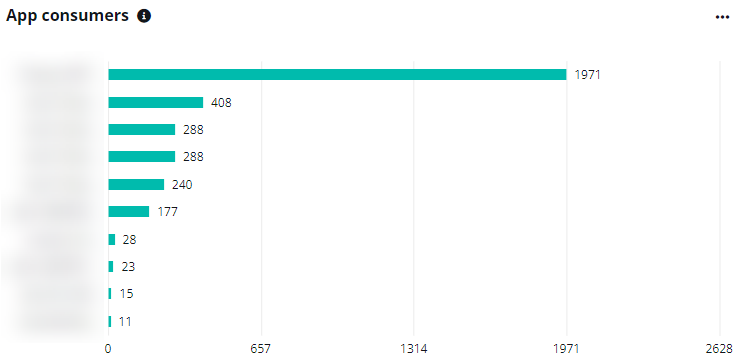
The App consumers chart shows the top app consumers who have launched the app by the number of their app launches. The X-axis depicts the number of launches. The Y-axis depicts the users.
Hover your mouse over the bars to view the detailed numbers.
App Rankings by Activities/Launches

The App rankings by activities/launches chart shows the top apps by the number of app activities and launches.
Click Activities and Launches to switch the ranking tabs. Hover your mouse over the bars to view the detailed numbers.
Expand the action list in the upper-right corner of the chart. Then click View the latest report to go to the Power Apps > Canvas app analytics tab.
App Creation in Offices
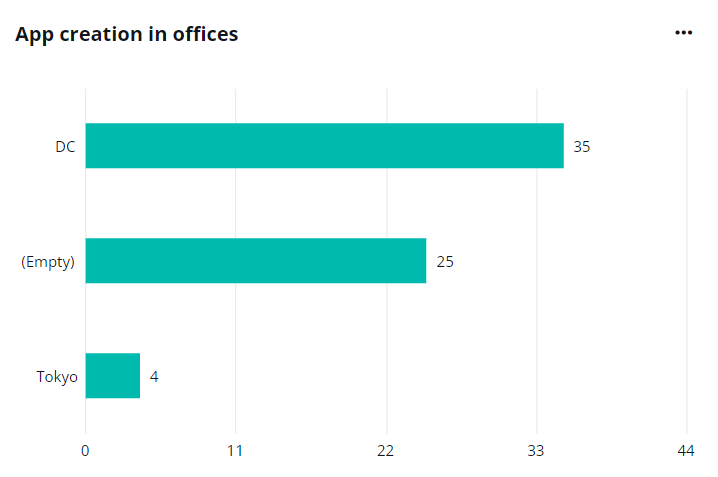
The App creation in offices chart shows the number of apps created in each office. The X-axis depicts the number of apps created and the Y-axis depicts the offices.
Hover your mouse over the bars to view the detailed number of apps created.
Service plans for App Creator Permission
When calculating users with creator permission in the Total app creators chart, the creator permission applies to users with the designated service plans. Refer to the table below for the service plans with the creator permission and corresponding licenses containing these service plans.
| Service plan | Licenses |
|---|---|
| POWERAPPS FOR DYNAMICS 365 | DYNAMICS 365 FOR TEAM MEMBERS ENTERPRISE EDITION DYNAMICS 365 TEAM MEMBERS Dynamics 365 Business Central Team Members |
| Power Apps for Dynamics 365 vTrial | Dynamics 365 Customer Service Enterprise vTrial Dynamics 365 Sales Premium Viral Trial Dynamics 365 Customer Service Enterprise Viral Trial Dynamics 365 Field Service Viral Trial |
| PowerApps for Dynamics 365 | Dynamics 365 Business Central Essentials Dynamics 365 Business Central External Accountant Dynamics 365 Business Central Premium Dynamics 365 Finance DYNAMICS 365 FOR CUSTOMER SERVICE ENTERPRISE EDITION DYNAMICS 365 FOR FINANCIALS BUSINESS EDITION DYNAMICS 365 FOR SALES AND CUSTOMER SERVICE ENTERPRISE EDITION Dynamics 365 for Sales Enterprise Edition Dynamics 365 Sales Premium Dynamics 365 Sales Premium DYNAMICS 365 FOR SUPPLY CHAIN MANAGEMENT Dynamics 365 for Talent MICROSOFT DYNAMICS CRM ONLINE BASIC MICROSOFT DYNAMICS CRM ONLINE Dynamics 365 for Case Management Enterprise Edition Dynamics 365 for Field Service Enterprise Edition |
| Power Apps for Office 365 | Microsoft 365 Business Basic MICROSOFT 365 BUSINESS BASIC Microsoft 365 Business Standard MICROSOFT 365 BUSINESS STANDARD - PREPAID LEGACY Microsoft 365 Business Premium MICROSOFT TEAMS EXPLORATORY Microsoft Teams Trial Microsoft Teams Commercial Cloud OFFICE 365 E1 OFFICE 365 E2 |
| Power Apps for Office 365 (Plan 3) | Office 365 E5 Microsoft 365 A5 for Faculty MICROSOFT 365 A5 FOR STUDENTS Microsoft 365 E5 Microsoft 365 E5 without Audio Conferencing Office 365 A5 for faculty Office 365 A5 for students OFFICE 365 E5 WITHOUT AUDIO CONFERENCING Microsoft 365 E5 Developer (without Windows and Audio Conferencing) Microsoft 365 E5 (No Teams) |
| Power Apps per App Plan | Power Apps per app plan |
| Power Apps for Customer Service Pro | Dynamics 365 Customer Service Professional |
| Power Apps for Office 365 K1 | Microsoft 365 F3 OFFICE 365 F3 |
| Power Apps per User Plan | Power Apps per user plan |
| Power Apps for Office 365 for Government | Office 365 G1 GCC |
| Power Apps for Office 365 F3 for Government | Microsoft 365 F3 GCC |
| Power Apps for Office 365 for Government | Office 365 G5 GCC Microsoft 365 GCC G5 |
| Power Apps per User Plan for Government | Power Apps per user plan for Government |
| PowerApps Plan 1 for Government | PowerApps Plan 1 for Government |
| Power Apps for Office 365 for GCCHigh | Office 365 E5 without Audio Conferencing - GCCHIGH |
| Power Apps for Office 365 for GCCHigh | Office 365 E1 - GCCHIGH |
| POWER APPS FOR OFFICE 365 FOR GOVERNMENT | MICROSOFT 365 G3 GCC OFFICE 365 G3 GCC |
| PowerApps Trial | Microsoft Power Apps Plan 2 Trial |
| Power Apps (Plan 2) | Microsoft Power Apps Plan 2 (Qualified Offer) |
| Power Apps for Customer Service Pro for Government | Dynamics 365 Customer Service Professional for Government |
| Dataverse for Power Apps per app | Power Apps per app plan (1 app or portal) |
| Power Apps per app | Power Apps per app plan (1 app or portal) |
| Common Data Service Power Apps Portals Login Capacity | Power Apps Portals login capacity add-on Tier 2 (10 unit min) |
| Power Apps Portals Login Capacity Add-On | Power Apps Portals login capacity add-on Tier 2 (10 unit min) |
| Power Apps Portals Login Capacity Add-On for Government | Power Apps Portals login capacity add-on Tier 2 (10 unit min) for Government |
| CDS PowerApps Portals page view capacity add-on for GCC | Power Apps Portals page view capacity add-on for Government |
| Power Apps Portals Page View Capacity Add-On for Government | Power Apps Portals page view capacity add-on for Government |
| Power Apps for Guides | Dynamics 365 Guides |
| MICROSOFT POWERAPPS | POWERAPPS AND LOGIC FLOWS |
| PowerApps per app baseline access | PowerApps per app baseline access |
| CDS PowerApps per app plan | Power Apps per app plan |
| Common Data Service Power Apps Portals Login Capacity for GCC | Power Apps Portals login capacity add-on Tier 2 (10 unit min) for Government |
| Power Apps for Dynamics 365 | Dynamics 365 Customer Engagement Applications for Demo Trial Dynamics 365 Customer Engagement Plan DYNAMICS 365 UNF OPS PLAN ENT EDITION |
| PowerApps for Developer | Microsoft Power Apps for Developer |
| Power Apps for Office 365 | Microsoft 365 A3 for Faculty MICROSOFT 365 A3 FOR STUDENTS Microsoft 365 A3 for students use benefit Microsoft 365 A3 - Unattended License for students use benefit Microsoft 365 A5 for students use benefit Microsoft 365 A5 without Audio Conferencing for students use benefit Microsoft 365 E3 Microsoft 365 E3 - Unattended License Office 365 A3 for faculty Office 365 A3 for students Office 365 E3 OFFICE 365 E3 DEVELOPER OFFICE 365 E4 Office 365 A1 for faculty Office 365 A1 Plus for faculty Office 365 A1 for students Office 365 A1 Plus for students |
| Power Apps for Sales Pro | Dynamics 365 for Sales Professional |
Orphaned Apps Dashboard
The following are the report charts that can be managed on the default Orphaned apps dashboard. You can also add them to your custom Power Apps’ dashboards as gadgets. They are all container-level reports and can only be added to container-level dashboards.
Legacy Apps
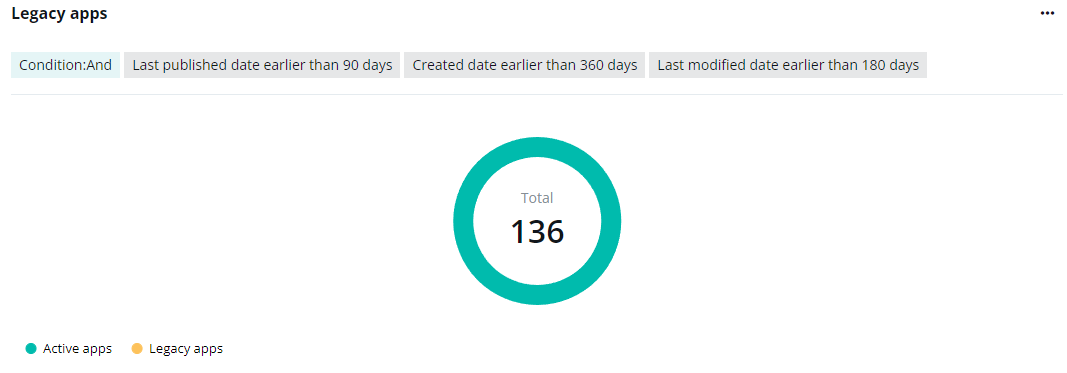
The Legacy apps chart shows the number of legacy and active apps in the specified containers.
You can define the legacy apps when you are adding the gadget or by editing the gadget. Apps can be defined as legacy apps by their last published date, creation date, last modification date, and last launched date.
When defining the legacy apps, you can select And or Or as the condition. If And is selected, apps that meet all of the specified definitions will be categorized as legacy apps. If Or is selected, apps will be defined as a legacy when one of the definitions is met.
Hover your mouse over the ring to view the detailed numbers. To hide the data of a specific type, click the corresponding data category below the chart.
Expand the action list in the upper-right corner of the chart. Then click View legacy apps to go to the Power Apps page to view the list of apps.
When the conditions are in the Or relations, the View legacy apps button is not available.
Ownership Risk Monitor
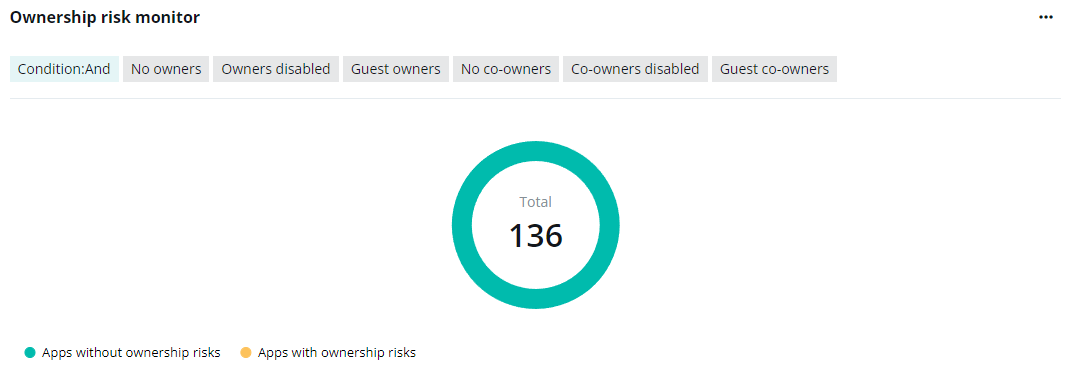
The Ownership risk monitor chart shows the number of apps with ownership risks and apps without ownership risks.
You can define the ownership risks when you are adding the gadget or by editing the gadget. Apps with no owners, disabled owners, guest owners, no co-owners, disabled co-owners, or guest co-owners can be defined as apps with ownership risks.
When defining the ownership risks, you can select And or Or as the condition. If And is selected, apps that meet all the specified definitions will be categorized as apps with ownership risks. If Or is selected, it will be defined as risky when one of the definitions is met.
Hover your mouse over the ring to view the detailed numbers. To hide the data of a specific type, click the corresponding data category below the chart.
Expand the action list in the upper-right corner of the chart. Then click View apps with ownership risks to go to the Power Apps page to view the list of apps.
When the conditions are in the Or relations, the View apps with ownership risks button is not available.