
Home > Upgrading from Legacy tyGraph to AvePoint tyGraph > Prerequisites > Install the New tyGraph Pages Engine
Download this articleInstall the New tyGraph Pages Engine
After you have received your AvePoint tyGraph license and before your upgrade occurs, you need to install a new version of the tyGraph Pages Engine. Until your Validation Period is complete, you will keep the legacy version of tyGraph Pages Engine installed along with the new version. This allows for data to be collected in both environments, ensuring a smooth transition experience.
Install the New tyGraph Pages Engine
You can find the instructions on installing the new tyGraph Pages Engine in the tyGraph Pages Web Part Installation section.
Installing the new tyGraph Pages Engine will not affect your existing reports in any way.
Identify tyGraph Pages Engine Versions
Once you have installed the new tyGraph Pages Engine into your App catalog, your installed apps will look like the screenshot below:
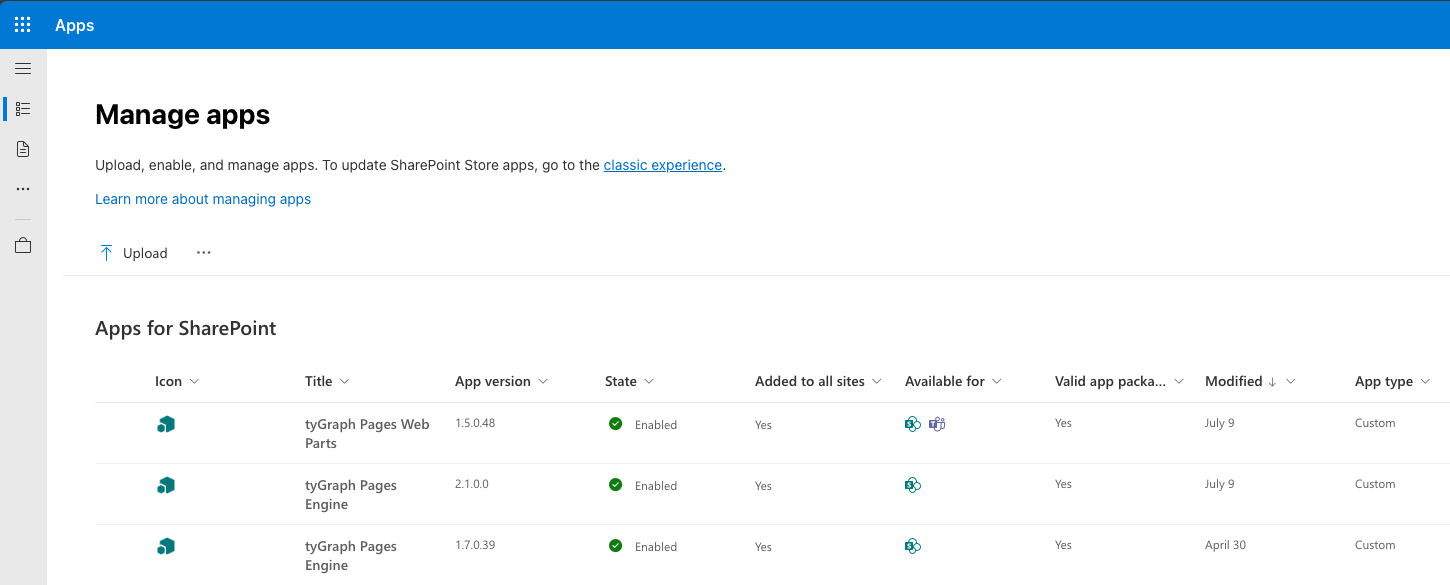
The legacy version of the tyGraph Pages Engine will show an app version number starting with 1.7.0.x. The new AvePoint tyGraph Pages Engine will show an app version number starting with 2.1.0.x.
tyGraph Pages Web Parts
Wait for a notification that your upgrade is finished before installing the new package. Installing the new web parts package early will result in multiple Site Analytics web parts displaying in the web part picker and duplicate report bars.
Remove Legacy tyGraph Pages Engine
When you have completed your Validation Period, you may remove the legacy tyGraph Pages Engine. Remove the package with a version number starting with 1.7.0.x. Keep the tyGraph Pages Engine with version 2.1.0.x. Once the legacy tyGraph Pages Engine is removed, telemetry will no longer be sent to your legacy environment.