
Home > Report Center > SharePoint > Site Overview
Download this articleSite Overview
On the Site overview page of SharePoint, a list of sites is displayed for business users who are site owners or site sponsors are site owners or site sponsors. They can view which sites people visit most, how users interact with content, and what they search for.
-
Site overview – This chart provides an overview of site usage, engagement, and sensitivity across your environment. By clicking the site title, you can redirect to the Site Details page for more reporting data.
-
Search query – This chart shows what users are searching for and how effective the searches are.
-
Search result clicks – This chart shows which content users select after performing a search, which helps you to evaluate how effectively your content meets user search intent.
Site Details
You can view the statistics of each site collection and click the site title to access the details page. The following statistics on the site collection are available for analysis.
-
Active users – The total unique users with any activity in the report period. This includes file views, accessed, downloaded, synced, previewed, and more. If you filter the activity types, it will reduce the number of ways someone could be considered active.
-
Unique file viewers – The total unique users who viewed a file in the report period.
-
Unique page viewers – The total unique users who viewed a page in the report period.
-
Total shares – The total unique users who shared a file in the report period.
-
Likes – The total number of likes received on the site.
-
Comments – The total number of comments on the site.
-
File activity by type over time – This chart shows the total activities or unique users for different file types over a period of time.
-
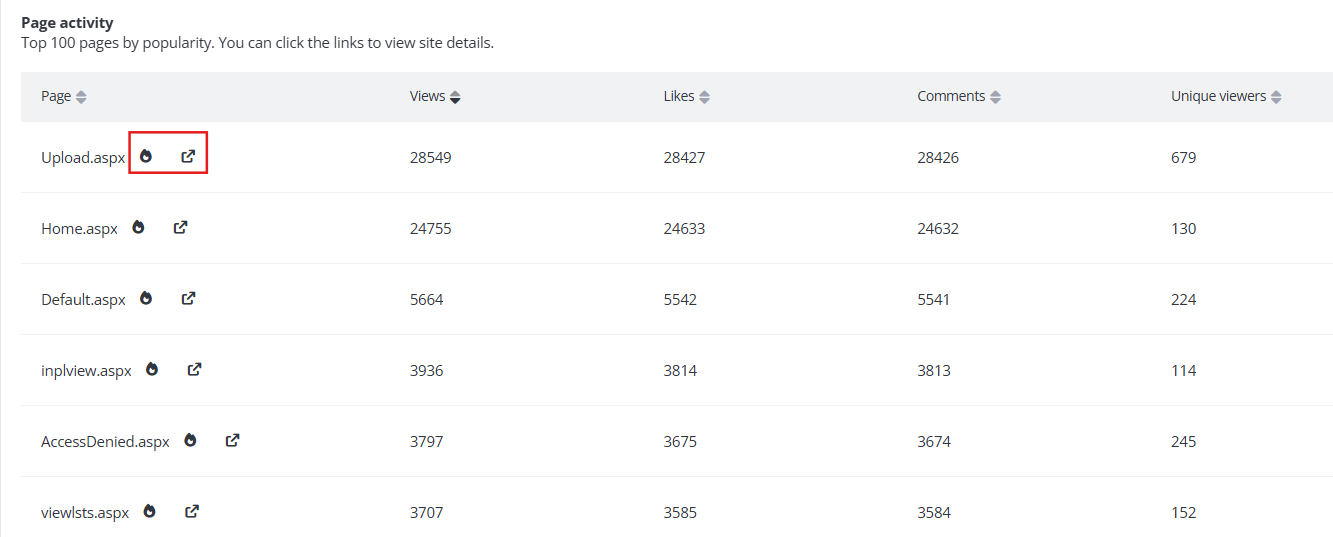
Page activity – Page activities on a site showing the number of views and unique viewers. Click the External link icon or the Heat map icon beside the page name to open a new tab, and you will be redirected to the corresponding tyGraph Pages reports or tyGraph Pages Site Analytics web part if deployed.
-
Site activity by folders and files – This chart shows the site activities by folders and files across different site objects. Click the External link icon beside the document name to download the document.
-
Total activities over time – This chart displays total activities of various types (such as downloads and shares) across different user properties over a period of time. Hover the mouse over a data point to display the detailed information based on your selected filter condition.
-
Top consumers – Identifies the most active users by categorizing total activities or unique user counts based on user properties.
-
External usage by User Business – Shows total activities of external users on your site, broken down by business unit. External users are those captured in activity logs but not registered in your Active Directory.
-
Agent activity over time – A line chart displaying agent activity over time on your site, with options to break down by agent type (SharePoint, Copilot Studio, Microsoft 365 platform, and Microsoft Foundry). Helps identify usage patterns and peak activity periods.
-
Agent accessing this site – List all agents that have accessed this site. Click the agent name, you can view the Agent details panel. Users with tyGraph for Copilot Adoption are taken to the Agent details panel in the tyGraph Copilot Agents report. Users with AgentPulse only are taken to the Agent details modal in AgentPulse. If both products are licensed, the link defaults to tyGraph.
-
File accessed by sensitivity label on this site by agent – Displays files accessed on this site, grouped by sensitivity label. Expand a label to view the specific files accessed by each agents.