
Home > Power BI Report Guides > tyGraph for Viva Engage
Download this articletyGraph for Viva Engage
tyGraph for Viva Engage is a comprehensive solution designed to optimize employee communications and harness the full potential of your Viva Engage network. This user guide will walk you through the features and functionalities to help you evolve your digital workplace, measure engagement, and create impactful communications to enhance employee experience and communication strategies.
Features Overview
-
Adoption – Actionable Insights
-
Leverage advanced harvesters to retain data for up to three years, allowing for year-over-year insights.
-
Map engagement, activity, and discussions based on users' role, region, or hierarchy by syncing with Microsoft Entra ID and HR data.
-
Measure Viva Engage adoption of registered members, active users, and engaged members.
-
-
Usage – Maximize Engagement
-
Map content volume and engagement signals across Viva Engage communities of practice.
-
Understand community interactions and curate your network for success.
-
View top discussions that are trending.
-
-
Impact – Enhance Content
-
Shape employee engagement campaigns based on signals like reactions, comments, contributors, seen by, threads, thread interactions, and sentiment analysis.
-
Show the value of leadership’s engagement through new Q&A and Live Events dashboards.
-
Measure employee sentiment to shape future Viva Engage campaigns.
-
Filter posts made by specific people OR by posts made on behalf of them.
-
Strategic Overview
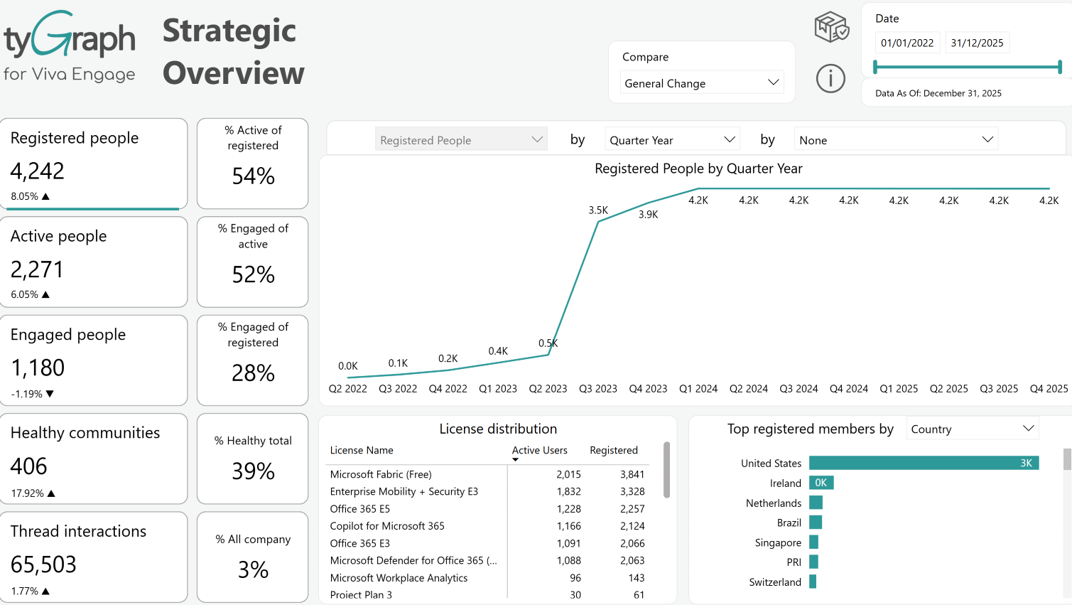
The Strategic Overview report stands as a strategic compass, offering decision-makers a high-level, summarized perspective with a focus on long-range insights. Providing a snapshot of user engagement, community health, and communication impact, this report serves as a comprehensive guide for decision-makers seeking to understand the overarching dynamics within Viva Engage.
Crucially, the report informs strategic decisions aimed at enhancing employee engagement across the platform. By focusing on key metrics and trends, decision-makers can gain valuable insights into the effectiveness of current strategies and make informed choices to optimize communication approaches.
Given its reliance on the summary activity period parameter, the report facilitates long-range trend analysis and year-over-year comparisons. This purposeful inclusion of summary-level data empowers decision-makers to conduct in-depth assessments, fostering a deeper understanding of Viva Engage's evolution and performance over extended periods.
Content Volume and Engagement
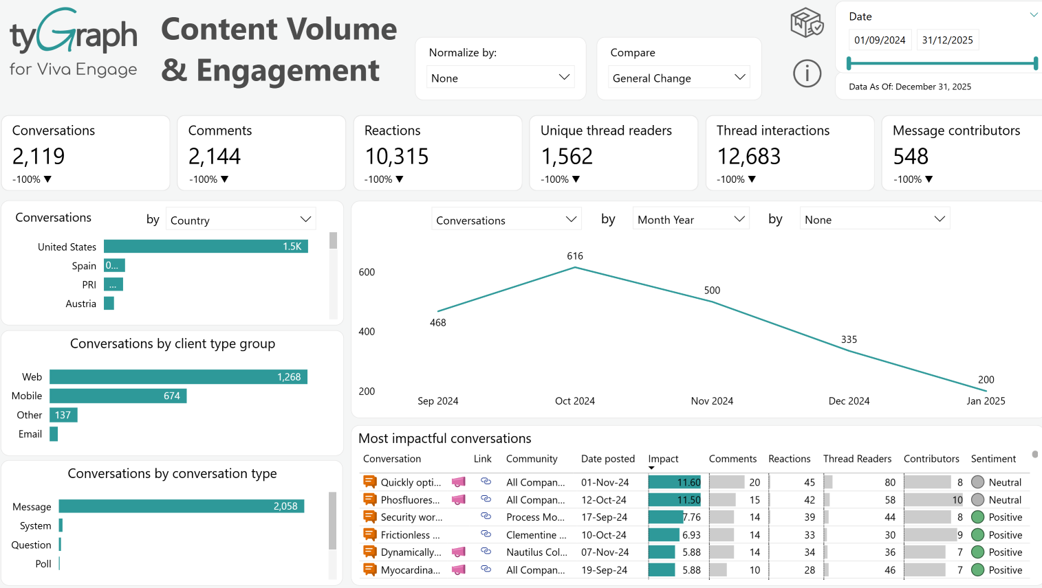
The Content Volume and Engagement report offers an immersive exploration of user interactions within Viva Engage. By delving into conversation metrics, top contributors, and impactful discussions, this report provides a nuanced understanding of the vibrancy within the platform. It categorizes contributions based on client type and conversation format, providing a detailed breakdown of how users engage with different types of content. This categorization enhances the report's ability to offer a comprehensive view of user engagement dynamics, ensuring that community owners and administrators gain valuable insights into the diverse ways users interact with and contribute to discussions within Viva Engage. The report is based on the detail period parameter configured within the dataset.
Topic Analysis
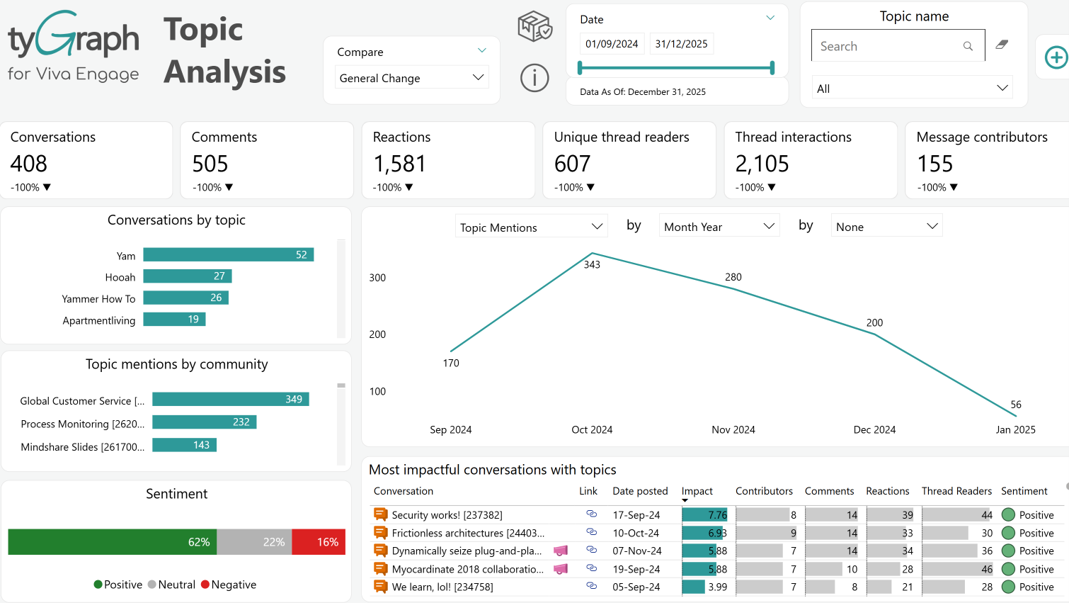
The Topic Analysis report stands out as a robust feature, allowing you to explore and understand prevalent themes within Viva Engage. As you dedicate considerable time to curating topics, this report becomes a valuable resource. It allows you to search for specific topics, providing insights into the effectiveness of your campaigns by exploring discussions aligned with your initiatives. Beyond identifying key topics, the report conducts sentiment trend analysis, offering valuable insights into the emotional context surrounding these conversations. The report is based on the detail period parameter configured within the dataset.
Keyword Analysis
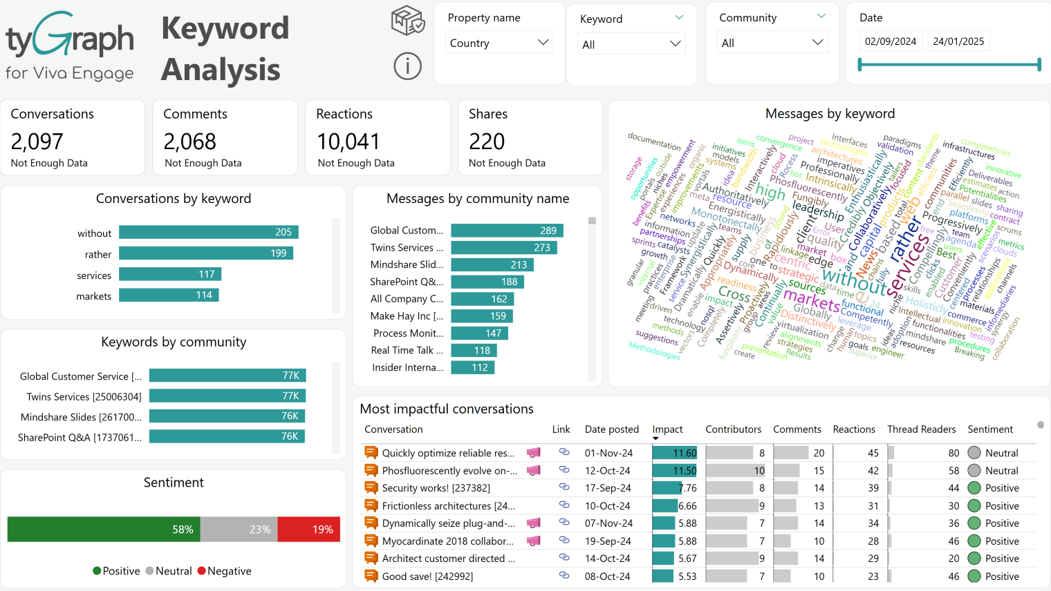
The Keyword Analysis report offers a thorough insight of the most recent 90 days of active conversations within Viva Engage. It goes beyond mere identification of discussed keywords, delving into an insightful analysis of impactful conversations. Additionally, the report incorporates sentiment analysis, providing a nuanced understanding of the emotional context surrounding the identified keywords and discussions. This comprehensive analysis equips users with valuable insights into prevalent themes and sentiments driving engagement within the specified timeframe.
Discussion Tone
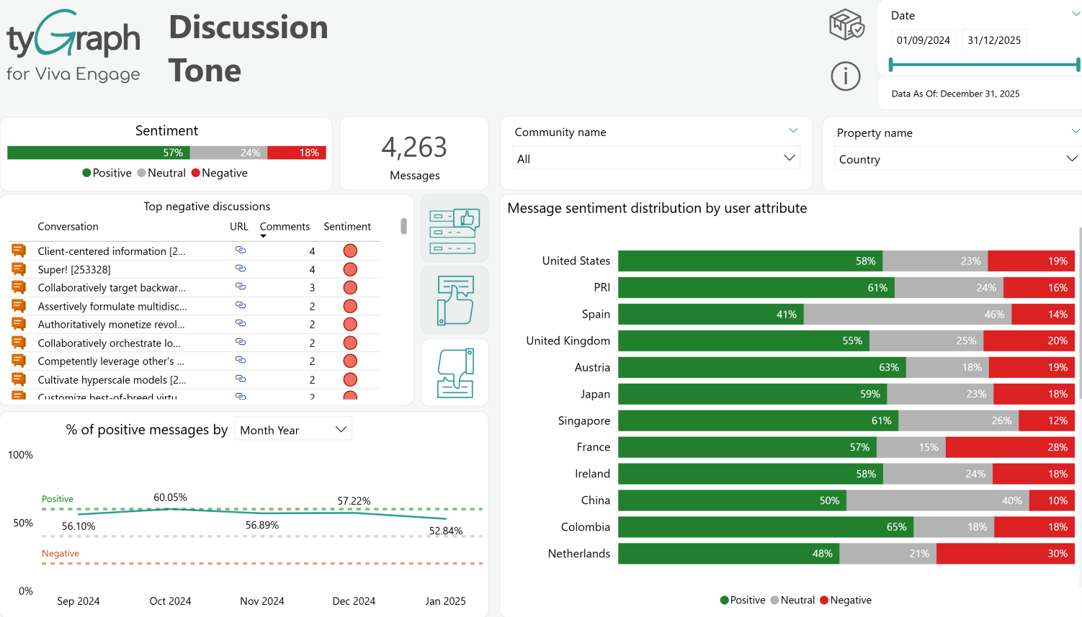
The Discussion Tone report employs sentiment analysis to measure the overall tone of discussions within Viva Engage. By utilizing this analytical approach, the report not only gauges the sentiment but also strategically highlights areas of success and identifies opportunities for improvement. Its emphasis on fostering a positive Employee Experience in Viva Engage ensures that insights derived from the report contribute to creating a more engaging and supportive environment. The report is based on the detail period parameter configured within the dataset.
Community Network
The Community Network report offers a visually compelling representation of organizational interactions within Viva Engage. It serves as a dynamic tool, revealing the intricate dynamics of the network based on hierarchy, geography, or individual users. Functioning as a "Hidden org chart," the report allows users to observe the flow of information within the organization, providing valuable insights into collaboration patterns. The report is based on the detail period parameter configured within the dataset.
The Network
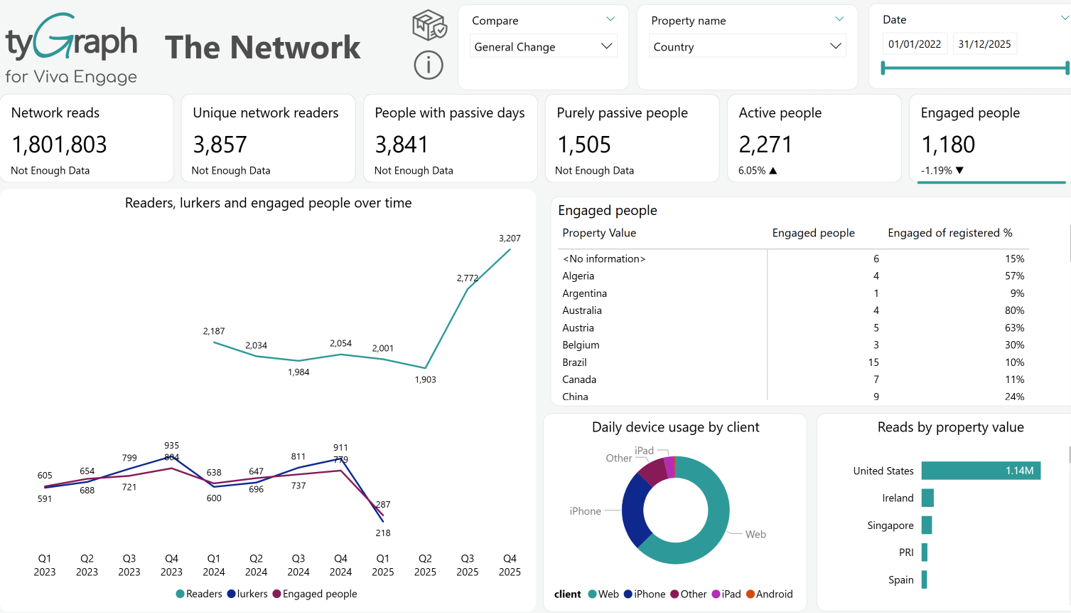
"The Network" report delivers high-level insights based on Microsoft Usage Report data, providing a snapshot of user activity to discern interaction patterns within the Viva Engage platform. It specifically emphasizes the number of conversations a user has read during a specified time period across the network, shedding light on individual engagement levels.
This report operates based on the summary period parameter, summarizing data at a granular User/Date level. It offers a comprehensive view of overall user activity. However, it's important to note that the report does not support segmentation by community or conversation, focusing on broader patterns of engagement across the platform.
Personal Impact
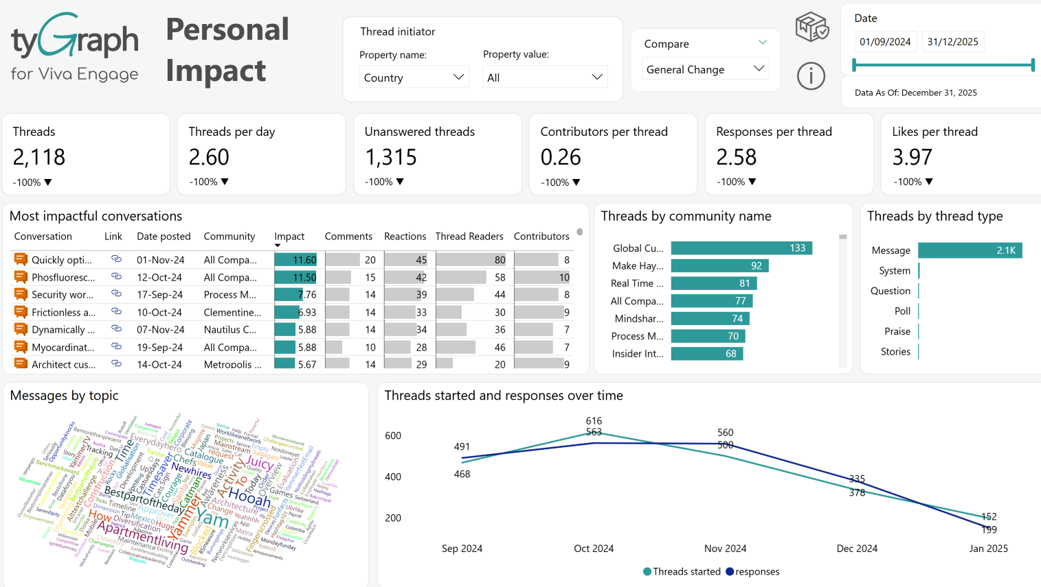
The Personal Impact report provides a clear view of how selected users contribute to conversations within Viva Engage. It focuses on thread creation, engagement generated by those threads, and the overall influence of user-initiated activity.
A key feature of this page is the Thread Initiator slicer, which allows you to filter by specific individuals or by user attributes such as country or department. This enables targeted analysis of how a single user or a defined group drives engagement. By adjusting these slicers, you can evaluate communication patterns, compare user groups, and understand the impact of particular contributors.
The report summarizes core metrics, including the number of threads started, responses and reactions per thread, contributor participation rates, and the volume of unanswered conversations. It also highlights the most impactful posts, activity by community and thread type, and common message topics. A timeline visualization displays how thread creation and responses change over the selected period.
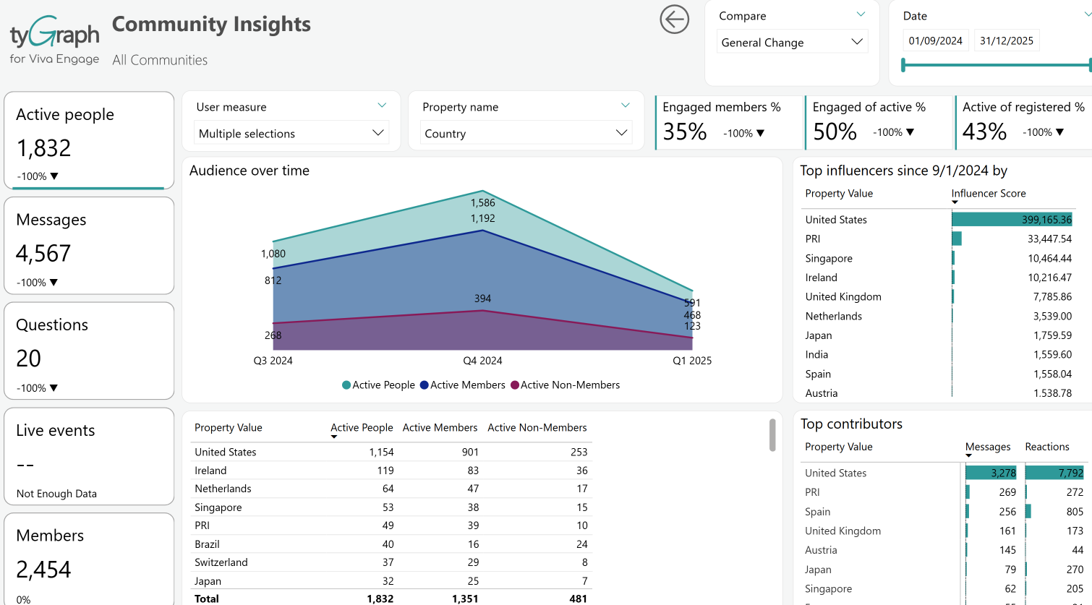
Community Insights
-
In-depth community analysis, tailored for community owners seeking a comprehensive understanding of usage and adoption within their community.
-
Showcases top contributors, both members and non-members, influencers, message volume, impactful conversations, sentiment analysis, and optimal posting times.
-
Delves into aspects like questions & answers, live events, and community membership.
-
Accessible through a right-click on a community from any of the main reports above, this report provides valuable insights for strategic decision-making.
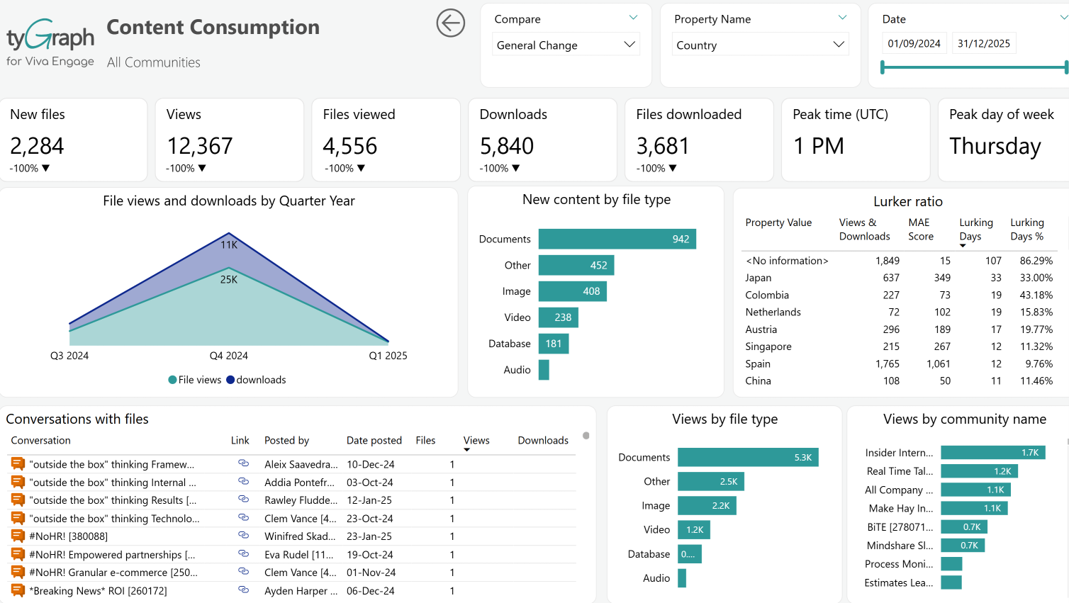
Content Consumption
-
Provides an overview of conversations containing file attachments.
-
Highlights the views and downloads associated with these attachments.
-
Helps track how content is consumed by the audience over a specified period.
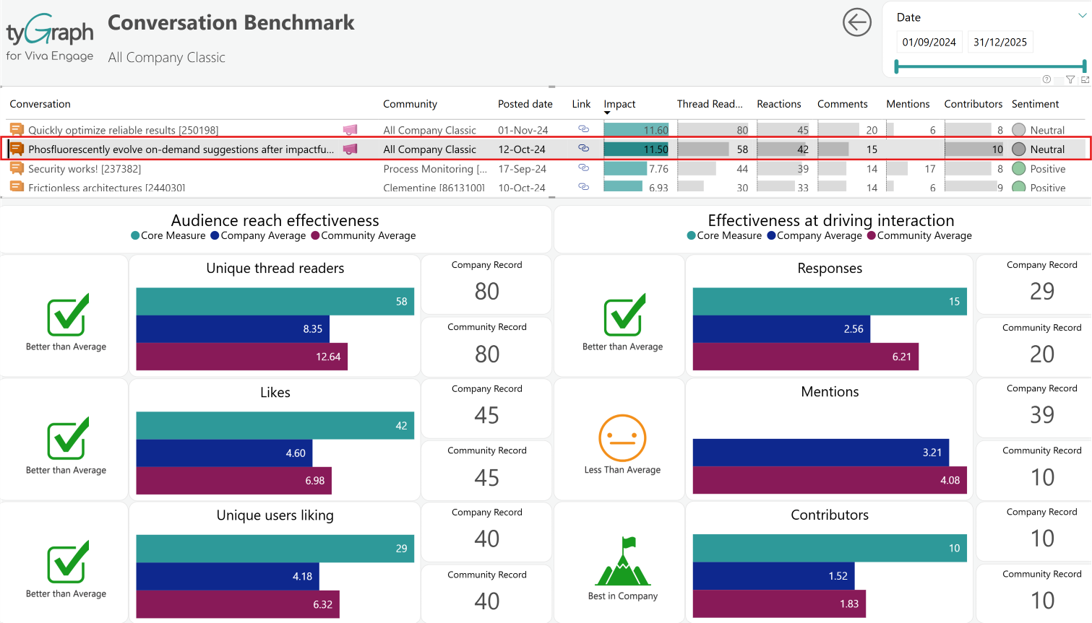
Conversation Benchmark
-
Evaluates a conversation's performance in reaching users and driving interaction.
-
Provides data-backed insights to support decision-making in optimizing communication approaches.
-
Helps identify successful communication strategies and areas for improvement.
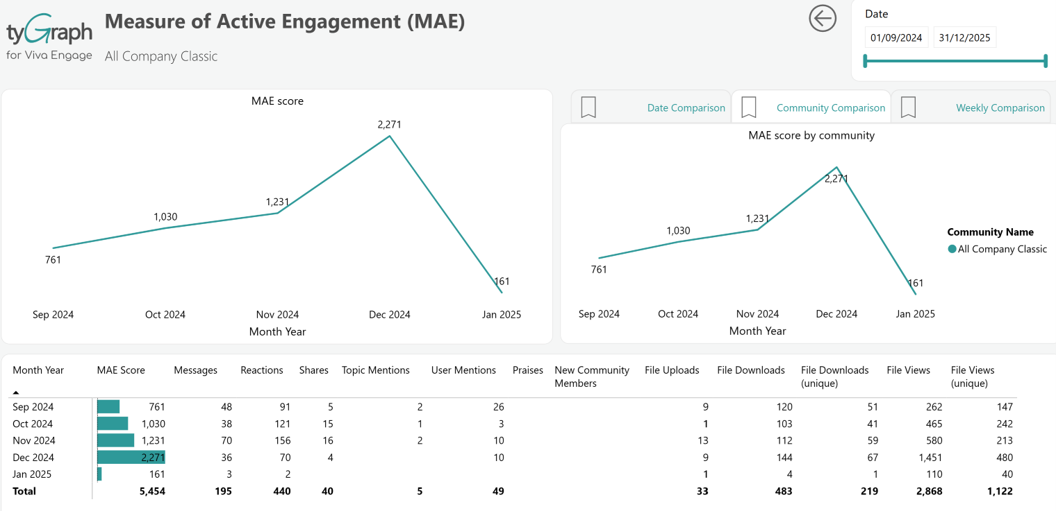
MAE Score
-
Analyzes the trend in user activity over time and offers insights into the evolving engagement levels within Viva Engage.
-
Serves as an indicator of the overall health and vitality of your network. A rising or seasonally higher MAE Score is indicative of positive engagement trends.
-
Check out the Viva Engage Benchmarking report in tyGraph Online for comparisons with other networks.