
Home > FAQs > AvePoint tyGraph FAQs > Licensing and Accounts
Download this articleLicensing and Accounts
Explore the FAQs on SKUs and pricing.
Has pricing changed with AvePoint tyGraph?
Pricing has been updated for all tyGraph products in 2024. Please contact your Account Manager to discuss any price changes.
What if we don’t have Power BI?
If your organization does not have Power BI, you can use the web reports exclusively, or opt to purchase the AvePoint tyGraph Embedded Reports SKU along with any of the core AvePoint tyGraph SKUs. The Embedded reports SKU gives you the Power BI reports embedded directly inside of the AvePoint tyGraph portal.
Does AvePoint tyGraph Embedded Reports provide the same capabilities as tyGraph Online?
For users using tyGraph Online, you may opt to purchase the AvePoint tyGraph Embedded Reports SKU for use with any of the Power BI reports for the core workloads including Calling, OneDrive, Pages, Pulse, SharePoint, Teams, and Viva Engage. If you have customized reports hosted in tyGraph Online, you will need to host those in your organization’s Power BI environment.
How to check if you have a Power BI pro license
To check if you have a Power BI pro license, follow the instructions below:
-
Sign in to Microsoft Power BI.
-
Click the gear button in the top ribbon.
-
Click Manage personal storage.
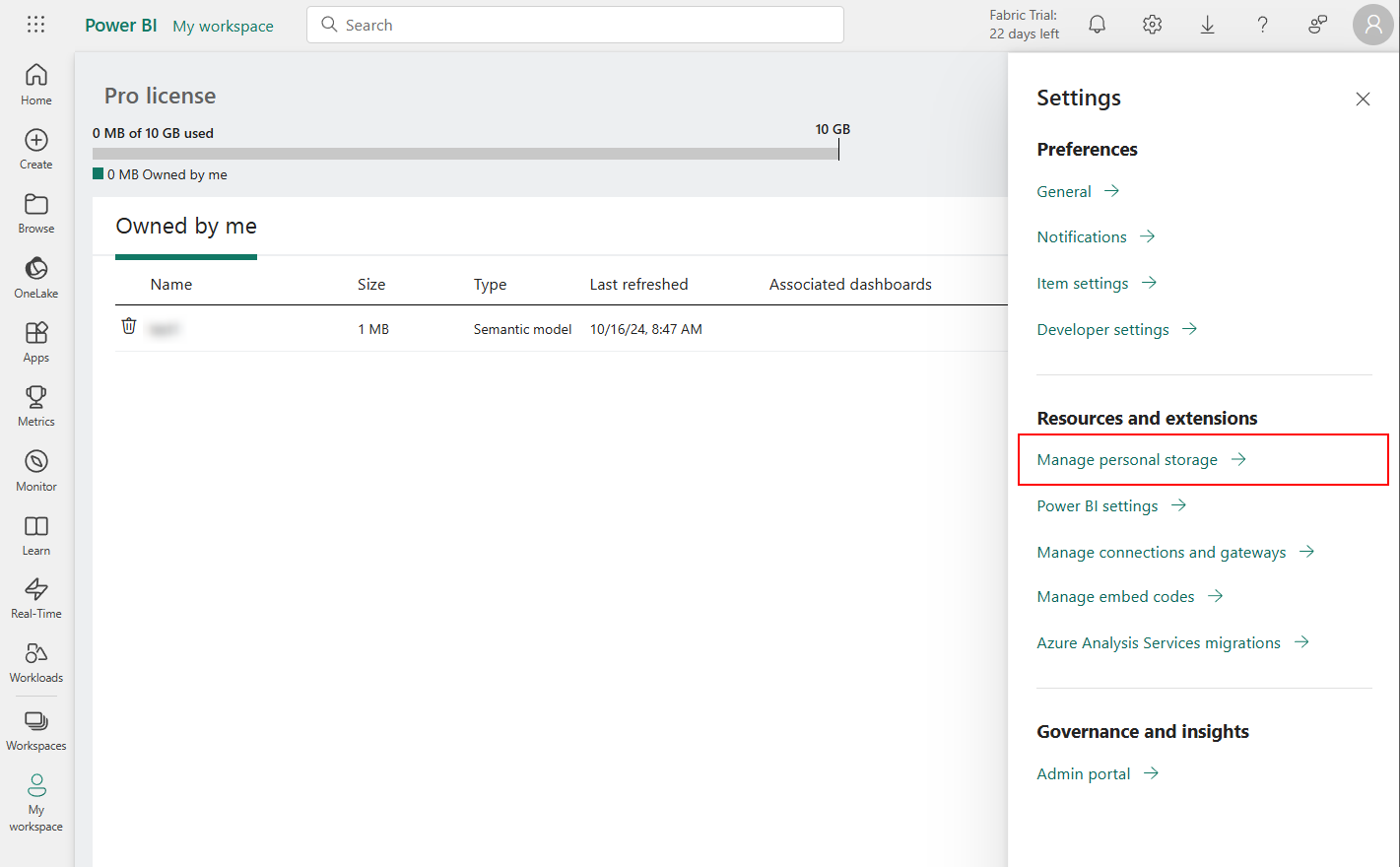
From this window, it can tell whether you have the Pro license and 10 GB of storage space.
Learn more about the types of Power BI licenses required for tyGraph, refer to the section below.
What Power BI license is required for tyGraph?
Power BI Pro ("Pro") or higher * is needed for a proper tyGraph setup. Pro allows a single Power BI workspace per report that can be shared and used by everyone with a Pro license in the organization. This simplifies the management of the tyGraph solutions and ensures prompt data refreshes with consistent reporting values.
Although we don't support this, running tyGraph with Power BI Free ("Free") is possible but not recommended. Free requires each tyGraph user to install, configure and maintain their copy of the tyGraph report within their personal Power BI workspace. These technical activities may be beyond most users' comfort level. With each user supporting their own tyGraph reports the concurrent refresh times will cause resource contention on the reporting database that could cause errors and lead to slower refresh times. Another consequence is the risk of inconsistent data in the reports because of refresh failures, customizations to reports or missing tyGraph updates.
Our recommendation is to ensure that all tyGraph users are using Power BI Pro or higher. If Power BI is an obstacle for your organization, please let us know so we can decide if your requirements can be met using alternative approaches such as the tyGraph Pages web part.
Power BI Premium comes in two flavors Per user and Per capacity. Premium workspaces can provide additional capacity to store larger datasets, supporting longer report periods (duration) on select tyGraph apps, while optimizing refresh and report performance. Both options can help simplify licensing requirements for tyGraph but do come with additional costs. See Power BI pricing.
| Power BI License | Free | Pro | Premium Per User | Premium Capacity |
|---|---|---|---|---|
| tyGraph Possible? | √ | √ | √ | √ |
| Collaborate with Other Pro Users | √ | √ | √ | |
| Distribute to Free Users | √ | |||
| Unlimited Dataset Size (Greater than 1GB) | √ | √ | ||
| Use Case | Bare minimum consumptional users | General Users, Administrators. | General users who want to host very large datasets but not share them broadly | Organizations looking to share apps with free Power BI viewers. For example, to distribute RLS-enabled reports that deliver scoped insights to site owners or community admins. |
| License Distribution for Typical tyGraph Deployment | Infinite | 3-10Licensed Users | 0-5Licensed Users | 0-2Capacities |