
Home > Perform Microsoft Teams Chat Migrations > Post-migration
Download this articlePost-migration
Refer to the following sections to run the post migration jobs.
Change Mapping Domain
This feature is only available for Microsoft Teams Chat to Microsoft Teams Chat migrations.
After the domain name of the source tenant is changed to the destination tenant or the UPN prefixes of source Team email addresses are changed, you can choose one of the following options to migrate the source new or modified data:
-
Option 1: Update the domain names of source and destination chat users configured in project mappings, and then perform an incremental job.
-
Option 2: Directly perform an incremental job since Fly now can migrate data based on the object GUIDs.
If you choose option 1, refer to the following steps to change the domain names of source and destination chat users:
-
Click Projects in the left pane to access the Projects page, and click the name of a project.
-
On the Project mappings page, select one or multiple mappings for which you want to change domain names.
-
Click Post-migration, and select Change mapping domain to change domain names for the chat users. Note that the source domains of your selected mappings must be the same. The destination domains of your selected mappings must be the same.
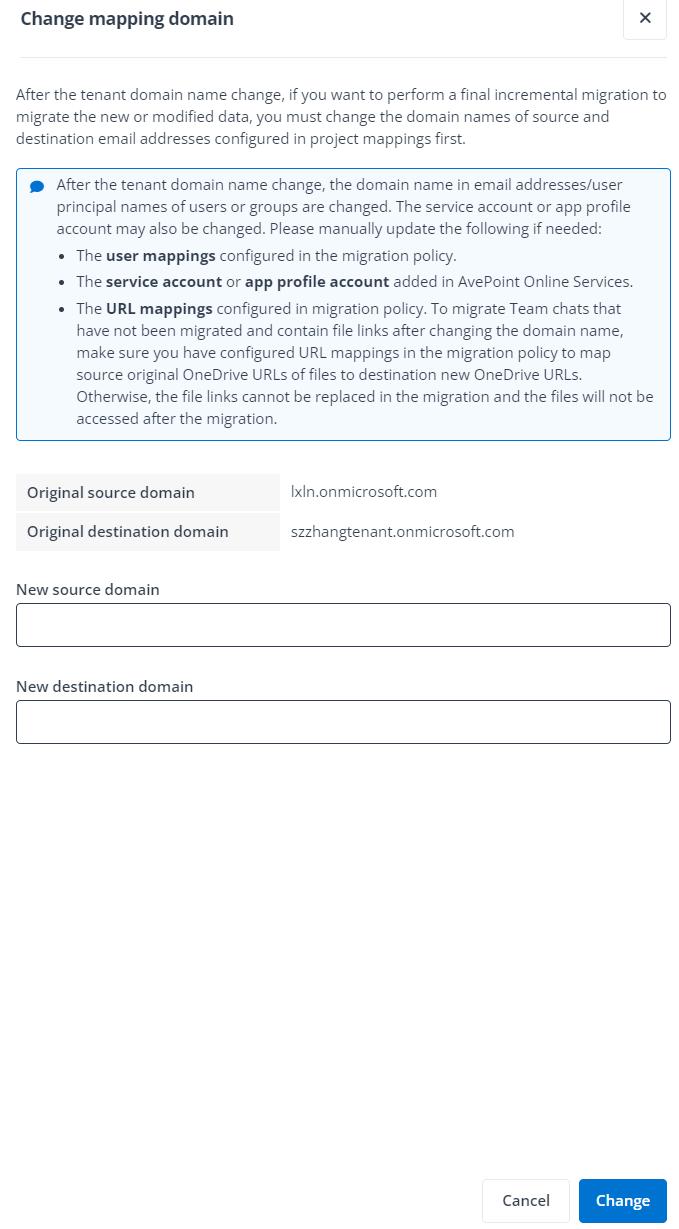
In the Change mapping domain panel, the original source domain and destination domain of chat users are automatically displayed.
-
Enter a new source domain and/or destination domain for the chat users, and click Change to change the domain names.
After changing the domain names, the original domain names of the source and destination chat users are updated to the new domain names.
NOTEIf you switch your source and destination tenant domains but do not provide the final destination domain in the migration policy, the domain of direct links and attachment links in source chat messages cannot be replaced with the final destination domain during the migration. To replace these links in the migrated messages, you can configure URL mappings to map corresponding OneDrive site URLs with the current destination domain to those with the final destination domain, and execute the ChatMigrationAssistTool.exe file.
Complete Migration
This feature is only available for Microsoft Teams Chat to Google Chat Space migrations.
Generally, the job is for spaces that are newly created in migrations. If all source data have been migrated to destination, you can run the Complete migration job to make destination spaces available for end users.
Refer to the following steps to run the Complete migration job:
-
Click Projects in the left pane to access the Projects page, and click the name of a project.
-
On the Project mappings page, select one or multiple mappings for which you want to complete destination spaces.
-
Click Post-migration and click Complete migration.
-
In the Complete migration job, Fly will also migrate internal chat users and replace the URLs of attachments within the current user's Teams Chat Files folder with corresponding destination Google Drive URLs. To migrate guest/external users and/or replace URLs of the attachments from other Teams Chat or OneDrive, select the Migrate guest users, Migrate external users, and/or Replace external attachment URLs checkboxes respectively.
NOTETo replace URLs of the external attachments, make sure you have configured URL mappings for the external attachments.
-
Click Run to run the Complete migration job.
Replace Attachment URLs
This feature is only available for Microsoft Teams Chat to Google Chat Space migrations.
After the full migrations, you can run a Replace attachment URLs job to replace the source attachment URLs with corresponding destination Google Drive URLs. Refer to the following steps for details:
By default, Fly will only replace the URLs of attachments within the current Teams Chat. For attachments from other Teams Chat or OneDrive, before you run the Replace attachment URLs job, you need to generate a URL mapping report for them to get the attachment URLs, and configure URL mappings for these attachments.
-
Click Projects in the left pane to access the Projects page, and click the name of a project.
-
On the Project mappings page, select one or multiple mappings for which you want to replace the attachment URLs.
-
Click Post-migration and click Replace attachment URLs. To replace the URLs of attachments from other Teams Chat or OneDrive, select the Replace external attachment URLs checkbox.
-
Click Run to replace attachment URLs.