
Home > Appendices > Information about Managing Sensitivity Labels > Migration Results of Sensitivity Labels
Export to PDFMigration Results of Sensitivity Labels
Refer to the following sections for the migration results of sensitivity labels in different workspaces and situations.
Exchange Online Migration
Refer to the following table for the migration results of sensitivity labels in different situations.
| Source Label Type | If Source Email has Label | If Source Attachment has Label | If Destination Label Exists | Migration result | Comment |
|---|---|---|---|---|---|
| Encrypted | Yes | No | No | Failed with the error code: EX-LabelNotFound. | You select the Apply same label in the destination or Apply labels in the destination based on label mappings option, and configure the MigrateLabelsForEmailAttachments=2 customized feature string in the migration policy. |
| Encrypted | No | Yes | No | Failed with the error code: EX-LabelNotFound. | You select the Apply same label in the destination or Apply labels in the destination based on label mappings option, and configure the MigrateLabelsForEmailAttachments=2 customized feature string in the migration policy. |
| Encrypted | Yes | Yes | No | Failed with the error code: EX-LabelNotFound. | You select the Apply same label in the destination or Apply labels in the destination based on label mappings option, and configure the MigrateLabelsForEmailAttachments=2 customized feature string in the migration policy. |
| Encrypted | Yes | No | Yes | Success. Source email label has been replaced with the destination label, and the attachment has no label applied. | You select the Apply same label in the destination or Apply labels in the destination based on label mappings option, and configure the MigrateLabelsForEmailAttachments=2 customized feature string in the migration policy. |
| Encrypted | No | Yes | Yes | Success. Migrated email has no label applied, and the attachment label has been replaced with the destination label. | You select the Apply same label in the destination or Apply labels in the destination based on label mappings option, and configure the MigrateLabelsForEmailAttachments=2 customized feature string in the migration policy. |
| Encrypted | Yes | Yes | Yes | Success. Labels of the migrated email and attachment have been replaced with the destination labels. | You select the Apply same label in the destination or Apply labels in the destination based on label mappings option, and configure the MigrateLabelsForEmailAttachments=2 customized feature string in the migration policy. |
| Non-encrypted | Yes | No | No | Failed with the error code: EX-LabelNotFound. | You select the Apply same label in the destination or Apply labels in the destination based on label mappings option, and configure the MigrateLabelsForEmailAttachments=2 customized feature string in the migration policy. |
| Non-encrypted | No | Yes | No | Failed with the error code: EX-LabelNotFound. | You select the Apply same label in the destination or Apply labels in the destination based on label mappings option, and configure the MigrateLabelsForEmailAttachments=2 customized feature string in the migration policy. |
| Non-encrypted | Yes | Yes | No | Failed with the error code: EX-LabelNotFound. | You select the Apply same label in the destination or Apply labels in the destination based on label mappings option, and configure the MigrateLabelsForEmailAttachments=2 customized feature string in the migration policy. |
| Non-encrypted | Yes | No | Yes | Success. Source email label has been replaced with the destination label, and the attachment has no label applied. | You select the Apply same label in the destination or Apply labels in the destination based on label mappings option, and configure the MigrateLabelsForEmailAttachments=2 customized feature string in the migration policy. |
| Non-encrypted | No | Yes | Yes | Success. Migrated email has no label applied, and the attachment label has been replaced with the destination label. | You select the Apply same label in the destination or Apply labels in the destination based on label mappings option, and configure the MigrateLabelsForEmailAttachments=2 customized feature string in the migration policy. |
| Non-encrypted | Yes | Yes | Yes | Success. Labels of the migrated email and attachment have been replaced with the destination labels. | You select the Apply same label in the destination or Apply labels in the destination based on label mappings option, and configure the MigrateLabelsForEmailAttachments=2 customized feature string in the migration policy. |
| Encrypted | Yes | No | No | Failed with the error code: EX-LabelNotFound. | You select the Apply same label in the destination or Apply labels in the destination based on label mappings option, and configure the MigrateLabelsForEmailAttachments=1 customized feature string in the migration policy. |
| Encrypted | No | Yes | No | Success. Migrated email has no label applied, and the source attachment label has been kept. | You select the Apply same label in the destination or Apply labels in the destination based on label mappings option, and configure the MigrateLabelsForEmailAttachments=1 customized feature string in the migration policy. |
| Encrypted | Yes | Yes | No | Failed with the error code: EX-LabelNotFound. | You select the Apply same label in the destination or Apply labels in the destination based on label mappings option, and configure the MigrateLabelsForEmailAttachments=1 customized feature string in the migration policy. |
| Encrypted | Yes | No | Yes | Success. Source email label has been replaced with the destination label, and the attachment has no label applied. | You select the Apply same label in the destination or Apply labels in the destination based on label mappings option, and configure the MigrateLabelsForEmailAttachments=1 customized feature string in the migration policy. |
| Encrypted | No | Yes | Yes | Success. Migrated email has no label applied, and the source attachment label has been kept. | You select the Apply same label in the destination or Apply labels in the destination based on label mappings option, and configure the MigrateLabelsForEmailAttachments=1 customized feature string in the migration policy. |
| Encrypted | Yes | Yes | Yes | Success. Labels of the migrated email and attachment have been replaced with the destination labels. | You select the Apply same label in the destination or Apply labels in the destination based on label mappings option, and configure the MigrateLabelsForEmailAttachments=1 customized feature string in the migration policy. |
| Non-encrypted | Yes | No | No | Failed with the error code: EX-LabelNotFound. | You select the Apply same label in the destination or Apply labels in the destination based on label mappings option, and configure the MigrateLabelsForEmailAttachments=1 customized feature string in the migration policy. |
| Non-encrypted | No | Yes | No | Success. Migrated email has no label applied, and the source attachment label has been kept. | You select the Apply same label in the destination or Apply labels in the destination based on label mappings option, and configure the MigrateLabelsForEmailAttachments=1 customized feature string in the migration policy. |
| Non-encrypted | Yes | Yes | No | Failed with the error code: EX-LabelNotFound. | You select the Apply same label in the destination or Apply labels in the destination based on label mappings option, and configure the MigrateLabelsForEmailAttachments=1 customized feature string in the migration policy. |
| Non-encrypted | Yes | No | Yes | Success. Source email label has been replaced with the destination label, and the attachment has no label applied. | You select the Apply same label in the destination or Apply labels in the destination based on label mappings option, and configure the MigrateLabelsForEmailAttachments=1 customized feature string in the migration policy. |
| Non-encrypted | No | Yes | Yes | Success. Migrated email has no label applied, and the source attachment label has been kept. | You select the Apply same label in the destination or Apply labels in the destination based on label mappings option, and configure the MigrateLabelsForEmailAttachments=1 customized feature string in the migration policy. |
| Non-encrypted | Yes | Yes | Yes | Success. Labels of the migrated email and attachment have been replaced with the destination labels. | You select the Apply same label in the destination or Apply labels in the destination based on label mappings option, and configure the MigrateLabelsForEmailAttachments=1 customized feature string in the migration policy. |
| Encrypted | Yes | No | No | Failed with the error code: EX-LabelNotFound. | You select the Apply same label in the destination or Apply labels in the destination based on label mappings option, and configure the MigrateLabelsForEmailAttachments=0 customized feature string in the migration policy. |
| Encrypted | No | Yes | No | Success. Migrated email has no label applied, and the source attachment label has been kept. | You select the Apply same label in the destination or Apply labels in the destination based on label mappings option, and configure the MigrateLabelsForEmailAttachments=0 customized feature string in the migration policy. |
| Encrypted | Yes | Yes | No | Failed with the error code: EX-LabelNotFound. | You select the Apply same label in the destination or Apply labels in the destination based on label mappings option, and configure the MigrateLabelsForEmailAttachments=0 customized feature string in the migration policy. |
| Encrypted | Yes | No | Yes | Success. Source email label has been replaced with the destination label, and the attachment has no label applied. | You select the Apply same label in the destination or Apply labels in the destination based on label mappings option, and configure the MigrateLabelsForEmailAttachments=0 customized feature string in the migration policy. |
| Encrypted | No | Yes | Yes | Success. Migrated email has no label applied, and the source attachment label has been kept. | You select the Apply same label in the destination or Apply labels in the destination based on label mappings option, and configure the MigrateLabelsForEmailAttachments=0 customized feature string in the migration policy. |
| Encrypted | Yes | Yes | Yes | Success. Source email label has been replaced with the destination label, and the source attachment label has been kept. | You select the Apply same label in the destination or Apply labels in the destination based on label mappings option, and configure the MigrateLabelsForEmailAttachments=0 customized feature string in the migration policy. |
| Non-encrypted | Yes | No | No | Success. Both migrated email and attachment have no label applied. | You select the Apply same label in the destination or Apply labels in the destination based on label mappings option, and configure the MigrateLabelsForEmailAttachments=0 customized feature string in the migration policy. |
| Non-encrypted | No | Yes | No | Success. Both migrated email and attachment have no label applied. | You select the Apply same label in the destination or Apply labels in the destination based on label mappings option, and configure the MigrateLabelsForEmailAttachments=0 customized feature string in the migration policy. |
| Non-encrypted | Yes | Yes | No | Success. Both migrated email and attachment have no label applied. | You select the Apply same label in the destination or Apply labels in the destination based on label mappings option, and configure the MigrateLabelsForEmailAttachments=0 customized feature string in the migration policy. |
| Non-encrypted | Yes | No | Yes | Success. Both migrated email and attachment have no label applied. | You select the Apply same label in the destination or Apply labels in the destination based on label mappings option, and configure the MigrateLabelsForEmailAttachments=0 customized feature string in the migration policy. |
| Non-encrypted | No | Yes | Yes | Success. Both migrated email and attachment have no label applied. | You select the Apply same label in the destination or Apply labels in the destination based on label mappings option, and configure the MigrateLabelsForEmailAttachments=0 customized feature string in the migration policy. |
| Non-encrypted | Yes | Yes | Yes | Success. Both migrated email and attachment have no label applied. | You select the Apply same label in the destination or Apply labels in the destination based on label mappings option, and configure the MigrateLabelsForEmailAttachments=0 customized feature string in the migration policy. |
| Non-encrypted | Yes | No | No | Failed with the error code: EX-LabelNotFound. | You select the Apply same label in the destination or Apply labels in the destination based on label mappings option, and configure the MigrateLabelsForNonEncryptedEmails=true and MigrateLabelsForEmailAttachments=0customized feature strings in the migration policy. |
| Non-encrypted | No | Yes | No | Success. Both migrated email and attachment have no label applied. | You select the Apply same label in the destination or Apply labels in the destination based on label mappings option, and configure the MigrateLabelsForNonEncryptedEmails=true and MigrateLabelsForEmailAttachments=0customized feature strings in the migration policy. |
| Non-encrypted | Yes | Yes | No | Failed with the error code: EX-LabelNotFound. | You select the Apply same label in the destination or Apply labels in the destination based on label mappings option, and configure the MigrateLabelsForNonEncryptedEmails=true and MigrateLabelsForEmailAttachments=0 customized feature strings in the migration policy. |
| Non-encrypted | Yes | No | Yes | Success. Source email label has been replaced with the destination label, and the attachment has no label applied. | You select the Apply same label in the destination or Apply labels in the destination based on label mappings option, and configure the MigrateLabelsForNonEncryptedEmails=true and MigrateLabelsForEmailAttachments=0customized feature strings in the migration policy. |
| Non-encrypted | No | Yes | Yes | Success. Both migrated email and attachment have no label applied. | You select the Apply same label in the destination or Apply labels in the destination based on label mappings option, and configure the MigrateLabelsForNonEncryptedEmails=true and MigrateLabelsForEmailAttachments=0customized feature strings in the migration policy. |
| Non-encrypted | Yes | Yes | Yes | Success. Source email label has been replaced with the destination label, and the attachment has no label applied. | You select the Apply same label in the destination or Apply labels in the destination based on label mappings option, and configure the MigrateLabelsForNonEncryptedEmails=true and MigrateLabelsForEmailAttachments=0customized feature strings in the migration policy. |
To migrate sensitivity labels of source emails with the MigrateLabelsForEmailAttachments feature enabled, note the following:
SharePoint Online / OneDrive Migration
Refer to the following table for the migration results of sensitivity labels in different situations.
| Workload | Source Label Type | If Source File has Label | If Destination Label Exist | Migration Result |
|---|---|---|---|---|
| File | Encrypted | Yes | No | Failed with the error code: SP-MIPLabelNotExist. |
| File | Encrypted | Yes | Yes | Successful. |
| File | Non-encrypted | Yes | No | Failed with the error code: SP-MIPLabelNotExist. |
| File | Non-encrypted | Yes | Yes | Successful. |
| List | Encrypted | Yes | No | Failed with the error code: SP-MIPLabelNotExist. |
| List | Encrypted | Yes | Yes | Successful. |
| List | Non-encrypted | Yes | No | Failed with the error code: SP-MIPLabelNotExist. |
| List | Non-encrypted | Yes | Yes | Successful. |
| Site | Encrypted | Yes | No | Failed with the error code: SP-MIPLabelNotExist. |
| Site | Encrypted | Yes | Yes | Successful. |
| Site | Non-encrypted | Yes | No | Failed with the error code: SP-MIPLabelNotExist. |
| Site | Non-encrypted | Yes | Yes | Successful. |
To verify if sensitivity labels are migrated, make sure the verifier has been assigned permissions to the sensitivity labels and files, and note the following:
Use the Azure Information Protection Application and PowerShell for Verification
Refer to the following steps to use the application and PowerShell to verify if the sensitivity label has been migrated:
-
Download the file you want to verify to your local device. The file will be used in subsequent steps.
-
Click to download the application and install the application on the device where the download file is located.
-
Right-click Windows PowerShell and click Run as administrator. Enter the following command in the Windows PowerShell window, and press Enter on the keyboard to install the AIPService module for the protection service from Azure Information Protection. Refer to for details.
-
Install-Module -Name AIPService
-
Enter the following command, and press Enter on the keyboard to verify if the AIPService module has been installed.
-
Get-Module -ListAvailable
-
Enter the following commands to assign the super user role to a user that will be used to retrieve the sensitivity labels applied to the file.
-
Import-Module AIPService
-
Connect-AipService -Credential (Get-Credential)
-
Add-AipServiceSuperUser -EmailAddress " "
-
Get-AipServiceSuperUser
-
Disconnect-AipService
Enter the email address of the user you want to assign the super user role as the attribute of EmailAddress and press Enter on the keyboard. The Microsoft sign in page appears, sign in with a Microsoft 365 Global Administrator account to continue the execution.
-
Enter the following commands to retrieve the sensitivity labels applied to the file.
-
Import-Module AIPService
-
Clear-AIPAuthentication
-
Set-AIPAuthentication
-
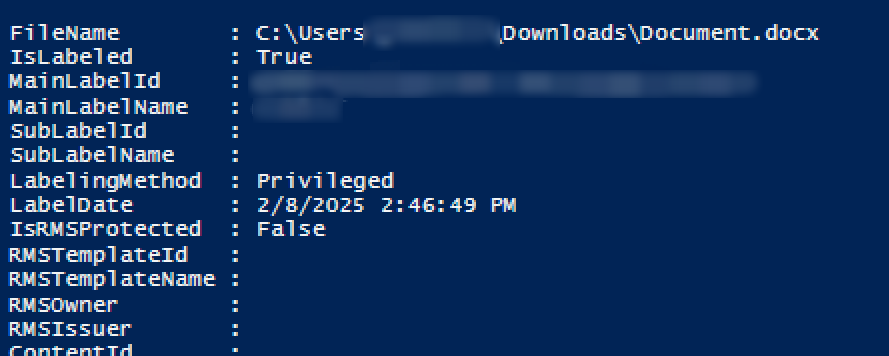
Get-AIPFileStatus -Path " "
Enter the full path of the downloaded file as the attribute of Path and press Enter on the keyboard. After the execution, the verification result will be displayed.
Microsoft 365 Groups / Microsoft Teams Migration
Refer to the following table for the migration results of sensitivity labels in different situations.
| Workload | Source Label Type | If Source Team/Group has Label | If Destination Label Exist | Migration Result |
|---|---|---|---|---|
| Teams / Groups only(Do not migrate team sites by configuring the migrateteamsite=false customized feature.) | Encrypted | Yes | No | Failed with the error code: CO-NotMatchMipLabel. |
| Teams / Groups only(Do not migrate team sites by configuring the migrateteamsite=false customized feature.) | Encrypted | Yes | Yes | Successful. |
| Teams / Groups only(Do not migrate team sites by configuring the migrateteamsite=false customized feature.) | Non-encrypted | Yes | No | Failed with the error code: CO-NotMatchMipLabel. |
| Teams / Groups only(Do not migrate team sites by configuring the migrateteamsite=false customized feature.) | Non-encrypted | Yes | Yes | Successful. |
If you also migrate group mailboxes and team sites, refer to the table in Exchange Online Migration for details about labels applied to emails and refer to the table in SharePoint Online / OneDrive Migration about labels applied to files.
Microsoft Teams Chat Migration
Refer to the table in SharePoint Online / OneDrive Migration for details about labels applied to files.