
Home > About AvePoint Cloud Backup for IaaS + PaaS
Download this articleAbout AvePoint Cloud Backup for IaaS + PaaS
AvePoint Cloud Backup ensures the resiliency of service in the event of a disaster and quickly recovers lost or corrupted content from your backup.
AvePoint Cloud Backup for IaaS + PaaS (formerly, Cloud Backup for Azure) offers data recovery capabilities for your Microsoft Entra ID, Azure AD B2C, Entra External ID, Admin Portal Settings, Azure DevOps, Virtual Machines (Azure VMs, Amazon EC2 instances, and Google VM instances), VMWare (Azure VMware), Azure Storage (blob storage and file share), Google Cloud Storage, Amazon S3, Azure SQL (for Azure SQL databases), AWS Platform Configurations (Private preview), SQL Server (including Microsoft SQL Server in Azure VM and Self-managed SQL Server), Azure PostgreSQL, and Cosmos DB.
In the SQL Server service, Self-managed SQL Server refers to SQL Servers that you install, configure, maintain, and operate yourself, whether they are deployed in the cloud or on premises.
-
Self-managed SQL Server on cloud – The SQL Servers running on virtual machines in cloud platforms such as Azure, AWS, or GCP. While the cloud provider manages the underlying infrastructure, you are responsible for managing the SQL Servers yourself.
-
Self-Managed SQL Server on premises – The SQL Servers installed and operated on local virtual machines in your on-premises environment.
Additionally, the Replication (Private preview) module provides seamless replication and failover capabilities for Microsoft Azure, Amazon Web Services (AWS), and Google Cloud resources by allowing customizable scope protection. With just one touch, resources within the specified scope can be replicated and failed over, ensuring comprehensive disaster recovery.
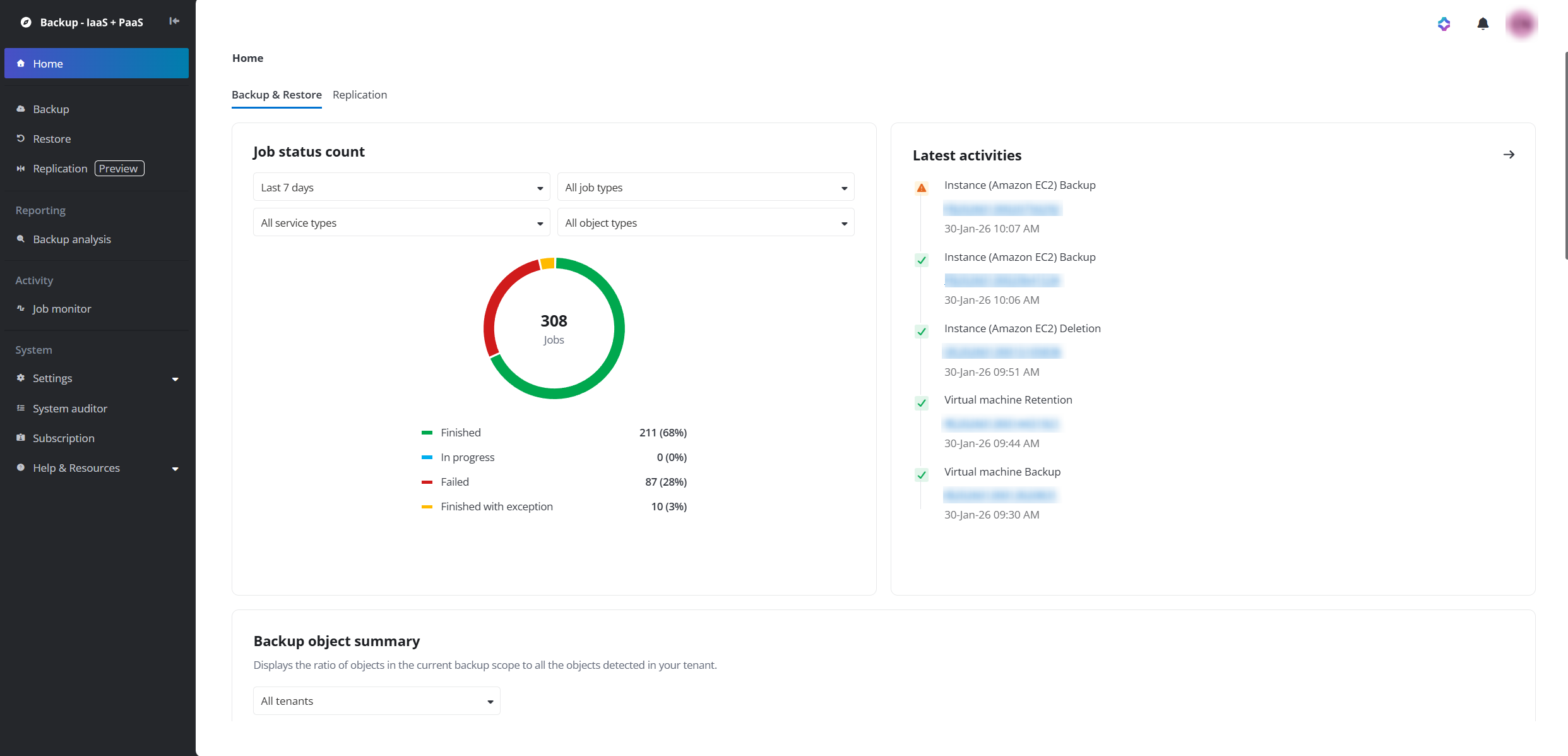
The Home page. The following services are available in the data center operated by 21Vianet in China:
-
Microsoft Entra ID
-
Admin Portal Settings
-
Azure VM
-
Azure Storage
-
SQL Server
AvePoint Cloud Backup for IaaS + PaaS is now only available in the following data centers: Australia Southeast (Victoria), Canada Central (Toronto), Germany West Central (Frankfurt), West Europe (Netherlands), UK South (London), North Europe (Ireland), Japan West (Osaka), East US (Virginia), Southeast Asia (Singapore), Switzerland North (Zurich), France Central (Paris), Korea Central (Seoul), US Gov Virginia (Virginia), United Arab Emirates (Dubai), Qatar Central (Doha), and South Africa North (Johannesburg).
In addition, if your browser’s first preferred language is French, Japanese, or German, the Cloud Backup for IaaS + PaaS interface will be displayed in French, Japanese, or German. In other cases, the interface will be displayed in English.
To access the user guide, expand the Help & Resources section on the left navigation and click User guide. If you encounter any issues when using AvePoint Cloud Backup for IaaS + PaaS services, you can expand the Help & Resources section and click Invite support to go to the AvePoint Online Services interface to submit an issue to AvePoint support for assistance.
The dashboard on the home page provides a comprehensive overview of your data protection statuses, including:
-
Backup & Restore – Displays the latest activities, job status count, backup object summary, restore job summary, storage space usage, and the storage profile usage rank.
-
Job status count – Shows the status of different types of jobs for different services and objects.
-
Latest activities – Shows the 5 most recent jobs in Cloud Backup for IaaS + PaaS. To find more jobs, click the arrow icon to navigate to the Job monitor page.
-
Backup object summary – Shows the ratio of objects in the current backup scope to all the objects detected in your tenant.
-
Restore job summary – Shows the total number of restore jobs for each service within a specified date range, as well as the number and ratio of restore jobs for each type of objects in the current service. Use the Date range and service drop-down lists to find the data you need.
-
Storage – Shows the storage space used by each service.
-
Storage profile usage rank – Shows the top 5 storage profiles by usage.
-
-
Replication – Displays the data under your replication and failover scope and their protection statuses.
NOTEReplication is currently in private preview. To enable the functionalities, contact your AvePoint support for assistance.
-
Replication policy status – Displays the number of replication policies you have created and their current status. You can click the arrow icon to navigate to the Replication page to manage the policies.
-
Protected resources overview – Shows the protected resources summary. Click Microsoft Azure, Amazon Web Services, or Google Cloud to switch among the three tabs. You can select different tenants, subscriptions, resource groups, accounts, and regions to view specific summaries.
Under each tab, you can see both the number of primary resources, which is the primary resource types selected and added to the policies, and the number of their related resources protected. To see the related resources of a primary resource, click the primary resource name and its related resources will be highlighted.
-
Latest activities – Shows the 5 most recent replication jobs. To find more jobs, click the arrow icon to navigate to the Job monitor page.
-
The Backup page shows the Microsoft Entra ID tile,the Azure AD B2C tile, the Entra External ID tile, the Admin Portal Settings tile, the Azure DevOps tile, the Virtual Machine tile, the VMware (Azure VMware) tile, the Azure Storage tile, the Google Cloud Storage tile, the Amazon S3 tile,the Azure SQL tile, the AWS Platform Configurations (Private preview) tile, the SQL Server (including Microsoft SQL Server in Azure VM and Self-managed SQL Server) tile,, the Azure PostgreSQL tile, and the Cosmos DB tile. The tiles shown may vary based on your subscription.
Through each service tile, you can view the backup and restore details of its latest jobs, including backup scope name, job duration, operator, latest restore history, etc. Additionally, you can update the backup scopes and frequency.
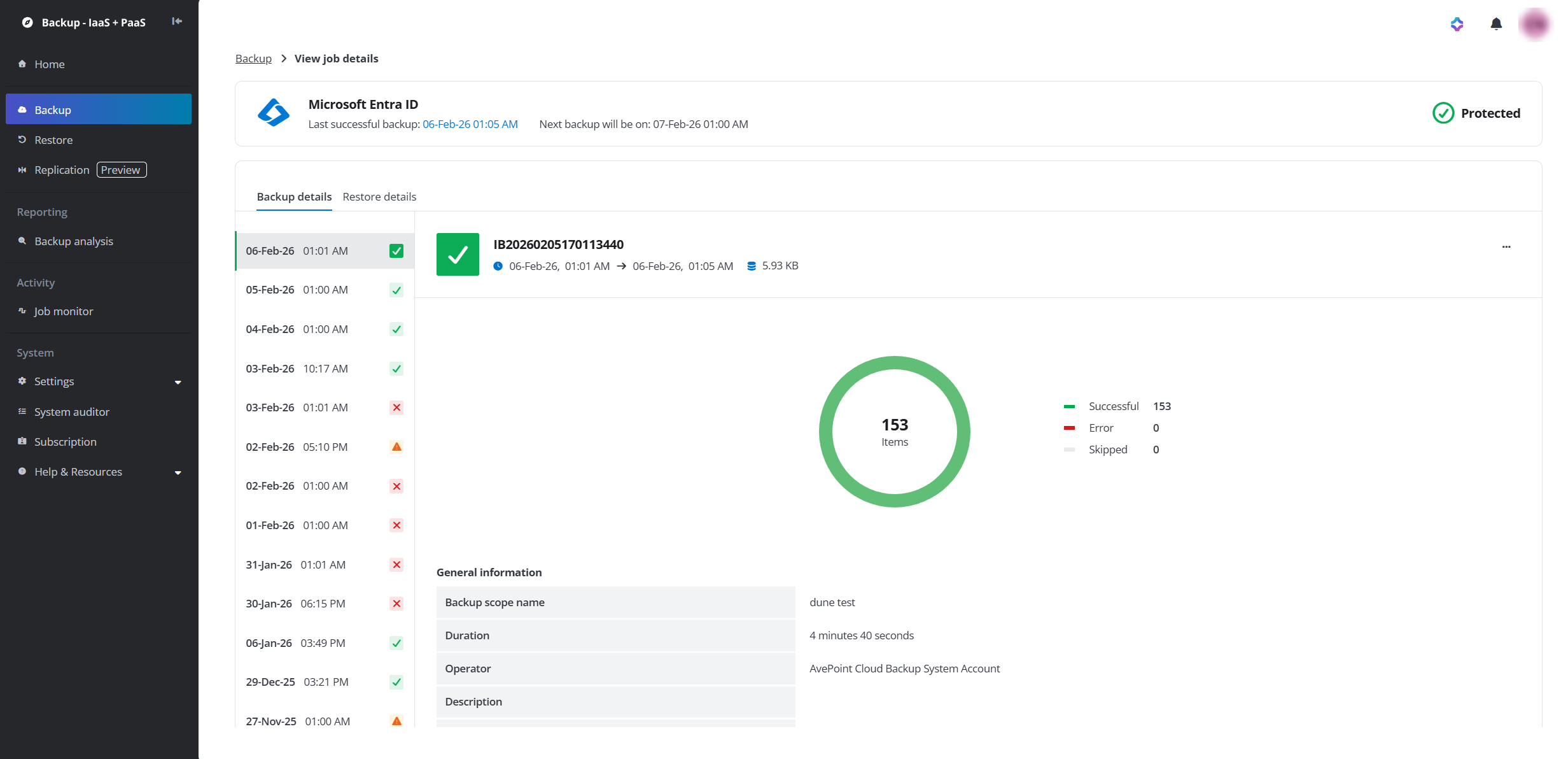
View backup and restore details on the new UI (through Backup > View job history).
If you are in trial, your experience with the backup services in Cloud Backup for IaaS + PaaS will be limited:
If you want to have an unlimited trial experience, you can contact AvePoint support for help.
-
Your trial instance of Cloud Backup for IaaS + PaaS will use the AvePoint default storage to store your backup data by default, and the data retention period is one month.
-
Virtual Machine backup service in the trial only allows one backup scope per service (Azure VM, Amazon EC2, and Google VM instance). You can select up to 5 Azure VMs, Amazon EC2 instances, or Google VM instances for each backup scope.
-
The Microsoft Entra ID backup service in the trial only allows you to protect one Microsoft Entra tenant, and the backup jobs in the trial will not restrict the number of objects to protect in your Microsoft Entra tenant.
-
Entra External ID backup service only allows you to protect one tenant.
-
Azure Storage backup service in the trial only allows one backup scope for Blob storage and file share, respectively. You can select up to 5 blob containers or 5 file shares for each backup scope. The backup job will protect up to 5 folder-level objects within the selected storage, and the storage space for backup data can be at most 25 GB.
-
Admin Portal Settings service in the trial only allows one backup scope.
-
Azure SQL backup service in the trial only allows one backup scope to protect up to 5 databases.
-
Azure DevOps backup service in the trial only allows one backup scope to protect up to 5 projects.
-
Azure AD B2C backup service in the trial only allows one backup scope.
-
SQL Server backup service in the trial only allows one backup scope.
-
Azure VMware backup service in the trial only allows one backup scope to protect up to 5 virtual machines.
-
Google Cloud Storage backup service in the trial only allows one backup scope to protect up to 5 buckets.
-
Amazon S3 backup service in the trial only allows one backup scope to protect up to 5 buckets.
-
Azure PostgreSQL backup service in the trial only allows one backup scope to protect up to 5 servers.
-
Cosmos DB backup service in the trial only allows one backup scope to protect up to 5 databases.
Enable Backup
To use Cloud Backup for IaaS + PaaS to protect Microsoft Entra ID, Entra External ID, Azure VMs, Azure Storage, Admin Portal Settings, Azure SQL, Amazon EC2 instances, Amazon S3, Azure DevOps, Azure AD B2C, AWS Platform Configurations (Private preview), SQL Server (including Microsoft SQL Server in Azure VM and Self-managed SQL Server), VMWare (Azure VMware), Azure PostgreSQL, or Cosmos DB, you must connect your Microsoft or Amazon tenant to AvePoint Online Services. For details, refer to Connect Your Tenants to AvePoint Online Services.
Note the following before you enable the backup:
-
Before you enable the backup service for Azure VM, Azure Storage, Azure SQL, VMware, or Azure PostgreSQL, you can register a Microsoft Delegated app in your tenant or use a custom Azure app with delegated permissions, and then add this app to the subscriptions where the VM, storage, or database to protect resides and grant the app the Contributor role or a custom role with equivalent permissions. For details, refer to Enable Backup for Azure Virtual Machines, Azure Storage, Azure SQL, VMware, and PostgreSQL .
NOTE- If your storage account has disabled the “Allow storage account key access” feature, the app must also have the Storage Blob Data Contributor role to the subscription or storage account, in addition to the Contributor role to protect the Azure Blob Storage, and in this case, the Azure File Storage is not supported.
- The Azure virtual machines that can be protected by Virtual Machine service must be hosted by Azure, which may be created with your pre-defined and endorsed settings or using the recommended defaults that match your workload.
- If the Azure storage account that you want to protect has enabled the firewall, complete the settings as instructed in Allow AvePoint Agent Servers to Access Your Storage Account. Note that the data in the Azure storage archive tier cannot be protected as the Cloud Backup for IaaS + PaaS cannot read or download a blob in the Archive tier. You must manually rehydrate the archive data that you want to protect to the online tier (cold, cool, or hot tier).
-
Before you enable the backup for Amazon EC2 instances, Amazon S3 buckets, or AWS Platform Configurations (Private preview), you must create and consent to a service app for your connected Amazon account. For details, refer to Enable Backup for Amazon EC2 Instances, Amazon S3, or AWS Platform Configurations.
-
Before you enable the backup for Google VM instances or Google Cloud Storage buckets, you must create a service account. For details, refer to Enable Backup for Google VM Instances or Google Cloud Storage.
-
Before you use the backup service for Microsoft Entra ID or Admin Portal Settings, you must create a Service app for Cloud Backup for IaaS + PaaS or use a custom Azure app to grant consent with the required permissions. For details, refer to Enable Backup for Microsoft Entra ID or Admin Portal Settings.
Note the following:
-
If you want to back up and restore distribution lists or mail-enabled security groups in Microsoft Entra ID, or back up and restore the Microsoft 365 Defender or Exchange settings through Admin Portal Settings service, you can choose to prepare a service account profile with a Global Administrator or Exchange Administrator, or you can go to the Microsoft Entra admin center (Azure portal) to assign the Exchange administrator role to this service app. For details on assigning an app the Exchange administrator role, refer to How to Assign the Exchange Administrator Role to an App?. For details on configuring a service account profile, refer to Create a Service Account Profile. Note that the service account with MFA enabled is currently not supported.
NOTEIf you are using a custom Azure app for Microsoft Entra ID or Admin Portal Settings service and you do not want to assign Global administrator or Exchange administrator role to the app, refer to the instructions in Create a Custom Role Group to create a role group with the minimum permissions. This configuration is only applicable to the custom app.
-
To restore a temporarily deleted user or group that has access to the Microsoft 365 admin center, the service account or the service app must be assigned with a Global administrator role.
-
To back up and restore the Self Service Group Management settings for Microsoft Entra ID > Group General, you must have a service account profile configured in the AvePoint Online Services interface and the service account you use must have the Cloud Application Administrator role. Note that if you only want to back up this property, the Cloud Application Administrator role is not required.
-
To back up and restore the Attributes and Claims, Identifier (Entity ID), currentSingleSignOnMode, ParentAppId, or IsCustomApp of the SSO configuration for the enterprise applications, you must have a service account profile configured in the AvePoint Online Services interface and the service account you use must have the Application Administrator role. Note that if you only want to back up this property, the Application Administrator role is not required.
-
-
Before you use the backup service for Entra External ID, you must create a service app or use a custom Azure app to grant consent with the required permissions. For details, refer to Enable Backup for Entra External ID.
-
Before you use the backup service for Azure DevOps, you must create a service app or use a custom Azure app to grant consent with the required permissions. For details, refer to Enable Backup for Azure DevOps.
-
Before you use the backup service for Azure AD B2C, you must create a service app or use a custom Azure app to grant consent with the required permissions. For details, refer to Enable Backup for Azure AD B2C .
- Before you use the backup service for SQL Server (including Microsoft SQL Server in Azure VM and Self-managed SQL Server), you can register a Microsoft Delegated app in your tenant or use a custom Azure app with delegated permissions, and then add this app to the subscriptions where the SQL Server to protect resides and grant the app the Contributor role or a custom role with equivalent permissions. For details, refer to Enable Backup for SQL Server .
- Before you enable the backup service for Cosmos DB, you can register a Microsoft Delegated app in your tenant or use a custom Azure app with delegated permissions, and then add this app to the subscriptions where the database to protect resides and grant the app the Contributor role or a custom role with equivalent permissions. For details, refer to Enable Backup for Cosmos DB.
Single Sign-On
With Single Sign-On(SSO) supported, you can access Cloud Backup for IaaS + PaaS interface via direct URL without providing user credentials, once it is detected that you have signed into the AvePoint Online Services interface.
Beta APIs
Refer to the table below for the beta version API methods of Microsoft Graph that we use in AvePoint Cloud Backup for IaaS + PaaS.
| Category | API Method | Is it available in the 1.0 version? | Then, why do we use the Beta version? |
|---|---|---|---|
| Microsoft Entra ID > groups | Groups resource type | No | |
| Microsoft Entra ID > EnterpriseApplication | Synchronization API | No | |
| Microsoft Entra ID > EnterpriseApplication | Delete synchronizationJob | Yes | Currently, there are some missing properties when using the Graph v1.0 endpoint. |
| Microsoft Entra ID > EnterpriseApplication | Create synchronizationJob | Yes | Currently, there are some missing properties when using the Graph v1.0 endpoint. |
| Microsoft Entra ID > EnterpriseApplication | Update synchronizationSchema | Yes | Currently, there are some missing properties when using the Graph v1.0 endpoint. |
| Microsoft Entra ID > EnterpriseApplication | synchronizationJob: pause∣start | Yes | Currently, there are some missing properties when using the Graph v1.0 endpoint. |
| Microsoft Entra ID > EnterpriseApplication | Add synchronization secrets | Yes | Currently, there are some missing properties when using the Graph v1.0 endpoint. |
| Microsoft Entra ID > EnterpriseApplication | Create unifiedRoleAssignment | Yes | Currently, there are some missing properties when using the Graph v1.0 endpoint. |
| Microsoft Entra ID > EnterpriseApplication | GetAppDefaultClaim (Internal) | Yes | Currently, there are some missing properties when using the Graph v1.0 endpoint. |
| Microsoft Entra ID > EnterpriseApplication | UpdateAppDefaultClaims (Internal) | Yes | Currently, there are some missing properties when using the Graph v1.0 endpoint. |
| Microsoft Entra ID > SignInLogs | List signIns | Yes | Currently, there are some missing properties when using the Graph v1.0 endpoint. |
| Microsoft Entra ID > Administrative Unit | Update administrativeUnit | Yes | Currently, there are some missing properties when using the Graph v1.0 endpoint. |
| Microsoft Entra ID > Express | List snapshots | No | |
| Microsoft Entra ID > Express | Create recovery preview job | No | |
| Microsoft Entra ID > Express | Get recovery preview job | No | |
| Microsoft Entra ID > Express | Create recovery job | No | |
| Microsoft Entra ID > Express | Get recovery job | No | |
| Microsoft Entra ID > Express | Get failed changes of recovery job | No | |
| Azure AD B2C > User Flow | List Userflow | No | |
| Azure AD B2C > User Flow | Get Userflow | No | |
| Azure AD B2C > User Flow | Create Userflow | No | |
| Azure AD B2C > User Flow | Update Userflow | No | |
| Azure AD B2C > User Flow | Delete UserFlow | No | |
| Azure AD B2C > User Flow | List Identity provider | No | |
| Azure AD B2C > User Flow | Add Identity provider | No | |
| Azure AD B2C > User Flow | Delete Identity provider | No | |
| Azure AD B2C > User Flow | List user attribute assignment | No | |
| Azure AD B2C > User Flow | Create user attribute assignment | No | |
| Azure AD B2C > User Flow | Delete user attribute assignment | No | |
| Entra External ID > Custom Authentication Extension | List authenticationEventListeners | Yes | Microsoft uses the Beta version, so we follow the same approach. |
| Entra External ID > Custom Authentication Extension | Create authenticationEventListener | Yes | Microsoft uses the Beta version, so we follow the same approach. |
| Entra External ID > Custom Authentication Extension | Add App To AuthenticationEventListener | No | |
| Entra External ID > Custom Authentication Extension | Remove App To AuthenticationEventListener | No | |
| Entra External ID > Enterprise application | Get synchronization secret | No | |
| Admin Portal Settings | Get authenticationMethodsPolicy | Yes | Currently, there are some missing properties when using the Graph v1.0 endpoint. |
| Admin Portal Settings | List policies | Yes | Currently, there are some missing properties when using the Graph v1.0 endpoint. |
| Admin Portal Settings | List deviceCompliancePolicies | Yes | Currently, there are some missing properties when using the Graph v1.0 endpoint. |
| Admin Portal Settings | *Get /deviceManagement/*compliancePolicies | Yes | Currently, there are some missing properties when using the Graph v1.0 endpoint. |
| Admin Portal Settings | List deviceConfigurations | No | |
| Admin Portal Settings | *GET /deviceManagement/configurationPolicies?$*filter=technologies ne 'mdm,microsoftSense' | No | |
| Admin Portal Settings | *GET /deviceManagement/configurationPolicies?$*filter=technologies eq 'mdm,microsoftSense' | No | |
| Admin Portal Settings | Get deviceConfigurationAssignment | No | |
| Admin Portal Settings | List deviceManagementConfigurationPolicyAssignments | No | |
| Admin Portal Settings | List deviceManagementConfigurationSetting | No | |
| Admin Portal Settings | List groupPolicyConfigurations | No | |
| Admin Portal Settings | Get groupPolicyDefinitionValue | No | |
| Admin Portal Settings | List deviceManagementScripts | No | |
| Admin Portal Settings | List deviceShellScripts | No | |
| Admin Portal Settings | Get deviceManagementScriptRunSummary | No | |
| Admin Portal Settings | Get deviceManagementScriptDeviceState | No | |
| Admin Portal Settings | List deviceManagementScriptUserStates | No | |
| Admin Portal Settings | List managedAppPolicies | Yes | Currently, there are some missing properties when using the Graph v1.0 endpoint. |
| Admin Portal Settings | Get androidManagedAppProtection | No | |
| Admin Portal Settings | Get iosManagedAppProtection | No | |
| Admin Portal Settings | Get mdmWindowsInformationProtectionPolicy | No | |
| Admin Portal Settings | Get windowsManagedAppProtection | No | |
| Admin Portal Settings | List managedDeviceMobileAppConfigurations | Yes | Currently, there are some missing properties when using the Graph v1.0 endpoint. |
| Admin Portal Settings | Get managedDeviceMobileAppConfiguration | No | |
| Admin Portal Settings | Get managedDeviceMobileAppConfigurationAssignment | No | |
| Admin Portal Settings | List targetedManagedAppConfigurations | Yes | Currently, there are some missing properties when using the Graph v1.0 endpoint. |
| Admin Portal Settings | *GET /deviceManagement/**intents?$**filter=*templateId ne 'e44c2ca3-2f9a-400a-a113-6cc88efd773d' | No | |
| Admin Portal Settings | *GET /deviceManagement/**intents?$**filter=*templateId eq 'e44c2ca3-2f9a-400a-a113-6cc88efd773d' | No | |
| Admin Portal Settings | Get targetedManagedAppConfiguration | Yes | Currently, there are some missing properties when using the Graph v1.0 endpoint. |
| Admin Portal Settings | conditionalAccessPolicy resource type | Yes | Currently, there are some missing properties when using the Graph v1.0 endpoint. |
| Admin Portal Settings | List targetedManagedAppPolicyAssignments | No | |
| Admin Portal Settings | List deviceManagementIntents | No | |
| Admin Portal Settings | List deviceManagementIntegerSettingInstances | No | |
| Admin Portal Settings | Get deviceManagementTemplate | No | |
| Admin Portal Settings | Get deviceManagementIntent | No | |
| Admin Portal Settings | Get deviceManagementIntentDeviceStateSummary | No | |
| Admin Portal Settings | Get deviceManagementIntentUserStateSummary | No | |
| Admin Portal Settings | Get deviceManagementIntentUserState | No | |
| Admin Portal Settings | List deviceManagementIntentDeviceStates | No | |
| Admin Portal Settings | List deviceManagementIntentDeviceSettingStateSummaries | No | |
| Admin Portal Settings | Create conditionalAccessPolicy | Yes | Currently, there are some missing properties when using the Microsoft Graph v1.0 endpoint. |
| Admin Portal Settings | Update conditionalAccessPolicy | Yes | Currently, there are some missing properties when using the Microsoft Graph v1.0 endpoint. |
| Admin Portal Settings | Create defaultDeviceCompliancePolicy | No | |
| Admin Portal Settings | assign action | No | |
| Admin Portal Settings | Update windows10CompliancePolicy | No | |
| Admin Portal Settings | scheduleActionsForRules action | No | |
| Admin Portal Settings | Create deviceManagementCompliancePolicy | No | |
| Admin Portal Settings | setScheduledActions action | No | |
| Admin Portal Settings | Create conditionalAccessPolicy | Yes | |
| Admin Portal Settings | Update conditionalaccesspolicy | No | |
| Admin Portal Settings | Create windows10CustomConfiguration | No | |
| Admin Portal Settings | Create deviceManagementScript | No | |
| Admin Portal Settings | Update deviceManagementScript | No | |
| Admin Portal Settings | Create deviceManagementScriptAssignment | No | |
| Admin Portal Settings | Update deviceManagementScriptAssignment | No | |
| Admin Portal Settings | Create deviceManagementConfigurationPolicy | No | |
| Admin Portal Settings | Update deviceManagementConfigurationPolicy | No | |
| Admin Portal Settings | Create androidManagedAppProtection | No | |
| Admin Portal Settings | Create iosManagedAppProtection | No | |
| Admin Portal Settings | Create windowsManagedAppProtection | No | |
| Admin Portal Settings | Create mdmWindowsInformationProtectionPolicy | No | |
| Admin Portal Settings | Update androidManagedAppProtection | No | |
| Admin Portal Settings | Update iosManagedAppProtection | No | |
| Admin Portal Settings | Update windowsManagedAppProtection | No | |
| Admin Portal Settings | Update mdmWindowsInformationProtectionPolicy | No | |
| Admin Portal Settings | Create iosMobileAppConfiguration | No | |
| Admin Portal Settings | Update iosMobileAppConfiguration | No | |
| Admin Portal Settings | createInstance action | No | |
| Admin Portal Settings | Update deviceManagementIntent | No | |
| Admin Portal Settings | updateSettings action | No | |
| Admin Portal Settings | Create deviceManagementConfigurationPolicy | No | |
| Admin Portal Settings | Update deviceManagementConfigurationPolicy | No | |
| Admin Portal Settings | list hardwareconfigurations | No | |
| Admin Portal Settings | get hardwareconfigurations | No | |
| Admin Portal Settings | create hardwareconfigurations | No | |
| Admin Portal Settings | update hardwareconfigurations | No | |
| Admin Portal Settings | Get Presentation of Definition | No | |
| Admin Portal Settings | Get Presentation Value | No |
Backup Scope
When configuring the backup scope for virtual machines, Azure Storage, Azure SQL, Admin Portal Settings, or Google Cloud Storage, you can click the Refresh List button to retrieve the latest data information and keep your backup scope updated. It may take a long time. The product also provides a timer job to regularly refresh your data list at 0:00 AM every day, in your local time. The last refreshed time will be displayed next to the button.
If it is your first time using a service, you can click the Refresh List button to manually initialize the data list that can be added to the backup scope according to your settings.
The backup service for Azure VMs, Azure Storage, and Azure Admin Settings supports you – by grouping the backup of Azure VMs, Blob Storage, File Share, or admin portal settings into separate backup scopes. This will protect them with individual backup schedules or data retention settings. Note that the data in the Azure storage archive tier cannot be protected as the Cloud Backup for IaaS + PaaS cannot read or download a blob in the Archive tier. You must manually rehydrate the archive data that you want to protect to the online tier (cold, cool, or hot tier).
Each backup scope for Microsoft Entra ID can only protect one tenant. In addition, once you have created a backup scope, you cannot add the same tenant to another scope.
The backup services will perform scheduled backups automatically according to the settings of each backup scope. Note that if a backup job for the same backup scope is in progress, the automatic backup job scheduled to run will be skipped.
Storage Location
You can choose to use the default storage hosted by AvePoint to store your backup data or choose to use your own storage. Currently, you can choose from the following supported storage types for AvePoint-hosted default storage or for BYOS (bring your own storage).
For replication (private preview), the default Microsoft Azure Blob storage hosted by AvePoint stores your replicated metadata.
Currently, the following storage types are supported for AvePoint default storage:
-
Microsoft Azure Blob Storage
-
Amazon S3
-
Google Cloud Storage
The AvePoint-hosted Amazon S3 Storage and Google Cloud Storage are only available in the commercial environment.
The following storage types are supported for BYOS (bring your own storage):
- Microsoft Azure Blob Storage
- Amazon S3 Storage
- Amazon S3-Compatible Storage
- FTP
- SFTP
- IBM Storage Protect - S3
- IBM Cloud Object Storage
- Google Cloud Storage
The supported Azure storage account kinds are Storage and StorageV2 of Standard performance type. Note that the Azure Blob storage that has enabled Data Lake Storage Gen2 capabilities (a hierarchical namespace) is not supported.
For details on how to change from AvePoint default storage to BYOS storage and manage your storage profiles, refer to Manage Your Storage.
If you are using your own Microsoft Azure storage and backup retention period is longer than 45 days, your backup data will be automatically stored to the Cold tier for cost savings after the December 2023 release. For existing customers, your former backup data are still stored in the cool tier. To use your Azure blob storage in the most cost-effective manner, you can store your backup data to archive tier. However, Cloud Backup for IaaS + PaaS currently does not support restoring the backup data from the archive tier automatically. If you want to restore the backup data from the archive tier, you must rehydrate the data first. For details on Azure storage access tiers, refer to the Microsoft article: Access tiers for blob data.
If you use your own Azure storage, AvePoint recommends using the Azure storage account from the same region as the object you want to back up, otherwise, the backup will incur data transfer costs. Data transfer costs are also incurred if you use AvePoint default storage and the Azure VMs or storage that is not in the same region as the AOS tenant that you’ve signed up for. See the information in this Microsoft article for bandwidth pricing that may be incurred due to the data transferred out of Azure data centers.
If you use AvePoint-hosted default storage, Availability Paired Region is now available as an option to replicate your data. To use availability paired region, go to the Cloud Operation Portal and configure your Cloud Backup for IaaS + PaaS settings by enabling the Availability Paired Region option.
- Once enabled, the Availability Paired Region cannot be turned off and will become available for all services.
- If you use AvePoint Azure storage and enable the Availability Paired Region, the paired region is only available for the storage region, not for the data region.
If you choose to use AvePoint default storage, you can choose the storage type of your AvePoint default storage location from the following:
-
Microsoft Azure Blob Storage
If you choose to use Microsoft Azure Blob Storage as the default storage type, Cloud Backup for IaaS + PaaS will store your data in the data center you signed up for AvePoint Online Services. For available data centers, refer to Microsoft Azure Cloud Platform.
If you signed up to AvePoint Online Services with the data center Australia Southeast (Victoria), and you have purchased a subscription to use AvePoint Azure storage to store backup data, the following storage regions will be available for selection when you sign into the Cloud Backup for IaaS + PaaS interface for the first time:
Data Center You Signed Up for AOS
(Home Region)Available Storage Region for Cloud Backup for IaaS + PaaS
(Storage Region)Australia Southeast (Victoria) Australia Southeast (Victoria)
New Zealand North (Auckland)If you enable the Availability Paired Region, it will be implemented through the Azure Geo-redundant storage functionality. For more details, refer to this Microsoft article. Refer to the following data center mappings between the data center you signed up to AOS with, the data center of the Microsoft Azure storage, and the paired secondary region. For more detailed information, you can find this mapping in the official Azure regions list.
Data Center You Signed Up for AOS
(Home Region)Microsoft Azure Blob Storage
(Storage Region)Availability Paired Region Australia Southeast (Victoria) Australia Southeast Australia East Canada Central (Toronto) Canada Central Canada East Switzerland North (Zurich) Switzerland North Switzerland West Germany West Central (Frankfurt) Germany West Central Germany North France Central (Paris) France Central France South Japan West (Osaka) Japan West Japan East Korea Central (Seoul) Korea Central Korea South North Europe (Ireland) North Europe West Europe Qatar Central (Doha) Qatar Central N/A Southeast Asia (Singapore) Southeast Asia East Asia United Arab Emirates (Dubai) UAE North UAE Central UK South (London) UK South UK West East US (Virginia) East US West US West Europe (Netherlands) West Europe North Europe South Africa North (Johannesburg) South Africa North South Africa West -
Amazon S3 Storage
If you use the AvePoint-hosted Amazon S3 storage, refer to the following data center mappings between the data center you signed up to AOS with, the data center of the Amazon S3 storage, and the paired secondary region.
If you enable the Availability Paired Region, it will be implemented through the Amazon Cross-Region Replication functionality. For more details, refer to this Amazon article.
Data Center You Signed Up for AOS
(Home Region)Amazon S3 Storage Data Center
(Storage Region)Availability Paired Region East US (Virginia) US East (N. Virginia) US East (Ohio) North Europe (Ireland) Europe (Ireland) Europe (Stockholm) Southeast Asia (Singapore) Asia Pacific (Singapore) Asia Pacific (Jakarta) Australia Southeast (Victoria) Asia Pacific (Sydney) Asia Pacific (Melbourne) Japan West (Osaka) Asia Pacific (Tokyo) Asia Pacific (Osaka) UK South (London) Europe (London) Europe (Milan) Canada Central (Toronto) Canada (Central) Canada West (Calgary) Germany West Central (Frankfurt) Europe (Frankfurt) Europe (Milan) Korea Central (Seoul) Asia Pacific (Seoul) Asia Pacific (Tokyo) France Central (Paris) Europe (Paris) Europe (Spain) Switzerland North (Zurich) Europe (Zurich) Europe (Spain) West Europe (Netherlands) Not Supported Not Supported United Arab Emirates (Dubai) Middle East (UAE) Middle East (Bahrain) South Africa North (Johannesburg) Africa (Cape Town) Not Supported -
Google Cloud Storage
If you use the AvePoint-hosted Google Cloud Storage, refer to the following data center mappings between the data center you signed up to AOS with, the data center of the Google Cloud Storage, and the paired secondary region.
If you enable the Availability Paired Region, it will be implemented through the Google Multi-region configuration. For more details, refer to this Google article. Refer to the following data center mappings between the data center you signed up to AOS with, the data center of the Google Cloud Storage, and the paired secondary region.
Data Center You Signed Up for AOS
(Home Region)Google Cloud Storage Data Center
(Storage Region)Availability Paired Region Australia Southeast (Victoria) Sydney (australia-southeast1) ASIA Canada central (Toronto) Canada Toronto (northamerica-northeast2) US Germany West Central (Frankfurt) Germany Frankfurt (europe-west3) EU West Europe (Netherlands) Netherlands (europe.west4) EU UK South (London) United Kingdom London (europe-west2) EU North Europe (lreland) Finland (europe-north1) EU Japan West (Osaka) Japan Osaka (asia-northeast2) ASIA East US (Virginia) South Carolina Moncks Corner (us-east1) US Southeast Asia (Singapore) Singapore (asia-southeast1) ASIA Switzerland North (Zurich) Switzerland Zurich (europe-west6) EU France Central (Paris) France Paris (europe-west9) EU Korea Central (Seoul) South Korea Seoul (asia-northeast3) ASIA United Arab Emirates (Dubai) Dammam, Saudi Arabia (ME-CENTRAL2) ASIA Qatar Central (Doha) Doha (me-central1) ASIA South Africa North (Johannesburg) Johannesburg (africa-south1) Not Supported Saudi (Dammam) GCP for Saudi (Dammam) Not Supported
Before you provide your storage information to the Cloud Backup interface, you must first add the AvePoint IP addresses to your storage firewall or configure the firewall to allow AvePoint servers running on a dedicated ARM Vnet subnet to access your storage location. For details, refer to Allow AvePoint Agent Servers to Access Your Storage Account.
Once you save the storage location for a specific region in a backup scope, you can no longer update the storage for that region in that scope.
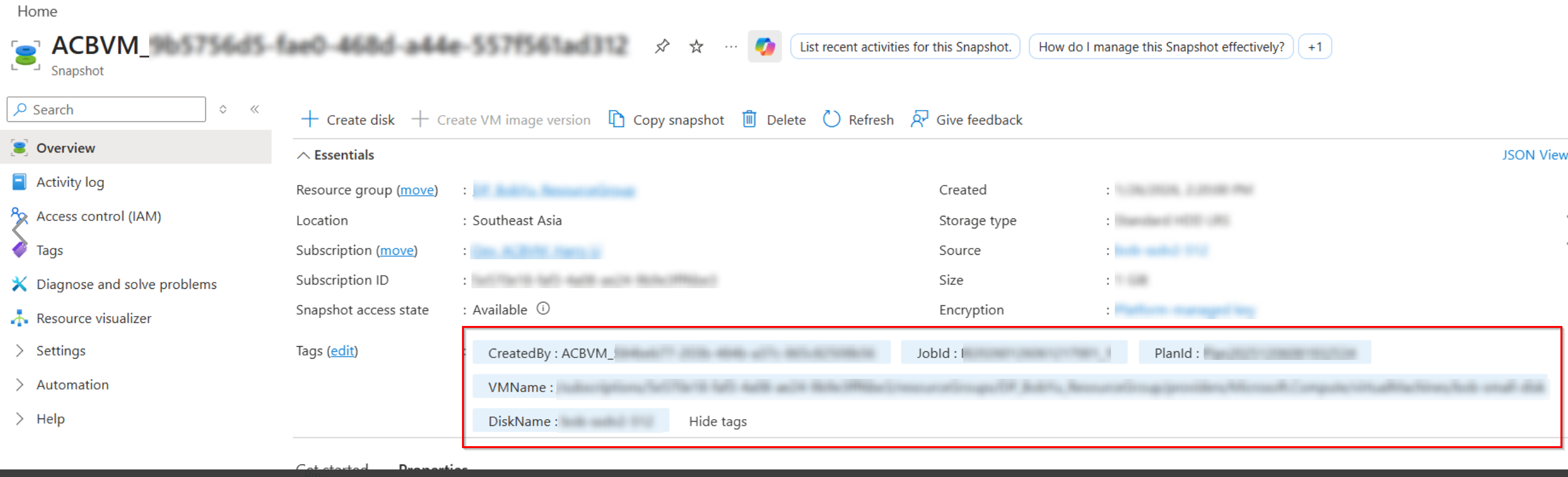
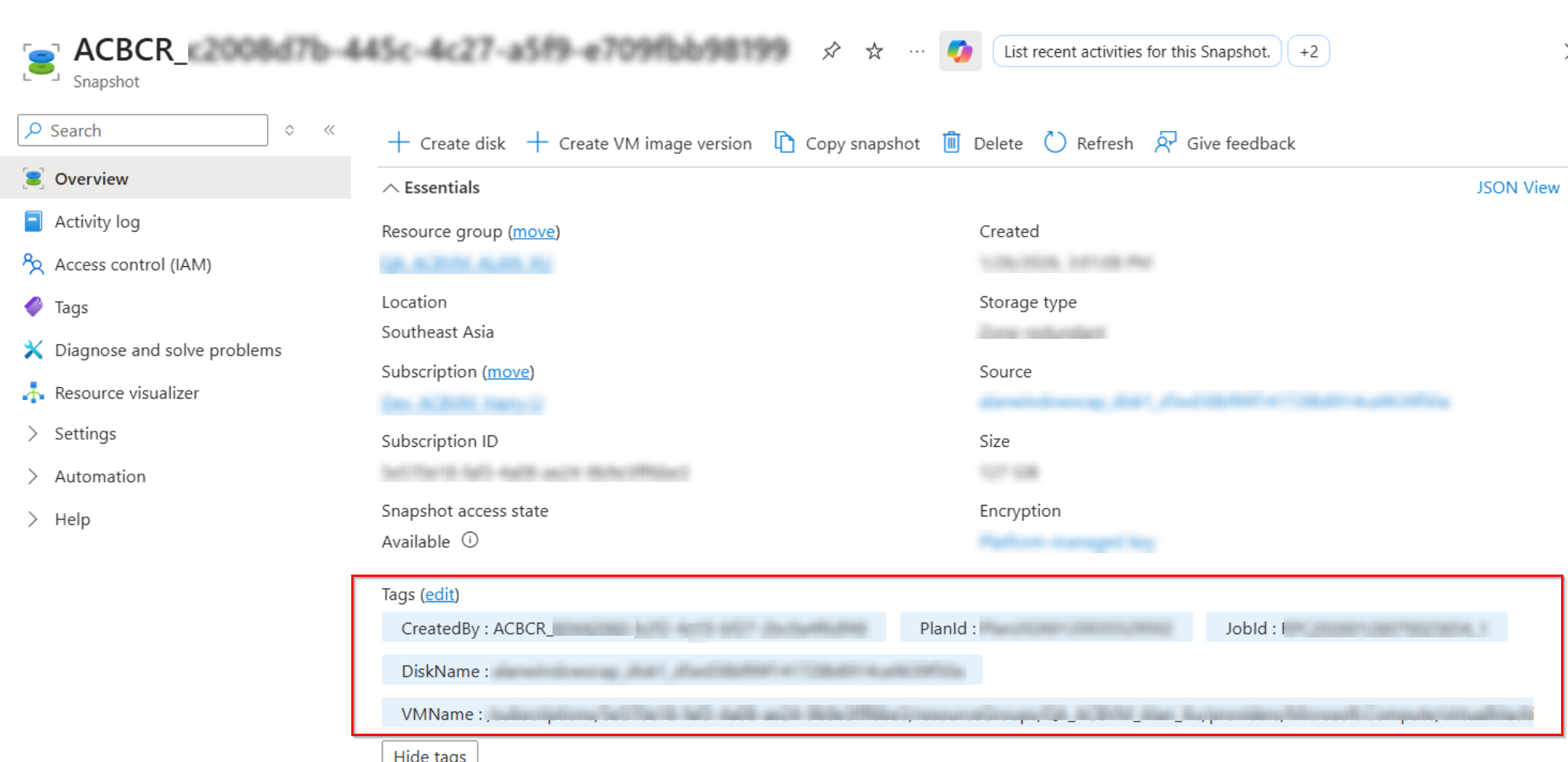
The snapshots for managed resources created by Cloud Backup for IaaS + PaaS will have the following tags: CreatedBy: ACBVM_{customerId} or ACBCR_{customerId} (for the Replication module); JobId: {FB or IB}{Date&TimeStamp} or {RPC}{Date&TimeStamp} (for the Replication module); VMName: {VMName}. You can use these tags to filter and manage the snapshots created by Cloud Backup for IaaS + PaaS. To ensure resource protection, please do not manually delete the snapshots.
Backup Retention
The data retention settings can be applied to your backup data to help save your storage costs. You can configure a custom retention period for your backup data up to the retention policy in your subscription.
Once the next full snapshot of your backup scope takes place, we will begin pruning the old backup data that met your retention settings. Your subscription capacity will be released after the backup data is deleted.
Data Restore and Export
The Restore page allows you to browse the recovery points of each service type to find the data that you want to restore.
For Microsoft Entra ID and Admin Portal Settings, you can also use the Compare method to generate a comparison report for the backup data of a specific recovery point against the Azure production data to help you easily locate the changes that you may want to revert. Note that if the properties that you have updated for the user or group are currently not supported by Cloud Backup for IaaS + PaaS, the user or group will be tagged as Modified in the report, though the report cannot show the differences.
After you have found the data at a specific recovery point that you want to restore, you can choose to restore the data to its original location or another destination. The data of specific types also supports being exported to a local location. A monthly export limitation of 500GB/Month has been applied to Azure VM and Azure Storage. Data cannot be exported once the limit has been reached.
Refer to the table below for the data types that you can restore and export or export only:
The data types protected by Cloud Backup for IaaS + PaaS that are not listed in the table below support being restored only. For the Azure VMs, Azure Storage, Microsoft Entra ID, Amazon EC2 instances, Azure PostgreSQL, and Cosmos DB, you can choose to restore the backup data to their original location or another destination.
| Data types | Restore & Export | Export Only |
|---|---|---|
| Microsoft Entra ID > Users | You can download the user properties with a script. You can use the script and the downloaded information to bulk import/update the users to a local directory. | / |
| All data types in Azure Storage | √ | / |
| Azure VMs & Disks | √ | / |
| Azure VMs > Files | / | √ |
| Admin Portal Settings | √ For the list of settings supported by restore or export, refer to Admin Portal Settings. | / |
| Google Cloud Storage > Buckets & Folders & Files | √ | / |
| All data types in AWS Platform Configurations (Private preview) | / | √ |
Activity and System Auditor
Using the backup statistics of Microsoft Entra ID, Azure VM, Amazon EC2, Amazon S3, Google VM instance, Azure Storage, Admin Portal Settings, Azure SQL, Azure DevOps, Azure AD B2C, SQL Server (including Microsoft SQL Server in Azure VM and Self-managed SQL Server), VMware (Azure VMware), Google Cloud Storage, Azure PostgreSQL, and Cosmos DB on the Backup analysis page and the total used storage space on the Subscription page, you will get an overview of the scale of your resources being protected and the storage used for data protection. You can also check user activities on the System auditor page. For details, refer to Reports.
Through Job monitor, you can monitor job status and download job reports to get a better understanding of your backup scope and performance and take responsive actions. For details, refer to Generate and Download a Job Report.
Use Public APIs for Job Information
You can now use the Cloud Backup for IaaS + PaaS Public APIs to get the information of backup and restore jobs. For details, refer to Use Public APIs for Job Information.
Configure Date Format
You can configure the date format for the Cloud Backup for IaaS + PaaS environment and notification emails in AvePoint Online Services > Administration > General settings > Culture settings. For details, refer to Culture Settings.
AVA Chatbot
Click the chatbot icon in the upper-right corner of a page to chat with AVA (AvePoint’s virtual assistant). For any product-related questions, AVA is here to help.