
Home > Protected Data Size Calculation > Azure DevOps
Download this articleAzure DevOps
Follow the instructions below to extract the protected data size for Azure DevOps:
-
Make sure you have downloaded the script package. Extract the package to locate the script for Azure DevOps.
NOTEIt is recommended to download the DevOps script to a separate empty folder and run it from there, outside of any existing repository folder, to avoid unexpected issues.
-
Open PowerShell and execute the command lines from the Azure DevOps script to check the protected data size for Azure DevOps. For details on using the PowerShell, refer to Getting started with PowerShell.
NOTEThe personal access token is required to execute the command lines. Refer to Use personal access tokens to check how to get the personal access token.
-
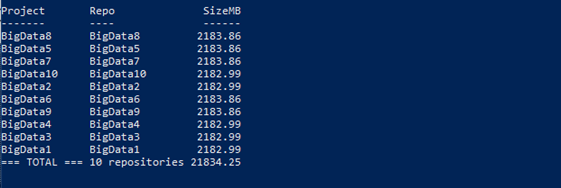
Upon execution, the protected size of each repository and the total protected size across all repositories will be listed. The script will automatically generate a results file named AzureDevOpsSize.txt in the downloaded script package folder.
 NOTE
NOTEThe script supports counting repository sizes only. Since it doesn't capture wiki or work item attachments sizes, it’s recommended adding a buffer to your subscription capacity to account for these attachments storage requirements.