
Home > Manage Your Storage > Overview
Download this articleManage Your Storage
In the Settings > Storage profiles page, the storage location and data retention time will be displayed.
There are two types of storage locations: the default storage location and the custom storage location. The default storage location is hosted by AvePoint in Microsoft Azure Blob Storage, Amazon S3 storage, or Google Cloud Storage, and cannot be modified. The storage information on Microsoft Azure, Amazon S3 storage, or Google Cloud Storage is displayed on the Settings > Storage profiles page. If you want to change your default storage type to another, you can contact AvePoint support for assistance. The backup data in the previous default storage can still be used for data recovery until the retention expires.
The AvePoint-hosted Amazon S3 Storage and Google Cloud Storage are only available in the commercial environment.
If you use AvePoint-hosted default storage, Availability Paired Region is now available as an option to replicate your data. To use availability paired region, you can contact your Sales representative to update subscription.
- Once enabled, the Availability Paired Region cannot be turned off and will become available for all services.
- If you use AvePoint Azure storage and enable the Availability Paired Region, the paired region is only available for the storage region, not for the data region.
If you choose to use AvePoint default storage, you can choose the storage type of your AvePoint default storage location from the following:
-
Microsoft Azure Blob Storage
If you choose to use Microsoft Azure Blob Storage as the default storage type, Cloud Backup for IaaS + PaaS will store your data in the data center you signed up for AvePoint Online Services. For available data centers, refer to Microsoft Azure Cloud Platform.
If you signed up to AvePoint Online Services with the data center Australia Southeast (Victoria), and you have purchased a subscription to use AvePoint Azure storage to store backup data, the following storage regions will be available for selection when you sign into the Cloud Backup for IaaS + PaaS interface for the first time:
Data Center You Signed Up for AOS
(Home Region)Available Storage Region for Cloud Backup for IaaS + PaaS
(Storage Region)Australia Southeast (Victoria) Australia Southeast (Victoria)
New Zealand North (Auckland)If you enable the Availability Paired Region, it will be implemented through the Azure Geo-redundant storage functionality. For more details, refer to this Microsoft article. Refer to the following data center mappings between the data center you signed up to AOS with, the data center of the Microsoft Azure storage, and the paired secondary region. For more detailed information, you can find this mapping in the official Azure regions list.
Data Center You Signed Up for AOS
(Home Region)Microsoft Azure Blob Storage
(Storage Region)Availability Paired Region Australia Southeast (Victoria) Australia Southeast Australia East Canada Central (Toronto) Canada Central Canada East Switzerland North (Zurich) Switzerland North Switzerland West Germany West Central (Frankfurt) Germany West Central Germany North France Central (Paris) France Central France South Japan West (Osaka) Japan West Japan East Korea Central (Seoul) Korea Central Korea South North Europe (Ireland) North Europe West Europe Qatar Central (Doha) Qatar Central N/A Southeast Asia (Singapore) Southeast Asia East Asia United Arab Emirates (Dubai) UAE North UAE Central UK South (London) UK South UK West East US (Virginia) East US West US West Europe (Netherlands) West Europe North Europe South Africa North (Johannesburg) South Africa North South Africa West -
Amazon S3 Storage
If you use the AvePoint-hosted Amazon S3 storage, refer to the following data center mappings between the data center you signed up to AOS with, the data center of the Amazon S3 storage, and the paired secondary region.
If you enable the Availability Paired Region, it will be implemented through the Amazon Cross-Region Replication functionality. For more details, refer to this Amazon article.
Data Center You Signed Up for AOS
(Home Region)Amazon S3 Storage Data Center
(Storage Region)Availability Paired Region East US (Virginia) US East (N. Virginia) US East (Ohio) North Europe (Ireland) Europe (Ireland) Europe (Stockholm) Southeast Asia (Singapore) Asia Pacific (Singapore) Asia Pacific (Jakarta) Australia Southeast (Victoria) Asia Pacific (Sydney) Asia Pacific (Melbourne) Japan West (Osaka) Asia Pacific (Tokyo) Asia Pacific (Osaka) UK South (London) Europe (London) Europe (Milan) Canada Central (Toronto) Canada (Central) Canada West (Calgary) Germany West Central (Frankfurt) Europe (Frankfurt) Europe (Milan) Korea Central (Seoul) Asia Pacific (Seoul) Asia Pacific (Tokyo) France Central (Paris) Europe (Paris) Europe (Spain) Switzerland North (Zurich) Europe (Zurich) Europe (Spain) West Europe (Netherlands) Not Supported Not Supported United Arab Emirates (Dubai) Middle East (UAE) Middle East (Bahrain) South Africa North (Johannesburg) Africa (Cape Town) Not Supported -
Google Cloud Storage
If you use the AvePoint-hosted Google Cloud Storage, refer to the following data center mappings between the data center you signed up to AOS with, the data center of the Google Cloud Storage, and the paired secondary region.
If you enable the Availability Paired Region, it will be implemented through the Google Multi-region configuration. For more details, refer to this Google article. Refer to the following data center mappings between the data center you signed up to AOS with, the data center of the Google Cloud Storage, and the paired secondary region.
Data Center You Signed Up for AOS
(Home Region)Google Cloud Storage Data Center
(Storage Region)Availability Paired Region Australia Southeast (Victoria) Sydney (australia-southeast1) ASIA Canada central (Toronto) Canada Toronto (northamerica-northeast2) US Germany West Central (Frankfurt) Germany Frankfurt (europe-west3) EU West Europe (Netherlands) Netherlands (europe.west4) EU UK South (London) United Kingdom London (europe-west2) EU North Europe (lreland) Finland (europe-north1) EU Japan West (Osaka) Japan Osaka (asia-northeast2) ASIA East US (Virginia) South Carolina Moncks Corner (us-east1) US Southeast Asia (Singapore) Singapore (asia-southeast1) ASIA Switzerland North (Zurich) Switzerland Zurich (europe-west6) EU France Central (Paris) France Paris (europe-west9) EU Korea Central (Seoul) South Korea Seoul (asia-northeast3) ASIA United Arab Emirates (Dubai) Dammam, Saudi Arabia (ME-CENTRAL2) ASIA Qatar Central (Doha) Doha (me-central1) ASIA South Africa North (Johannesburg) Johannesburg (africa-south1) Not Supported Saudi (Dammam) GCP for Saudi (Dammam) Not Supported
If you are using your own storage, you can choose to use the following storage type: Amazon S3, Amazon S3-Compatible, Microsoft Azure Blob Storage, IBM Storage Protect - S3, IBM Cloud Object Storage, Google Cloud Storage, FTP, and SFTP. In addition, if you may have set up the storage firewall to only allow trusted clients to access your storage, read the instructions in the Allow AvePoint Agent Servers to Access Your Storage Account section carefully and complete the settings as needed.
The Microsoft Azure Storage is currently unsupported for Azure VMware and SQL Server.
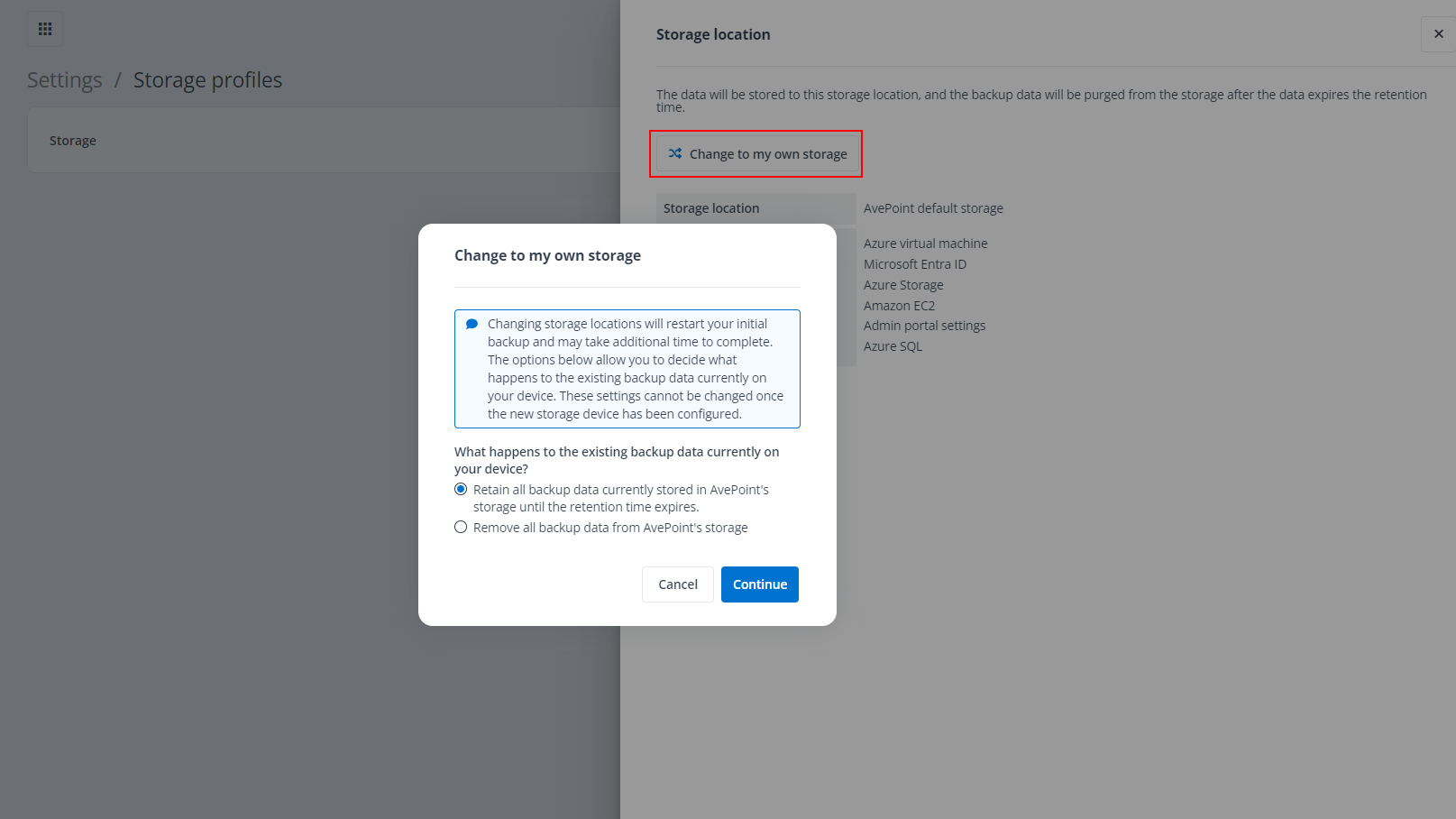
If you have updated your subscription from using default storage to your own storage, you must navigate to this page, click Storage, and click the Change to my own storage link to configure the storage profiles connecting to your own storage. Otherwise, the backup will be interrupted.
If you updated the subscription by using your own storage to default AvePoint storage, the backup service will force a full backup for the subsequent backup job in the schedule and automatically store the backup data to the default AvePoint storage. The legacy backup data stored on your own storage can still be used for restoring until it expires the retention period.
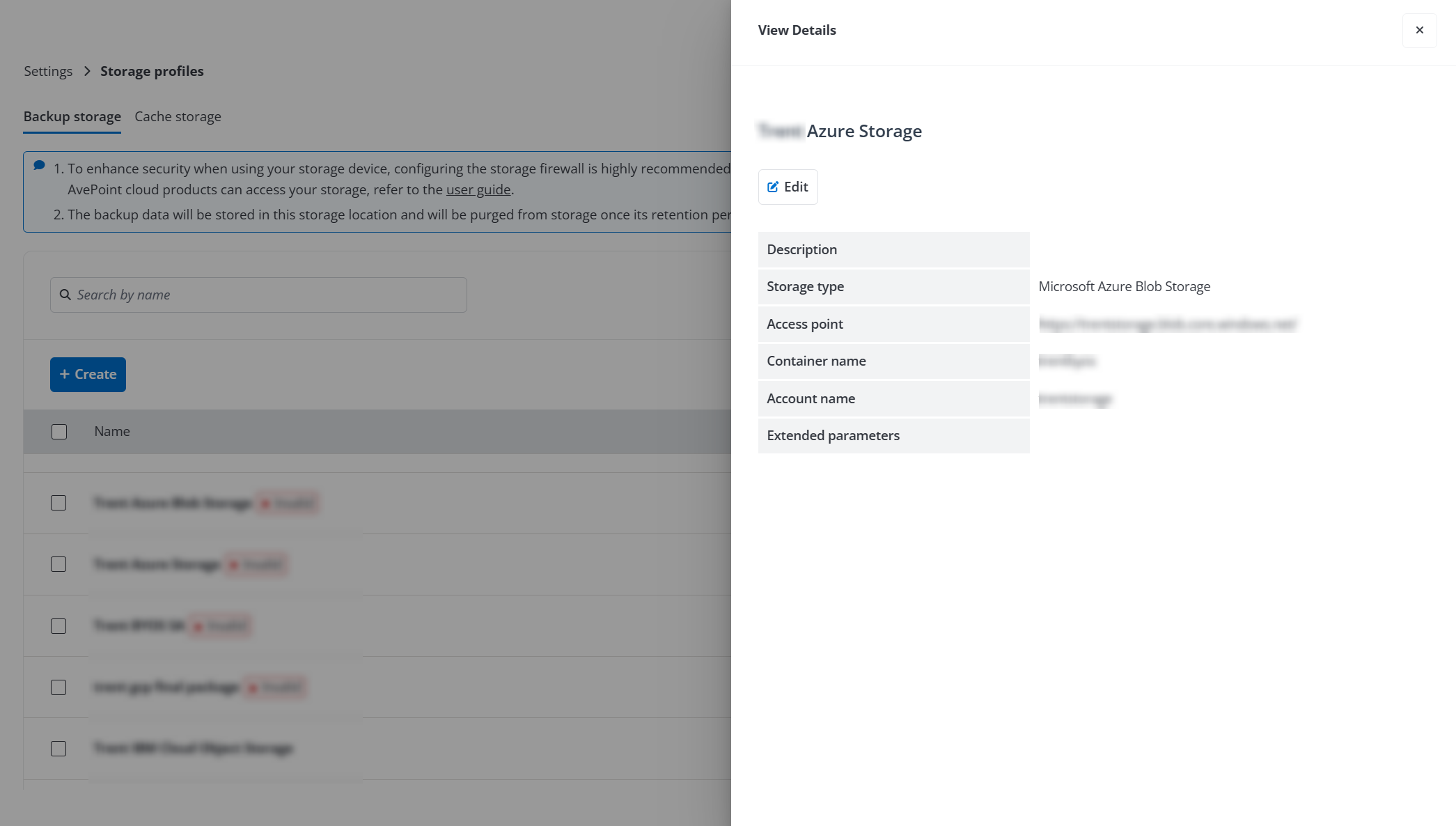
You can click the storage profile name to view the details of the storage location and click Edit to update the profile information. The storage information, apart from its path information, can be modified.
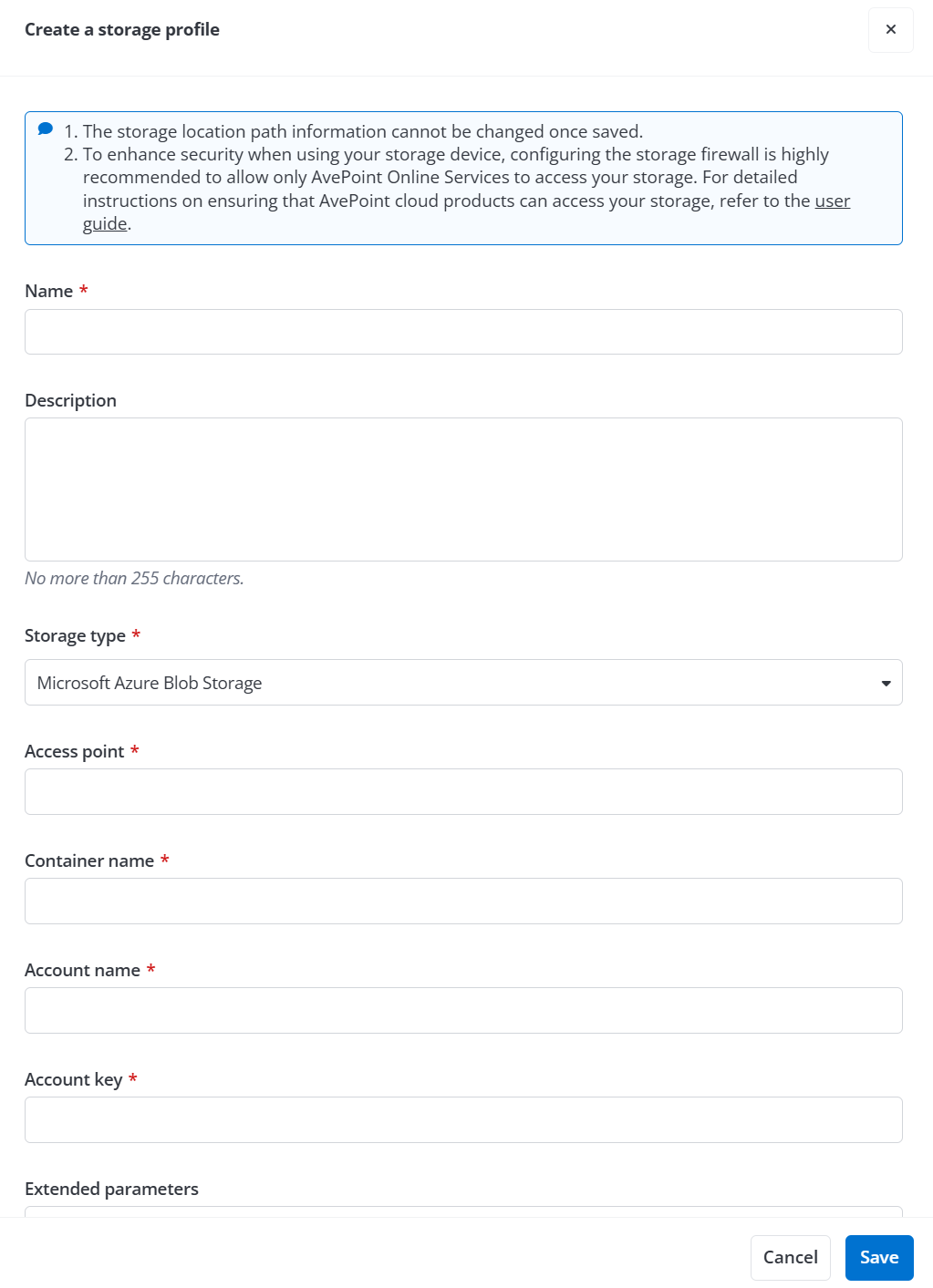
Follow the instructions below to create a storage profile:
-
In the Backup storage tab, click the Create button. The Create a storage profile pane appears on the right.
-
Enter a profile name for the storage location that you want to connect to and provide an optional description.
-
In the Storage Type field, select a storage type from the list and then refer to the following sections for the storage configuration.