
Home > Appendices > Appendix E - Supported References in Email Templates
Download this articleAppendix E - Supported References in Email Templates
AvePoint Cloud Governance can send notification emails to users when different events occur, for example, when a user has a new task that needs approval or a user’s request has been approved by the approver.
The notification emails are sent based on the corresponding email templates. AvePoint Cloud Governance provides built-in email templates. You can edit the built-in email templates, as well as create custom email templates. Each email template can contain references. A reference is a parameter that will call up the corresponding information for each request, task, or event.
The table below lists all supported references in classic email templates configured in the classic Cloud Governance admin center. The references that can be added to each email template vary with email template types. After you click Insert Reference in the window for configuring the email subject and message body, the pop-up window only shows the references that are supported in the current email template.
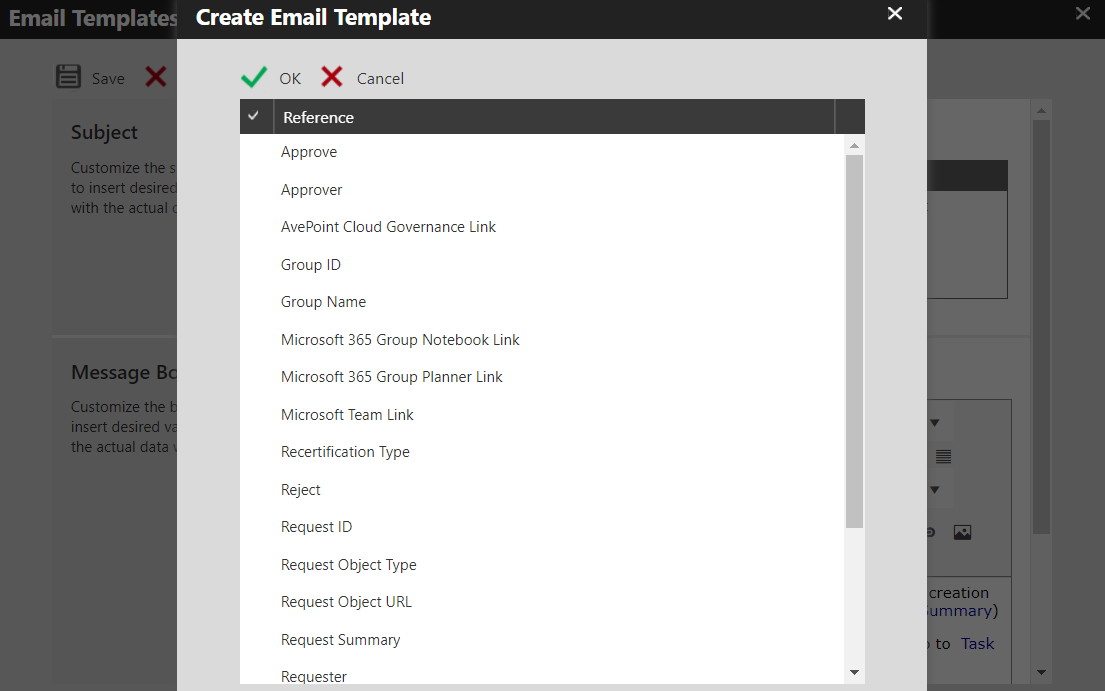
| Supported Reference | Reference Description |
|---|---|
| Approve(in Message Body only) | This will be displayed as a button in the notification email. |
| Approved Time | The time when a request is approved. |
| Approver | The name of the user who is set as an approver. |
| Automatic Import Profile Name | The name of an automatic import profile. |
| AvePoint Cloud Governance Link | The link to the AvePoint Cloud Governance website. |
| Comments | The comments that an approver enters when the approver approves or rejects a request. |
| Consequence | In a task reminder email, the consequence can be:The site collection will be lockedA lifecycle task to Delete Site Collection will be generatedA lifecycle task to Archive Site Collection will be generated |
| Consequence Executed Time | In a task reminder email, the consequence executed time refers to the time when the site collection will be locked or when the site collection deletion task will be generated. |
| Contact for Confirming Governance Details | The primary site collection contact who is responsible for confirming governance details of a newly-imported site collection.The primary group/team contact who is responsible for confirming governance details of a newly-imported Microsoft 365 Group or Microsoft Team. |
| Error Message | The detailed error information for an error task. An error task is generated when a request encounters an error.The detailed error information for a renewal process that encounters an error. |
| Expiration Date | The date when a site collection lease expires. |
| Group ID | The ID (email address) of a Microsoft 365 Group or Microsoft Team. |
| Group Name | The name of a Microsoft 365 Group or Microsoft Team. |
| Guest User Email Address | The email address of a guest user. |
| Guest User Name | The name of a guest user. |
| Guest User Renewal Escalation Result for Body | The guest user renewal escalation result in the email body:The guest user has been blocked from signing in and accessing the services and data in your Microsoft 365 tenant.The guest user has been removed from your organization's directory. |
| Guest User Renewal Escalation Result for Subject | The guest user renewal escalation result in the email subject:Blocked Guest UserRemoved Guest User |
| Lease Expiration Warning Period | The amount of time that is left before a site collection lease expires. |
| Locked Reason | The reason why a site collection is locked.The reason why a Microsoft 365 user is blocked. |
| Microsoft Team Link | The link of a Microsoft Team. |
| Microsoft 365 Group Notebook Link | The link of a Microsoft 365 Group’s notebook in OneNote. |
| Microsoft 365 Group Planner Link | The link of a Microsoft 365 Group’s plan in Planner. |
| Permission Expiration Warning Period | The amount of time that is left before a user’s temporary permissions expire.*Note: This reference is only supported in the Built-in Upcoming Permission Expiration Email Template. |
| Phase Start Time | The time when a site collection, Microsoft 365 Group, or Microsoft Team starts a phase, such as Renewal Pending and Automatic Import Process Pending. |
| Previous Assignee of the Renewal Task | The name of the user who is the previous task assignee of the renewal task. *Note: If a renewal task is not processed within the duration and it is overdue, AvePoint Cloud Governance will reassign the task to the next stage task assignee. In this case, the value of this reference shown in the notification email will be System. |
| Primary Contact | The primary contact of a workspace. |
| Recertification Type | The type of the recertification task, such as permission recertification and ownership recertification. |
| Reject(in Message Body only) | This will be displayed as a button in the notification email. |
| Rejected Time | The time when a request is rejected. |
| Rejecter | The name of the user who rejects a request. |
| Request Canceled By | The name of the user who cancels a request. |
| Request Final Status | The final status of a request, such as Rejected and Completed. |
| Request ID | The ID of a request. This is automatically generated by AvePoint Cloud Governance. |
| Request Object Type | The type of object, such as site collection and Microsoft 365 Group, that is involved in a request. |
| Request Object URL | The URL of the object, such as site collection and site, which is involved in a request. |
| Request Summary | The brief summary that is entered by a requester. It reflects the request’s purpose or function to help the approver quickly understand the business reason behind the request. |
| Requester | The name of the user who submits a request. |
| Result File Location | The location where an automatic import result file is stored. The file provides the import results of the site collections, Microsoft 365 Groups, or Microsoft Teams that are imported via an automatic import process. |
| Result File Name | The name of an automatic import result file. The file provides the import results of the site collections, Microsoft 365 Groups, or Microsoft Teams that are imported via an automatic import process. |
| Retry | This will be displayed as a button in the notification email about an error task. An error task is generated when a request encounters an error. |
| Secondary Contact | The secondary contact of a workspace. |
| Site Collection Title | The title of the site collection that is involved in a task. |
| Skip | This will be displayed as a button in the notification email about an error task. An error task is generated when a request encounters an error. |
| Task Created Date | The date when a task is generated. |
| Task Created Time | The time when a task is generated. |
| Task Duration | The time that a task is overdue. |
| Task Link | Clicking the link will open the task details panel in the AvePoint Cloud Governance Portal. For a completed task, clicking the link will open the AvePoint Cloud Governance Portal homepage. |
| Task Name | The title of a task. |
| User Display Name | The display name of a Microsoft 365 user who is involved in a user provisioning or user management task. |
| User Password | The password of a newly created Microsoft 365 user via a Create User service request.The new password of an existing Microsoft 365 user. The password is reset via a User Lifecycle Management service request. |
| User Status | The status of a Microsoft 365 user who is involved in a user provisioning or user management task, such as Active and Blocked. |
| Username | The login name of a Microsoft 365 user who is involved in a user provisioning or user management task. |