
Home > Get Started > Create App Profiles or Microsoft 365 Service Account Profiles
Download this articleCreate App Profiles or Microsoft 365 Service Account Profiles
To use AvePoint Cloud Governance properly, your tenant must first create app profiles or Microsoft 365 service account profiles in AvePoint Online Services. With the apps or Microsoft 365 service account, AvePoint Cloud Governance can connect to your Microsoft 365 tenant, Microsoft Entra ID, or Viva Engage.
For details, refer to the scenarios below:
I Want AvePoint Online Services to Automatically Create Apps in My Microsoft Entra ID
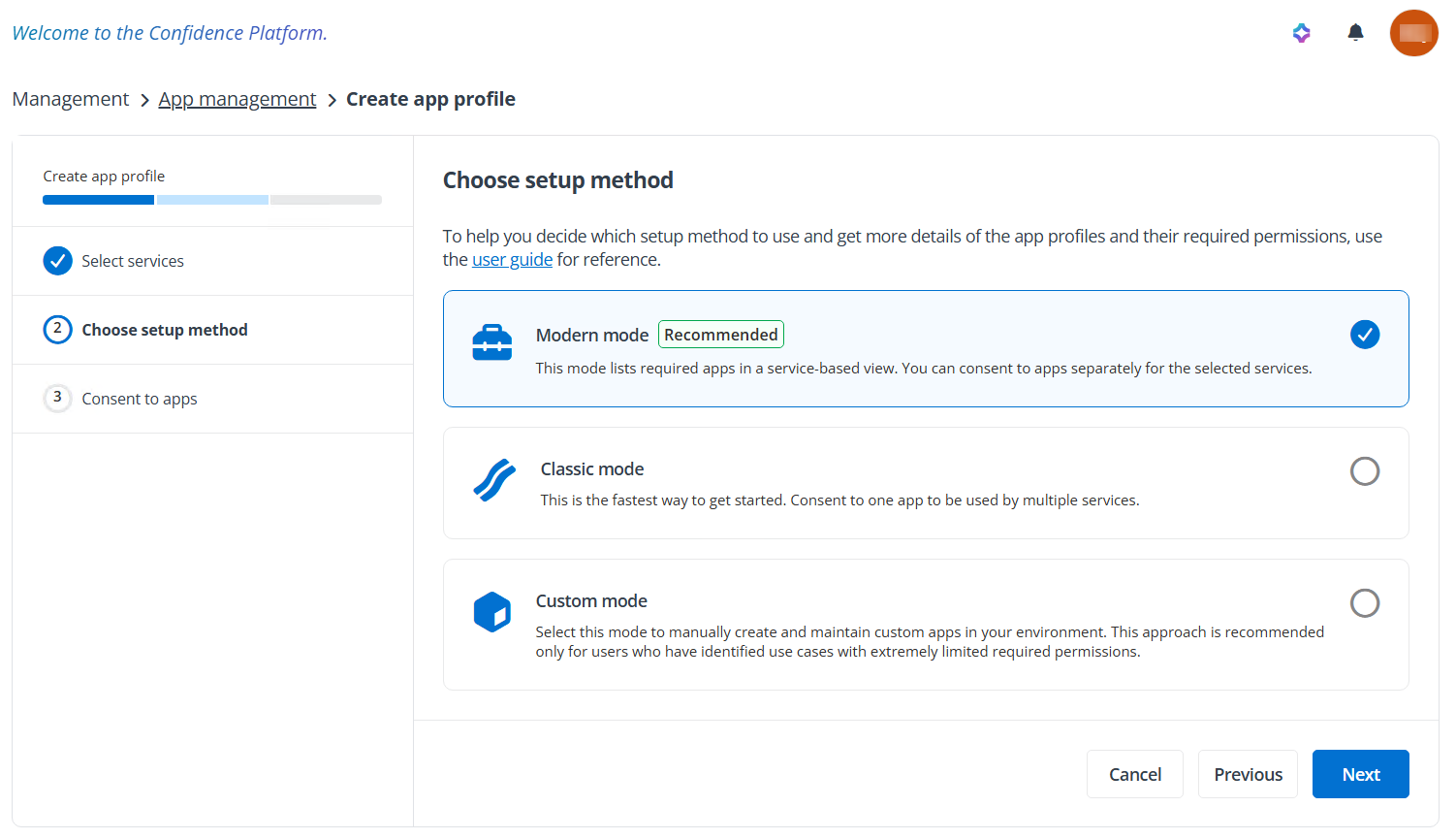
If you want AvePoint Online Services to automatically create apps in your Microsoft Entra ID, choose the appropriate mode and app types when creating app profiles in AvePoint Online Services. For details on creating app profiles, see Create an App Profile.
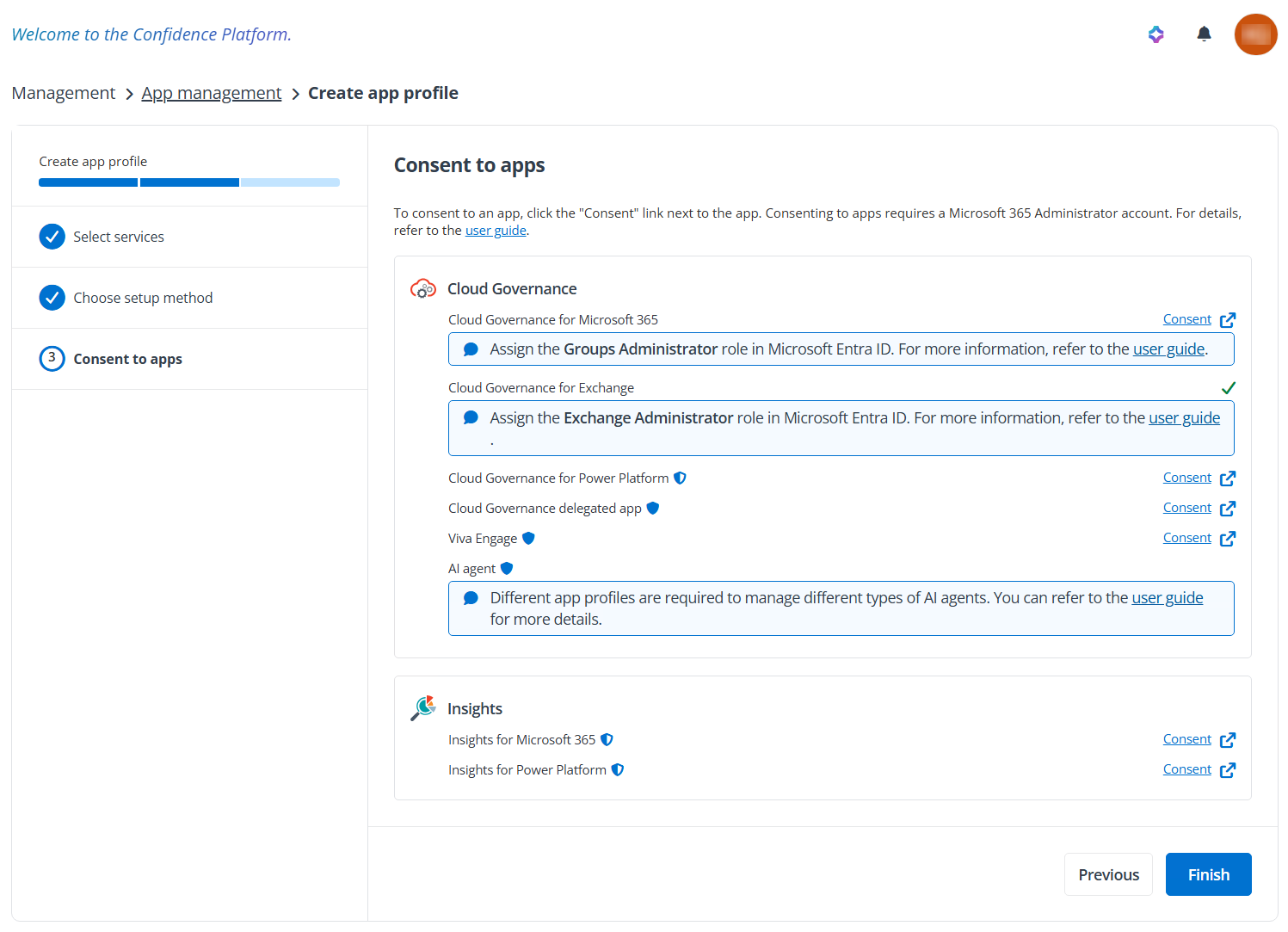
Ensure that the user authenticating the Cloud Governance delegated app has permanent Exchange Administrator privileges to maintain the app functionality.
-
App profile for Microsoft 365 (All permissions) in classic mode – Creating this app profile will create the AvePoint Online Services Administration forMicrosoft365 app in your Microsoft Entra ID.
-
App profile for Microsoft Entra ID in classic mode – Creating this app profile will create the AvePoint Online Services Administration forEntra ID app in your Microsoft Entra ID.
-
App profile for Cloud Governance for Microsoft 365 in modern mode – It can replace the Microsoft 365 (All permissions) app profile and Microsoft Entra ID app profile in classic mode. Creating this app profile will create the AvePoint Cloud Governance for Microsoft365 app in your Microsoft Entra ID.
NOTETo use the following features, you must assign the Groups Administrator role to the app:
-
Configure external sharing settings for the Create Microsoft 365 Group service or Create Microsoft Teams service
-
Enable site collection provisioning or group team site provisioning in multi-geo locations for the corresponding service
-
Configure Group/Team advanced settings in system settings
For how to assign roles to the app, refer to the instructions in Appendix O - How to Assign the Groups Administrator Role to an App?.
-
-
App profile for Cloud Governance for Exchange in modern mode – Creating this app profile will create the AvePoint Cloud Governance for Exchange App in your Microsoft Entra ID.
NOTEAfter you create the AvePoint Cloud Governance for Exchange App, you need to go to the Microsoft Entra admin center (or Microsoft Azure portal) to assign the Exchange Administrator role to the app or assign custom Exchange Online role groups to the app if you want to leverage the functions listed in the following table.
For how to assign roles or Exchange Online role groups to the app, refer to the instructions in How to Assign the Exchange Administrator Role to an App?. Note that you need to add the following permissions when you create role groups in the Exchange Online admin center:
PowerShell Command Role Name Function New-Mailbox Mail Recipient Creation Create mailbox Get-Mailbox Mail Recipient Creation Get mailbox Set-Mailbox Mail Recipients Update mailbox Add-MailboxPermission Mail Recipients Manage mailbox permission Remove-MailboxPermission Mail Recipients Manage mailbox permission Get-MailboxPermission Mail Recipients Manage mailbox permission New-DistributionGroup Security Group Creation and Membership Create mail-enabled security group New-DistributionGroup Distribution Groups Create and manage distribution group Get-OrganizationConfig View-Only Configuration Get geo location Get-OrganizationConfig View-Only Configuration Get naming policy Set-UnifiedGroup Mail Recipients Change Outlook experience settings Set-UnifiedGroup Mail Recipients Manage Exchange global address list Set-UnifiedGroup Mail Recipients Configure welcome email in the Create team service of dynamic service Set-UnifiedGroup Mail Recipients Set domain scope in dynamic service Set-UnifiedGroup Mail Recipients Configure team ID settings in the Create team service of dynamic service -
App profile for Cloud Governance for Power Platform in modern mode – Creating this app profile will create the AvePoint Cloud Governance for Power Platform app in your Microsoft Entra ID.
-
App profile for Cloud Governance delegated app in modern mode – Creating this app profile will create AvePoint Cloud Governance Delegated App in your Microsoft Entra ID.
-
App profile for Viva Engage – Creating this app profile will create AvePoint Online Services Administration for Viva Engage app in your Microsoft Entra ID.
-
App profile for AI agent in modern mode – To manage different types of agents, Copilot Studio agents require the AvePoint Cloud Governance for Power Platform app, while SharePoint agents, Microsoft 365 agents, and Microsoft Foundry agents require the AvePoint Cloud Governance for Microsoft 365 app.
-
App profile for Insights for Microsoft 365 – Creating this app profile will create AvePoint Insights for Microsoft365 app in your Microsoft Entra ID. This app is a prerequisite for using the renewal permission index functionality in Cloud Governance. An insights subscription is not required.
Refer to API Permissions Required by AvePoint Apps to see the API permissions you need to accept when you authorize the apps.
The table below details the required Microsoft 365 roles to consent to or re-authorize an app profile, and the minimum required role after the app creation to maintain its functionalities.
| App Profile | User Role Required to Consent to an App Profile During App Creation | User Role Required to Re-authorize an App Profile | Minimum User Role Required to Maintain App Functionality | Comment |
|---|---|---|---|---|
| Cloud Governance for Microsoft 365 | Privileged Role Administrator or Global Administrator | Privileged Role Administrator or Global Administrator | No role required | |
| Cloud Governance for Exchange | Privileged Role Administrator or Global Administrator | Privileged Role Administrator or Global Administrator | No role required | |
| Cloud Governance for Power Platform | Global Administrator | Privileged Role Administrator or Global Administrator | Power Platform Administrator | Maintains the functionalities related to environments, Power Apps, Power Automate flows, and Power Pages sites. |
| Cloud Governance for Power Platform | Global Administrator | Privileged Role Administrator or Global Administrator | Environment Administrator | Maintains the functionalities related to environments, Power Apps, and Power Automate flows. |
| Cloud Governance for Power Platform | Global Administrator | Privileged Role Administrator or Global Administrator | Fabric Administrator | Maintains the functionalities related to Power BI workspaces. |
| Cloud Governance delegated app | Privileged Role Administrator or Global Administrator | Privileged Role Administrator, Exchange Administrator, or Global Administrator | Exchange Administrator | |
| Viva Engage | Global Administrator | Global Administrator | Yammer Administrator |
I Want to Manually Create an App in My Microsoft Entra ID
A custom app can replace the automatically created apps.
If you want to manually create an app in your Microsoft Entra ID, refer to the permissions listed in the table below to add API permissions required by AvePoint Cloud Governance features to the custom app.
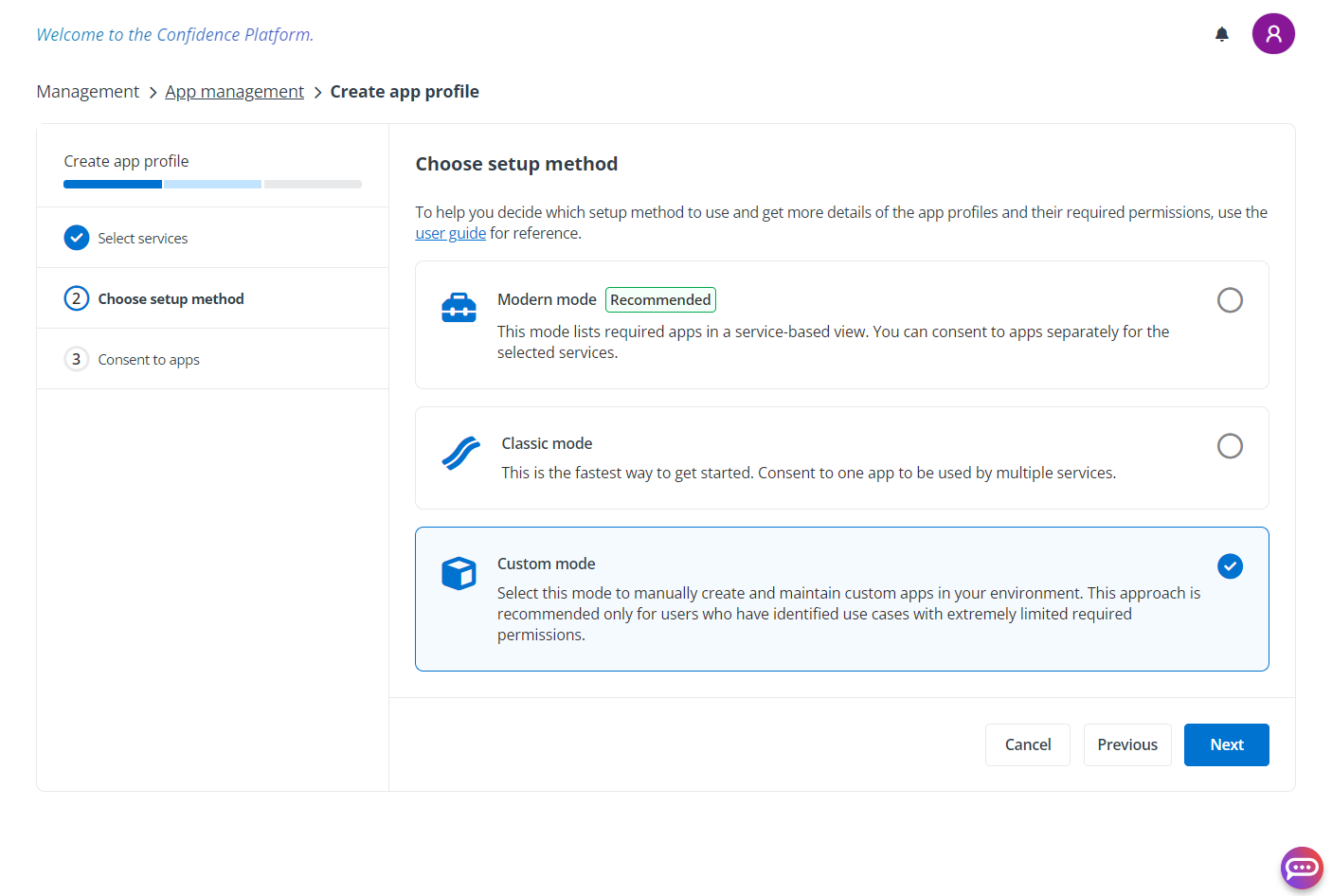
For details on how to create an app in your Microsoft Entra ID, see Create a Custom Azure Apps. When the app is in place, create an app profile in AvePoint Online Services and choose the Custom mode. For detailed instructions, refer to Create an App Profile.
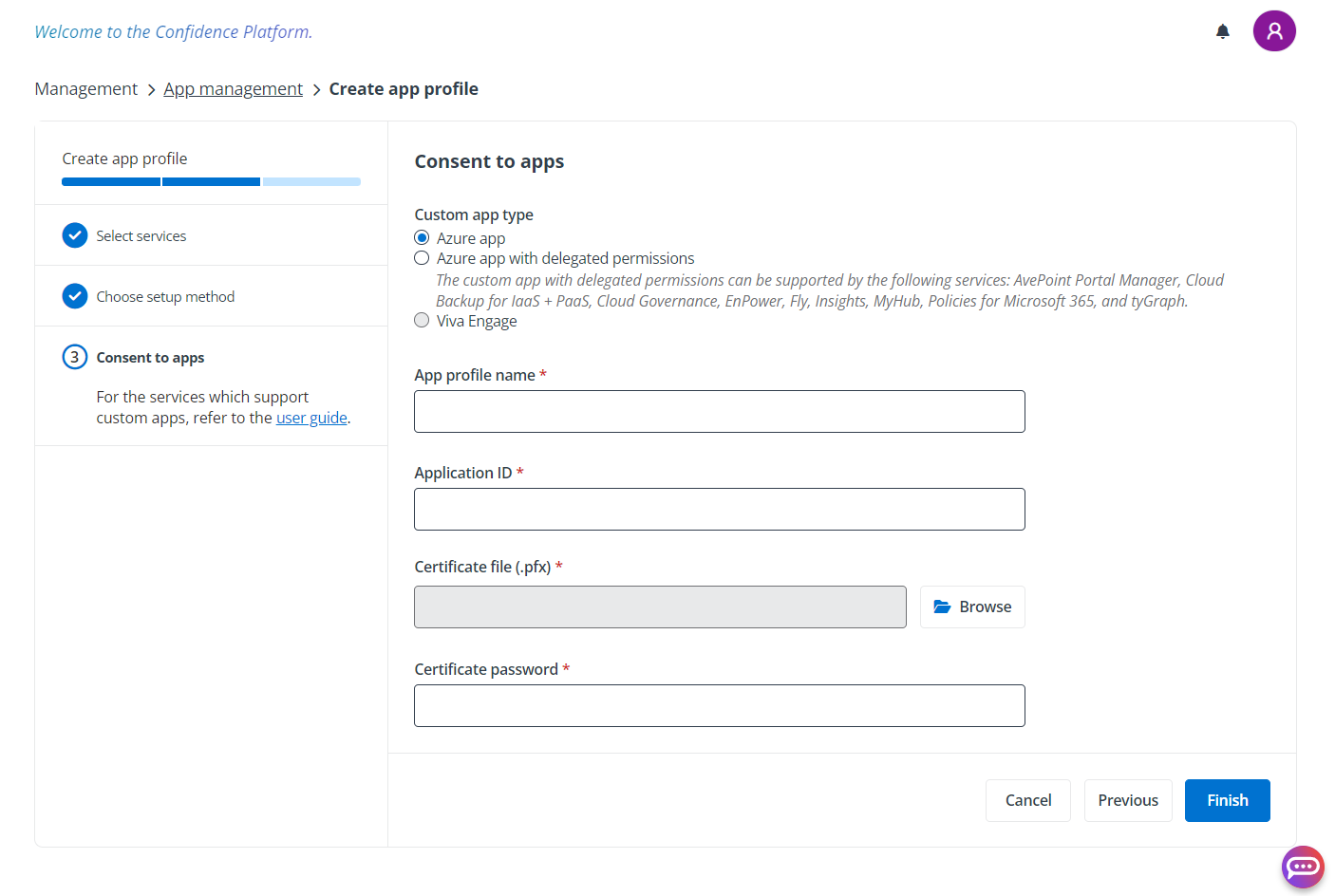
According to the features you want to use and the permissions you have granted to the custom Azure app, select the Azure app, Azure app with delegated permissions, or Viva Engage.
| AvePoint Cloud Governance Feature | API Name | Permission | Type | Purpose |
|---|---|---|---|---|
| SharePoint Object Provisioning and Management | SharePoint | Sites.FullControl.All (Have full control of all site collections) | Application | Retrieve SharePoint settings and SharePoint object properties. Create and manage SharePoint objects. |
| SharePoint Object Provisioning and Management | Microsoft Graph | Sites.Read.All (Read items in all site collections [preview]) | Application | Retrieve the latest site collection URLs. |
| SharePoint Object Provisioning and Management | Microsoft Graph | User.Invite.All (Invite guest users to the organization) | Application | Assign SharePoint permissions to guest users. |
| SharePoint Object Provisioning and Management | Microsoft Graph | Directory.Read.All (Read directory data) | Application | Retrieve the user, group, and guest user membership information. |
| SharePoint Object Provisioning and Management | Microsoft Graph | InformationProtectionPolicy.Read.All (Read all published labels and label policies for an organization.) | Application | Manage sensitivity labels. |
| SharePoint Object Provisioning and Management | Microsoft Graph | Sites.FullControl.All (Have full control of all site collections) | Application | Manage content types. |
| SharePoint Object Provisioning and Management | Microsoft Graph | Reports.Read.All (Read all usage reports) | Application | Retrieve the last activity time. |
| Microsoft 365 Groups/Microsoft Teams Provisioning and Management | SharePoint | Sites.FullControl.All (Have full control of all site collections) | Application | Retrieve and update group team site properties. |
| Microsoft 365 Groups/Microsoft Teams Provisioning and Management | Office 365 Exchange Online Note that the Office 365 Exchange Online API is required only when you choose to use the Exchange Web Services API for group/team provisioning and management. For more details, refer to Appendix I - About Exchange Web Services API. | full_access_as_app (Use Exchange Web Services with full access to all mailboxes) | Application | Create groups/teams and update group/team properties. |
| Microsoft 365 Groups/Microsoft Teams Provisioning and Management | Office 365 Exchange Online Note that the Office 365 Exchange Online API is required only when you choose to use the Exchange Web Services API for group/team provisioning and management. For more details, refer to Appendix I - About Exchange Web Services API | Exchange.ManageAsApp (Manage Exchange As Application) Note that the app must have the Exchange Administrator role, or you need to assign custom Exchange Online role groups to the app. For how to assign roles or Exchange Online role groups to the app, refer to the instructions in How to Assign the Exchange Administrator Role to an App?. | Application | Configure settings for groups/teams. |
| Microsoft 365 Groups/Microsoft Teams Provisioning and Management | Microsoft Graph | Directory.ReadWrite.All (Read and write directory data) Or Groups administrator role assigned to the custom app Note that for how to assign the Groups administrator role to the app, refer to the instructions in Appendix O - How to Assign the Groups Administrator Role to an App?. | Application | Retrieve group/team settings, configure external sharing settings, and support multi-geo location group/team provisioning. Retrieve groups that users belong to. |
| Microsoft 365 Groups/Microsoft Teams Provisioning and Management | Microsoft Graph | Group.ReadWrite.All (Read and write all groups) | Application | Retrieve group/team properties. Create and manage groups/teams. Add users to groups. |
| Microsoft 365 Groups/Microsoft Teams Provisioning and Management | Microsoft Graph | Member.Read.Hidden (Read all hidden memberships) | Application | Read the members of a team with hidden membership to copy members from existing teams. |
| Microsoft 365 Groups/Microsoft Teams Provisioning and Management | Microsoft Graph | User.Invite.All (Invite guest users to the organization) | Application | Invite guest users to groups/teams. |
| Microsoft 365 Groups/Microsoft Teams Provisioning and Management | Microsoft Graph | Files.Read.All (Read files in all site collections) | Application | Retrieve the URLs of the Microsoft 365 Group team sites and team channel sites. |
| Microsoft 365 Groups/Microsoft Teams Provisioning and Management | Microsoft Graph | ChannelMember.ReadWrite.All (Add and remove members from all channels) | Application | Retrieve and manage the channel members. |
| Microsoft 365 Groups/Microsoft Teams Provisioning and Management | Microsoft Graph | Policy.Read.All (Read your organization's policies) | Application | Renew shared channel members. |
| Microsoft 365 Groups/Microsoft Teams Provisioning and Management | Microsoft Graph | Channel.Create (Create channels) | Application | Create private channels in a team. |
| Microsoft 365 Groups/Microsoft Teams Provisioning and Management | Microsoft Graph | ChannelSettings.ReadWrite.All (Read and write the names, descriptions, and settings of all channels) | Application | Update channel properties. |
| Microsoft 365 Groups/Microsoft Teams Provisioning and Management | Microsoft Graph | TeamSettings.ReadWrite.All (Read and change all teams' settings) | Application | Retrieve and update team settings. |
| Microsoft 365 Groups/Microsoft Teams Provisioning and Management | Microsoft Graph | Team.Create (Create teams) | Application | Create teams from existing teams or using team templates. |
| Microsoft 365 Groups/Microsoft Teams Provisioning and Management | Microsoft Graph | TeamMember.ReadWrite.All (Add and remove members from all teams) | Application | Add or remove members from teams. |
| Microsoft 365 Groups/Microsoft Teams Provisioning and Management | Microsoft Graph | Channel.Delete.All (Delete channels) | Application | Delete channels. |
| Microsoft 365 Groups/Microsoft Teams Provisioning and Management | Microsoft Graph | ChannelMessage.Read.All (Read all channel messages) | Application | Retrieve Microsoft Teams channel conversations for team inactivity threshold calculation. |
| Microsoft 365 Groups/Microsoft Teams Provisioning and Management | Microsoft Graph | InformationProtectionPolicy.Read.All (Read all published labels and label policies for an organization) | Application | Manage sensitivity labels. |
| Microsoft 365 Groups/Microsoft Teams Provisioning and Management | Microsoft Graph | Sites.FullControl.All (Have full control of all site collections) | Application | Retrieve and update group team site content types. |
| Microsoft 365 Groups/Microsoft Teams Provisioning and Management | Microsoft Graph | Reports.Read.All (Read all usage reports) | Application | Retrieve the last activity time. |
| Microsoft 365 Groups/Microsoft Teams Provisioning and Management | Microsoft Graph | Group.ReadWrite.All (Read and write all groups) | Delegated | Allow outside senders to Microsoft 365 Groups. Change member subscription settings for Microsoft 365 Groups. |
| Distribution Group/Mail-enabled Security Group Provisioning and Management | Office 365 Exchange Online | Exchange.ManageAsApp (Manage Exchange As Application) Note that the app must have the Exchange Administrator role, or you need to assign custom Exchange Online role groups to the app. For how to assign roles or Exchange Online role groups to the app, refer to the instructions in How to Assign the Exchange Administrator Role to an App?. | Application | Create and manage groups. |
| Distribution Group/Mail-enabled Security Group Provisioning and Management | Microsoft Graph | User.Read.All (Read all users' full profiles) | Application | Retrieve user properties from user profiles. |
| Distribution Group/Mail-enabled Security Group Provisioning and Management | Microsoft Graph | Group.ReadWrite.All (Read and write all groups) | Application | Retrieve the group information, manage the group lifecycle, and change group ownership or membership. |
| Distribution Group/Mail-enabled Security Group Provisioning and Management | Microsoft Graph | User.Invite.All (Invite guest users to the organization) | Application | Invite guest users to groups. |
| Security Group Provisioning and Management | Microsoft Graph | User.Read.All (Read all users' full profiles) | Application | Retrieve user properties from user profiles. |
| Security Group Provisioning and Management | Microsoft Graph | Group.ReadWrite.All (Read and write all groups) | Application | Retrieve the group information, manage the group lifecycle, and change group ownership or membership. |
| Security Group Provisioning and Management | Microsoft Graph | User.Invite.All (Invite guest users to the organization) | Application | Invite guest users to groups. |
| Shared Mailbox Provisioning and Management | Office 365 Exchange Online | Exchange.ManageAsApp (Manage Exchange As Application) Note that the app must have the Exchange Administrator role, or you need to assign custom Exchange Online role groups to the app. For how to assign roles or Exchange Online role groups to the app, refer to the instructions in How to Assign the Exchange Administrator Role to an App?. | Application | Create and manage shared mailboxes. |
| Shared Mailbox Provisioning and Management | Microsoft Graph | User.ReadWrite.All (Read and write all users' full profiles) | Application | Retrieve and update user properties. |
| Shared Mailbox Provisioning and Management | Microsoft Graph | Group.Read.All (Read all groups) | Application | Retrieve the group information. |
| Resource Mailbox Provisioning and Management | Office 365 Exchange Online | Exchange.ManageAsApp (Manage Exchange As Application) Note that the app must have the Exchange Administrator role, or you need to assign custom Exchange Online role groups to the app. For how to assign roles or Exchange Online role groups to the app, refer to the instructions in How to Assign the Exchange Administrator Role to an App?. | Application | Create and manage resource mailboxes. |
| Resource Mailbox Provisioning and Management | Microsoft Graph | User.ReadWrite.All (Read and write all users' full profiles) | Application | Retrieve and update user properties. |
| Resource Mailbox Provisioning and Management | Microsoft Graph | Group.Read.All (Read all groups) | Application | Retrieve the group information. |
| Viva Engage Community Provisioning Management | Microsoft Graph | Group.ReadWrite.All (Read and write all groups) | Application | Retrieve and manage the group information. |
| Viva Engage Community Provisioning Management | Microsoft Graph | Sites.FullControl.All (Have full control of all site collections) | Application | Retrieve and update Viva Engage community site content types. |
| Viva Engage Community Provisioning Management | Microsoft Graph | Directory.Read.All (Read directory data) | Application | Retrieve the user and group information. |
| Viva Engage Community Provisioning Management | Microsoft Graph | Files.Read.All (Read files in all site collections) | Application | Retrieve the URLs of the Viva Engage community sites. |
| Viva Engage Community Provisioning Management | Microsoft Graph | Reports.Read.All (Read all usage reports) | Application | Retrieve the last activity time. |
| Viva Engage Community Provisioning Management | Microsoft Graph | Community.ReadWrite.All | Application | Create a new community in Viva Engage. |
| Viva Engage Community Provisioning Management | SharePoint | Sites.FullControl.All (Have full control of all site collections) | Application | Manage the associated team sites. |
| Viva Engage Community Provisioning Management | Yammer | user_impersonation (Read and write to the Yammer platform [preview]) | Delegated | Access and manage the Viva Engage communities. |
| Power App Management | Dynamics CRM | user_impersonation (Access Common Data Service as organization users) | Delegated | Manage Power Apps. |
| Power App Management | Microsoft Graph | User.Read.All (Read all users' full profiles) | Application | Retrieve user properties from user profiles. |
| Power App Management | Microsoft Graph | Group.Read.All (Read all groups) | Application | Retrieve the group information. |
| Power App Management | PowerApps Service | User (Access the PowerApps Service API) | Delegated | Retrieve information of Power Apps. |
| Environment Management | Dynamics CRM | user_impersonation (Access Common Data Service as organization users) | Delegated | Manage Power Platform environments. |
| Environment Management | Microsoft Graph | User.Read.All (Read all users' full profiles) | Application | Retrieve user properties from user profiles. |
| Environment Management | Microsoft Graph | Group.ReadWrite.All (Read and write all groups) | Application | Retrieve and update the group information. |
| Power Automate Flow Management | Microsoft Graph | User.Read.All (Read all users' full profiles) | Application | Retrieve user properties from user profiles. |
| Power Automate Flow Management | Microsoft Graph | Group.Read.All (Read all groups) | Application | Retrieve the group information. |
| Power Automate Flow Management | PowerApps Service | User (Access the PowerApps Service API) | Delegated | Retrieve information of Power Apps. |
| Power BI Workspace Management | Microsoft Graph | Directory.Read.All (Read directory data) | Application | Retrieve the user and group information. |
| Power BI Workspace Management | Power BI Service | Tenant.ReadWrite.All (Read and write all content in tenant) | Delegated | Update Power BI workspace roles. |
| Power BI Workspace Management | Power BI Service | Workspace.ReadWrite.All (Read and write all workspaces) | Delegated | Delete Power BI workspaces. |
| Power Pages Site Management | Power Platform | PowerPages.Websites.Read (Read Power Pages websites) | Delegated | Manage Power Pages sites. |
| Power Pages Site Management | Power Platform | PowerPages.Website.Write (Write Power Pages websites) | Delegated | Manage Power Pages sites. |
| Microsoft 365 User Management | Microsoft Graph | User.ReadWrite.All (Read and write all users' full profiles) | Application | Retrieve and update user properties. |
| Microsoft 365 User Management | Microsoft Graph | Directory.Read.All (Read directory data) | Application | Retrieve the user license information. |
| Guest User Invitation and Management | Microsoft Graph | User.ReadWrite.All (Read and write all users' full profiles) | Application | Retrieve and update user properties. |
| Guest User Invitation and Management | Microsoft Graph | User.Invite.All (Invite guest users to the organization) | Application | Invite guest users. Assign SharePoint permission to guest users. |
| Guest User Invitation and Management | Microsoft Graph | Group.ReadWrite.All (Read and write all groups) | Application | Add guest users to groups. Retrieve groups that users belong to. |
| Guest User Invitation and Management | Microsoft Graph | AuditLog.Read.All (Read all audit log data) | Application | Retrieve the user who invited the guest user to the tenant. |
| Metadata Management | SharePoint | User.Read.All (Read user profiles) | Application | Retrieve user properties from user profiles. |
| Metadata Management | SharePoint | TermStore.ReadWrite.All (Read and write managed metadata) | Application | Retrieve term store information. |
| Metadata Management | SharePoint | Sites.FullControl.All (Have full control of all site collections) | Application | Retrieve the SharePoint list information when managing the Lookup metadata. |
| Metadata Management | Microsoft Graph | User.Read.All (Read all users' full profiles) | Application | Retrieve user properties from user profiles when managing the Person or group metadata. |
| Metadata Management | Microsoft Graph | Group.Read.All (Read all groups) | Application | Retrieve the group information when managing the Person or group metadata. |
| Email Settings – Use a Microsoft 365 account as the email sender | Microsoft Graph | Mail.Send (Send mail as any user) | Application | Use a Microsoft 365 account as the email sender to send notification emails. |
| Search for Users in the People Picker | Microsoft Graph | User.Read.All (Read all users' full profiles) | Application | Retrieve user properties from user profiles. |
| Search for Users in the People Picker | Microsoft Graph | Group.Read.All (Read all groups) | Application | Retrieve the group information. |
| Enable Integration with Sensitivity Labels | Microsoft Graph | InformationProtectionPolicy.Read.All (Read all published labels and label policies for an organization.) | Application | Retrieve published sensitivity labels and label policy settings. |
| Enable Renewal Permission Index with AvePoint Insights Make sure the API permissions required by AvePoint Insights are contained in the Azure app in a tenant to enable site permission index integration. For details, refer to Use Custom Azure App in AvePoint Insights User Guide. | Office 365 Management APIs | ActivityFeed.Read (Read activity data for your organization) | Application | Check if audit is enabled. |
For a detailed list of features that require these permissions, refer to Appendix J - Custom Azure App Permissions for Using AvePoint Cloud Governance.
For the updated history of the permissions, refer to API Permission Update History.
If you are using a Microsoft 365 Government environment and you want to use a custom Azure app for Microsoft 365 management, you must add SharePoint and Office 365 Exchange Online API permissions to the custom app through Manifest. Microsoft Azure Government does not allow you to select SharePoint and Office 365 Exchange Online API permissions on the Azure Governance Portal interface.
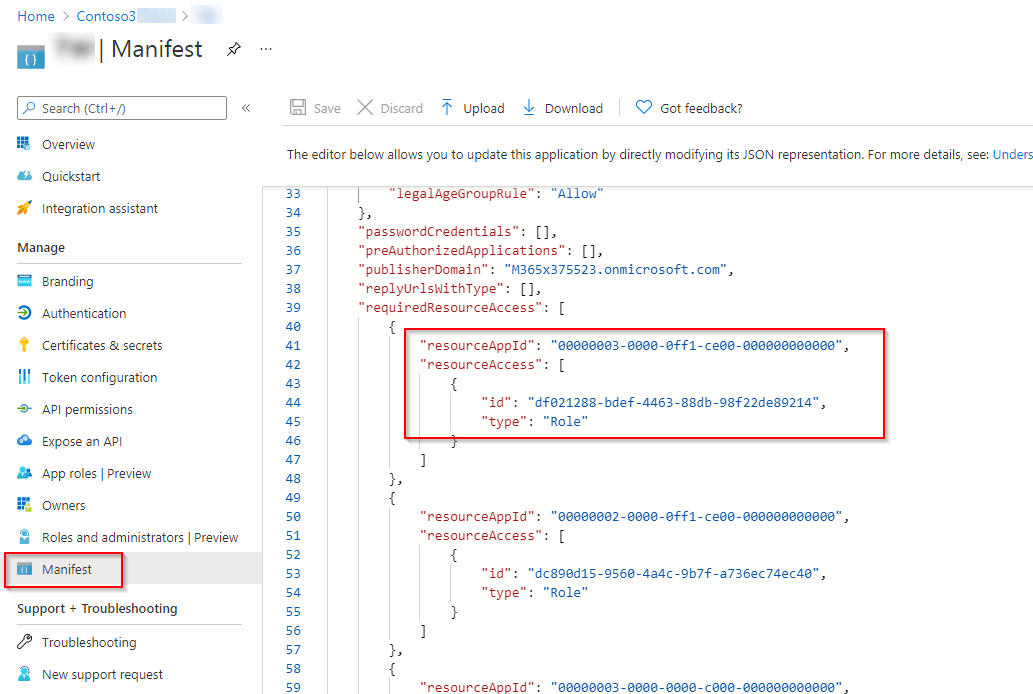
The table below lists the required information for adding SharePoint and Office 365 Exchange Online API permissions to the custom app:
| API | Permission | resourceAppId | id | type |
|---|---|---|---|---|
| SharePoint | Sites.FullControl.All (Have full control of all site collections) | 00000003-0000-0ff1-ce00-000000000000 | 678536fe-1083-478a-9c59-b99265e6b0d3 | Role |
| SharePoint | TermStore.ReadWrite.All (Read and write managed metadata) | 00000003-0000-0ff1-ce00-000000000000 | c8e3537c-ec53-43b9-bed3-b2bd3617ae97 | Role |
| SharePoint | User.Read.All (Read user profiles) | 00000003-0000-0ff1-ce00-000000000000 | df021288-bdef-4463-88db-98f22de89214 | Role |
| Office 365 Exchange Online | Exchange.ManageAsApp (Manage Exchange As Application) | 00000002-0000-0ff1-ce00-000000000000 | dc50a0fb-09a3-484d-be87-e023b12c6440 | Role |
| Office 365 Exchange Online | full_access_as_app (Use Exchange Web Services with full access to all mailboxes) | 00000002-0000-0ff1-ce00-000000000000 | dc890d15-9560-4a4c-9b7f-a736ec74ec40 | Role |
When is a Microsoft 365 Service Account Profile Required?
A Microsoft 365 service account profile is required in the following circumstances:
-
If your tenant users want to use AvePoint Cloud Governance to create site collections or sites with the following templates, your tenant must have a Microsoft 365 service account profile with a SharePoint Administrator account.
-
Business Intelligence Center
-
Visio Process Repository
-
-
If your tenant users want to grant permissions to guest users via AvePoint Cloud Governance Grant Permissions requests, your tenant must have a Microsoft 365 service account profile with a SharePoint Administrator account.
-
If you want to use the AvePoint Cloud Management Deployment Manager plan to deploy design elements or solutions to the site collections or sites created via AvePoint Cloud Governance requests, refer to Deployment Manager to see whether your specific deployment settings require a service account profile.
-
If your tenant has the Multi-Geo Capabilities in Microsoft 365 service plan, to manage hub sites, your tenant must have a Microsoft 365 service account profile.
The Microsoft 365 service account profile is configured in AvePoint Online Services > Management > Service account. For details on creating Microsoft 365 service account profiles, refer to Manage Service Account Profiles.