
Home > Get Started > Permissions for App Authorization
Download this articlePermissions for App Authorization
To use Insights, you need to create an app for Microsoft 365 or Google Workspace via app profile to connect Insights to your Microsoft 365 tenant or Google tenant.
Permissions for Microsoft 365
To connect Insights to your Microsoft 365 tenant, you need to create an app for Microsoft 365 via app profile.
Use the App Automatically Created in Azure by AvePoint Online Services
You can select the setup method while creating your app profiles. If you select Classic mode in AvePoint Online Services, the AvePoint Online Services Administration for Microsoft365 app will be automatically created. If there are strict limitations within your organization on the permissions that can authorize the app, you can select Modern mode in AvePoint Online Services, and the AvePoint Insights for Microsoft365 and/or AvePoint Insights for Power Platform apps will be automatically created.
For details on creating app profiles, see Manage App Profiles for Microsoft Tenants.
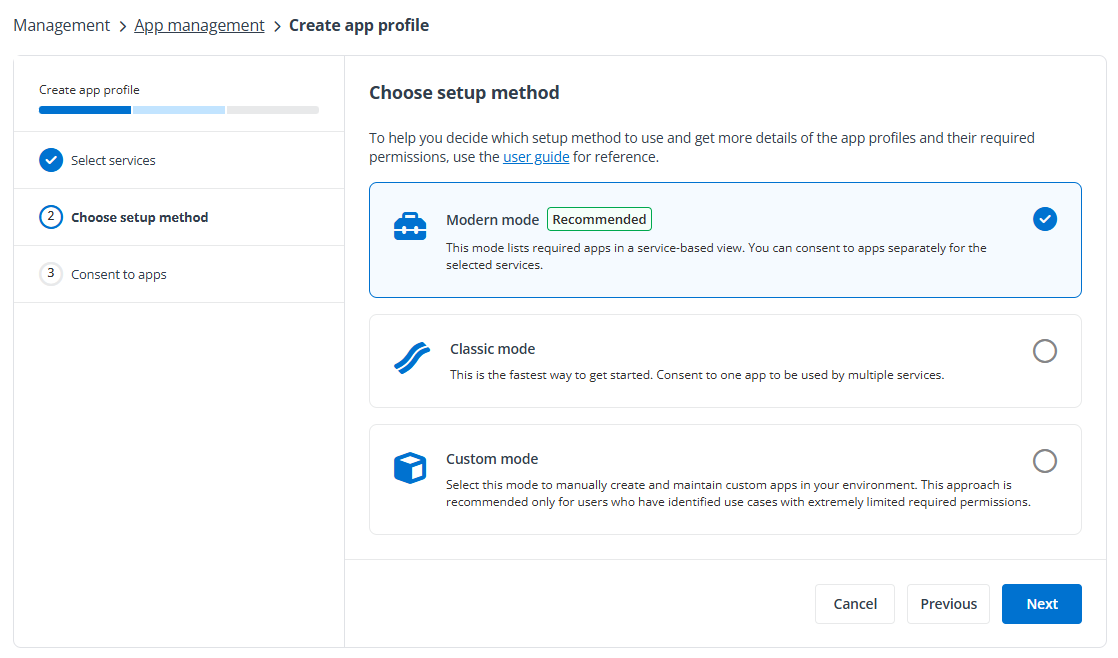
-
The Microsoft 365 account used to consent to the app must have the Global Administrator role, which is a requirement from Microsoft. For details about this role, refer to the Microsoft article About Microsoft 365 admin roles. For the permissions that should be accepted when you authorize the corresponding app, see Permissions Required by Insights for Microsoft 365 and Permissions Required by Insights for Power Platform.
-
Select all permissions to grant all permissions to the app profile.
Use a Custom Azure App
To create a custom Azure app to connect Insights to your Microsoft 365 tenant, you can refer to the required API permissions listed below to add the API permissions to your custom app.
For details on how to create an app in your Microsoft Entra ID, see Create a Custom Azure App. When the app is in place, create an app profile in AvePoint Online Services and select Custom mode as the setup method. For detailed instructions, refer to Consent to Custom Azure Apps.
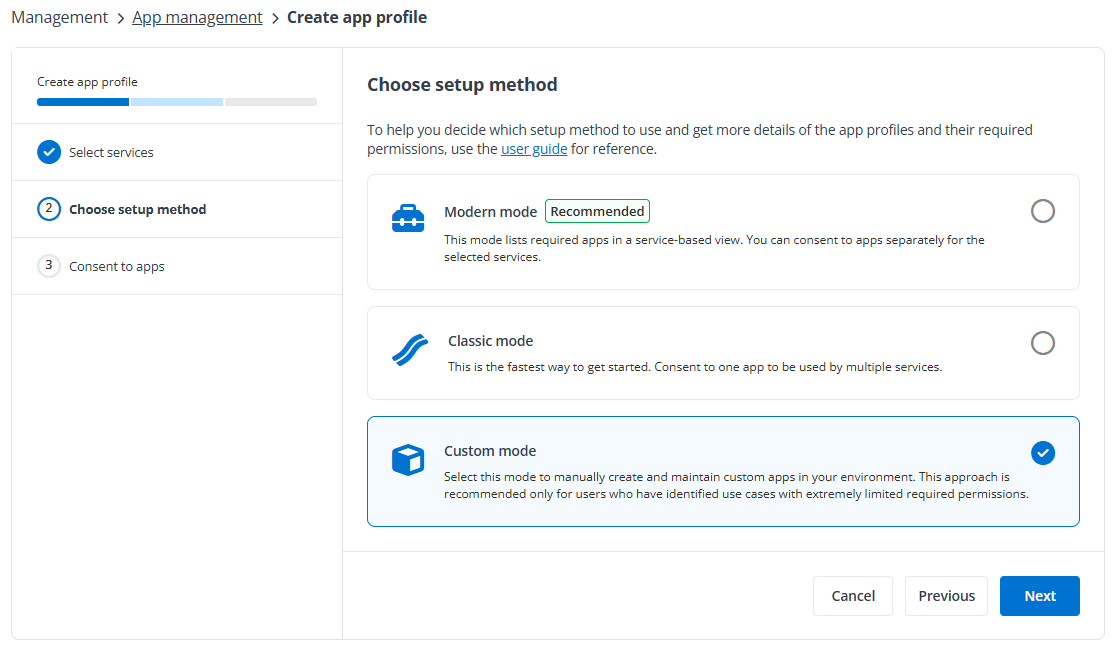
Refer to the required API permissions listed below to add the API permissions to your custom app.
| Feature | API | Permission | Type | Purpose |
|---|---|---|---|---|
| Generate basic reports in Insights | Microsoft Graph | ChannelMember.Read.All (Read the members of all channels) | Application | Retrieve private channel members. |
| Generate basic reports in Insights | Microsoft Graph | ChannelSettings.Read.All (Read the names, descriptions, and settings of all channels) | Application | Retrieve channel information in Teams. |
| Generate basic reports in Insights | Microsoft Graph | Directory.Read.All (Read directory data) | Application | Retrieve AD group/user information for permissions. |
| Generate basic reports in Insights | Microsoft Graph | Files.Read.All (Read files in all site collections) | Application | Retrieve URLs of channels in Teams. |
| Generate basic reports in Insights | Microsoft Graph | Group.Read.All (Read all groups) | Application | Retrieve AD group member information. |
| Generate basic reports in Insights | Microsoft Graph | Reports.Read.All (Read all usage reports) | Application | Retrieve the last accessed time of site collections. |
| Generate basic reports in Insights | Microsoft Graph | Sites.Read.All (Read items in all site collections) | Application | Search for sensitivity data. |
| Generate basic reports in Insights | Microsoft Graph | TeamMember.Read.All (Read the members of all teams) | Application | Retrieve members in Teams. |
| Generate basic reports in Insights | Microsoft Graph | TeamSettings.Read.All (Read all teams' settings) | Application | Retrieve information of teams. |
| Generate basic reports in Insights | Office 365 Management APIs | ActivityFeed.Read (Read activity data for your organization) | Application | Retrieve activity data in your organization. |
| Generate basic reports in Insights | SharePoint/Office 365 SharePoint Online | Sites.FullControl.All (Have full control of all site collections) | Application | Retrieve the permission resources on site collections. *Note: This is the least privileged permission for the Microsoft Graph REST API v1.0. |
| Generate basic reports in Insights | SharePoint/Office 365 SharePoint Online | User.Read.All (Read user profiles) | Application | Retrieve user profiles for OneDrive that are scanned by AvePoint Online Services. |
| View sensitivity labels | Microsoft Information Protection Sync Service *Note: This is under the APIs my organization uses tab. | UnifiedPolicy.Tenant.Read (Read all unified policies of the tenant) | Application | Retrieve sensitivity label information configured in the tenant from Microsoft 365. |
| Show user photos and metadata | Microsoft Graph | User.Read.All (Read all users' full profiles) | Application | Retrieve and display the user photo and metadata. |
| Show the last sign-in time of external users. | Microsoft Graph | AuditLog.Read.All (Read all audit log data) | Application | Retrieve the last sign-in time of external users. |
To use specific features of Insights, additional API permissions need to be added to your custom app.
| Feature | API | Permission | Type | Purpose |
|---|---|---|---|---|
| Remove external users from Microsoft Entra and Block external users from signing in | Microsoft Graph | User.ReadWrite.All | Application | Retrieve and display the user photo and metadata. Allow users to remove or block external users. |
| Add/remove owners for Microsoft 365 Groups | Microsoft Graph | Group.ReadWrite.All (Read and write all groups) | Application | Retrieve AD group member information. Allow users to add or remove owners for Teams/Microsoft 365 Groups. |
| Add/remove owners for Teams | Microsoft Graph | TeamMember.ReadWrite.All (Add and remove members from teams) | Application | Retrieve and manage members in your Teams. |
| Add/remove owners for private channels | Microsoft Graph | ChannelMember.ReadWrite.All (Add and remove members from all channels) | Application | Retrieve private channel members. Allow users to add or remove owners for private channels. |
| Confirm user compromised and Dismiss user risk | Microsoft Graph | IdentityRiskyUser.ReadWrite.All (Read and write risky user information) | Application | Retrieve risky user information. Allow users to confirm user compromised or dismiss user risk. |
| Show the risk detections of risky users | Microsoft Graph | IdentityRiskEvent.Read.All (Read identity risk event information) | Application | Retrieve risky event information. |
| Use Microsoft 365 sensitivity labels in site collection level sensitivity definitions | Microsoft Graph | InformationProtectionPolicy.Read.All (Read all published labels and label policies for an organization.) | Application | Retrieve sensitivity labels from Microsoft 365. |
| Apply sensitivity labels with encryption to files. | Microsoft Rights Management Services *Note: Make sure your organization has a subscription (or service principal) for the Azure Rights Management Services API. | Content.SuperUser (Read all protected content for this tenant) | Application | Read the protected content of encrypted files. |
| Apply sensitivity labels with encryption to files. | Microsoft Rights Management Services *Note: Make sure your organization has a subscription (or service principal) for the Azure Rights Management Services API. | Content.Writer (Create protected content) | Application | Allow users to encrypt the files. |
| Automatically sync Microsoft 365 sensitive info types | Office 365 Exchange Online | Exchange.ManageAsApp (Manage Exchange As Application) *Note: The app must have the Compliance Administrator role. For details, refer to Appendix G: How to Assign a Role to an App?. | Application | Automatically sync Microsoft 365 sensitive info types either through a daily sync job or by clicking Automatically sync when adding conditions in a sensitivity definition. |
| Apply sensitivity label to site collections. | Microsoft Graph | Group.ReadWrite.All (Read and write all groups) | Delegated | Apply sensitivity labels to Microsoft 365 Groups and Microsoft Teams. |
| Enable Power BI workspace in Insights. | Commercial environment: Power BI Service GCC or GCC High environment: Microsoft Power BI Government Community Cloud | Dataset.Read.All (View all datasets) | Delegated | Retrieve datasets in Power BI workspaces. |
| Enable Power BI workspace in Insights. | Commercial environment: Power BI Service GCC or GCC High environment: Microsoft Power BI Government Community Cloud | Tenant.Read.All (View all content in tenant) | Delegated | Retrieve information of Power BI workspaces. |
| Reset password for risky users. | Microsoft Graph | UserAuthenticationMethod.ReadWrite.All (Read and write all users’ authentication methods) | Delegated | Reset password for risky users. |
| Sync retention labels | Microsoft Graph | RecordsManagement.Read.All (Read Records Management configuration, labels, and policies) | Delegated | Sync retention labels from Microsoft 365. |
| Enable AI Agent workspaces in Insights. | Microsoft Graph | User.Read (Sign in and read user profile) | Delegated | Support signing into AvePoint Online Services with Microsoft 365 accounts. |
| Enable AI Agent workspaces in Insights. | Microsoft Graph | User.Read.All (Read all users’ full profiles) | Application | Retrieve Microsoft 365 tenant user information. |
| Enable AI Agent workspaces in Insights. | Microsoft Graph | Application.Read.All (Read applications) | Application | Get applications in the organization. |
| Enable AI Agent workspaces in Insights. | Microsoft Graph | Organization.Read.All (Read organization information) | Application | Get commercial subscriptions the organization has acquired and calculate user seats. Retrieve the tenant information. |
| Enable AI Agent workspaces in Insights. | Microsoft Graph | Group.Read.All (Read all groups) | Application | Get the group information. |
| Enable SharePoint agent workspace in Insights. | Microsoft Graph | Sites.Read.All (Read items in all site collections) | Application | Search across files related to SharePoint agents. |
| Enable SharePoint agent workspace in Insights. | SharePoint/Office 365 SharePoint Online | Sites.FullControl.All (Have full control of all site collections) | Application | Read items in all site collections for Copilot report. |
| Enable Copilot Studio workspace in Insights. | Commercial environment: Dynamics CRM GCC or GCC High environment: Dataverse | user_impersonation (Access Common Data service as organization users) | Delegated | Retrieve Copilot Studio agents. |
| Enable Copilot Studio workspace in Insights. | Azure Service Management | user_impersonation (Access Azure Resource Manager as organization users) | Delegated | Get all subscriptions for a tenant. |
| Enable Copilot Studio workspace in Insights. | Commercial environment: PowerApps Service GCC environment: PowerApps Service – GCC GCC High environment: PowerApps Service – GCC L4 | User (Access the PowerApps Service API) | Delegated | Retrieve the information of environments. |
| Enable Microsoft Foundry workspace in Insights. | Azure Machine Learning Services | user_impersonation (Access Azure Machine Learning Services as organization users) | Delegated | Retrieve Microsoft Foundry agents. |
To use specific features that require delegated permissions, make sure the Azure app with delegated permissions custom app type is selected when creating the app profile.
To view analysis reports for specific agents, you can use the following app types in AvePoint Online Services > App management > App profile management tab:
-
Copilot Studio agents: AgentPulse app or Custom Azure app with delegated permissions
-
SharePoint agents: Insights for Microsoft 365 app or Custom Azure app with delegated permissions
-
Microsoft Foundry agents: AgentPulse Microsoft Foundry app or Custom Azure app with delegated permissions
-
Microsoft 365 agents: AgentPulse app or AgentPulse Enterprise app
For more information, refer to AgentPulse App Profiles.
Consent from a Microsoft 365 Global Administrator is required when creating a delegated permissions app profile and must be retained. However, the consent can be revoked.
-
If you only use this delegated app to manage Power BI workspaces and artifacts via Insights, the authentication user must have a Power BI Pro, Premium Per User (PPU), or Power BI (free) license, and have at least the Fabric Administrator role (the former Power BI admin role).
-
If you only use this delegated app to manage sensitivity labels for Teams and Microsoft 365 Groups, the authentication user must have at least the Groups Administrator role.
If you are using a Microsoft 365 U.S. Government environment and you want to use a custom Azure app for Microsoft 365 management, you must add SharePoint and Microsoft Information Protection Sync Service API permissions to the custom app through Manifest. Microsoft Azure Government does not allow you to select SharePoint and Microsoft Information Protection Sync Service API permissions on the Azure Governance Portal interface.
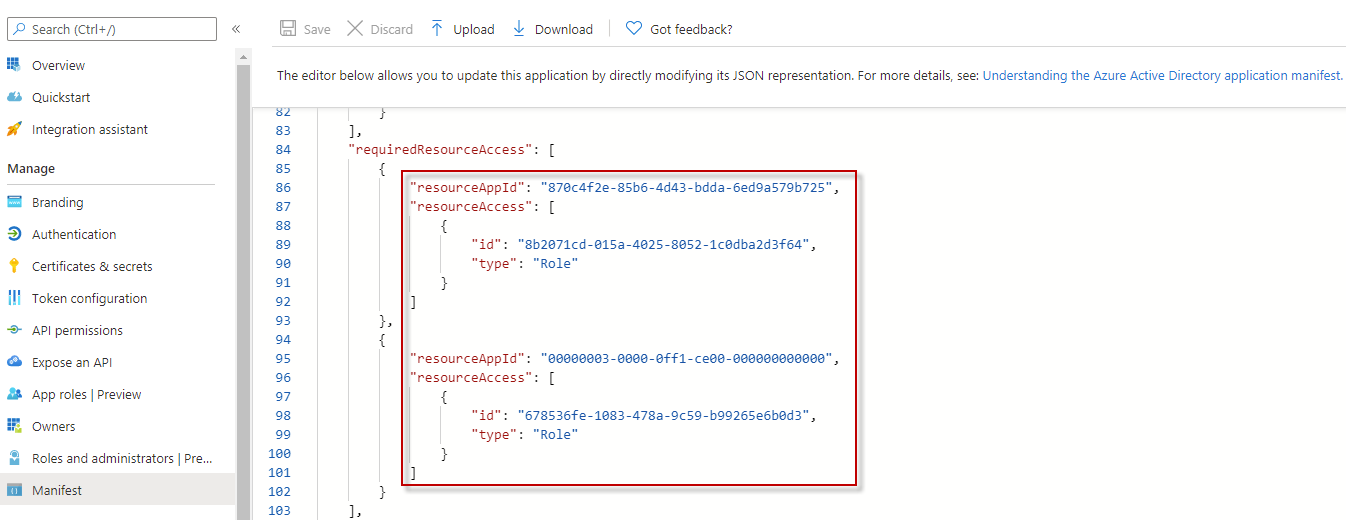
The table below lists the required information for adding SharePoint and Microsoft Information Protection Sync Service API permissions to the custom app:
| API | Permission | resourceAppId | id | type |
|---|---|---|---|---|
| SharePoint | Have full control of all site collections | 00000003-0000-0ff1-ce00-000000000000 | 678536fe-1083-478a-9c59-b99265e6b0d3 | Role |
| Microsoft Information Protection Sync Service | Read all unified policies of the tenant | 870c4f2e-85b6-4d43-bdda-6ed9a579b725 | 8b2071cd-015a-4025-8052-1c0dba2d3f64 | Role |
API Permission Update History
February 2026
| API | Permission | Type | Notes |
|---|---|---|---|
| Microsoft Graph | RecordsManagement.Read.All (Read Records Management configuration, labels, and policies) | Delegated | Sync retention labels from Microsoft 365. |
| Microsoft Graph | User.Read (Sign in and read user profile) | Delegated | Support signing into AvePoint Online Services with Microsoft 365 accounts. |
| Microsoft Graph | User.Read.All (Read all users’ full profiles) | Application | Retrieve Microsoft 365 tenant user information. |
| Microsoft Graph | Application.Read.All (Read applications) | Application | Get applications in the organization. |
| Microsoft Graph | Organization.Read.All (Read organization information) | Application | Get commercial subscriptions the organization has acquired and calculate user seats. Retrieve the tenant information. |
| Microsoft Graph | Group.Read.All (Read all groups) | Application | Get the group information. |
| Microsoft Graph | Sites.Read.All (Read items in all site collections) | Application | Search across files related to SharePoint agents. |
| SharePoint/Office 365 SharePoint Online | Sites.FullControl.All (Have full control of all site collections) | Application | Read items in all site collections for Copilot report. |
| Commercial environment: Dynamics CRM GCC or GCC High environment: Dataverse | user_impersonation (Access Common Data service as organization users) | Delegated | Retrieve Copilot Studio agents. |
| Azure Service Management | user_impersonation (Access Azure Resource Manager as organization users) | Delegated | Get all subscriptions for a tenant. |
| Commercial environment: PowerApps Service GCC environment: PowerApps Service – GCC GCC High environment: PowerApps Service – GCC L4 | User (Access the PowerApps Service API) | Delegated | Retrieve the information of environments. |
| Azure Machine Learning Services | user_impersonation (Access Azure Machine Learning Services as organization users) | Delegated | Retrieve Microsoft Foundry agents. |
June 2025
| API | Permission | Type | Notes |
|---|---|---|---|
| Office 365 Exchange Online | Exchange.ManageAsApp (Manage Exchange As Application) *Note: The app must have the Compliance Administrator role. For details, refer to Appendix G: How to Assign a Role to an App?. | Application | Automatically sync Microsoft 365 sensitive info types either through a daily sync job or by clicking Automatically sync when adding conditions in a sensitivity definition. |
April 2024
| API | Permission | Type | Notes |
|---|---|---|---|
| Commercial environment: Power BI Service GCC or GCC High environment: Microsoft Power BI Government Community Cloud | Tenant.Read.All (View all content in tenant) | Delegated | These permissions are required if you want to view reports for Power BI. |
| Commercial environment: Power BI Service GCC or GCC High environment: Microsoft Power BI Government Community Cloud | Dataset.Read.All (View all datasets) | Delegated | These permissions are required if you want to view reports for Power BI. |
February 2024
| API | Permission | Type | Notes |
|---|---|---|---|
| Microsoft Graph | Group.ReadWrite.All | Delegated | These permissions are required if you want to apply sensitivity labels to site collections. |
| Microsoft Graph | InformationProtectionPolicy.Read | Delegated | These permissions are required if you want to apply sensitivity labels to site collections. |
| SharePoint | AllSites.FullControl | Delegated | These permissions are required if you want to apply sensitivity labels to site collections. |
March 2023
| API | Permission | Type | Notes |
|---|---|---|---|
| Microsoft Graph | IdentityRiskyUser.ReadWrite.All | Application | This permission is required if you want to obtain risky user information. |
| Microsoft Graph | IdentityRiskEvent.Read.All | Application | This permission is required if you want to obtain risky event information. |
January 2023
| API | Permission | Type | Notes |
|---|---|---|---|
| Microsoft Graph | TeamMember.Read.All | Application | This permission is required if you want to display members of all teams. |
| Microsoft Graph | Reports.Read.All | Application | This permission is required if you want to obtain the last accessed time of site collections. |
July 2021
| API | Permission | Type | Notes |
|---|---|---|---|
| Microsoft Graph | AuditLog.Read.All | Application | This permission is required if you want to view the last sign-in time of external users. |
May 2021
| API | Permission | Type | Notes |
|---|---|---|---|
| Microsoft Graph | User.ReadWrite.All | Application | This permission is required if you want to remove external uses from Microsoft Entra or block external users from signing in. |
| Microsoft Rights Management Services | Content.SuperUser | Application | These permissions are required if you want to apply sensitivity labels with encryption to files. *Note: To apply sensitivity labels with encryption to files, make sure your organization has a subscription (or service principal) for the Azure Rights Management Services API. Also, make sure you use the custom app and add these permissions to the app. |
| Microsoft Rights Management Services | Content.Writer | Application | These permissions are required if you want to apply sensitivity labels with encryption to files. *Note: To apply sensitivity labels with encryption to files, make sure your organization has a subscription (or service principal) for the Azure Rights Management Services API. Also, make sure you use the custom app and add these permissions to the app. |
March 2021
| API | Permission | Type | Notes |
|---|---|---|---|
| Microsoft Graph | User.Read.All | Application | This permission is required if you want to display user photos and metadata in Insights. |
| Microsoft Graph | ChannelMember.ReadWrite.All | Application | This permission is required if you want to add or remove owners for private channels in Insights. |
January 2021
| API | Permission | Type | Notes |
|---|---|---|---|
| Microsoft Graph | UnifiedPolicy.Tenant.Read | Application | Replaced the InformationProtectionPolicy.Read.All Microsoft Information Protection API permission with this permission. It is required to retrieve sensitivity label information from Microsoft 365. |
| Microsoft Graph | Group.ReadWrite.All | Application | This permission is required if you want to add or remove owners for Teams/Microsoft 365 Groups. |
Permissions for Google Workspace
To create a custom Google app to connect Insights to your Google tenant, you can refer to the required scopes and APIs listed below to configure scopes and enable APIs for your custom app.
For details on how to create a Google app, refer to the Create a Custom Google App section in the AvePoint Online Services user guide. When the app is in place, refer to Consent to Custom Google Apps sections to configure an app profile for the custom Google app.
Make sure the custom Google app meets the following requirements:
-
The following APIs are enabled in the projects where the service accounts are created:
-
Google Drive API
-
Drive Labels API
-
Admin SDK API
-
Cloud Identity API
-
-
The following scopes are configured in the OAuth scopes field:
https://www.googleapis.com/auth/drive,https://www.googleapis.com/auth/drive.readonly,https://www.googleapis.com/auth/drive.admin.labels.readonly,https://www.googleapis.com/auth/drive.labels.readonly,https://www.googleapis.com/auth/admin.directory.group.readonly,https://www.googleapis.com/auth/admin.directory.user.readonly,https://www.googleapis.com/auth/admin.directory.domain.readonly,https://www.googleapis.com/auth/admin.reports.usage.readonly,https://www.googleapis.com/auth/admin.reports.audit.readonly,https://www.googleapis.com/auth/cloud-identity.userinvitations.readonly,https://www.googleapis.com/auth/admin.directory.orgunit.readonly,https://www.googleapis.com/auth/admin.directory.group.member
Refer to the table below for details about why we need the scopes and APIs for your custom Google app.
| Service | Scope | Purpose | Last update |
|---|---|---|---|
| Drive | https://www.googleapis.com/auth/drive*Note: If you only need to view statistics for your Google Workspace and do not intend to make changes, you can ignore this permission scope. | Run action jobs and scheduled exports. | February 2026 |
| Drive | https://www.googleapis.com/auth/drive.readonly | Discover folders and files under My Drive and Shared Drives for reports. | February 2026 |
| Drive label | https://www.googleapis.com/auth/drive.admin.labels.readonly | Retrieve all information of labels on files in drives for sensitive definition. | |
| Drive label | https://www.googleapis.com/auth/drive.labels.readonly | Get properties of labels on files in drives. | |
| Common | https://www.googleapis.com/auth/admin.directory.group.readonly | Retrieve groups in your domain. | |
| Common | https://www.googleapis.com/auth/admin.directory.user.readonly | Retrieve users in your domain. | |
| Common | https://www.googleapis.com/auth/admin.directory.domain.readonly | Retrieve domains in your domain. | |
| Common | https://www.googleapis.com/auth/admin.reports.usage.readonly | Retrieve activities in your domain. | |
| Common | https://www.googleapis.com/auth/admin.reports.audit.readonly | Retrieve DLP (Data Loss Prevention) activities in your domain. | |
| Unmanaged user | https://www.googleapis.com/auth/cloud-identity.userinvitations.readonly | Retrieve unmanaged user information. | June 2025 |
| Organization unit | https://www.googleapis.com/auth/admin.directory.orgunit.readonly | Get and compare organization conditions in Google search profile. | June 2025 |
| Organization unit | https://www.googleapis.com/auth/admin.directory.group.member | Manage group members. | June 2025 |
If you have the Google Cloud on-demand feature enabled, make sure the custom Google app meets the following requirements:
-
The following APIs are enabled in the projects where the service accounts are created:
-
Cloud Asset API
-
Cloud Resource Manager API
-
Identity and Access Management (IAM) API
-
-
The following scopes are configured in the OAuth scopes field:
https://www.googleapis.com/auth/cloud-platform -
The admin account configured when creating the custom app profile must have the following permissions in Google Cloud:
-
cloudasset.assets.listResource
-
cloudasset.assets.searchAllamPolices
-
resourcemanager.folders.get
-
resourcemanager.folders.getlamPolicy
-
resourcemanager.folders.list
-
resourcemanager.organizations.get
-
resourcemanager.organizations.getIamPolicy
-
resourcemanager.projects.get
-
resourcemanager.projects.getIamPolicy
-
resourcemanager.projects.list
-
serviceusage.services.use
-
resourcemanager.organizations.setIamPolicy
-
resourcemanager.folders.setIamPolicy
-
resourcemanager.projects.setIamPolicy
If there are no strict limitations within your organization on the permissions that can be applied, you can simply assign the following roles to apply all the required permissions.
-
Cloud Asset Viewer
-
Organization Administrator
-
Service Usage Consumer
-
Refer to the table below for details about why we need the scopes and APIs for your custom Google app.
| Service | Scope | Purpose |
|---|---|---|
| Asset | https://www.googleapis.com/auth/cloud-platform | Retrieve the resource information. |
Permissions for Salesforce
To connect Insights to your Salesforce tenant, you need to create an app for Salesforce via app profile. Select Modern mode as the setup method when creating your app profiles in AvePoint Online Services, and the Insights for Salesforce app will be automatically created.
For details on creating app profiles, see Manage App Profiles.
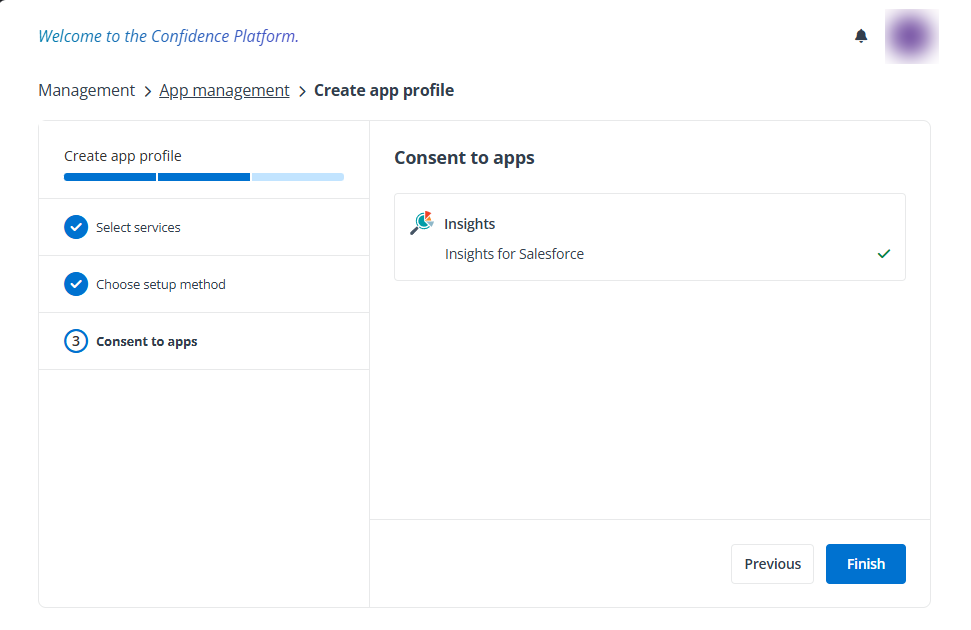
The following application permissions will be granted to the app:
-
Perform requests at any time
-
Manage user data via APIs