
Home > About AvePoint Insights
Download this articleAbout AvePoint Insights
AvePoint Insights provides centralized visibility of risky data across your tenants. Aggregate access, sensitivity, and activity data across Microsoft 365 or Google. Prioritize issues based on how you define risk – aligned to relevant regulations and security policies.
Single Sign-On
With Single sign-on (SSO) supported, you can access AvePoint Insights interface via direct URL without providing user credentials once it is detected that you have signed into AvePoint Online Services.
Supported Browsers
The table below outlines the required browser versions to support Insights.
| Browser | Version |
|---|---|
| Internet Explorer | IE 11* |
| Google Chrome | The latest version |
| Mozilla Firefox | The latest version |
| Microsoft Edge * | The latest version |
| Microsoft Edge based on Chromium | The latest version |
Following Microsoft’s announcement regarding the end of support for Microsoft Edge Legacy and IE 11, AvePoint has ended support for Microsoft Edge Legacy (on March 9, 2021) and IE 11 (on August 17, 2021) accordingly.
Supported Languages
AvePoint Insights interface is available in Japanese, French, German, and Chinese when your browser's default language (or the first preferred language) is set to one of those language. Otherwise, the interface is displayed in English.
Policies and Insights
AvePoint Policies & Insights helps find, prioritize, and fix permissions, membership, and configuration issues across your workspaces. Policies & Insights can monitor Teams, Groups, SharePoint, and OneDrive to automatically detect, notify, and revert configuration drift or security risks – giving you more control over your content, external sharing, and settings. AvePoint Policies & Insights makes it easy to run tenant-wide security reports, transforming traditional security reporting by adding context. Aggregated sensitivity and activity data across Microsoft Teams, Groups, SharePoint, and OneDrive ensures your most critical issues are prioritized for action. Then, edit permissions and settings in bulk, and set policies to be enforced automatically.
Insights can work with the Policies for Microsoft 365 service in the AvePoint Online Services platform to empower your users to monitor user activities and changes within your Microsoft environment to ensure that all actions and changes to your Microsoft 365 content remain within your organization’s defined governance policy and are under control.
Intelligent Remediation
Click Learn more in Discover Policies below the left navigation, and the Intelligent remediation page appears. This page is made up of two tabs: Suggested rules and Other popular rules.
In the Suggested rules tab, the rules of Policies and the matched security risk reports of Insights are displayed. You can view the following information:
-
Rule – The rules of Policies that can be used to remediate the matched Insights reports, the object types to which the rules can be added, and introductions of the rules are displayed.
-
Insights report – The security risk reports provided by Insights are displayed. You can click the links to view the corresponding reports.
For the Remove Shadow Users, Restrict Sharing Links, Remove Inactive Guest Users, and Scan Orphaned Users rules, you can click the button to the right of the row to run policy.
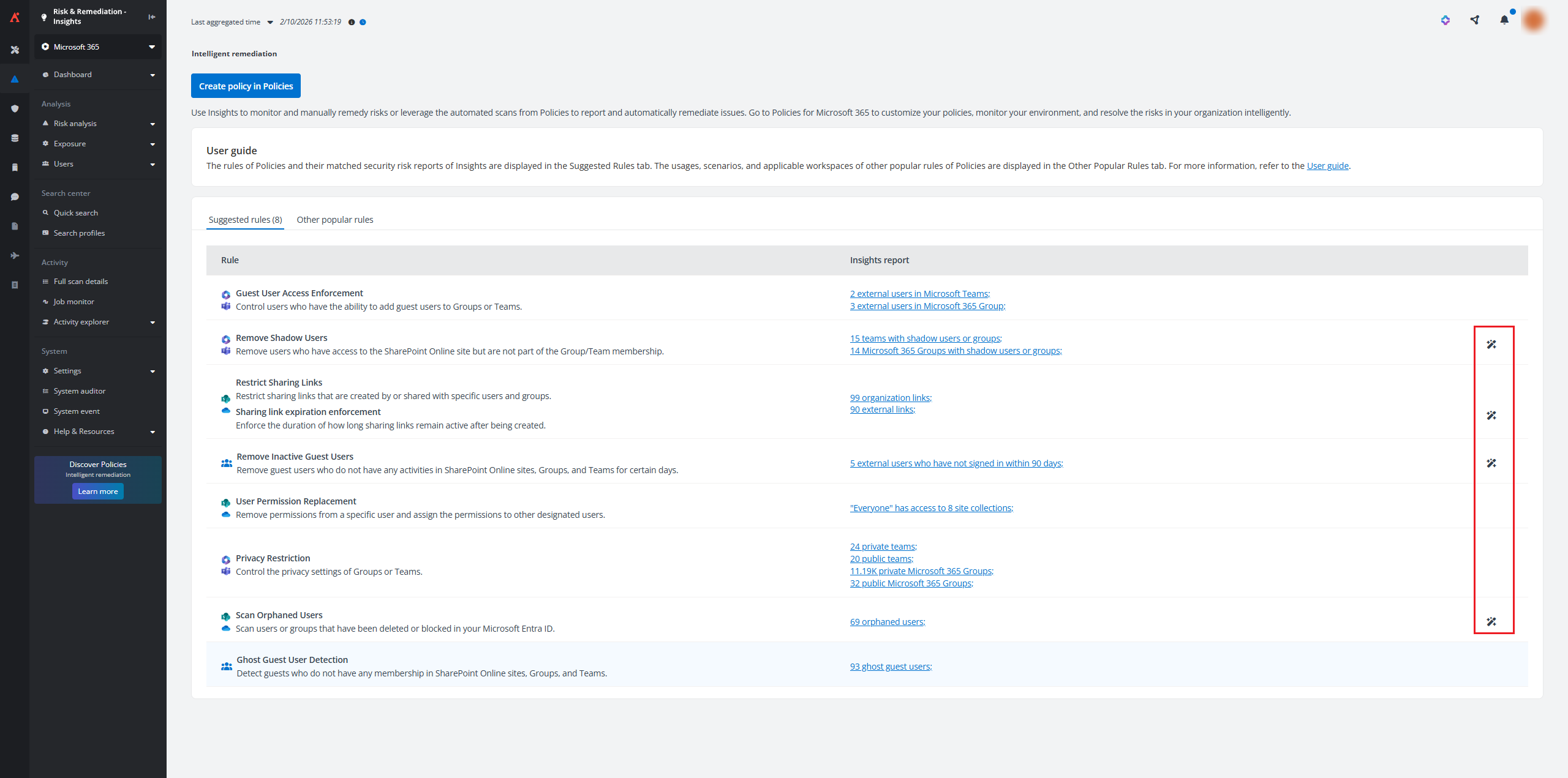
After configuring settings for the corresponding rule, click Save and run now to directly run the policy without having to sign in to Policies for Microsoft 365.
The suggested rules of Policies are displayed when there are security risks found by Insights that match the rules.
To create a policy in Insights directly without having to sign in to Policies for Microsoft 365, click Create policy.
This button is only available when you meet the following conditions:
-
The service administrator of both Insights and Policies for Microsoft 365.
-
Have a subscription for both Insights and Policies for Microsoft 365.
On the Create policy page, complete the following steps:
-
Select an object type from the drop-down list. Enter a name and optional description for the policy.
-
Click Next to go to the next step.
-
In the Rules step, click Add rule. In the window that appears on the right pane, select a rule to add to the policy. The configuration page of this specific rule will appear. You can search for a specific rule by entering the rule name in the Search text box and then selecting it from the suggestion list.
-
Configure rule settings and click Add to policy. You can also update rule settings after adding the rule by clicking the gear button to the right of the corresponding rule name.
-
Click Next to go to the next step.
-
In the Assign policy step, all containers in the configured data scope of Insights are displayed. Select the containers for which you want to assign the policy and click Next. To apply this policy to only specific objects, you can select an existing filter or click New from the filter drop-down list to create a new filter.
-
In the Schedule step, configure the scan schedule and retention settings.
-
Scan interval – Enter a positive integer and select a time unit (Hours, Days, Weeks, or Months). Policies for Microsoft 365 will start Enforce policy jobs of the current policy to scan your Microsoft 365 environment according to the configured interval.
NOTEYou can narrow down scan intervals to hours to detect violations sooner than a day. The minimum scan interval is 2 Hours.
-
Scan start time – When the scan interval is set to Days, Weeks, or Months, the Scan start time setting will appear below for you to specify the exact timing of job executions.
-
Retention duration – Enter a positive integer to define how many days you would like to retain the data associated with the current policy. After the retention period, the violation details and job details will be removed from Policy for Microsoft 365.
-
-
Click Next to go to the Review step.
-
Review the configured settings. If you want to update information in a step, click the edit button and then make updates.
-
Click Publish to publish the policy to Policies for Microsoft 365. The Enforce policy job will start based on the configured scan start time.
Alternatively, click Publish and run now to publish the policy and run an Enforce policy job immediately. You can go to Policies for Microsoft 365 > Job monitor to check the job details.
For more information on configuring policies, refer to Service Level Policies.
In the Other popular rules tab, 8 rules of Policies are displayed by default. You can view the rule names, introductions to the rules, scenarios, and object types to which the rules can be added.
You can remediate the security risks using the policies in Policies for Microsoft 365. Click Go to Policies to open Policies for Microsoft 365 in a new tab.
Make sure that you have a valid subscription to Policies for Microsoft 365 before accessing it. To obtain the subscription, contact your AvePoint account manager. For more information on Policies for Microsoft 365, see the Policies for Microsoft 365 User Guide.
Insights Versions: Insider and Production
There are two versions of Insights: a version for preview features and a version for generally available features.
The Insider version was created for users who want to see and test new product features before they are generally available in your production tenant. If you would like to join the Insights for Microsoft 365 Insider program, contact your AvePoint account manager to purchase the subscription. When you are ready to access the Insights for Microsoft 365 Insider environment, make sure you have a non-production Microsoft 365 tenant, and use this test tenant in the Insider environment.
The production version has two environments: an environment for commercial use and an environment available on Microsoft’s Cloud Platform for the U.S. Government.
All versions and environments are covered in this guide. The table below lists the differences.
| Insider Environment | Commercial Production Environment | U.S. Government Production Environment | |
|---|---|---|---|
| Sign-in address | https://insider.avepointonlineservices.com | https://www.avepointonlineservices.com | https://usgov.avepointonlineservices.com |
| Sign-in methods | Sign in with:Local accountMicrosoft 365 account | Sign in with:Local accountMicrosoft 365 accountSalesforce accountGoogle account | Sign in with:Local accountMicrosoft 365 accountMicrosoft 365 U.S. Government accountSalesforce accountGoogle account |
| Supported data centers | East US (Virginia)North Europe (Ireland) | Australia Southeast (Victoria)Canada Central (Toronto)East US (Virginia)France Central (Paris)Germany West Central (Frankfurt)Japan West (Osaka)Korea Central (Seoul)North Europe (Ireland)Southeast Asia (Singapore)Switzerland North (Zurich)UK South (London)West Europe (Netherlands) | US Gov Virginia (Virginia) |
Elements management
If you are using Elements to manage Insights, you can efficiently export existing settings in Insights into a template and apply it to other tenants in Elements directly. This feature simplifies risk definition consistency and accelerates setup for partner-managed environments.
For step-by-step guidance on managing templates in Elements, refer to Use Nitro.
Integration with Ava
Insights offers integration with Ava, an AvePoint virtual assistant that offers instructions and answers to your questions. You can click the Ask Ava button in the upper-right corner and try to chat with Ava and get some instructions.
Confidence Platform Services Integration
AvePoint Insights supports integration with multiple services in the Confidence Platform when you have available subscription for the services.
-
Cloud Backup for IaaS + PaaS – Microsoft Entra audit logs and sign-ins can be synchronized from Cloud Backup for IaaS + PaaS before you start using Insights. For more information, refer to Microsoft Entra Activity Logs.
-
Cloud Governance – You can enable below settings to retrieve corresponding data from Cloud Governance and display it in Insights for enhanced visibility and data management. For more information, refer to Cloud Governance Integration Settings.
-
Policies for Microsoft 365 – Insights integrates with Policies for Microsoft 365, which allow you to create policy and run one-time policy jobs directly in Insights. Sharing links, orphaned users, inactive guest users, and shadow users that meet the rule settings can be removed in bulk. For more information, refer to Policies and Insights, Overview Reports, Sharing Links, External Users, and Orphaned Users.
-
MyHub – Insights offers integration with MyHub to enhance the user experience in reporting risky data within their scope of responsibility. Microsoft 365 tenant users can conveniently and efficiently manage risky information within their workspaces through MyHub. For detailed information in MyHub, refer to MyHub User Guide.
-
AgentPulse – Insights offers integration with AgentPulse to analyze Copilot Studio agents, SharePoint agents, Microsoft Foundry agents, and Microsoft 365 agents for potential risks. For more information, refer to Agent Reports.
Data Security and Management for Google
The multi-cloud security platform for Google, seamlessly integrates AvePoint’s data protection technologies into a robust and scalable solution. This platform empowers you to manage, govern, and protect Google Workspace and Cloud with confidence in the security and quality of your data.
-
Complete Google Data Protection – Experience comprehensive protection with Google Workspace Backup, which securely safeguards and swiftly restores your Google Workspace, Directory, and Classroom data. Benefit from granular solutions designed to prevent data loss and ensure business continuity. To learn more, refer to the Cloud Backup for Google Workspace User Guide.
-
Proactive Risk Intelligence – Stay ahead of potential threats with Insights, offering proactive risk intelligence across Google Workspace. Gain powerful data security insights that help reduce the security burden by easily identifying, prioritizing, and rectifying controls for Google Workspace permissions, membership, and sharing. Utilize Google’s DLP engine for advanced sensitivity scanning, risk monitoring, and data leak prevention through smarter permissions control. To learn more, explore this user guide.
-
Command the Entire Information Lifecycle – Take full command of your information lifecycle with Opus, ensuring a seamless and efficient content management experience across Google Workspace. Centrally manage and control records to achieve operational efficiency and compliance, streamlining your information governance processes. Drive productivity within in-depth analysis by discovering and classifying inactive and ROT (redundant, obsolete, or trivial) data—empowering smarter decisions on what data to keep and what to remove. To learn more, refer to the AvePoint Opus User Guide.
-
Build a Modern, Agile Workspace – Transform your workspace by breaking down data silos and unifying your data with Fly. This solution simplifies even the most complex data migrations, helping you modernize and transform your data with our Azure-hosted SaaS solution for Google Workspace workload migration or tenant restructuring. To learn more, refer to the Fly User Guide.
-
Reliable Google VM Safeguard – Attain robust data protection for your Google VM instances and Google Cloud Storage buckets with Cloud Backup for IaaS + PaaS, ensuring data is securely backed up and can be rapidly restored. Meet diverse operational needs with flexible mode options: leverage the SaaS infrastructure mode for centralized, policy-driven protection, or opt for the CAP Gateway mode to minimize network latency and enhance backup performance. To learn more, refer to the Cloud Backup for IaaS + PaaS User Guide.
These features collectively enhance the security, management, and efficiency of your Google Workspace and Cloud environments, ensuring robust data protection and streamlined operations.