
Home > Appendices
Download this articleAppendices
The following table details the appendices included in this document.
| Appendix | Description |
|---|---|
| Appendix A: Data Aggregation Details | Lists the sections and columns in Insights reports where the data is aggregated every 12 hours. |
| Appendix B: Exposure and Sensitivity Scan Supported and Unsupported List | Lists the supported object levels in which exposure and sensitivity information can be scanned. |
| Appendix C: Data Update Intervals | Lists the intervals for data updates for each event. |
| Appendix D: Objects Skipped in Scan | Lists the relative URLs of objects that will be skipped in the data scan of Insights. |
| Appendix E: Supported and Unsupported Action List of Sharing Links | Lists the supported and unsupported actions for sharing links of objects at different levels. |
| Appendix F: Custom Azure App Permissions List | Lists the basic app permissions and additional app permissions for specific features in Insights that need to be added to custom Azure app profiles. |
| Appendix G: How to Assign a Role to an App? | Introduces how to assign a role to an app in Microsoft Entra admin center or Microsoft Azure portal. |
| Appendix H: Collected Microsoft 365 Activity List | Lists the Microsoft 365 activities of each activity type that are collected in Activity explorer. |
| Appendix I: Permission Difference Between Standard User and Visitor | Lists the permission difference between standard user and visitor in Insights. |
Appendix A: Data Aggregation Details
The table below lists the sections on the dashboard, sections, and columns in Insights reports where the data is aggregated every 12 hours. The analysis and aggregation results will be available when the aggregation is completed.
Insights for Microsoft 365
| Functional module | Functional module | Element |
|---|---|---|
| Dashboard | All Microsoft 365 workspaces and Power BI | Contributing factors |
| Dashboard | All Microsoft 365 workspaces and Power BI | Overall risk |
| Dashboard | All Microsoft 365 workspaces and Power BI | Top 5 sensitive info types |
| Dashboard | All Microsoft 365 workspaces and Power BI | Top 5 sensitivity labels |
| Dashboard | All Microsoft 365 workspaces and Power BI | Top 5 trainable classifiers |
| Dashboard | Overview | External users with the most permissions |
| Users | Overview | User trends |
| Users | External users | Sites with direct access |
| Users | External users | Last sign-in |
| Users | External users | Last interactive sign-in |
| Users | External users | Last non-interactive sign-in |
| Users | Orphaned users | Sites with direct access |
| Users | Groups with external users | External users |
| Activity | Scan details | Total sites trend / Total workspaces trend |
| Activity explorer | Overview (Preview) | Summary |
| Activity explorer | Overview (Preview) | Sign-in distribution |
| Risk definition | Data type management | Detected objects |
| Risk definition | Data type management | Confidence |
| Risk definition | Data type management | Validated detections |
For the other sections on the dashboard and other elements of the exposure report, the data is aggregated in real-time based on the scanned data. However, change to Microsoft 365 data or permissions made after a scan completes may take some time to appear in Insights, since updates depend on the Microsoft 365 Activity Feed and overall data volume.
Insights for Google
| Functional module | Functional module | Element |
|---|---|---|
| Dashboard | Dashboard | Contributing factors |
| Dashboard | Dashboard | Overall risk |
| Dashboard | Dashboard | File security and classification |
| Dashboard | Dashboard | External users with the most permissions |
| Dashboard | Dashboard | Identity and Access Management |
| Exposure | Sharing links | Sensitive items |
| Users | External users | Drives with direct access |
| Users | Groups with external users | External users |
| Users | Unmanaged users | Request status |
| Users | Unmanaged users | Requests sent |
| Users | Unmanaged users | Drives with direct access |
| Scan details | Scan details | Total drives trend |
Insights for Salesforce
| Functional module | Element |
|---|---|
| Dashboard | Contributing factors |
| Dashboard | Overall risk |
| Dashboard | Objects |
Insights for File System
| Functional module | Element |
|---|---|
| Dashboard | Contributing factors |
Appendix B: Exposure and Sensitivity Scan Supported and Unsupported List
Refer to the following table for the supported object levels in which exposure and sensitivity information can be scanned.
√ – Supported; × – Unsupported.
| Object level / What to scan | Exposure information | Sensitivity information |
|---|---|---|
| Site Collection | √ | √ |
| Site | √ | × |
| List/Library | √ | × |
| Folder | √ | × |
| File | √ | √ |
| Item | √ | √ |
| Workspace | √ | × |
| Artifact | √ | √ |
The following table illustrates the supported and unsupported statuses of sensitive info types and sensitivity labels for each element.
| Element / What to scan | Microsoft 365 sensitive info types | Custom information types | Sensitivity labels |
|---|---|---|---|
| Site Collection Properties | Unsupported | Unsupported | Supported |
| File Content | Supported | Supported | Unsupported |
| File Properties | Unsupported | Supported | Unsupported |
| File Columns | Unsupported | Supported | Supported |
| Item Content | Unsupported | Unsupported | Unsupported |
| Item Columns | Unsupported | Supported | Unsupported |
| Item Attachment Content | Unsupported | Supported | Unsupported |
| Workspace | Unsupported | Unsupported | Unsupported |
| Artifact | Unsupported | Unsupported | Supported |
Appendix C: Data Update Intervals
The following table lists the events that trigger a full scan, database data update, or incremental scan of Insights for Microsoft 365 and the intervals of data updates for the events.
| Trigger type | Event | Details |
|---|---|---|
| Full scan | Update risk definition profile | Event triggered. 1 week for changes to no more than 10,000 site collections; 1 month for changes to 10,000–100,000 site collections; over 1 month for changes to more than 100,000 site collections. |
| Full scan | Enable containers | Event triggered. 1 week for changes to no more than 10,000 site collections; 1 month for changes to 10,000–100,000 site collections; over 1 month for changes to more than 100,000 site collections. |
| Full scan | Prioritize in scan | Event triggered. 1 week for changes to no more than 10,000 site collections; 1 month for changes to 10,000–100,000 site collections; over 1 month for changes to more than 100,000 site collections. |
| Database data update | Move site collections to other containers | Event triggered. 3 days for changes to no more than 10,000 site collections; 2 weeks for changes to more than 10,000 site collections. |
| Database data update | Update settings for user identification | Event triggered. 3 days for changes to no more than 10,000 site collections; 2 weeks for changes to more than 10,000 site collections. |
| Database data update | Update settings for library exclusions | Event triggered. 3 days for changes to no more than 10,000 site collections; 2 weeks for changes to more than 10,000 site collections. |
| Database data update | Update site location, site name, team name, and group name | Event triggered. 3 days for changes to no more than 10,000 site collections; 2 weeks for changes to more than 10,000 site collections. |
| Database data update | Disable containers | The related data will be retained for 15 days. |
| Incremental scan | Microsoft 365 activity feeds are detected by Insights, triggered by one of the following actions (not limited to these) in Microsoft 365: Upload new sensitive data or update existing sensitive data; Update permissions of objects (granting permissions to users, generating sharing links, etc.); Apply label to site collections or files. | Event triggered. For most customers, the data will be updated in a few hours, and up to 2 days based on the data volume. *Note: Incremental scans rely on the last modified time of items. Newly uploaded items with a last modified time older than one hour may not be detected by an incremental scan and will require a full scan for updates, which is up to 7 days. |
| Data aggregation | No event related. | The interval is 24 hours. |
Enabling more sensitivity definitions will impact the performance of Insights.
Appendix D: Objects Skipped in Scan
Refer to the following list for the relative URLs of system lists and libraries that will be skipped in the data scan of Insights.
-
/formservertemplates/
-
/style library/
-
/searchcenter/
-
/searchresults/
-
/reports list/
-
/reusablecontent/
-
/lists/categories/
-
/lists/members/
-
/_layouts/
-
/_catalogs/masterpage/
-
/_catalogs/theme/
-
/siteassets/
-
/user photos/
-
/publishingimages/
-
/publishedfeed/
-
/sitecollectionimages/
-
/social/
Appendix E: Supported and Unsupported Action List of Sharing Links
Insights offers reports on sharing links of the objects in the configured data scope. Based on the user scopes with whom the objects are shared, the sharing link types of objects are defined as follows:
-
Anyone link – The link type for objects of which the link is shared with anyone.
-
Organization link – The link type for objects of which the link is shared with people in organization.
-
Specific link – The link type for objects of which the link is shared with people you choose.
The table below illustrates the supported and unsupported actions for sharing links of objects at different levels.
| Object level | Link type | Remove access | Set expiration date |
|---|---|---|---|
| List | Anyone link | Supported | Supported |
| List | Organization Link | Supported | Unsupported |
| List | Specific link | Supported | Unsupported |
| Folder (Library) | Anyone link | Supported | Supported |
| Folder (Library) | Organization Link | Supported | Unsupported |
| Folder (Library) | Specific link | Supported | Unsupported |
| Folder (List) | Anyone link | Not applicable | Not applicable |
| Folder (List) | Organization Link | Not applicable | Not applicable |
| Folder (List) | Specific link | Supported | Unsupported |
| File | Anyone link | Supported | Supported |
| File | Organization Link | Supported | Unsupported |
| File | Specific link | Supported | Unsupported |
| Item | Anyone link | Supported | Supported |
| Item | Organization Link | Supported | Unsupported |
| Item | Specific link | Supported | Unsupported |
Appendix F: Custom Azure App Permissions List
To use Insights, you need to create an app for Microsoft 365 to connect AvePoint Online Services to your Microsoft 365 tenant. For more details on app profiles, refer to Permissions for App Authorization.
If you want to manually create an app profile in your Microsoft Entra ID, you need to add API permissions to the custom app. The tables below detail the Insights features and the required permissions.
Basic App Permissions for Microsoft 365
| Insights for Microsoft 365 feature | API | Required app permission |
|---|---|---|
| Generate basic reports in Insights | Microsoft Graph | Directory.Read.All |
| Generate basic reports in Insights | Microsoft Graph | Group.Read.All |
| Generate basic reports in Insights | Microsoft Graph | ChannelMember.Read.All |
| Generate basic reports in Insights | Microsoft Graph | ChannelSettings.Read.All |
| Generate basic reports in Insights | Microsoft Graph | TeamSettings.Read.All |
| Generate basic reports in Insights | Microsoft Graph | TeamMember.Read.All |
| Generate basic reports in Insights | Microsoft Graph | Files.Read.All |
| Generate basic reports in Insights | Microsoft Graph | Sites.Read.All |
| Generate basic reports in Insights | Microsoft Graph | Reports.Read.All |
| Generate basic reports in Insights | SharePoint/Office 365 SharePoint Online | Sites.FullControl.All |
| Generate basic reports in Insights | SharePoint/Office 365 SharePoint Online | User.Read.All |
| Generate basic reports in Insights | Office 365 Management APIs | ActivityFeed.Read |
| View sensitivity labels | Microsoft Information Protection Sync Service *Note: This is under the APIs my organization uses tab. | UnifiedPolicy.Tenant.Read |
| Show user photos and metadata | Microsoft Graph | User.Read.All |
| Show the last sign-in time of external users | Microsoft Graph | AuditLog.Read.All |
| Automatically sync Microsoft 365 sensitive info types | Office 365 Exchange Online | Exchange.ManageAsApp (Manage Exchange As Application) *Note: The app must have the Compliance Administrator role. For details, refer to Appendix G: How to Assign a Role to an App? |
App Permissions Required for Additional Features
| Insights for Microsoft 365 feature | API | Required app permission |
|---|---|---|
| Add owners to Teams | Microsoft Graph | TeamMember.ReadWrite.All |
| Remove owners from Teams | Microsoft Graph | TeamMember.ReadWrite.All |
| Add owners to private channels | Microsoft Graph | ChannelMember.ReadWrite.All |
| Remove owners from private channels | Microsoft Graph | ChannelMember.ReadWrite.All |
| Add owners to Microsoft 365 Groups | Microsoft Graph | Group.ReadWrite.All |
| Remove owners from Microsoft 365 Groups | Microsoft Graph | Group.ReadWrite.All |
| Apply sensitivity labels with encryption to files | Microsoft Rights Management Services *Note: Make sure your organization has a subscription (or service principal) for the Azure Rights Management Services API. | Content.SuperUser |
| Apply sensitivity labels with encryption to files | Microsoft Rights Management Services *Note: Make sure your organization has a subscription (or service principal) for the Azure Rights Management Services API. | Content.Writer |
| Apply sensitivity labels to site collections | Microsoft Graph | Group.ReadWrite.All |
| Use sensitivity labels in site collection level sensitivity definitions | Microsoft Graph | InformationProtectionPolicy.Read.All |
| Remove external users from Microsoft Entra | Microsoft Graph | User.ReadWrite.All |
| Block external users from signing in to Microsoft 365 | Microsoft Graph | User.ReadWrite.All |
| Unblock external users | Microsoft Graph | User.ReadWrite.All |
| Obtain risky user info | Microsoft Graph | IdentityRiskyUser.ReadWrite.All |
| Dismiss user risk | Microsoft Graph | IdentityRiskyUser.ReadWrite.All |
| Confirm user compromised | Microsoft Graph | IdentityRiskyUser.ReadWrite.All |
| Obtain risk detentions information of risky users | Microsoft Graph | IdentityRiskEvent.Read.All |
| Reset password for risky users | Microsoft Graph | UserAuthenticationMethod.ReadWrite.All |
| Sync retention labels | Microsoft Graph | RecordsManagement.Read.All |
| Enable AI Agent workspaces in Insights | Microsoft Graph | User.Read (Sign in and read user profile) |
| Enable AI Agent workspaces in Insights | Microsoft Graph | User.Read.All (Read all users' full profiles) |
| Enable AI Agent workspaces in Insights | Microsoft Graph | Application.Read.All (Read applications) |
| Enable AI Agent workspaces in Insights | Microsoft Graph | Organization.Read.All (Read organization information) |
| Enable AI Agent workspaces in Insights | Microsoft Graph | Group.Read.All (Read all groups) |
| Enable SharePoint agent workspace in Insights | Microsoft Graph | Sites.Read.All (Read items in all site collections) |
| Enable SharePoint agent workspace in Insights | SharePoint/Office 365 SharePoint Online | Sites.FullControl.All (Have full control of all site collections) |
| Enable Copilot Studio workspace in Insights | Commercial environment: Dynamics CRM GCC or GCC High environment: Dataverse | user_impersonation (Access Common Data service as organization users) |
| Enable Copilot Studio workspace in Insights | Azure Service Management | user_impersonation (Access Azure Resource Manager as organization users) |
| Enable PowerApps workspace in Insights | Commercial environment: PowerApps Service GCC environment: PowerApps Service – GCC GCC High environment: PowerApps Service – GCC L4 | User (Access the PowerApps Service API) |
| Enable Microsoft Foundry workspace in Insights | Azure Machine Learning Services | user_impersonation (Access Azure Machine Learning Services as organization users) |
Appendix G: How to Assign a Role to an App?
To block the users that are members or owners of role-assignable groups from signing in to Microsoft 365, the Privileged Authentication Administrator or Global Administrator role must be assigned to the app configured in the app profile, which is a requirement from Microsoft. For detailed information, refer to the Microsoft article Who can perform sensitive actions.
To automatically sync Microsoft 365 sensitive info types either through a daily sync job or by clicking Automatically sync when adding conditions in a sensitivity definition, the Compliance Administrator role must be assigned to the app configured in the app profile, which is required to connect to Security & Compliance PowerShell. For more details, refer to the Microsoft article Assign Microsoft Entra roles to the application.
To assign the role to the app, refer to the following steps:
-
Log in to Microsoft Entra admin center (or Microsoft Azure portal), and go to Microsoft Entra ID.
-
Click Roles & admins (or Roles and administrators) in the left pane, and click the Privileged Authentication Administrator or Global Administrator role you want to assign.

-
On the Assignments page that opens, click Add assignments.
-
On the Add assignments page, you can enter an application ID in the search box to search for the app to which you want to assign the role.
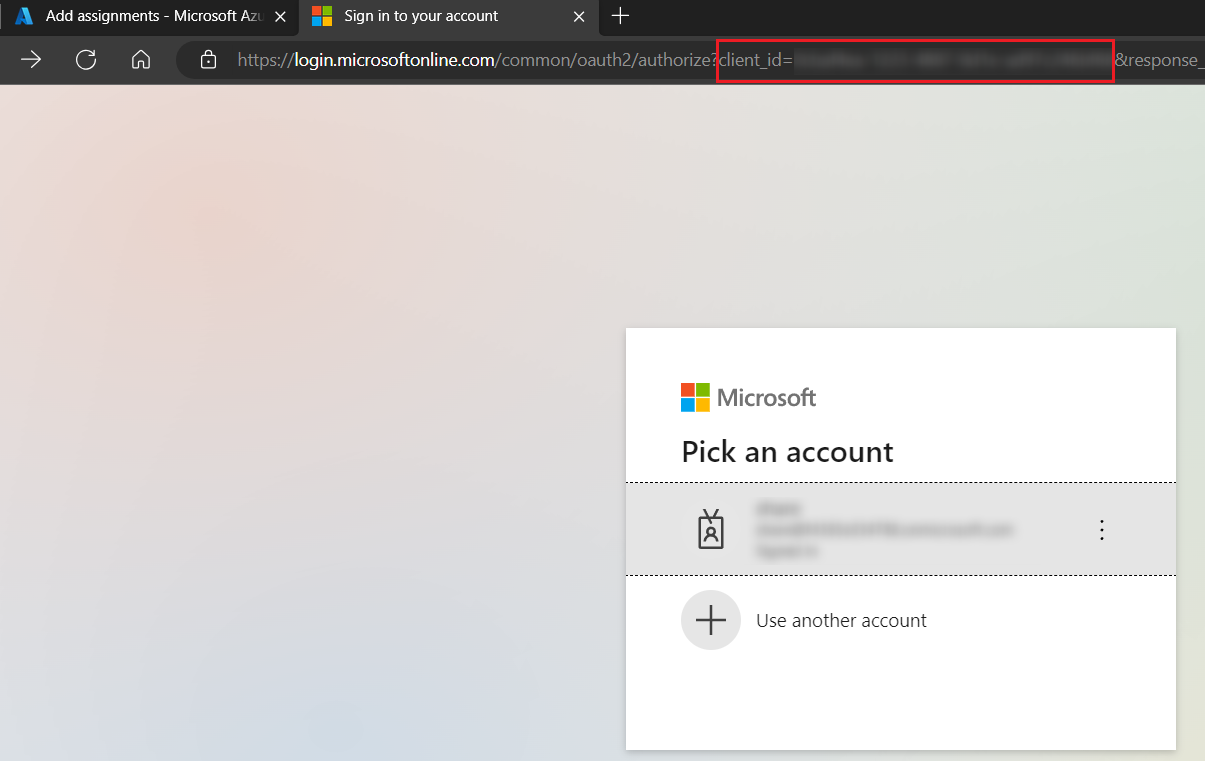
NOTEYou can get an app’s application ID when you create/re-authorize the related app profile in AvePoint Online Services and the Microsoft 365 account sign-in page appears. The application ID will be displayed as the value of the client_id in the URL.
-
Select the app, and click Add to assign the role. Note that the assigned role will take effect in about 30 minutes.
Appendix H: Collected Microsoft 365 Activity List
The table below lists the activities of each activity type that are collected based on Microsoft 365 activity feeds in activity explorer.
| Activity type | Activity |
|---|---|
| File and page activities | Removed retention label |
| File and page activities | Applied retention label |
| File and page activities | Accessed file |
| File and page activities | Recycled a file |
| File and page activities | Checked in file |
| File and page activities | Checked out file |
| File and page activities | Copied file |
| File and page activities | Deleted file |
| File and page activities | Deleted file from recycle bin |
| File and page activities | Discarded file checkout |
| File and page activities | Downloaded file |
| File and page activities | Modified file |
| File and page activities | Moved file |
| File and page activities | Renamed file |
| File and page activities | Restored file |
| File and page activities | Uploaded file |
| File and page activities | Viewed page |
| File and page activities | Accessed file continually |
| File and page activities | Changed retention label for a file |
| File and page activities | Changed record status to locked |
| File and page activities | Changed record status to unlocked |
| File and page activities | Deleted file marked as a record |
| File and page activities | Detected document sensitivity mismatch |
| File and page activities | Detected malware in file |
| File and page activities | Recycled all minor versions of file |
| File and page activities | View signaled by client |
| File and page activities | Prefetched page |
| File and page activities | Previewed file |
| File and page activities | Viewed page continually |
| File and page activities | Modified file continually |
| File and page activities | Recycled all versions of file |
| File and page activities | Recycled version of file |
| Synchronization activities | Allowed computer to sync files |
| Synchronization activities | Blocked computer from syncing files |
| Synchronization activities | Downloaded files to computer |
| Synchronization activities | Downloaded file changes to computer |
| Synchronization activities | Uploaded files to document library |
| Synchronization activities | Uploaded file changes to document library |
| Folder activities | Copied folder |
| Folder activities | Created folder |
| Folder activities | Recycled a folder |
| Folder activities | Add shortcut to OneDrive |
| Folder activities | Deleted folder |
| Folder activities | Deleted folder from recycle bin |
| Folder activities | Modified folder |
| Folder activities | Moved folder |
| Folder activities | Renamed folder |
| Folder activities | Restored folder |
| Sharing and access request activities | Accepted access request |
| Sharing and access request activities | Denied access request |
| Sharing and access request activities | Accepted sharing invitation |
| Sharing and access request activities | Blocked sharing invitation |
| Sharing and access request activities | Created a company shareable link |
| Sharing and access request activities | Created access request |
| Sharing and access request activities | Created an anyone link |
| Sharing and access request activities | Created sharing invitation |
| Sharing and access request activities | Removed a company shareable link |
| Sharing and access request activities | Removed an anyone link |
| Sharing and access request activities | Shared file, folder, or site |
| Sharing and access request activities | Updated an anyone link |
| Sharing and access request activities | Used an anyone link |
| Sharing and access request activities | Unshared file, folder, or site |
| Sharing and access request activities | Used a company shareable link |
| Sharing and access request activities | Withdrew sharing invitation |
| Sharing and access request activities | Created secure link |
| Sharing and access request activities | Deleted secure link |
| Sharing and access request activities | Updated access request |
| Sharing and access request activities | Updated sharing invitation |
| Sharing and access request activities | Used secure link |
| Sharing and access request activities | User added to secure link |
| Sharing and access request activities | User removed from secure link |
| Sharing and access request activities | Updated secure link |
| Sharing and access request activities | Used sharing link |
| Sharing and access request activities | User added to sharing link |
| Sharing and access request activities | Updated sharing link |
| Sharing and access request activities | Created sharing link |
| Sharing and access request activities | Deleted sharing link |
| Sharing and access request activities | User removed from sharing link |
| Sharing and access request activities | Updated company link |
| Site administration activities | Added exempt user agent |
| Site administration activities | Allowed user to create groups |
| Site administration activities | Changed exempt user agents |
| Site administration activities | Changed a sharing policy |
| Site administration activities | Create sent to connection |
| Site administration activities | Created site collection |
| Site administration activities | Delete sent to connection |
| Site administration activities | Deleted site |
| Site administration activities | Enabled document preview |
| Site administration activities | Enabled legacy workflow |
| Site administration activities | Enable office on demand |
| Site administration activities | Enabled RSS feeds |
| Site administration activities | Enable result source for people searches |
| Site administration activities | Modified site permissions |
| Site administration activities | Renamed site |
| Site administration activities | Invoked site design |
| Site administration activities | Changed file version trimming settings |
| Site administration activities | Removed from shared with me |
| Site administration activities | Scheduled site rename |
| Site administration activities | Set host site |
| Site administration activities | Removed from site collection |
| Site administration activities | Added allowed data location |
| Site administration activities | Added geo location admin |
| Site administration activities | Canceled site geo move |
| Site administration activities | Changed device access policy |
| Site administration activities | Changed network access policy |
| Site administration activities | Completed site geo move |
| Site administration activities | Deleted orphaned hub site |
| Site administration activities | Joined site to hub site |
| Site administration activities | Registered hub site |
| Site administration activities | Removed allowed data location |
| Site administration activities | Removed geo location admin |
| Site administration activities | Scheduled site geo move |
| Site administration activities | Set storage quota for geo location |
| Site administration activities | Unjoined site from hub site |
| Site administration activities | Unregistered hub site |
| SharePoint list activities | Viewed list |
| SharePoint list activities | Viewed list item |
| SharePoint list activities | Deleted list |
| SharePoint list activities | Created list |
| SharePoint list activities | Created list item |
| SharePoint list activities | Created site column |
| SharePoint list activities | Deleted list item |
| SharePoint list activities | Recycled list item |
| SharePoint list activities | Restored list |
| SharePoint list activities | Restored list item |
| SharePoint list activities | Updated list |
| SharePoint list activities | Updated list item |
| SharePoint list activities | List design involved |
| SharePoint permissions activities | Added site collection admin |
| SharePoint permissions activities | Changed site status to locked |
| SharePoint permissions activities | Added user or group to SharePoint group |
| SharePoint permissions activities | Created group |
| SharePoint permissions activities | Deleted group |
| SharePoint permissions activities | Removed user or group from SharePoint group |
| SharePoint permissions activities | Requested site admin permissions |
| SharePoint permissions activities | Updated group |
| SharePoint permissions activities | Restored sharing inheritance |
| SharePoint permissions activities | Broke sharing inheritance |
| SharePoint permissions activities | Broke permission level inheritance |
| SharePoint permissions activities | Modified access request setting |
| SharePoint permissions activities | Modify 'Members Can Share' setting |
| SharePoint permissions activities | Removed site collection admin |
| SharePoint permissions activities | Modified access request approver setting |
| SharePoint permissions activities | Modified access request site description |
| Information barrier activities | Applied information barriers mode to site |
| Information barrier activities | Changed information barriers mode of site |
| Sensitivity label activities | Applied sensitivity label to site |
| Sensitivity label activities | Change sensitivity label applied to site |
| Sensitivity label activities | Removed sensitivity label from site |
| Sensitivity label activities | Applied sensitivity label to file |
| Sensitivity label activities | Changed sensitivity label applied to file |
| Sensitivity label activities | Removed sensitivity label from file |
| Microsoft Teams activities | Added channel |
| Microsoft Teams activities | Added members to team |
| Microsoft Teams activities | Changed channel setting |
| Microsoft Teams activities | Changed role of members |
| Microsoft Teams activities | Changed Teams settings |
| Microsoft Teams activities | Created team |
| Microsoft Teams activities | Deleted channel |
| Microsoft Teams activities | Deleted team |
| Microsoft Teams activities | Removed members from team |
| Microsoft Teams activities | Added bot to team |
| Microsoft Teams activities | Added connector |
| Microsoft Teams activities | Added tab |
| Microsoft Teams activities | Changed organization setting |
| Microsoft Teams activities | Removed bot from team |
| Microsoft Teams activities | Removed connector |
| Microsoft Teams activities | Removed tab |
| Microsoft Teams activities | Updated connector |
| Microsoft Teams activities | Updated tab |
| Microsoft Teams activities | User signed in to Teams |
| Microsoft Teams activities | Responded to invitee response to shared channel |
| Microsoft Teams activities | Added details about Teams meeting |
| Microsoft Teams activities | Installed app |
| Microsoft Teams activities | Uninstalled app |
| Microsoft Teams activities | Added information about meeting participants |
| Microsoft Teams activities | Created a chat |
| Microsoft Teams activities | Deleted all organization apps |
| Microsoft Teams activities | Deleted app |
| Microsoft Teams activities | Edited a message with a URL link in Teams |
| Microsoft Teams activities | Exported messages |
| Microsoft Teams activities | Exported recordings |
| Microsoft Teams activities | Exported transcripts |
| Microsoft Teams activities | Failed to validate invitation to shared channel |
| Microsoft Teams activities | Fetched chat |
| Microsoft Teams activities | Fetched all hosted content of a message |
| Microsoft Teams activities | Performed action on card |
| Microsoft Teams activities | Posted a new message |
| Microsoft Teams activities | Published app |
| Microsoft Teams activities | Read a message |
| Microsoft Teams activities | Read hosted content of a message |
| Microsoft Teams activities | Removed sharing of team channel |
| Microsoft Teams activities | Restored sharing of team channel |
| Microsoft Teams activities | Responded to invitation for shared channel |
| Microsoft Teams activities | Retrieved messages |
| Microsoft Teams activities | Sent a message with a URL link in Teams |
| Microsoft Teams activities | Sent change notification for message creation |
| Microsoft Teams activities | Sent change notification for message deletion |
| Microsoft Teams activities | Sent change notification for message update |
| Microsoft Teams activities | Sent invitation for shared channel |
| Microsoft Teams activities | Subscribed to message change notifications |
| Microsoft Teams activities | Updated application |
| Microsoft Teams activities | Updated a chat |
| Microsoft Teams activities | Updated a message |
| Microsoft Teams activities | Upgraded app |
| Microsoft Teams activities | Deleted a message |
| Microsoft Fabric activities | Copied Power BI dashboard |
| Microsoft Fabric activities | Created Power BI dashboard |
| Microsoft Fabric activities | Deleted Power BI dashboard |
| Microsoft Fabric activities | Renamed Power BI dashboard |
| Microsoft Fabric activities | Shared Power BI dashboard |
| Microsoft Fabric activities | Viewed Power BI dashboard |
| Microsoft Fabric activities | Created Power BI semantic model |
| Microsoft Fabric activities | Shared Power BI semantic model |
| Microsoft Fabric activities | Created Power BI report |
| Microsoft Fabric activities | Deleted Power BI report |
| Microsoft Fabric activities | Downloaded Power BI report |
| Microsoft Fabric activities | Edited Power BI report |
| Microsoft Fabric activities | Renamed Power BI report |
| Microsoft Fabric activities | Shared Power BI report |
| Microsoft Fabric activities | Viewed Power BI report |
| Microsoft Fabric activities | Created Power BI dataflow |
| Microsoft Fabric activities | Deleted Power BI dataflow |
| Microsoft Fabric activities | Updated Power BI dataflow |
| Microsoft Fabric activities | Published dataflow |
| Microsoft Fabric activities | Added admin personal workspace access |
| Microsoft Fabric activities | Restored Power BI workspace |
| Microsoft Fabric activities | Changed sensitivity label |
| Microsoft Fabric activities | Applied sensitivity label to Power BI item |
| Microsoft Fabric activities | Deleted sensitivity label from Power BI item |
| Microsoft Fabric activities | Created Power BI folder |
| Microsoft Fabric activities | Updated Power BI folder access |
| Microsoft Fabric activities | Deleted Power BI folder |
| Microsoft Fabric activities | Updated Power BI folder |
| Microsoft Fabric activities | Deleted Power BI folder access |
| Microsoft Fabric activities | Deleted group workspace |
| Microsoft Fabric activities | Edited Power BI dashboard |
| Microsoft Fabric activities | Printed Power BI dashboard |
| Microsoft Fabric activities | Deleted Power BI semantic model |
| Microsoft Fabric activities | Edited Power BI semantic model |
| Microsoft Fabric activities | Exported Power BI dataflow |
| Copilot activities | Interacted with Copilot |
Appendix I: Permission Difference Between Standard User and Visitor
Insights provides the management of two user roles in Insights, standard user and visitor. For details about how to edit user roles, refer to Manage Members.
Insights for Microsoft 365
The following table illustrates the permission difference between standard user and visitor in Insights for Microsoft 365.
√ – Supported; × – Unsupported.
| Module - Page | Action | Standard user | Visitor |
|---|---|---|---|
| Dashboard | Export | × | × |
| Risk analysis - Overview | Manage sensitivity label | √ | × |
| Risk analysis - Overview | Trust | × | × |
| Risk analysis - Overview | Remove from trusted list | × | × |
| Risk analysis - Overview | Rescan | √ | × |
| Risk analysis - Overview | Save | √ | × |
| Risk analysis - Overview | Save as new view | √ | × |
| Risk analysis - Overview | set as default view | √ | × |
| Risk analysis - Overview | Delete view | √ | × |
| Risk analysis - Overview | Set as favorite | √ | × |
| Risk analysis - Overview | Remove from favorites | √ | × |
| Risk analysis - Overview | Add channel owner | √ | × |
| Risk analysis - Overview | Add channel member | √ | × |
| Risk analysis - Overview | Add owner | √ | × |
| Risk analysis - Overview | Add member | √ | × |
| Risk analysis - Overview | Remove owner | √ | × |
| Risk analysis - Overview | Remove member | √ | × |
| Risk analysis - Overview | Demote owner to member | √ | × |
| Risk analysis - Overview | Promote member to owner | √ | × |
| Risk analysis - Overview | Add comment | √ | × |
| Risk analysis - Overview | Delete comment | × | × |
| Risk analysis - Overview | Remove access | √ | × |
| Risk analysis - Overview | Remove (Remove shared permission of user or group for shared link) | √ | × |
| Risk analysis - Overview | Revert | × | × |
| Risk analysis - Overview | Remove permissions | √ | × |
| Risk analysis - Overview | Edit permissions | √ | × |
| Risk analysis - Overview | Remove (Remove group from SharePoint group list) | √ | × |
| Risk analysis - Overview | Remove (Remove user or group from All people list) | √ | × |
| Risk analysis - Overview | Remove (Remove user from the Site collection administrators group) | √ | × |
| Risk analysis - Overview | Add user (Add user to the Site collection administrators group) | √ | × |
| Risk analysis - Overview | Remove users/groups (Remove shadow users/groups from Team or Microsoft 365 Group) | √ | × |
| Risk analysis – Overview > Details > Copilot readiness | Remove access (Remove access to sensitive items from Everyone, Everyone except external users, All Users (membership), and All Users (windows) groups) | √ | × |
| Risk analysis – Overview > Details > Copilot readiness | Remove access (Remove access to sensitive items via links) | √ | × |
| Risk analysis - Detailed records | Notify | √ | × |
| Risk analysis - Detailed records | Add tag | √ | × |
| Risk analysis - Detailed records | Break inheritance | √ | × |
| Risk analysis - Detailed records | Inherit permissions | √ | × |
| Exposure - Sharing links | Set expiration data | √ | × |
| Exposure - Sharing links | Remove (Remove shared permission from specific link) | √ | × |
| Exposure - Sharing links | Remove access | √ | × |
| Exposure - Sharing links | Notify | √ | × |
| Activity - Scan details | Prioritize in scan | √ | × |
| Activity – Job Monitor > Download center | Download | √ | × |
| Activity – Job Monitor > Download center | Terminate | √ | × |
Insights for Google
The following table illustrates the permission difference between standard user and visitor in Insights for Google.
√ – Supported; × – Unsupported.
| Module - Page | Action | Standard user | Visitor |
|---|---|---|---|
| Risk analysis – Overview | Export | √ | × |
| Risk analysis – Overview | Trust | × | × |
| Risk analysis – Overview | Rescan | √ | × |
| Risk analysis – Overview | Remove from trusted list | × | × |
| Risk analysis – Overview | Manage members | √ | × |
| Risk analysis – Overview > Gemini readiness | Remove access | √ | × |
| Risk analysis – Overview > View shared links | Remove access | √ | × |
| Risk analysis – Overview > View shared links | Edit permission | √ | × |
| Risk analysis – Detailed records | Export | √ | × |
| Risk analysis – Detailed records | Add tag | √ | × |
| Risk analysis – Detailed records | Manage label | √ | × |
| Risk analysis – Detailed records | Unshare | √ | × |
| Risk analysis – Detailed records | Edit permission | √ | × |
| Risk analysis – Detailed records | Remove permissions | √ | × |
| Risk analysis – Detailed records | Set expiration time | √ | × |
| Exposure – Sharing links | Remove access | √ | × |
| Exposure – Sharing links | Edit permission | √ | × |
| Activity – Scan details | Prioritize in scan | √ | × |
| Activity – Job monitor > Download center | Download | √ | × |
| Activity – Job monitor > Download center | Terminate | √ | × |