
Home > AvePoint Cloud Governance API
Download this articleAvePoint Cloud Governance API
AvePoint Cloud Governance provides APIs. Refer to the instructions below to use the APIs. You can also refer to the coding details demonstrated in cloud-governance-client.
C#
AvePoint Cloud Governance provides a Software Development Kit (SDK) for the C# language. Refer to the instructions below to get started:
-
Install the AvePoint Cloud Governance Client by using the following:
-
Choose any of the following methods to authenticate with AvePoint Cloud Governance API:
-
Authentication via a client ID and client secret
-
Navigate to System settings > API authentication profiles and click Create on the ribbon.
-
Enter a name for the profile.
-
Configure a duration for the client secret. The start time is the profile created time. Enter a number in the text box and select Days, Weeks, Months, or Years as the unit of time.
-
Define the services that can be called using this AvePoint Cloud Governance API access token.
-
Click Save to save your configurations.
-
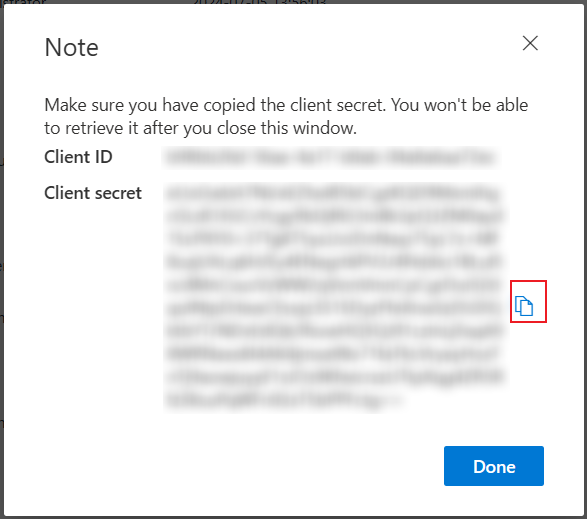
The Note window appears displaying the API authentication details. Click the Copy button to copy the client secret to your clipboard.
 NOTE
NOTEThe client secret will only be displayed one time, and you cannot retrieve it after you close the window.
-
Refer to the example below to authenticate with AvePoint Cloud Governance API.

The value of the userPrincipalName parameter is the login name of a delegated user that will be used to invoke the AvePoint Cloud Governance API. Make sure the user’s account has been added to AvePoint Online Services and has the subscription for AvePoint Cloud Governance.
The API URLs vary with AvePoint Cloud Governance environments. Choose one of the following API URLs according to the environment you are using.
AvePoint Cloud Governance Environment API URL The production environment for commercial use https://go-api.avepointonlineservices.com The production environment for U.S. Government Public Sector https://governance-api-us-gov.avepointonlineservices.com The Insider environment – the East US (Virginia) data center https://insider-governance-api-us-east.avepointonlineservices.com The Insider environment – the North Europe (Ireland) data center https://insider-governance-api-north-europe.avepointonlineservices.com
-
-
Authentication via an app registered in AvePoint Online Services
NOTEThis method cannot limit the services that can be called using the Cloud Governance API access token.
-
Go to the AvePoint Online Services > Administration > App registration page to register an app for AvePoint Cloud Governance. For details, refer to Configure App Registrations.
-
After you registered the app, get the access token to authenticate with AvePoint Cloud Governance Public API. To get the access token, specify the following attributes:
Element Description identityServiceUrl For Commercial environment, use: https://identity.avepointonlineservices.com; For U.S. Government environment, use: https://identity-gov.avepointonlineservices.com clientId Specifies the application (client) ID of the app you registered through AvePoint Online Services > Administration > App registration. clientsecret Specifies the client secret of the app you registered through AvePoint Online Services > Administration > App registration. scope Specifies the permission that has been granted to the app. For AvePoint Cloud Governance, the value is cloudgovernance.fullcontrol.all. thumbprint The thumbprint of the corresponding .pfx certificate file of the .cer certificate you used when registering the app. TokenLifetimeInMinutes Specifies an expiration time for the retrieved token. The unit of time is Minute. username Specifies a username as a delegated user to call Cloud Governance API. Example:
Certificate as a credential:
Client secret as a credential:
-
-
-
You can find more information on what is possible with AvePoint Cloud Governance API here, as well as the coding details and examples.
PowerShell
AvePoint Cloud Governance provides a Software Development Kit (SDK) for integration with PowerShell. Refer to the instructions below to get started:
-
Use the following command to install the Cloud Governance PowerShell module:
NOTEThe Cloud Governance PowerShell module requires PowerShell 3.0 or above.
-
Choose any of the following methods to authenticate with AvePoint Cloud Governance API:
-
Authentication via a client ID and client secret
-
Navigate to System settings >API authentication profiles and click Create on the ribbon.
-
Enter a name for the profile.
-
Configure a duration for the client secret. The start time is the profile created time. Enter a number in the text box and select Days, Weeks, Months, or Years as the unit of time.
-
Define the services that can be called using this AvePoint Cloud Governance API access token.
-
Click Save to save your configurations.
-
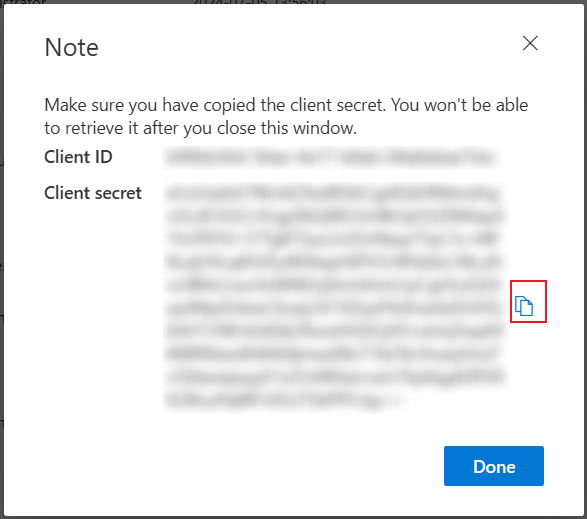
The Note window appears displaying the API authentication details. Click the Copy button to copy the client secret to your clipboard.
 NOTE
NOTEThe client secret will only be displayed one time, and you cannot retrieve it after you close the window.
-
Refer to the example below to authenticate with AvePoint Cloud Governance API.

The value of the userPrincipalName parameter is the login name of a delegated user that will be used to invoke the AvePoint Cloud Governance API. Make sure the user’s account has been added to AvePoint Online Services and has the subscription for AvePoint Cloud Governance.
The API URLs vary with AvePoint Cloud Governance environments. Choose one of the following API URLs according to the environment you are using.
AvePoint Cloud Governance Environment API URL The production environment for commercial use https://go-api.avepointonlineservices.com The production environment for U.S. Government Public Sector https://governance-api-us-gov.avepointonlineservices.com The Insider environment – the East US (Virginia) data center https://insider-governance-api-us-east.avepointonlineservices.com The Insider environment – the North Europe (Ireland) data center https://insider-governance-api-north-europe.avepointonlineservices.com
-
-
Authentication via an app registered in AvePoint Online Services
NOTEThis method cannot limit the services that can be called using the Cloud Governance API access token.
-
Go to the AvePoint Online Services > Administration > App registration page to register an app for AvePoint Cloud Governance. For details, refer to Configure App Registrations.
-
After you registered the app, get the access token to authenticate with AvePoint Cloud Governance Public API. To get the access token, specify the following attributes:
Element Description identityServiceUrl For Commercial environment, use: https://identity.avepointonlineservices.com; For U.S. Government environment, use: https://identity-gov.avepointonlineservices.com clientId Specifies the application (client) ID of the app you registered through AvePoint Online Services > Administration > App registration. clientsecret Specifies the client secret of the app you registered through AvePoint Online Services > Administration > App registration. scope Specifies the permission that has been granted to the app. For AvePoint Cloud Governance, the value is cloudgovernance.fullcontrol.all. certificate The path of the corresponding .pfx certificate file of the .cer certificate you used when registering the app. username Specifies a username as a delegated user to call Cloud Governance API. Example
Certificate as a credential:
Client secret as a credential:
-
-
-
You can find more information on what is possible with AvePoint Cloud Governance API here, as well as the coding details and examples.
REST API
Refer to the instructions below to get started with AvePoint Cloud Governance REST API.
-
In the AvePoint Cloud Governance API, you can see the supported methods. Access the API URL according to the environment you are using.
AvePoint Cloud Governance Environment API URL (End User Level APIs) API URL (System Level APIs) The production environment for commercial use https://go-api.avepointonlineservices.com https://go-api.avepointonlineservices.com/admin The production environment for U.S. Government Public Sector https://governance-api-us-gov.avepointonlineservices.com https://governance-api-us-gov.avepointonlineservices.com/admin The Insider environment – the East US (Virginia) data center https://insider-governance-api-us-east.avepointonlineservices.com https://insider-governance-api-us-east.avepointonlineservices.com/admin The Insider environment – the North Europe (Ireland) data center https://insider-governance-api-north-europe.avepointonlineservices.com https://insider-governance-api-north-europe.avepointonlineservices.com/admin -
Choose one of the following methods to authenticate with AvePoint Cloud Governance API:
-
Authentication via a client ID and client secret
-
Navigate to System settings >API authentication profiles and click Create on the ribbon.
-
Enter a name for the profile.
-
Configure a duration for the client secret. The start time is the profile created time. Enter a number in the text box and select Days, Weeks, Months, or Years as the unit of time.
-
Define the services that can be called using this Cloud Governance API access token.
-
Click Save to save your configurations.
-
The Note window appears displaying the API authentication details. Click the Copy button to copy the client secret to your clipboard.
 NOTE
NOTEThe client secret will only be displayed one time, and you cannot retrieve it after you close the window.
-
-
Authenticate via Microsoft 365 single sign-on
This authentication method requires an access token and the access token will expire in one hour.
-
Access {API URL}/auth/token/user via your web browser. For example, https://go-api.avepointonlineservices.com/auth/token/user.
Refer to the information in the table below to choose the API URL.
AvePoint Cloud Governance Environment API URL (End User Level APIs) API URL (System Level APIs) The production environment for commercial use https://go-api.avepointonlineservices.com https://go-api.avepointonlineservices.com/admin The production environment for U.S. Government Public Sector https://governance-api-us-gov.avepointonlineservices.com https://governance-api-us-gov.avepointonlineservices.com/admin The Insider environment – the East US (Virginia) data center https://insider-governance-api-us-east.avepointonlineservices.com https://insider-governance-api-us-east.avepointonlineservices.com/admin The Insider environment – the North Europe (Ireland) data center https://insider-governance-api-north-europe.avepointonlineservices.com https://insider-governance-api-north-europe.avepointonlineservices.com/admin/index.html -
On the Microsoft 365 sign-in page, sign in with your Microsoft 365 account.
NOTEMake sure the account has been added to AvePoint Online Services and has the subscription for AvePoint Cloud Governance.
-
You can see an access token, a refresh token, and user information. The following is an example of the response:
-
-
Authentication via an app registered in AvePoint Online Services
Go to the AvePoint Online Services > Administration > App registration page to register an app for AvePoint Cloud Governance. For details, refer to Configure App Registrations.
-
-
See the examples below for using the authentication.
-
Authentication via a client ID and client secret
The following is an example of the request that contains the required parameters for authentication: clientid, clientSecret, and userPrincipalName.
NOTEThe value of the userPrincipalName parameter is the login name of a delegated user that will be used to invoke the AvePoint Cloud Governance API. Make sure the user’s account has been added to AvePoint Online Services and has a subscription for AvePoint Cloud Governance.
-
Authentication via Microsoft single sign-on
Add a header in the request. The header name is Authorization, and the header value is Bearer {access token}. The following is an example:
If you want your application to receive the access token, you can append a redirect_uri query string. For example, https://go-api.avepointonlineservices.com/auth/token/user?redirect_uri=`{your application URL`}. AvePoint Cloud Governance API will post a form with the above information to your application URL.
-
Authentication via an app registered in AvePoint Online Services
Add a header in the request. The header name is Authorization, and the header value is Bearer {access token}. The following is an example:
-