
Home > User Guide > Get Started > Custom Google App
Export to PDFCustom Google App
Configuring a custom Google app is required in the following scenarios:
Follow the instructions below to configure a custom Google app and create an app profile to consent to the custom app:
-
Configure a custom Google app by referring to the section in the AvePoint Online Services user guide.
-
Refer to the information below to enable the required APIs:
-
Admin SDK API must be enabled for common functionalities.
-
Gmail API must be enabled if you want to protect the Gmail data.
-
Google Drive API must be enabled if you want to protect drives and shared drives.
-
Drive Labels API must be enabled if you want to protect labels for drives and shared drives.
-
Google Calendar API must be enabled if you want to protect calendars.
-
Google People API must be enabled if you want to protect contacts.
-
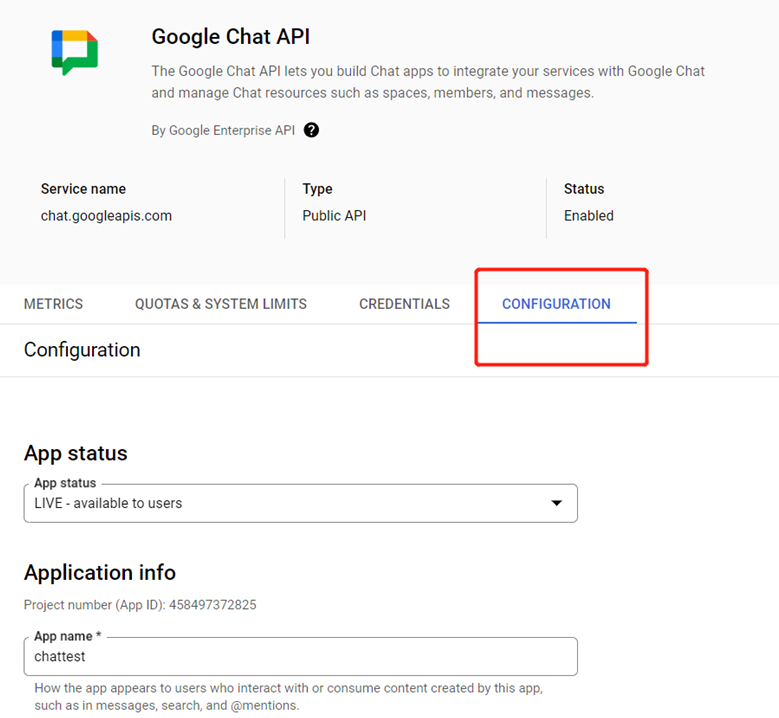
Google Chat API must be enabled if you want to protect chats. After enabling the Google Chat API at , you need to configure the app information under its CONFIGURATION tab by following the steps below. (Note that the Chat apps are required to access Chat data but are invisible to Google users.)
-
Configure the following application information:
-
App Name – Enter the name of the app.
-
Avatar URL – Provide an icon for the app. Any valid URL is acceptable.
-
Description – Write a brief description of the app.
-
-
Disable the Enable Interactive features option.

-
Click Save.
-
-
Google Vault API and Google Cloud Storage JSON API must be enabled if you want to protect the Vault data.
-
Google Classroom API must be enabled if you want to protect the Classroom data.
-
Cloud Identity, Admin SDK API, Groups Settings API, and Enterprise License Manager API must be enabled if you want to protect the Directory data.
-
-
Refer to the following information to configure the related OAuth scopes:
-
To protect the Google Workspace data (including Gmail, Drive, Drive labels, Calendar, Contacts, Chat, and shared drives), you can copy and paste the following to the OAuth scopes:
-
To protect the Google Workspace data (including Gmail, Drive, Drive labels, Calendar, Contacts, Chat, and shared drives) and the Google Vault data (including Gmail, Drive, and shared drives), you can copy and paste the following to the OAuth scopes:
-
To protect the Google Classroom data, you can copy and paste the following to the OAuth scopes:
-
To protect the Google Directory data, you can copy and paste the following to the OAuth scopes:
Refer to the table below for details about why we need the scopes:
-
| Service | API | Scope | Purpose |
|---|---|---|---|
| Common | Admin SDK API | https://www.googleapis.com/auth/admin.directory.group.readonly | Retrieve groups in your domain. |
| Common | Admin SDK API | https://www.googleapis.com/auth/admin.directory.user.readonly | Retrieve users in your domain. |
| Common | Admin SDK API | https://www.googleapis.com/auth/admin.reports.usage.readonly | Retrieve your organization subscription usage for backup admins to monitor their subscription in the app. |
| Common | Admin SDK API | https://www.googleapis.com/auth/admin.directory.orgunit.readonly | Retrieve organization units in your workspace. |
| Gmail | Gmail API | https://mail.google.com/ | Back up emails and labels in Gmail for future recovery. |
| Drive | Google Drive API | https://www.googleapis.com/auth/drive | Back up folders and files under My Drive and shared drives for future recovery. |
| Drive label | Drive Labels API | https://www.googleapis.com/auth/drive.admin.labels | Retrieve all information of labels on files in Drives for backup and restore. |
| Drive label | Drive Labels API | https://www.googleapis.com/auth/drive.labels | Back up and restore properties of labels on files in Drives. |
| Calendar | Google Calendar API | https://www.googleapis.com/auth/calendar | Back up calendars and events from Google Calendar for future recovery. |
| Contacts | Google People API | https://www.googleapis.com/auth/contacts.other.readonly | Back up Other contacts data. |
| Contacts | Google People API | https://www.googleapis.com/auth/contacts | Back up contact groups and contacts from Google Contacts for future recovery. |
| Chat | Google Chat API | https://www.googleapis.com/auth/chat.spaces.readonly | Retrieve all chat spaces. |
| Chat | Google Chat API | https://www.googleapis.com/auth/chat.memberships.readonly | Retrieve the membership of each chat space. |
| Chat | Google Chat API | https://www.googleapis.com/auth/chat.messages.readonly | Back up chats and related attachments. |
| Vault | Google Vault API | https://www.googleapis.com/auth/ediscovery | Use this API to export Google Vault data. |
| Vault | Google Cloud Storage JSON API | https://www.googleapis.com/auth/devstorage.read_only | Download the exported Google Vault data. |
| Classroom | Google Classroom API | https://www.googleapis.com/auth/classroom.courses | Back up and restore classes. |
| Classroom | Google Classroom API | https://www.googleapis.com/auth/classroom.announcements | Back up and restore announcements in classes. |
| Classroom | Google Classroom API | https://www.googleapis.com/auth/classroom.coursework.me | Back up classwork in classes. |
| Classroom | Google Classroom API | https://www.googleapis.com/auth/classroom.coursework.students | Restore classwork in classes. |
| Classroom | Google Classroom API | https://www.googleapis.com/auth/classroom.courseworkmaterials | Back up and restore classwork materials. |
| Classroom | Google Classroom API | https://www.googleapis.com/auth/classroom.rosters | Back up and restore students and teachers in classes. |
| Classroom | Google Classroom API | https://www.googleapis.com/auth/classroom.profile.emails | Retrieve email addresses in classes. |
| Classroom | Google Classroom API | https://www.googleapis.com/auth/classroom.topics | Back up and restore topics in classes. |
| Classroom | Google Classroom API | https://www.googleapis.com/auth/classroom.topics.readonly | Retrieve information of topics. |
| Classroom | Google Classroom API | https://www.googleapis.com/auth/classroom.guardianlinks.students | Retrieve guardians of students in classes. |
| Google Directory | Cloud Identity | https://www.googleapis.com/auth/cloud-identity.groups | Back up and restore groups. |
| Google Directory | Admin SDK API | https://www.googleapis.com/auth/admin.directory.group | Back up and restore groups. |
| Google Directory | Admin SDK API | https://www.googleapis.com/auth/admin.directory.group.member | Back up and restore group members. |
| Google Directory | Admin SDK API | https://www.googleapis.com/auth/admin.directory.user | Back up and restore users. |
| Google Directory | Admin SDK API | https://www.googleapis.com/auth/admin.directory.rolemanagement | Back up and restore group roles and user roles. |
| Google Directory | Admin SDK API | https://www.googleapis.com/auth/admin.directory.userschema | Back up and restore user attributes. |
| Google Directory | Groups Settings API | https://www.googleapis.com/auth/apps.groups.settings | Back up and restore group settings. |
| Google Directory | Enterprise License Manager API | https://www.googleapis.com/auth/apps.licensing | Back up and restore user licenses. |
- After you finish configuring scopes for the custom Google app, go to AvePoint Online Services and navigate to Management > App management to create an app profile and consent to the custom Google app. For more details, refer to the section in the AvePoint Online Services user guide.