
Home > Account Management
Export to PDFAccount Management
Account Management is defined for permission management with security groups. To cater to the diverse administrative needs, administrators can create security groups with a custom permission scope, which can dive down to the specific functions of each service, such as Backup, Restore, and Export. The standard users added to a security group can inherit the group permissions automatically.
Administrators group is the built-in group that has all permissions in AvePoint Cloud Backup for IaaS + PaaS. You cannot remove this group or update its permissions.
*Note: The users who have been designated as service administrators of AvePoint Online Services and the application administrators of AvePoint Cloud Backup for IaaS + PaaS will be automatically synchronized to the Administrators group. If the user is demoted from the application administrator to a standard user, Cloud Backup for IaaS + PaaS will not automatically remove this user from the Administrators group. If you no longer want to grant this user full control of the application, you must manually remove the user from the Administrators group.
Create a Security Group
To manage user permissions more efficiently, you can create a security group for a set of users and configure the group permissions. The users within this group will inherit the group permissions automatically.
Follow the steps below to create a security group:
-
Navigate to Settings > Account management.
-
Click Create.
-
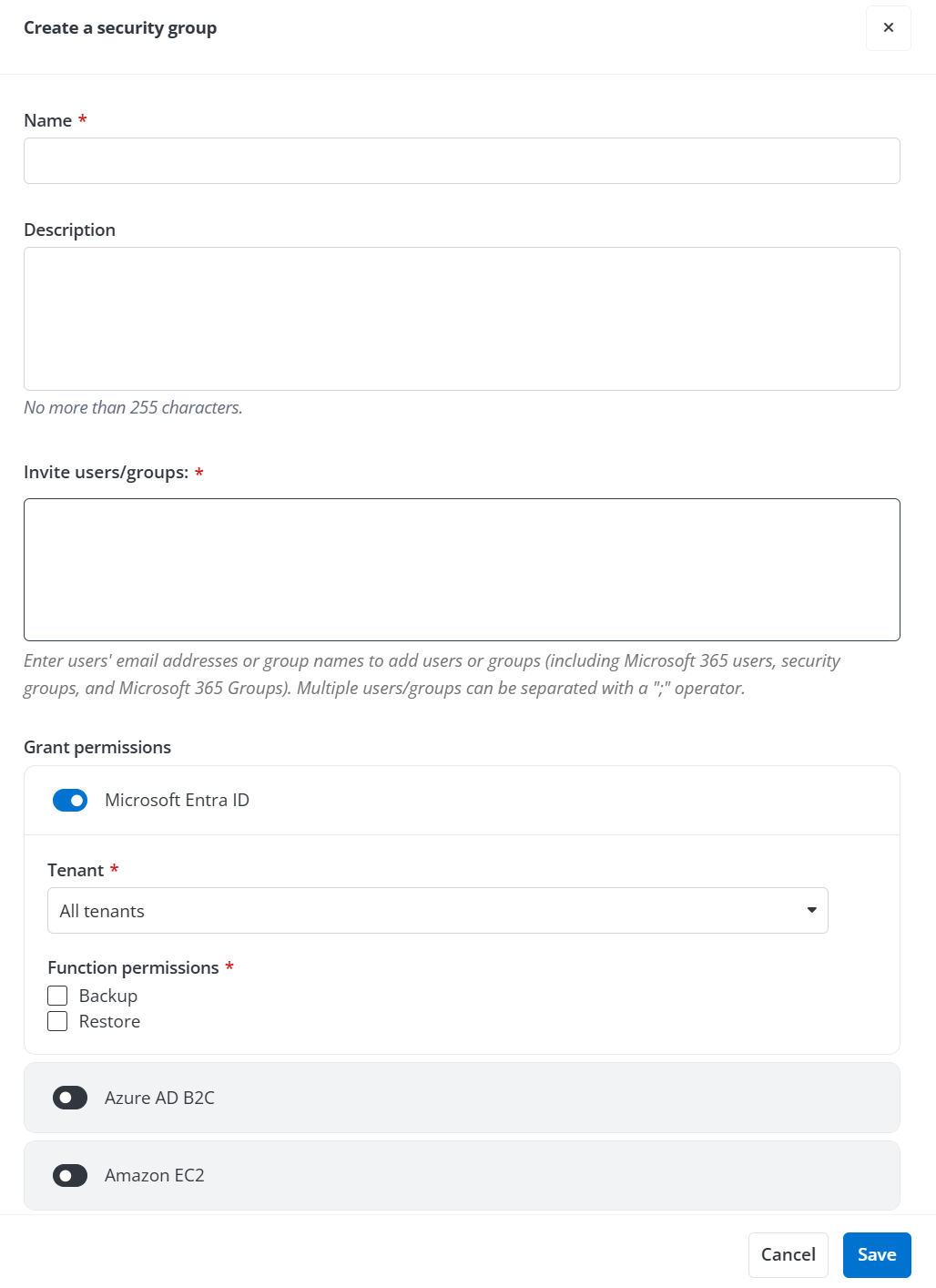
In the Create a security group panel, complete the following settings:
-
Name – Enter a name for this security group.
-
Description – Enter a description for this security group for future reference. This field is optional.
-
Invite users/groups – Enter the email addresses of the users or groups that you want to add to this group. The users/groups you want to add to this group must have at least the Standard user permission to Cloud Backup for IaaS + PaaS. For details on adding a standard user through AvePoint Online Services, refer to .
-
Grant permissions – Turn on the switch next to the service that you want to allow this group to access and select the region, tenant, and functionalities, such as Backup, Restore, Export to grant the specific permission.
*Note: The region section is required for Azure VM, Amazon EC2, Azure storage, Azure SQL backup and native Azure SQL backup monitoring services.
-
Click Save to save this security group or click Cancel to exit this panel without saving.