Home > Monitor Subscription Consumption > AvePoint Cloud Backup
Download this articleAvePoint Cloud Backup
The subscription consumption report for AvePoint Cloud Backup contains two tabs: Microsoft 365 services and Power Platform. It displays your subscription details and consumption of Microsoft 365 services and Power Platform.
Microsoft 365 Services
The Microsoft 365 services tab provides a dashboard that displays your subscription details, usage growth rate, trends, and utilizations. This helps you monitor how your Microsoft 365 subscription is being consumed and anticipate when it may reach its quota.
The subscription consumption report in Subscriptions is updated once a week and is only available to the AOS Service Administrator and the Application Administrators of AvePoint Cloud Backup for Microsoft 365. For subscriptions with multi-Geo enabled, only AOS Service Administrators can view this report.
AvePoint Cloud Backup provides two primary subscription models for Microsoft 365 services:
-
Per-GB Subscription: Protect unlimited users with a fixed per-GB rate. The backup scope is measured weekly based on Microsoft 365 object data size. Note that large data volumes may increase processing time. For details on how storage is calculated under the Per-GB subscription, refer to the corresponding FAQ in License and Subscription.
-
Per-User Subscription: Protect unlimited content across your organization with a fixed per-user rate, based on assigned Microsoft 365 user seats. For details, refer to Licensing.
Refer to the following for the Dashboard tab for different subscription types. If you want to increase your subscription capacity, you can reach out to your AvePoint sales representative.
Per-GB Subscription
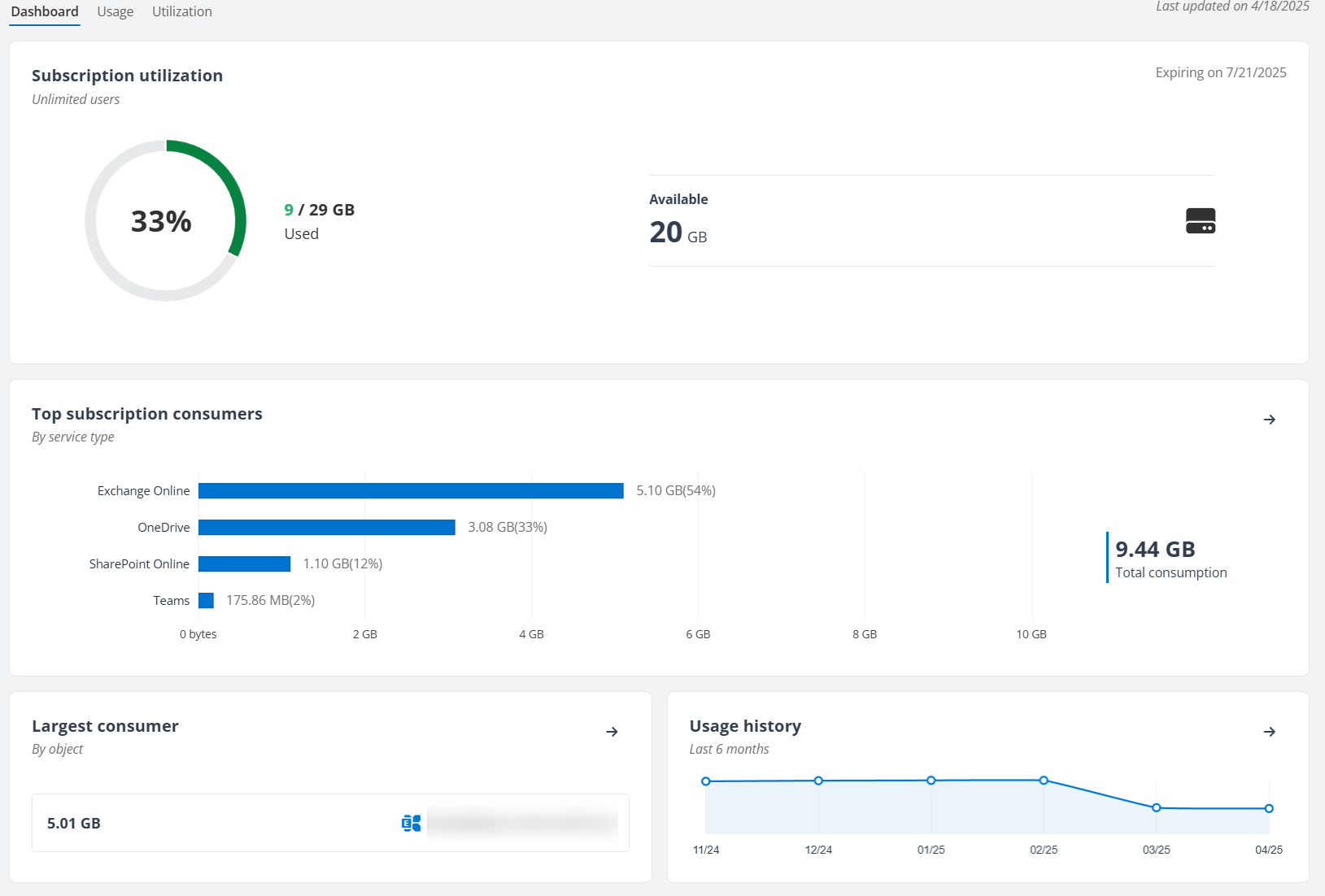
The Subscription utilization section provides a snapshot of the total backup size versus purchased capacity, including available or exceeded capacity. You can also view major consumers by service type, the largest consumer on your subscription, and the usage history respectively in Top subscription consumers section, Largest consumer section, and Usage history section.
-
To view additional usage statistics, such as usage history and trends, average growth rate, spike, and the object type that consumed most, click
 on the upper right corner of the Usage history pane or click the Usage tab.
 -
To view the overall subscription utilization of each object type or to drill down to a single site collection, OneDrive, mailbox, public folder, team, or a group, click
 button on the upper-right corner of the Largest consumer pane or click the Utilization tab.
For AvePoint Cloud Backup for Microsoft 365 subscriptions with multi-Geo enabled:
-
Sign in with the Central AOS Location – View the overall capacity of your purchased subscription and the percentage consumed. You can also view subscription consumers by region and data type, identify the largest consumer of your subscription, and track usage history.
-
Sign in with other regions – View major consumers by service type, the largest consumer on your subscription, and the usage history respectively specific to the current region.
You also need to note the following when monitoring the subscription consumption:
-
From the September 2020 release, Cloud Backup will count the size of private channel sites in the Teams total size, which may cause a spike in your license consumption growth if your tenant has a lot of private channels. You can download the report to view the details. We provide a Teams Private Channel Site sheet to show the private sites and their size in the report. If you do not want to back up private channels, navigate to Settings > Backup page to deselect the Back up private channels option.
-
If you have ever included the Recordings folder in backup, the size of the Recordings folders will be counted in the subscription consumption thereafter.
Per-User Subscription
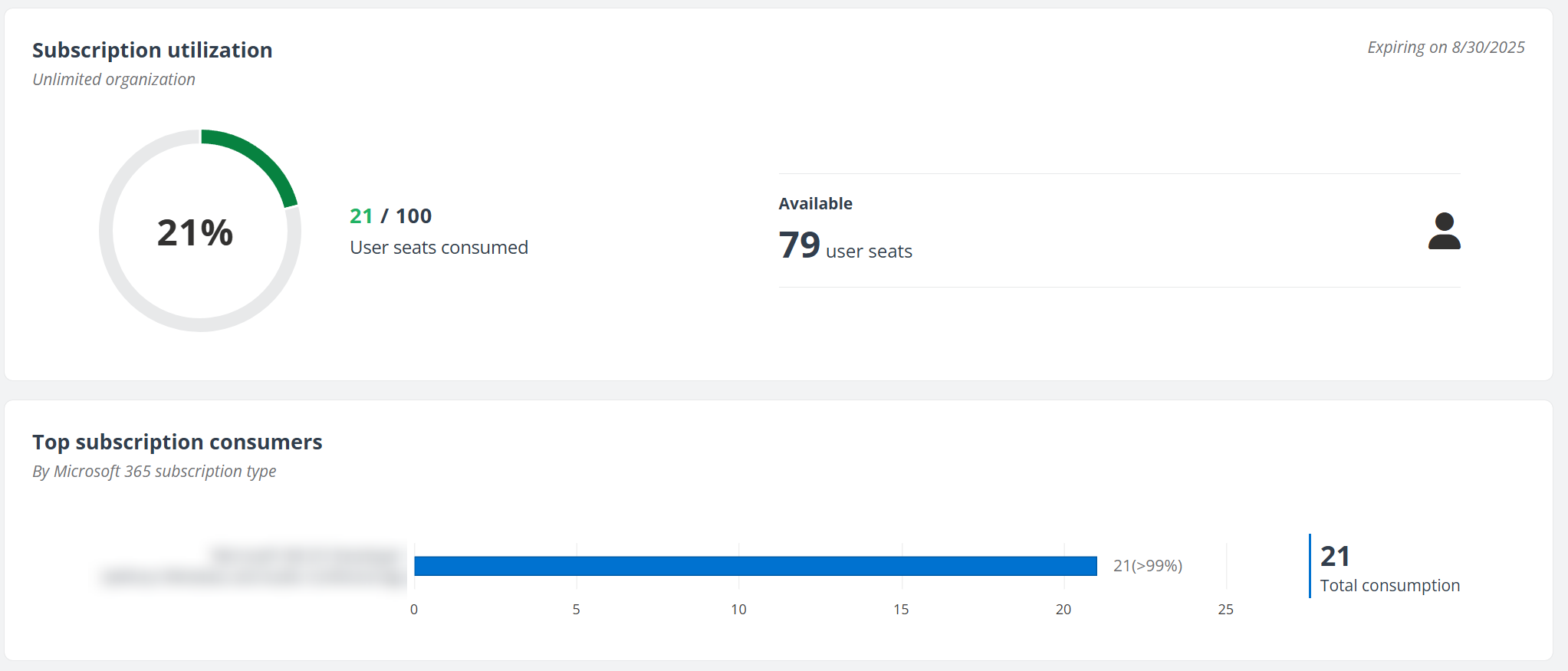
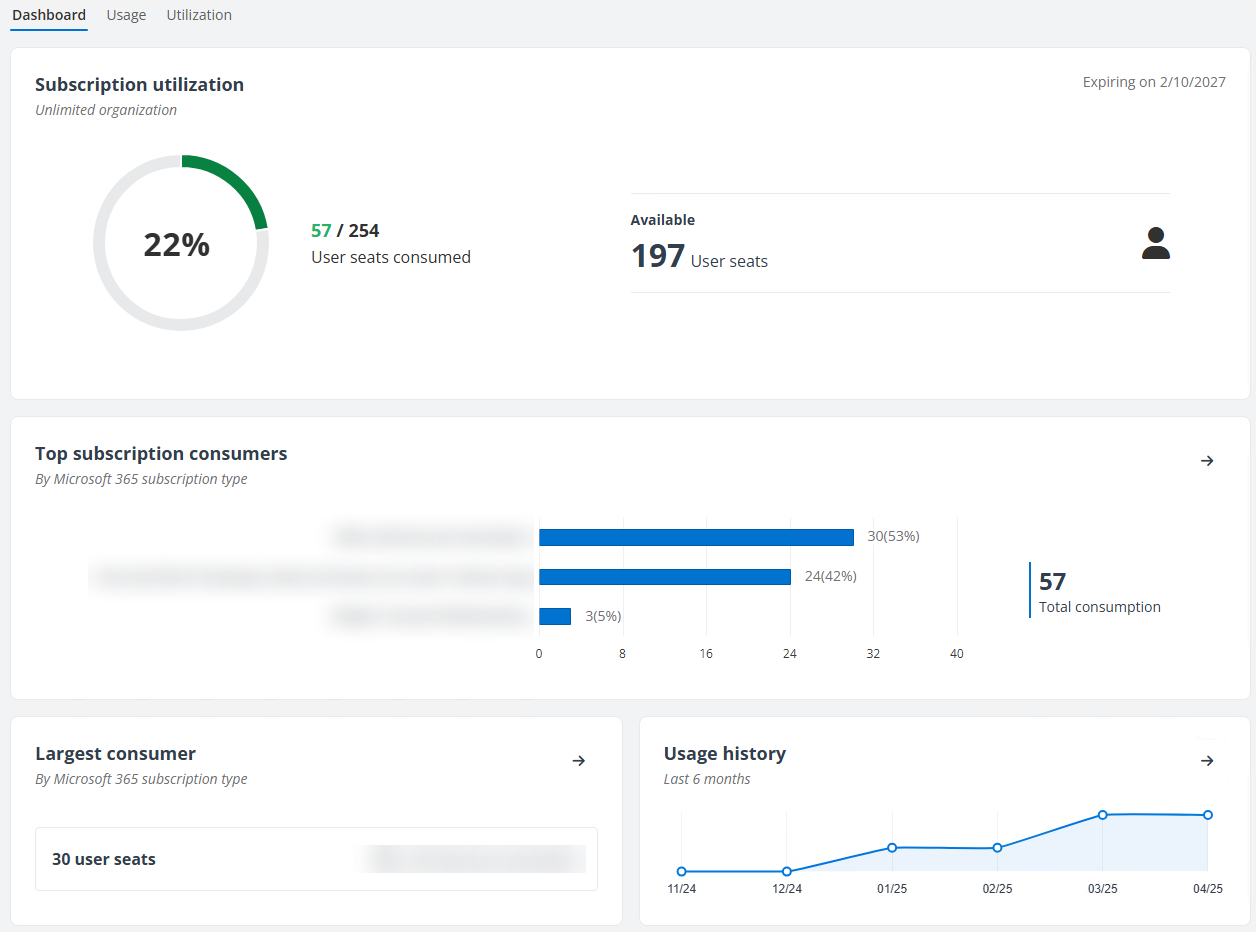
In the Subscription utilization section, you can view a snapshot of the number of consumed seats versus the total purchased seats, and the number of seats currently available or exceeded. You can also view the major consumers by Microsoft 365 subscription type, the largest consumer on your subscription, and the usage history respectively in Top subscription consumers section, Largest consumer section, and Usage history section.
-
To view additional usage statistics, such as usage history and trends, average growth rate, spike, and the object type that consumed most, click
 on the upper right corner of the Usage history pane or click the Usage tab.
 -
To view the overall subscription utilization of each subscription type, click
 button on the upper-right corner of the Largest consumer pane or click the Utilization tab.
Usage Tab
Refer to the following sections for the Usage tab for different subscription types:
Per-GB Subscription
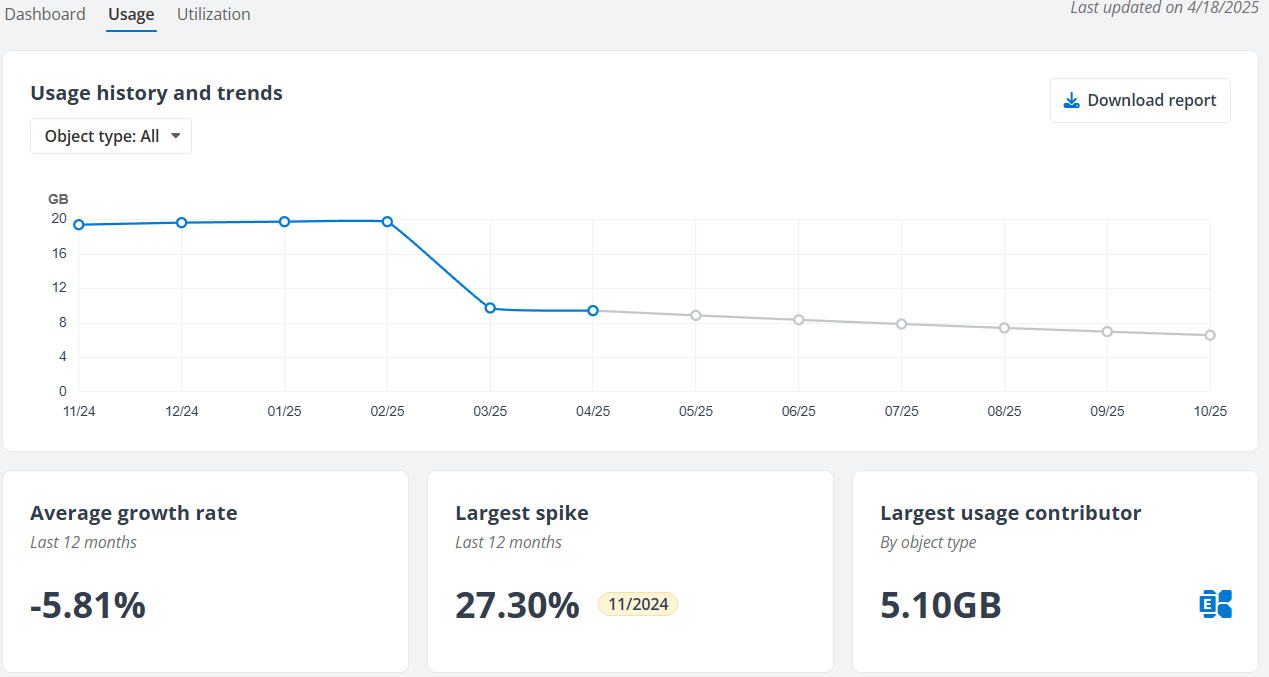
The Usage tab shows the average growth rate in the past 12 months, the largest spike, and the service that has the largest size of protected data. Additionally, a usage projection will be displayed in Usage history and trends for when your subscription capacity will be reached.
For Cloud Backup for Microsoft 365 subscriptions with multi-Geo enabled
-
Sign in with the Central AOS Location – View the overall usage of your purchased subscription. In the Usage history and trends section, you can click Region to view the usage by region.
-
Sign in with other regions – View the subscription usage for the current region.
You can click Download report to download the usage statistics to your computer and view the size of the protected data on the corresponding date.
Per-User Subscription
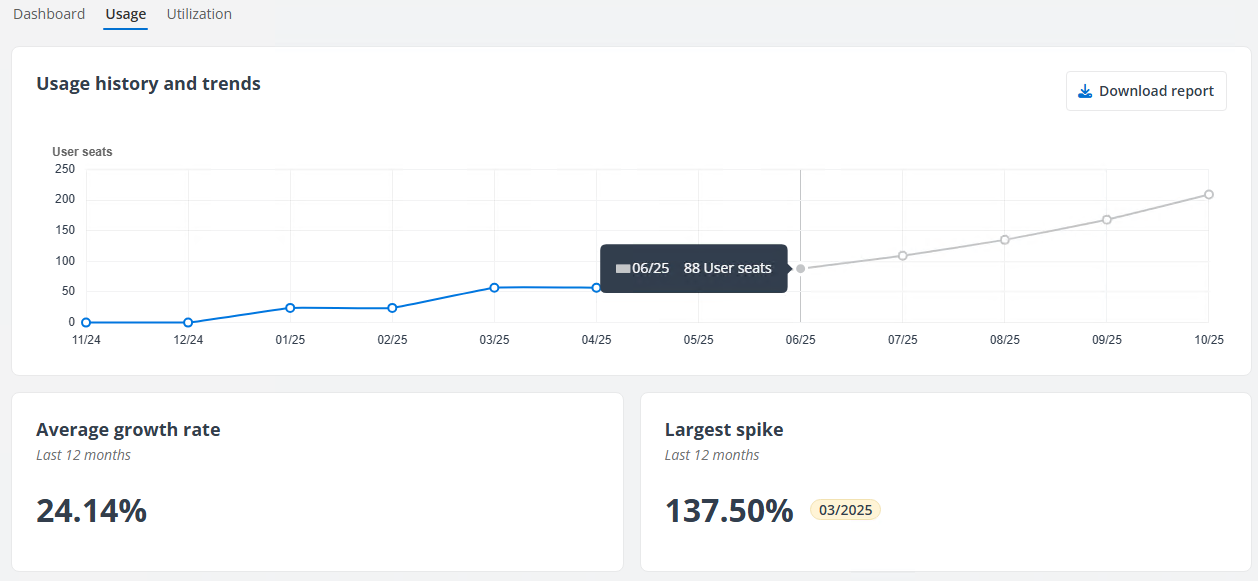
The Usage tab shows the average growth rate in the past 12 months and the largest spike. Also, a usage projection will be displayed in Usage history and trends for when your subscription capacity will be reached.
You can click Download report to download the usage statistics to your computer and view the number of the assigned user seats for each subscription type on the corresponding date.
Utilization Tab
Refer to the following for the Utilization tab for different subscription types:
Per-GB Subscription
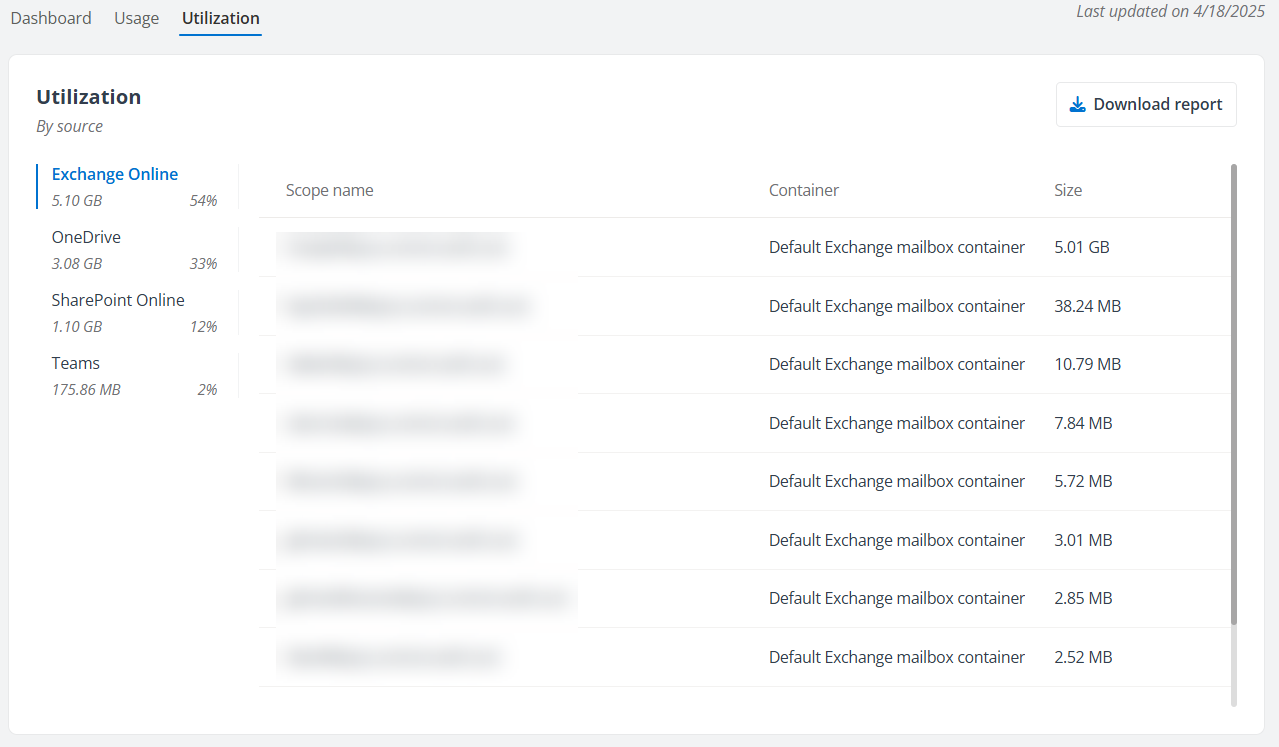
To view the detailed subscription consumption, click the Utilization tab. The subscription consumption of each object type will be listed in descending order. Click the tab of an object type on the left pane to view the usage information for the objects within this object type.
For Cloud Backup for Microsoft 365 subscriptions with multi-Geo enabled
-
Sign in with the Central AOS Location – View the overall utilization of your purchased subscription. You can click Region to view the utilization by region.
-
Sign in with other regions – View the subscription utilization for the current region.
You can click Download report to download the subscription utilization data, including the overall subscription utilization information and the size of the protected objects within each object type, and the containers where the objects reside. The downloaded job report will also provide a sheet “Summary per Container” to display the subscription consumption per container in each service type. The service types and their containers will be displayed in descending order according to size.
Note the following:
-
For Exchange Online service, the mailboxes in the report will be distinguished by their mailbox types, such as User, Shared, In-Place Archive, and Resource.
-
You may find a difference in the data size of the in-place archive mailbox when comparing it to Microsoft 365. This is because Microsoft displays the size of the entire in-place archive mailbox, while Cloud Backup for Microsoft 365 only accounts for the data size in the main archive folder. This difference will not impact the performance and effectiveness of your backup jobs.
Per-User Subscription
-
To view the detailed subscription consumption, click the Utilization tab. The subscription consumption of each Microsoft 365 subscription type will be listed in descending order.
-
You can click Download report to download the subscription utilization data, including the overall subscription utilization information.

Power Platform
The Power Platform tab provides your subscription details and utilization, helping you understand how your subscription to Power Platform is consumed.
AvePoint Cloud Backup for M365 provides two primary choices for the subscription to Power Platform:
-
Protection for unlimited users for a set per-object subscription (count the Power Platform object number in the backup scope)
-
Protection for an unlimited amount of content in an organization for a set per-user subscription (count the Microsoft 365 assigned user seats. For details, refer to Licensing.)
Refer to the following for the subscription consumption report for different subscription types. If you want to increase your subscription capacity, you can reach out to your AvePoint sales representative.
Per-Object Subscription
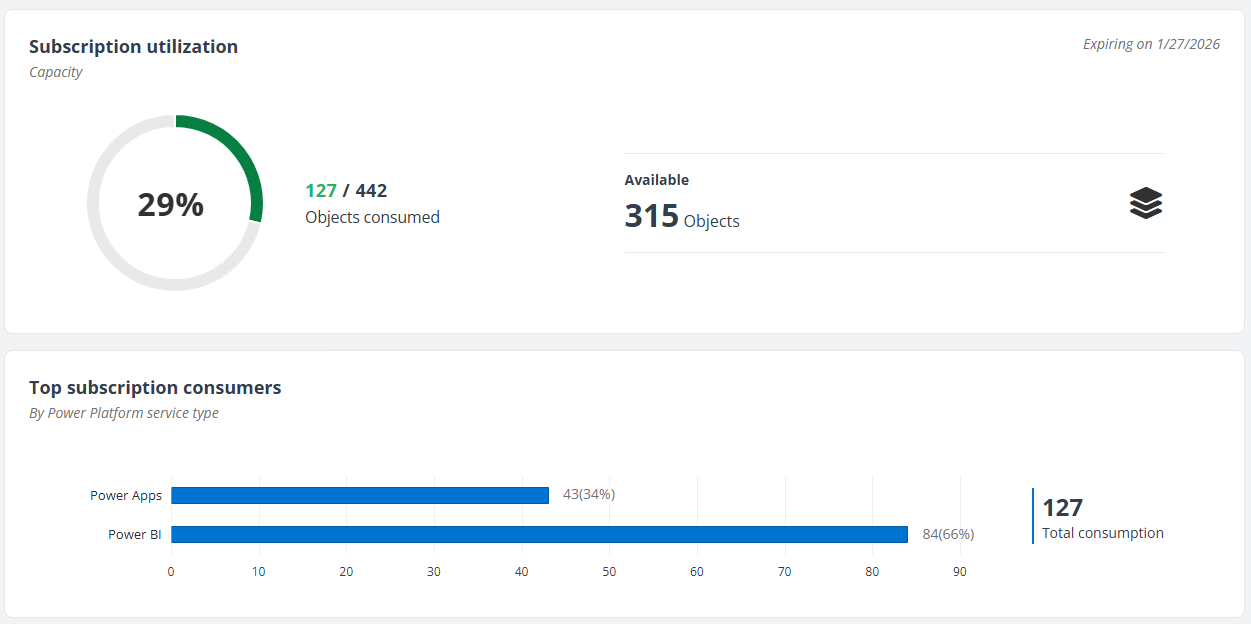
You can get a glance at the subscription type, the number of objects consumed versus the total purchased objects, and the number of objects currently available or exceeded in the Subscription utilization section, and view the major consumers on your subscription by Power Platform service type.
Per-User Subscription
You can get a glance at the subscription type, the number of consumed seats versus the total purchased seats, and the number of seats currently available or exceeded in the Subscription utilization section, and view the major consumers on your subscription by Microsoft 365 subscription type.