
Home > Configure Settings for AvePoint Cloud Backup > Configure Retention Policy
Download this articleConfigure Retention Policy
Either using the AvePoint default storage or your own storage, the data retention settings can be applied to your backup data to help save your storage costs. If there is backup data approaching the retention period, your administrator group or your service provider’s administrator group will receive the Data Retention Notification. Note that the Teams Chat service does not support the retention policy.
-
If you want to keep your data in default storage, you can contact your AvePoint Account Manager to update your subscription and increase your retention settings, but please note that increasing your data retention may increase the price you pay for your backup. If you want to archive the backup data that met the retention settings for potential restore in the future, instead of letting them be deleted from AvePoint storage, you can submit an export request to export the data from the default storage as a paid service. For details, refer to Introduction to Data Export Service.
-
If your subscription is the BYOS type, you can update your retention settings by navigating to Settings > Retention > Data retention settings. Increasing your data retention may increase the price you pay for your backup.
If you changed storage from the default AvePoint storage to BYOS, or from BYOS to the default storage, your changes on the retention policies would apply to your overall backup data. This means, your legacy backup data in the previous storage will be removed when it reaches the data retention date.
For customers who have purchased a BYOS subscription or a subscription using default AvePoint storage with an unlimited retention agreement, the retention policy supports being configured at the container level for each service type. Note that the default retention period for the BYOS license is one year. Once the next full snapshot of your Microsoft 365 scope takes place, we will begin pruning the old backup data that met your retention settings.
We always maintain at least one full backup cycle of your data, so the retained backup data may span a period longer than the configured retention duration.
You can now configure a retention period that is less than one year (from 30 days to 365 days) for services and containers. To enable the day unit retention policy, contact AvePoint support for assistance.
Note the following:
-
The day unit retention is not applicable to the channel conversations and settings in Teams, and the Viva Engage messages. Note that Power BI, Power Automate, and Power Apps do not support day unit retention.
-
The day unit retention job will ensure that any data you deleted from Microsoft 365 only lives for the configured period of time, regardless of your backup cycle. The backup data will be destroyed and unrecoverable. If the data exists in Microsoft 365 but has no recovery points within the retention period, its last recovery point that may have exceeded the retention period will be retained. However, when you search for this content to restore, the recovery point can only be displayed for the start date of the configured retention period.
NOTEFor BYOS customers, the day unit retention policy is not designed to reduce storage costs. Initially, the backup data will be destroyed and marked for deletion, but it does not immediately reduce the data size in your storage. Additionally, there is an annual task that permanently deletes data deemed unavailable to help manage long-term storage requirements.
-
If you ask AvePoint Support to disable the day unit retention policy, your retention policy will be reset according to the retention policy in your subscription. You need to navigate to the Cloud Backup interface to customize your retention policy again.
Follow the steps below to update the retention period for a specific service type or configure the container-specific retention policies:
-
Navigate to Settings > Retention **> Data retention settings.
-
To apply a default retention period for your backup data of all service types, select the Set a default retention period for all services option and update the number in the box below. Note that the retention period you can set for the retention policy cannot exceed your purchased retention years. If your subscription contains an unlimited data retention agreement, you can customize the data retention years for each of the services. Before the retention period of your data of a certain service type expires, your tenant owner will receive an email notification.
-
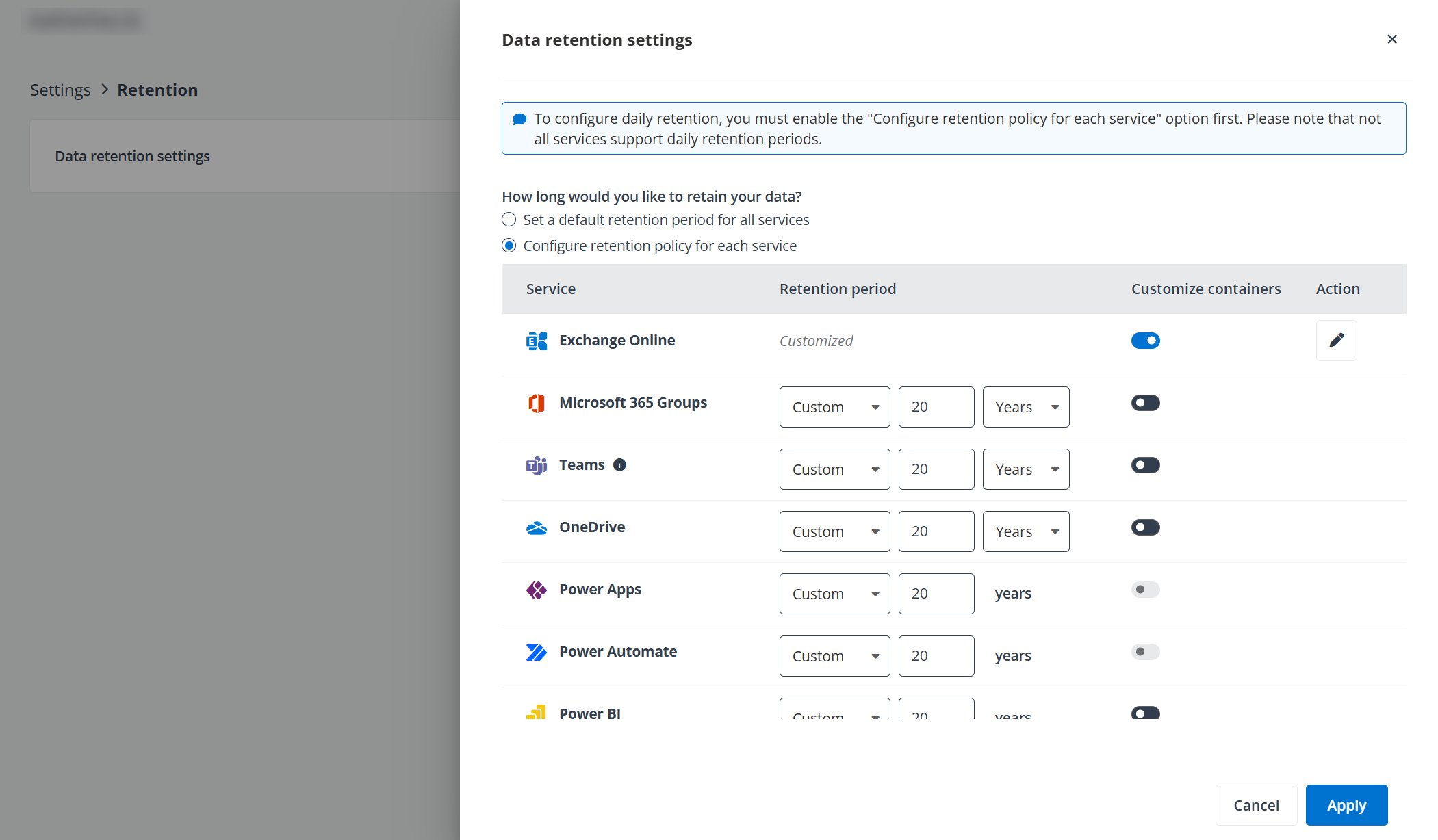
With the Configure retention policy for each service option selected, all the enabled service types are displayed. Note that the Teams Chat service does not support the retention policy and all backup data of Teams Chat will be retained until the subscription expires.
-
You can update the number for each service type under the Retention period column to define the default retention period for the specific service type.
-
If you would like to define retention policies for a specific container of that service type, you can turn on the switch under the Customize containers column. The Customize container level retention policy pane will appear. Note that Power Apps and Power Automate do not support container level retention settings.
-
In the Specialized retention settings section, you can update the default retention period for newly created containers in the future and for objects that are currently not included in any containers. Then you can update the number under the Retention period column in the table for a specific container. Day unit retention policy is currently supported at the container level.
-
Click Save in the Customize container level retention policy pane to save your changes to the retention policy of the corresponding service type, or click Cancel to exit.
-
You can repeat the actions from steps 5 to 7 to customize the container level retention policy for the other service types.
-
Click Apply at the bottom of the Data retention settings page to update the settings.