
Home > Configure Settings for AvePoint Cloud Backup > Configure End-User Restore Settings
Download this articleConfigure End-User Restore Settings
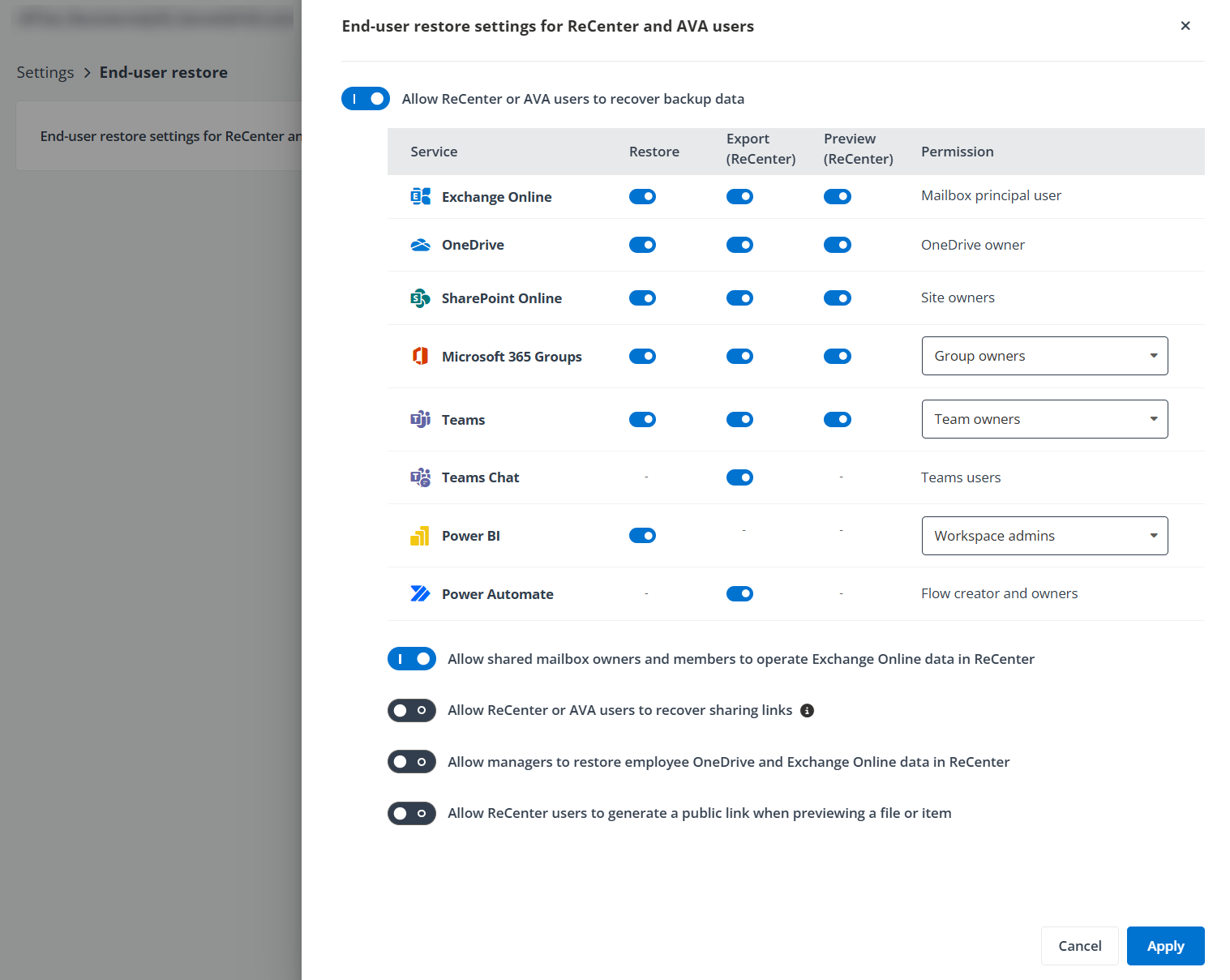
Through the Settings > End-user restore > End-user restore settings for ReCenter and AVA users page, you can choose whether to enable the end-user restore functionality for ReCenter or AVA users. This also includes allowing users to recover, export, or preview the backup data of the supported services, as well as specifying who have permission to restore, export, or preview the Team/Group/Power BI backup data via ReCenter/AVA.
The End-user restore setting is only available to your application administrators or the service provider.
-
If you do not want to allow the end-user restore, you can turn off the Allow ReCenter or AVA users to recover backup data switch. You can also separately disable the end-user restore, export, or preview for the following services: Exchange Online, OneDrive, SharePoint Online, Microsoft 365 Groups, Teams, Teams Chat, Power BI, and Power Automate. Note that Power BI only supports the end-user restore, and Teams Chat and Power Automate only supports the end-user export. The preview function is only supported for Exchange Online, OneDrive, SharePoint Online, Microsoft 365 Groups, and Teams.
-
With the end-user restore enabled, you can select the user roles for who can perform the restore, export, or preview for Teams and Groups, and who can restore Power BI reports from ReCenter/AVA.
You can also configure the following settings:
-
Allow shared mailbox owners and members to operate Exchange Online data in ReCenter - By default, shared mailbox owners and members can restore Exchange Online backup data in ReCenter. You can disable this option to prevent end users from restoring shared mailbox data through the ReCenter portal.
-
Allow ReCenter or AVA users to restore archived data stored on the Archive tier – If you have a BYOS subscription using your Azure storage, the Allow all ReCenter and AVA users to restore archived data stored on the Archive tier switch is available on this page. To allow all ReCenter and AVA users to restore backup data in the archive tier, turn this switch on. Note that Cloud Backup for Microsoft 365 does not support exporting the backup data in the archive tier.
The restore job will at first rehydrate the backup data sets in the archive tier for restore. Therefore, the restore job may take longer, and you may notice an additional charge. For additional details, refer to this Microsoft article.
NOTEIf your subscription was updated to use AvePoint default storage from using your own storage (BYOS subscription), this setting will be unavailable, and your end users cannot restore the backup data stored at the archive tier from your own storage. In this case, you can help them perform the restore from Cloud Backup for Microsoft 365 interface instead.
-
Allow ReCenter or AVA users to recover sharing links – By default, sharing links for SharePoint Online, OneDrive and Team/Group data won’t be restored when end users restore the backup data through ReCenter or AVA. To enable the restore of sharing links, you can turn on the Allow ReCenter or AVA users to recover sharing links switch.
NOTEFor OneDrive backup cycles after November 2022, sharing links will always be restored and cannot be controlled by the Allow ReCenter or AVA users to recover sharing links setting.
-
Allow managers to restore employee OneDrive and Exchange Online data in ReCenter – Enable this option to allow managers to recover the OneDrive and Exchange Online data of their departed employees through ReCenter. This is limited to the user’s designated manager in the Microsoft 365 hierarchy and applies only to inactive users, meaning employees appear in this view only after their accounts have been disabled or their sign-in is blocked.
-
Allow ReCenter users to generate a public link when previewing a file or item – Enable this setting to allow users to generate a public link from the preview window in ReCenter.