
Home > AvePoint Cloud Governance との統合
この記事をダウンロードAvePoint Cloud Governance との統合
AvePoint Portal Manager は AvePoint Cloud Governance と統合できます。Cloud Governance 管理者はサイト コレクション プロビジョニング用のサービスを作成する際に、サイト コレクションに展開できる AvePoint Portal Manager テンプレートを定義することができます。ビジネス ユーザーはこのサービスを要求してサイト コレクションを作成する場合、管理者によって設定された利用可能なテンプレートからテンプレートを選択することができます。その後、AvePoint Cloud Governance はサイト コレクションを作成し、定義されたテンプレートを作成したサイト コレクションに展開します。
AvePoint Portal Manager と AvePoint Cloud Governance を統合する方法については、以下の説明を参照してください。
-
管理者アカウントで AvePoint Cloud Governance 管理センターにサインインします。
-
設定 > 要求の管理 > サービス に移動して、AvePoint Cloud Governance サービスを作成・管理する サービス ページにアクセスします。
-
サイト コレクションの作成 または グループ / チーム / コミュニティの作成 サービスを作成・編集します。
-
サービスの作成・編集画面で、以下の設定を構成します。
-
メタデータ セクションで、メタデータを追加してサイト コレクションに展開できる AvePoint Portal Manager テンプレートを定義します。
-
[メタデータの追加] をクリックして、メタデータの追加 ウィンドウを開きます。
-
名前とタイプ – メタデータ名 (例: APM テンプレート タイトル) を入力して、メタデータ タイプとして 選択肢 (メニューから選択) を選択します。
-
列の追加設定 – ビジネス ユーザーはこのサービスを要求してサイト コレクションを作成する際に選択できる APM テンプレートの名前を入力します。レコード毎に改行してください。
NOTEAvePoint Portal Manager でテンプレートが既に作成されており、かつ発行されていることを確認してください。今後の AvePoint Portal Manager のテンプレートが変更された場合、メタデータの値を更新することができます。
-
必要に応じて他の設定を構成します。
-
[保存] をクリックして変更を保存します。
-
新規作成されたメタデータを選択して、[リストに追加] をクリックします。
-
-
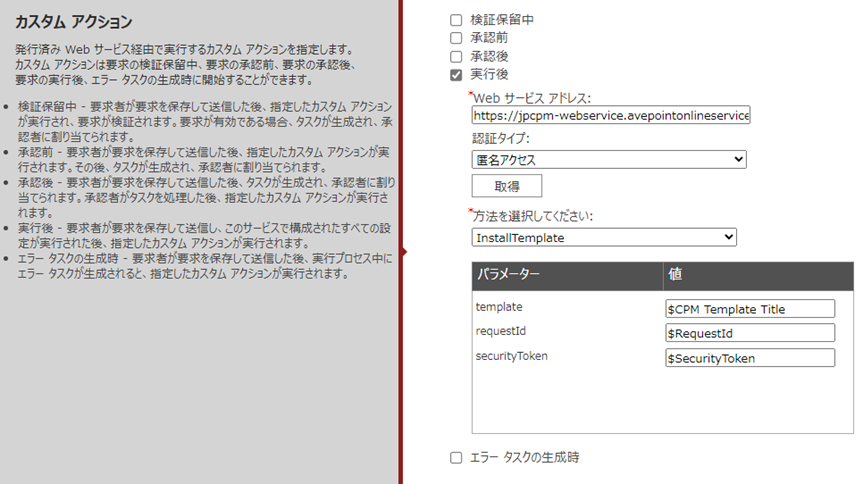
カスタム アクション セクションで、AvePoint Cloud Governance のカスタム アクションに Web サービスを適用します。
-
実行後 を選択します。
-
Web サービス アドレス テキスト ボックスに以下の URL を入力します。
-
米国データ ベースの場合、https://cpm-webservice.avepointonlineservices.com/DeploymentService.asmx を入力します。
-
日本データ ベースの場合、https://jpcpm-webservice.avepointonlineservices.com/DeploymentService.asmx を入力します。
-
-
Web サービスへのアクセスに使用する認証タイプとして、匿名アクセス を選択します。
-
[取得] をクリックして Web サービス内の方法を取得します。選択した方法でパラメーターが定義されている場合、パラメーターが以下の表に表示されます。
-
以下のようにパラメーターの値を定義します。
-
template – $ を入力して、上で作成したカスタム メタデータの名前を入力します。カスタム メタデータがサービスに適用されている場合、要求者はメタデータの値を定義します。定義されたメタデータの値はパラメーターの値となります。
-
requestId – パラメーターの値として $RequestId を入力します。
-
securityToken – パラメーターの値として $SecurityToken を入力します。
-
-
-
サービスへの変更を保存します。
ビジネス ユーザーが サイト コレクションの作成 または グループ / チーム / コミュニティの作成 サービスの要求を開始する際に、管理者によって設定された利用可能な AvePoint Portal Manager テンプレートから、サイト コレクションに展開するテンプレートを選択することができます。
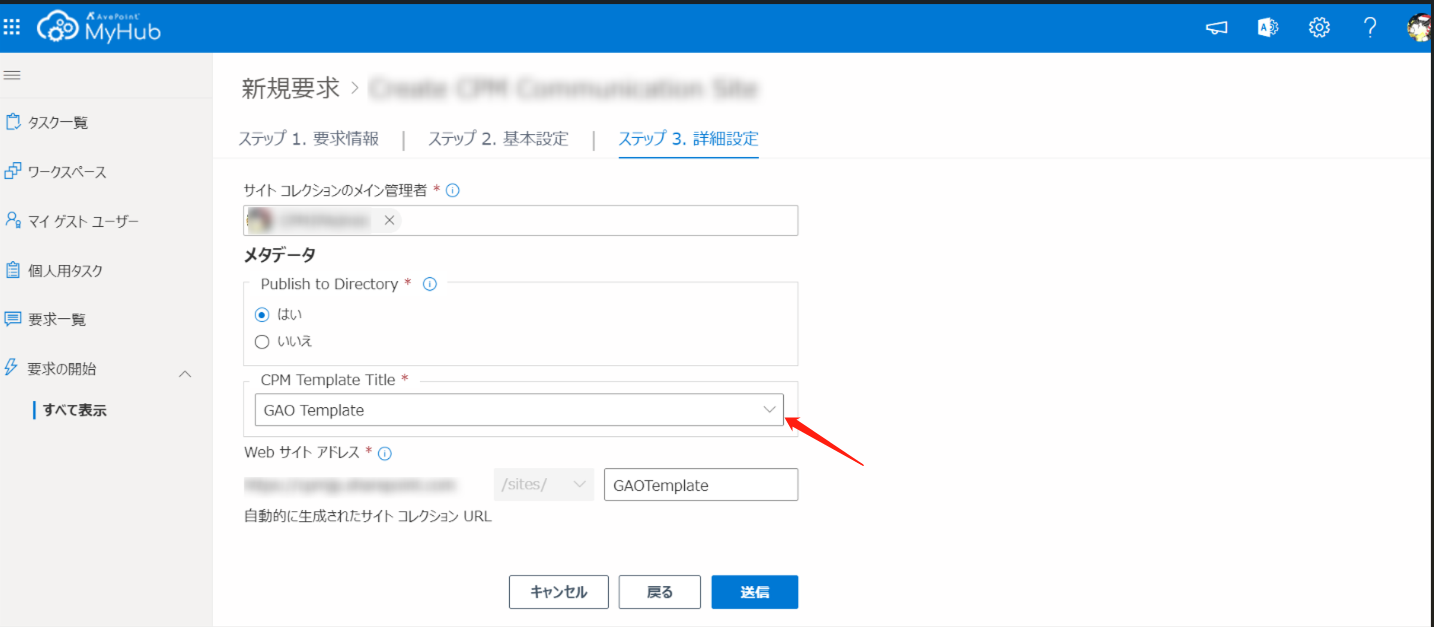
管理者としてサービスを作成する方法の詳細については、AvePoint Cloud Governance 管理者用ガイド を参照してください。ビジネス ユーザーとしてサービス要求を開始する方法の詳細については、AvePoint Cloud Governance ポータル ユーザー用ガイド を参照してください。