Specify Selected Sites via Graph Explorer

    以下の説明を参照し、アプリがアクセスできるサイトを指定します。

    1. Go to , and click the profile icon to sign in.

      Clicking the profile icon.

      ポップアップ ウィンドウが表示されると、[承諾] をクリックします。

      ![Clicking "Accept".](/en/aos/faqs/auto-discovery/what-should-i-do-if-the-sitesfullcontrolall-permission-cannot-be-added-to-my-custom-app/images/image17.png "Clicking "Accept".")

    2. 以下の説明を参照して、提供したキーワードと一致するサイトを検索します。

      1. From the left navigation, click search for a SharePoint site by keyword.

        ![Clicking "search for a SharePoint site by keyword".](/en/aos/faqs/auto-discovery/what-should-i-do-if-the-sitesfullcontrolall-permission-cannot-be-added-to-my-custom-app/images/image18.png "Clicking "search for a SharePoint site by keyword".")

      2. Modify permissions タブで、Sites.Read.All または Sites.ReadWrite.All 権限が付与されていることを確認します。****付与されていない場合、[Consent] をクリックして権限を付与します。

        ![Configuring permissions under the "Modify permissions" tab.](/en/aos/faqs/auto-discovery/what-should-i-do-if-the-sitesfullcontrolall-permission-cannot-be-added-to-my-custom-app/images/image19.png "Configuring permissions under the "Modify permissions" tab.")

      3. Replace the text after search= with the desired site name. 例として以下のスクリーンショットを参照してください。

        An example of specifying a site name.

      4. [Run query] をクリックします。****応答結果を確認して、以下のスクリーンショットの赤いボックスの位置にあるサイト ID 値をメモします。サイト ID 値は以下の手順で使用されます。
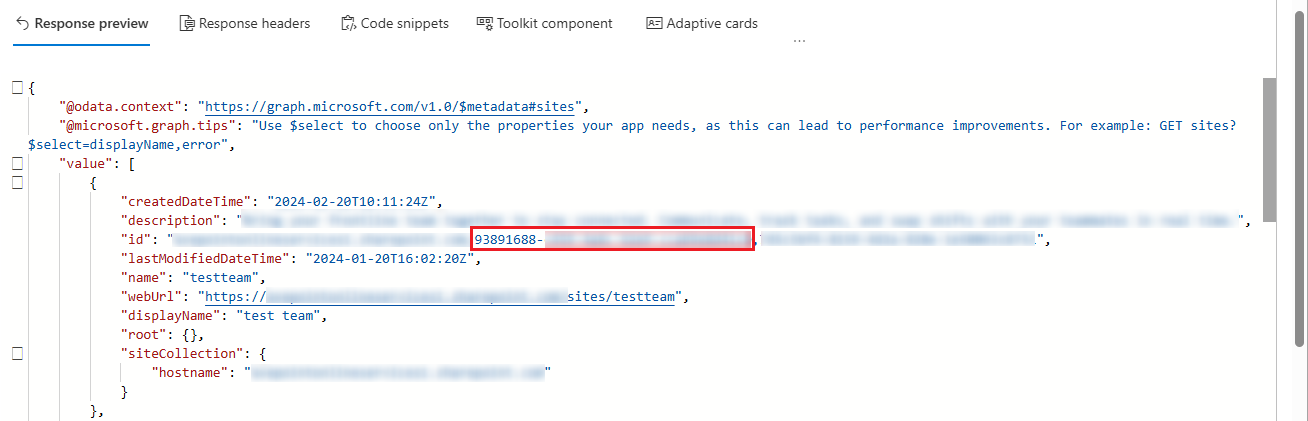
        A sample of the site ID value in a response.

    3. 特定のサイトにアクセスするには、以下の API 呼び出しを使用して、アプリに対して FullControl 権限を付与します。

      1. リクエスト方法を POST に変更します。

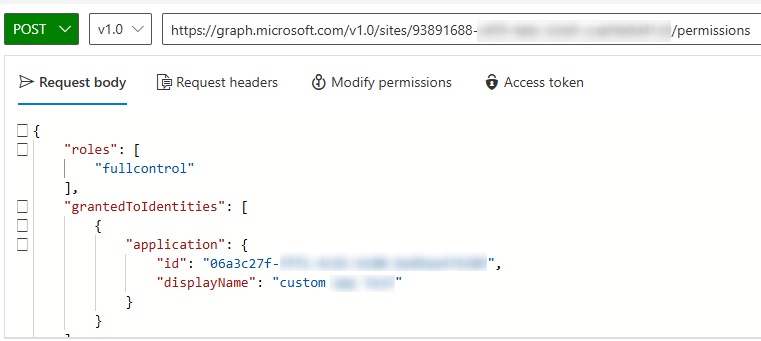
      2. Enter the following URL in the address bar, replacing {site-id} with the site ID value obtained in the previous step.

        https://graph.microsoft.com/v1.0/sites/{site-id}/permissions

        A sample of the POST request for a specific site.

      3. In the Request body text box, enter the following JSON, replacing {app-id} and {app-name} with the custom app's client ID and display name.

        {

        "roles": [ "fullcontrol" ], "grantedToIdentities": [ { "application": { "id": "{app-id}", "displayName": "{app-name}" } } ]

        }

        A sample of the Request body content.

      4. Modify permissions タブで、Sites.FullControl.All 権限が付与されていることを確認します。付与されていない場合、[Consent] をクリックして権限を付与します。

        ![Configuring permissions under the "Modify permissions" tab.](/en/aos/faqs/auto-discovery/what-should-i-do-if-the-sitesfullcontrolall-permission-cannot-be-added-to-my-custom-app/images/image24.png "Configuring permissions under the "Modify permissions" tab.")

      5. [Run query] をクリックして、リクエストを実行します。正常に実行すると、特定のサイトにおける操作が完了します。
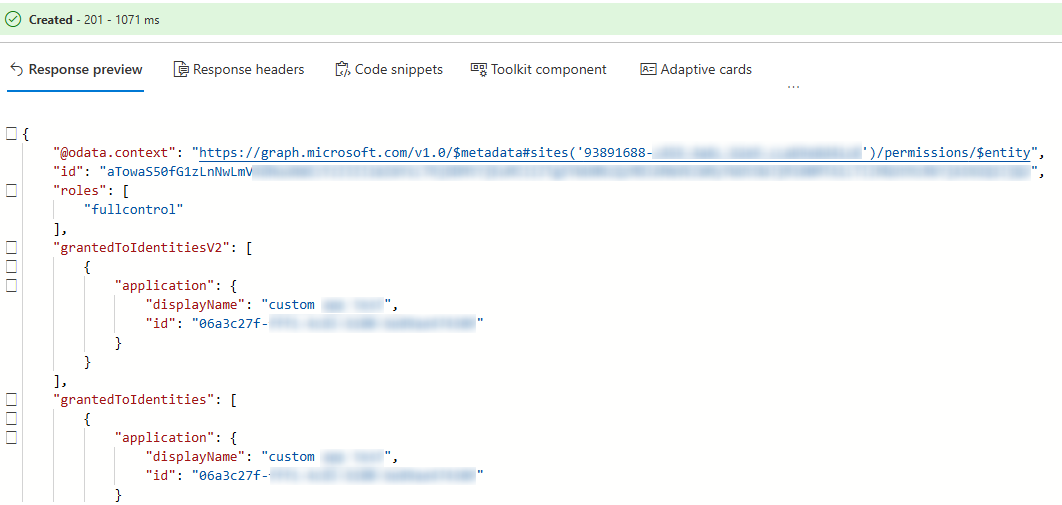
        A sample of a successful execute.