
Home > アプリ プロファイルの管理 > カスタム アプリの作成 > カスタム アプリへの同意 > カスタム Google アプリへの同意
Export to PDFカスタム Google アプリへの同意
カスタム Google アプリに同意する際に、以下の設定を完了してください。
-
アプリ プロファイル名 – プロファイルの名前を入力します。
-
Admin account – Enter the name of the Admin account that has the required privileges/roles. 各機能に応じて異なる必要な権限 / ロールについては、以下の表を参照してください。追加の詳細については、下記の 管理者ロールおよび権限の管理**** セクションを参照してください。
| サービス | 機能 / モジュール | Admin account permissions |
|---|---|---|
| Cloud Backup for Google Workspace | ユーザー サービスの保護 (Gmail、ドライブ、カレンダー、連絡先、チャットを含む) | 管理者 API 権限: ユーザー > 読み取り |
| Cloud Backup for Google Workspace | 共有ドライブの保護 | 管理者コンソールの権限: ドライブとドキュメント > 設定**** |
| Cloud Backup for Google Workspace | Google Vault の保護 | Admin console privileges:Google Vault >View All MattersGoogle Vault >Manage ExportsGoogle Vault > Manage Holds |
| Cloud Backup for Google Workspace | Google Classroom の保護 | 特権管理者 |
| Cloud Backup for Google Workspace | Google ディレクトリの保護 | 管理者コンソールの権限: Security Center > This user has full administrative rights for Security Center > Audit and Investigation > ViewAdmin API privileges:Groups > Create, Read, and UpdateUsers > Create, Read, and Update Custom Attributes |
| Fly | Gmail 移行 | Admin API privileges:Users > ReadGroups > ReadAdmin console privileges:Calendar > All Settings > Buildings and Resources > Room InsightsReportsMake changes to events permission to the calendar, or assign the Super Admin role to the Admin account. See more details in the Fly user guide. |
| Fly | Google ドライブ移行 | Admin console privileges:Users > ReadDrive and Docs > SettingsReportsContent manager of shared drives See more details in the Fly user guide. |
| Insights | すべての Google Workspace 機能 | 特権管理者 |
| Opus | すべての Google Workspace 機能 | 特権管理者、以下の権限が割り当てられているカスタム ロール Admin API privileges: Users > ReadDomain ManagementAdmin console privileges:Drive and Docs > SettingsReportsData Classification > Manage Labels |
-
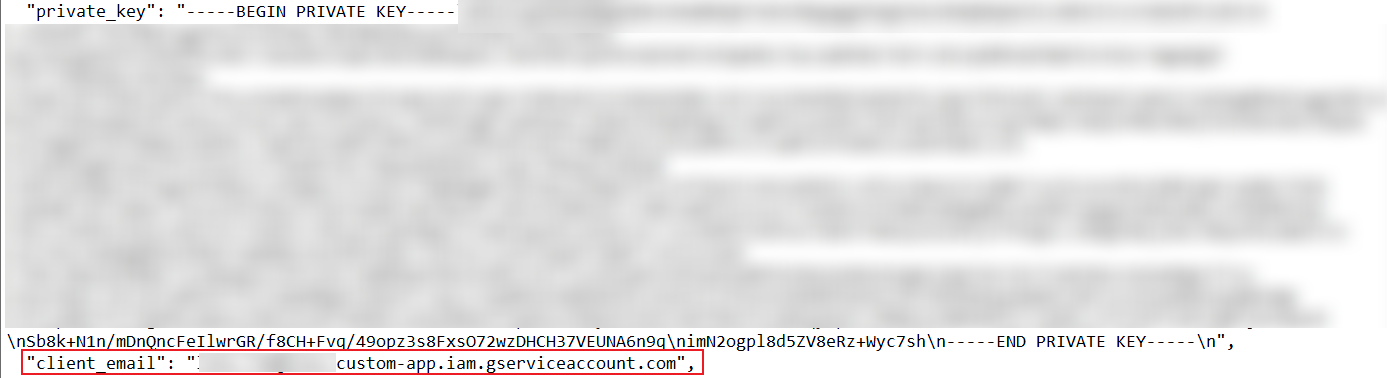
Google サービス アカウント**** – サービス アカウントのメール アドレスを入力します。
*Note: メール アドレスは、ダウンロードした秘密キー ファイル内の client_email 値から取得できます。詳細については、サービス アカウントの作成**** を参照しください。
-
プライベート キー – プライベート キーを入力します。
*Note: Make sure the private key starts with -----BEGIN PRIVATE KEY----- prefix and ends with the \n-----END PRIVATE KEY-----\n suffix.
管理者ロールおよび権限の管理
管理者アカウントのロールおよび権限を管理するには、以下の説明を参照してください。
*Note: ロールおよび権限を管理するには、ユーザーは 特権管理者 ロールを持っている必要があります。
-
Go to the Google .
-
ユーザー セクションの [管理]**** をクリックします。
-
ロールを割り当てるユーザーをクリックします。ユーザーの詳細 ページが表示されます。
-
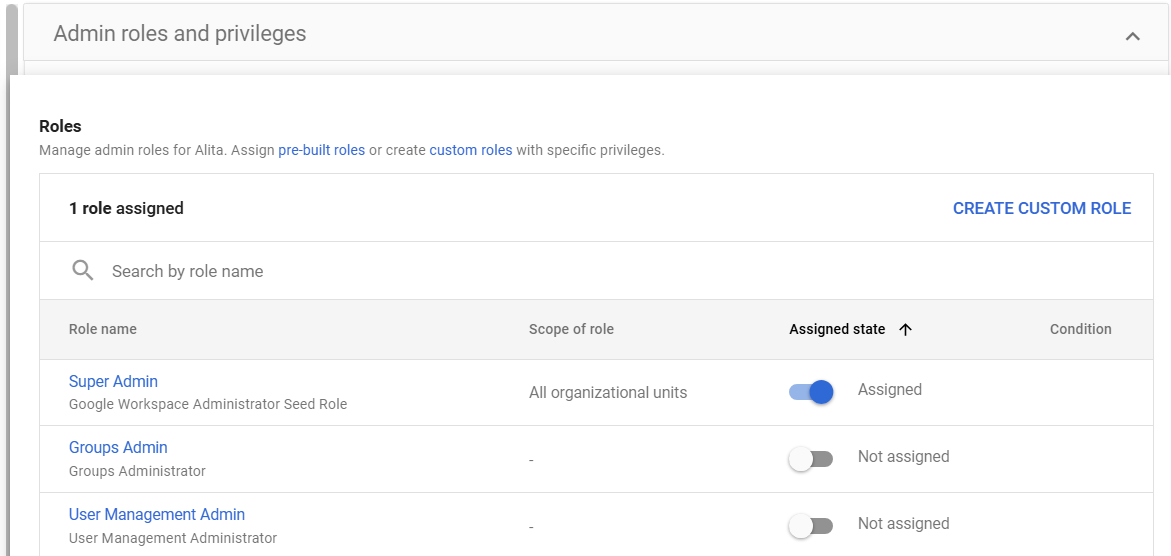
管理者ロールと権限 セクションで、展開 (
 ) ボタンをクリックします。
 -
If you want to assign a pre-built role such as Super Admin or User Management Admin to the account, toggle the switch to Assigned in the Assigned state column.
-
[保存] をクリックします。
-
必要な権限を持つカスタム ロールを作成する場合、[カスタムロールを作成] をクリックします。
-
[新しいロールを作成] をクリックします。

-
ロールの作成 ページが表示されます。ロール名前を入力して、[続行] をクリックします。

-
権限を選択 セクションで、上記の 管理者アカウント テーブルを参照して必要な権限を選択します。
-
[続行] をクリックします。
-
[ロールの作成] をクリックします。カスタム ロールが作成されました。
-
カスタム ロールを管理者アカウントに割り当てることができます。