データ回復
このダッシュボードでは、Microsoft 365 管理者にデータ回復を監視するための統合ツールを提供します。ストレージの使用量、バックアップ データ、関連コストを追跡することで、ストレージの使用量を最適化して、データ保護を強化するための実用的な分析を提供します。Microsoft 365 サービス全体のデータ管理の問題に対応することで、ダッシュボードは IT 管理者に対し、デジタル ワークスペースにおけるデータ管理の効率化とコスト削減を実現する支援を提供します。
データ回復**** には以下のレポートが含まれています。
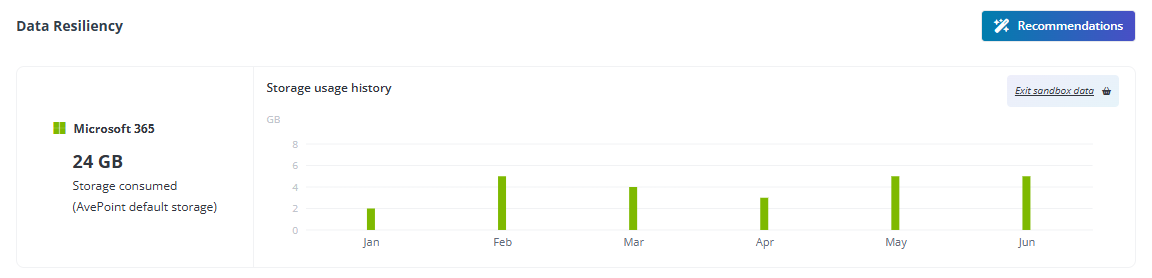
- The value of consumed storage and the **Storage usage history** bar chart.
- **Workspace overview** – Monitor the status of your organization’s protected workspaces.

このレポートの完全機能を使用するには、Cloud Backup for Microsoft 365 サブスクリプションが必要です。
推奨
データ回復 コマンド センターを最大限に活用するために、以下の推奨事項を参照し、必要な構成を完了してください。
- **Enable Backup Express** – Backup Express is tailored for large data volumes, leveraging Microsoft 365 backup storage to achieve recovery speeds of up to 3 Terabytes per hour. 1 時間ごとに複数の復旧ポイントを備えた高速バックアップを提供します。Backup Express は、SharePoint Online、OneDrive、Exchange Online に対応しており、Microsoft セキュリティ境界内のストレージに対して 1 年間の保持を提供しています。 You can click the link () to visit the website and learn more details.
- **Optimize backup frequency for low-impact data** – Prioritize backup resources for critical data by reducing backup frequency or excluding low-impact data. これにより、ストレージの使用量を最小限に抑え、バックアップの効率が向上します。 You can click the link () to access Cloud Backup for Microsoft 365 and set up configurations.
