
Home > アプリ プロファイルの管理 > Exchange 管理者ロールのアプリへの割り当て方法
Export to PDFExchange 管理者ロールのアプリへの割り当て方法
If you create app profiles for the following apps and you want to manage Exchange mailboxes and settings / Security and distribution group objects / Microsoft 365 Defender settings, you need to go to the Microsoft Entra admin center (or Microsoft Azure portal) to assign the Exchange Administrator role to the apps.
| App profile type (in AOS) | App profile type (in AOS) | App name(in Microsoft Entra ID) |
|---|---|---|
| クラシック モード | Microsoft 365 (すべての権限) | AvePoint Online Services Administration for Microsoft365 |
| モダン モード | Cloud Backup for Microsoft 365 (すべての権限) | AvePoint Cloud Backup for Microsoft365 (すべての権限) |
| モダン モード | Cloud Backup for Microsoft 365 (Exchange 権限) | AvePoint Cloud Backup for Microsoft365 (Exchange 権限) |
| モダン モード | EnPower for Microsoft 365 | AvePoint EnPower for Microsoft365 |
| モダン モード | EnPower for Teams Calling | AvePoint EnPower Teams Calling |
| モダン モード | Policies for Microsoft 365 | AvePoint Policies for Microsoft365 |
| モダン モード | Cloud Governance for Exchange | AvePoint Cloud Governance Exchange アプリ |
| モダン モード | Fly | AvePoint Fly |
| モダン モード | Opus | AvePoint Opus |
| モダン モード | Cloud Management Services for Microsoft 365*Note: This app requires the Exchange Administrator role only when your organization uses the Classic DocAve Backup service or uses the Cloud Archiving service together with the AvePoint Opus service for Exchange management. | AvePoint Cloud Management Service for Microsoft365 |
| カスタム モード | Cloud Backup for Microsoft 365、Cloud Management、Cloud Governance、Fly、EnPower、Opus、Policies for Microsoft 365のカスタム Azure アプリ | [custom app name]You can also get its application ID in the app profile detail page. |
以下のことに注意してください。
To assign the Exchange Administrator role to the app, refer to the following steps:
-
Microsoft Entra 管理センター (または Microsoft Azure ポータル) にログインし、Microsoft Entra ID に移動します。
-
Click Roles & admins (or Roles and administrators) in the left pane.
-
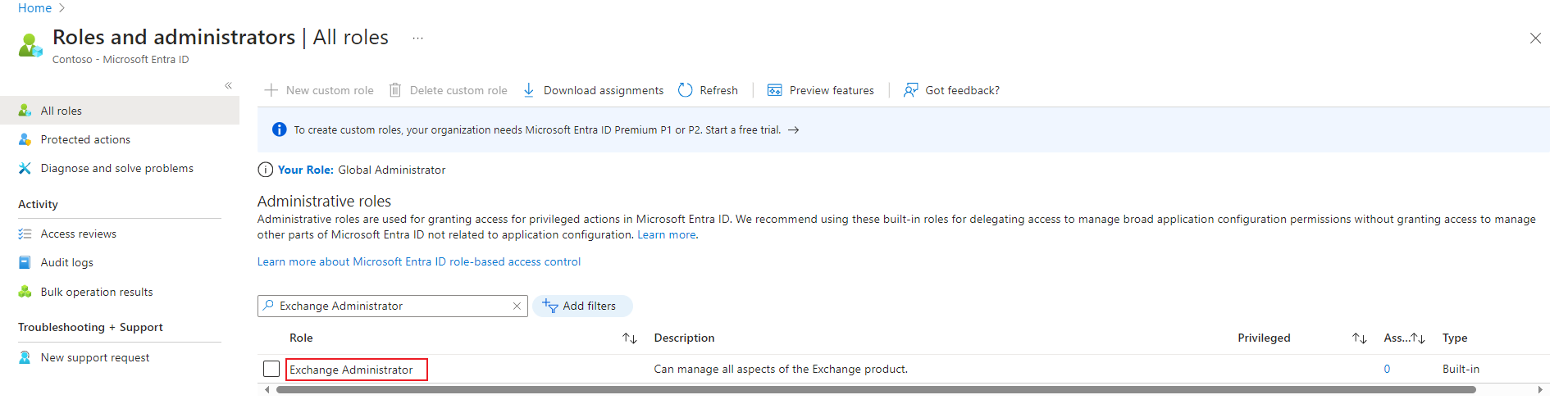
On the Roles and administrators page, search the Exchange Administrator role, and then click Exchange Administrator.
-
開いた 割り当て ページで、[割り当ての追加] をクリックします。
-
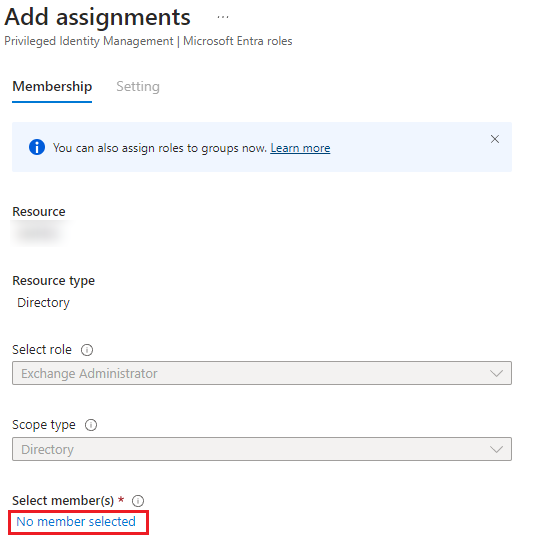
割り当て****の追加 ページで、ボタンをクリックしてメンバーを選択します。
-
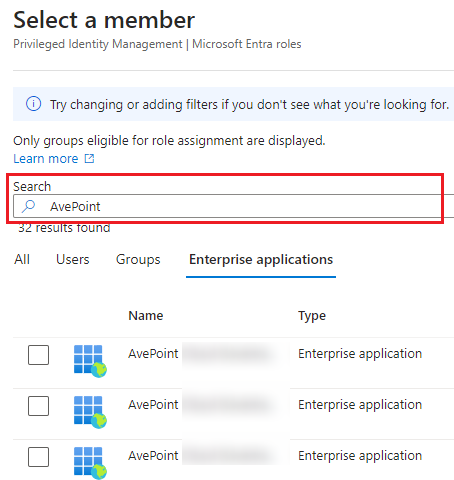
検索ボックスにアプリ名 (またはアプリケーション ID) を入力し、ロールを割り当てるアプリを検索します。
*Note: アプリケーション ID 情報は、AvePoint Online Services > 管理 > アプリ管理 の アプリ プロファイルの詳細 ページに表示されます。
-
アプリを選択して、[追加] をクリックしてロールを割り当てます。割り当てられたロールは 30 分間以内に反映されることに注意してください。