
Home > Command Centers > Custom Dashboards > Create New Dashboard
Download this articleCreate New Dashboard
Before you create a new dashboard and customize widgets on a dashboard to meet your organization’s demands, ensure that you have subscriptions and permissions required by the corresponding widgets. Refer to the All Widgets section to see the services required by various widgets.
To create a new dashboard, follow the steps below:
-
Click Create new dashboard.
-
Provide value for Dashboard name and click Next.
-
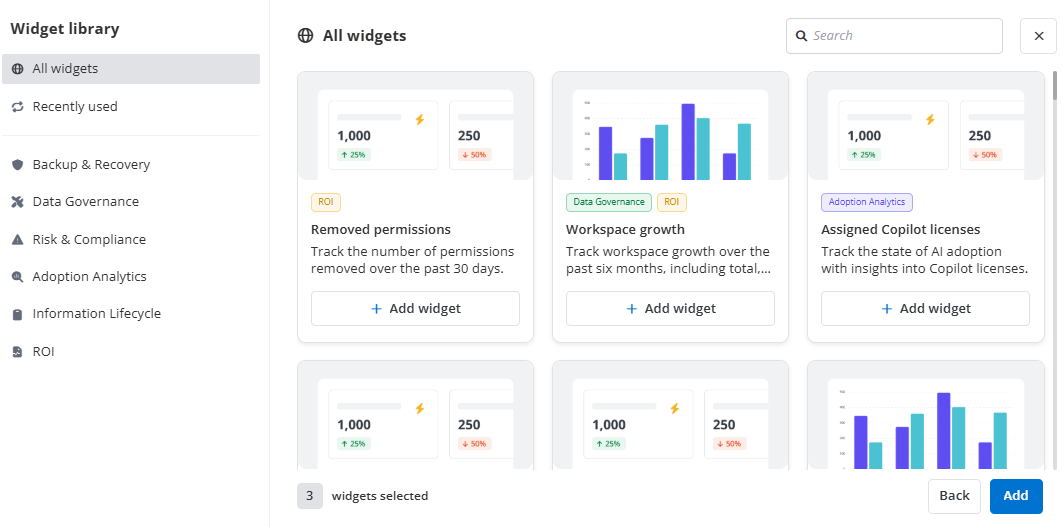
The Widget library window appears. You can perform the following actions:
-
On the left navigation pane, the All widgets option is selected by default. You can also click Recently used or click a category to filter widgets.
-
Enter keywords in the search box to search for a widget by title.
-
To add widgets to the dashboard, click Add widget under each desired widget.
-
Click Remove widget to remove a widget from the dashboard.
-
-
Click Add at the bottom of the Widget library window. The successful message prompts once the dashboard is created.