Home > About MyHub > MyHub for Microsoft 365
Download this articleMyHub for Microsoft 365
MyHub centralizes your Microsoft 365 workspaces for your convenient and efficient management, including Microsoft 365 Groups, Microsoft Teams, Viva Engage Communities, and SharePoint Sites.
You can use MyHub in the web portal and the MyHub app in Microsoft Teams.
MyHub supports the following languages: English, Japanese, German, Chinese, French, Italian, Spanish, Portuguese, Korean, and Dutch.
-
The display language of your MyHub portal follows your browser’s language. If your browser language is not one of the supported languages listed above, the display language of your MyHub portal will be English.
-
The display language of your MyHub Teams app follows the display language of your Microsoft Teams client.
Microsoft Teams Client Language MyHub Language Language Name in English Deutsch (Deutschland)
Deutsch (Liechtenstein)
Deutsch (Luxemburg)
Deutsch (Schweiz)
Deutsch (Österreich)Deutsch (Deutschland) German (Germany) Español (Argentina)
Español (Bolivia)
Español (Chile)
Español (Colombia)
Español (Costa Rica)
Español (Ecuador)
Español (El Salvador)
Español (España, alfabetización internacional)
Español (Estados Unidos)
Español (Guatemala)
Español (Honduras)
Español (México)
Español (Nicaragua)
Español (Panamá)
Español (Paraguay)
Español (Perú)
Español (Puerto Rico)
Español (Republica Bolivariana de Venezuela)
Español (República Dominicana)
Español (Uruguay)Español (España, alfabetización internacional) Spanish (Spain, international alphabet) Français (Belgique)
Français (Canada)
Français (France)
Français (Luxembourg)
Français (Principauté de Monaco)
Français (Suisse)Français (France) French (France) Italiano (Italia)
Italiano (Svizzera)Italiano (Italia) Italian (Italy) Português (Brasil)
Português (Portugal)Português (Brasil) Portuguese (Brazil) Others English (United States) English (United States) 日本語 (日本) 日本語 (日本) Japanese (Japan) 中文 (中国)
中文 (新加坡)简体中文 (中国) Simplified Chinese (China) 한국어 (대한민국) 한국어 (대한민국) Korean (South Korea) Nederlands (België)
Nederlands (Nederland)Nederlands (Nederland) Dutch (Netherlands)
This guide details how to access MyHub and how to manage your Microsoft 365 workspaces in MyHub.
MyHub Versions: Insider and Production
There are two versions of MyHub: a version for preview features and a version for generally available features.
The MyHub Insider program was created for users who want to see and test new product features before they are generally available in your production tenant. If your organization has registered for the MyHub Insider program, you will be able to use the Microsoft 365 test tenant in the Insider environment.
The production version has three environments: an environment for commercial use, an environment available on Microsoft’s Cloud Platform for the U.S. Government, and an environment for Microsoft 365 US Government GCC High.
All versions and environments are covered in this guide. The table below lists the differences:
| MyHub Commercial Production Environment | MyHub US Government Production Environment Microsoft 365 Version: Global Microsoft 365 or Microsoft 365 US Government GCC | MyHub US Government Production Environment Microsoft 365 Version: Microsoft 365 US Government GCC High | MyHub Insider Environment | |
|---|---|---|---|---|
| Sign-in Address | https://myhub.avepointonlineservices.com | https://myhub-gov.avepointonlineservices.com | https://myhub.gov.avepointonlineservices.com | https://myhub-insider.avepointonlineservices.com |
| Sign-in Method | Microsoft 365 account | Microsoft 365 account | Microsoft 365 account | Microsoft 365 account |
| MyHub Teams App | Get the MyHub app from the Microsoft Teams app store. | Get the MyHub for AOS-US app from the Microsoft Teams app store. | Your administrator can configure the app. | Your administrator can configure the app. |
Supported Browsers
The following table lists the browsers supported by MyHub:
| Browser | Version |
|---|---|
| Google Chrome* | The latest version |
| Mozilla Firefox | The latest version |
| Microsoft Edge based on Chromium | The latest version |
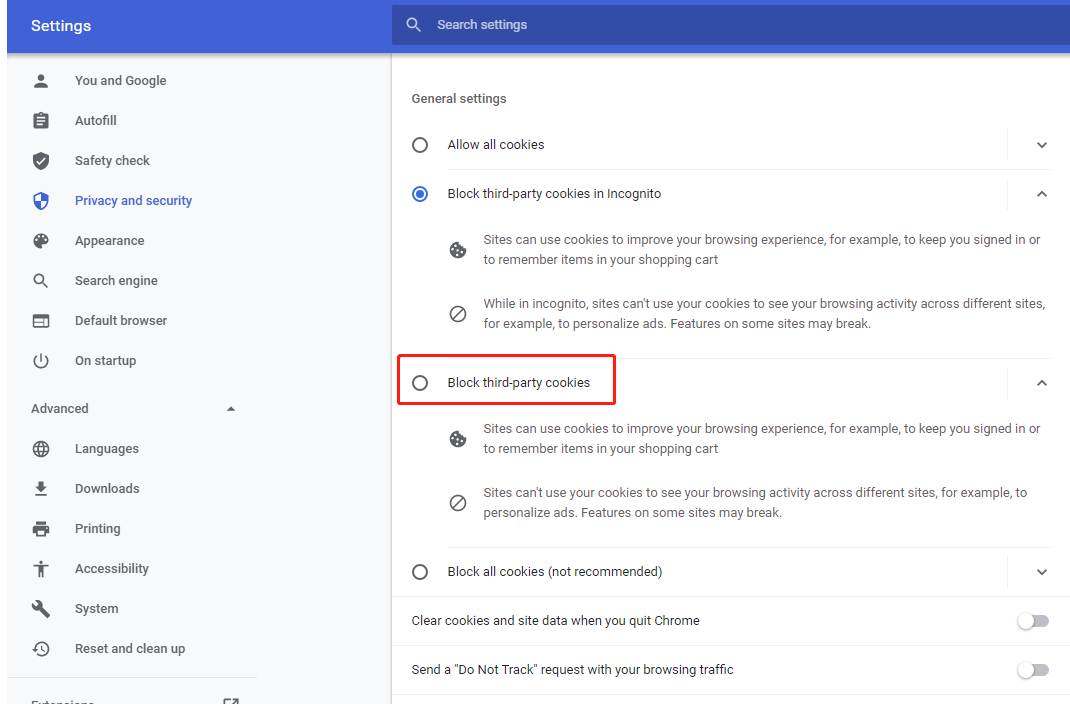
If you are using the Google Chrome browser to access MyHub, make sure the Block third-party cookies option is disabled in Settings > Privacy and security in Chrome.