
Home > Security Control
Download this articleSecurity Control
Administrator’s security control features can be accessed on the Security tab.
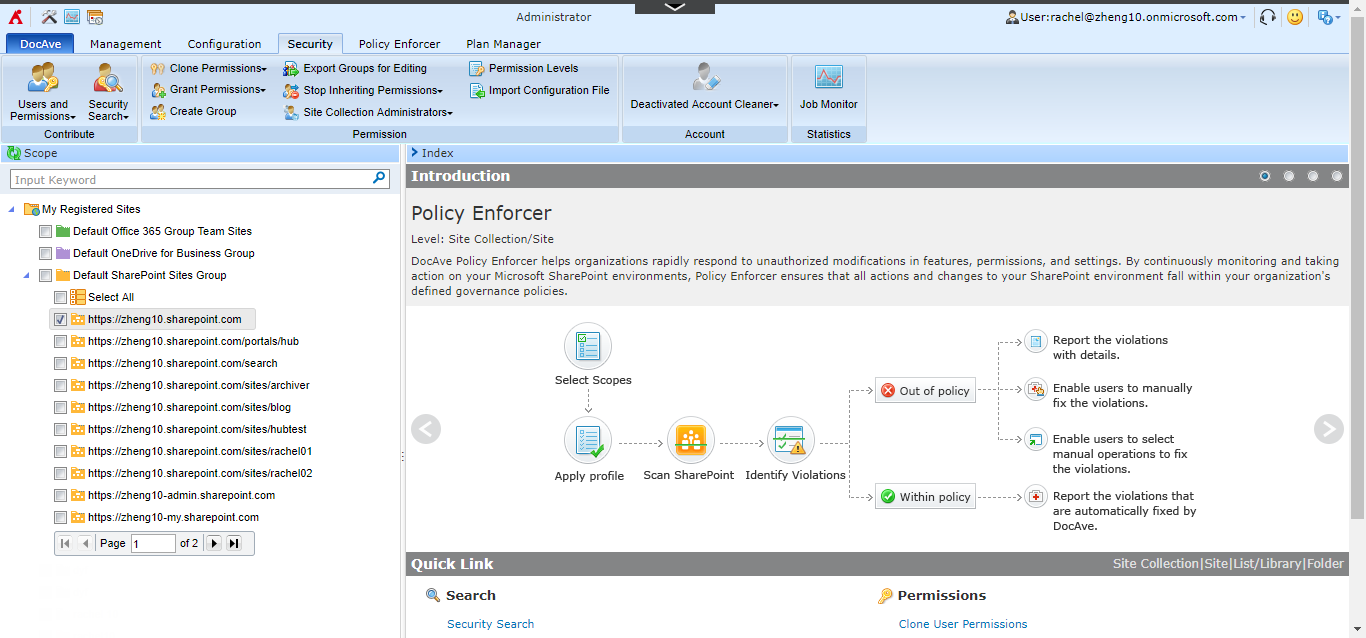
The following tables illustrate all security control features at each object level under the Security tab.
Level - Sites Container
| Feature | Description |
|---|---|
| Security Search | This feature allows you to search for specific permissions within the selected scope. |
| Deactivated Account Cleaner | This feature allows you to remove deactivated and non-existent AD accounts from your SharePoint Online environment and transfer their permissions to other available users using either Plan Mode or Scan Mode. |
Level - Site Collection
| Feature | Description |
|---|---|
| Users and Permissions | This feature allows you to view a list of user permissions for people and groups or a list of site collection permissions. |
| Security Search | This feature allows you to search for specific permissions within the selected scope. |
| Clone Permissions | This feature allows you to copy a user’s or group’s permissions to one or more specified users/groups. |
| Grant Permissions | This feature allows you to grant permissions or temporary permissions, and search for temporary permissions. |
| Create Group | This feature allows you to create SharePoint groups for the selected site collection. |
| Export Groups for Editing | This feature allows you to export the SharePoint group and user information of the selected site collections for batch setting changes. Currently, we only support adding or deleting groups or members. The following group settings and membership requests are not supported yet: View Membership (Who can view the membership of the group?), Edit Membership (Who can edit the membership of the group?), Allow Requests to Join/Leave (Allow requests to join/leave this group?), Auto-accept Requests (Auto-accept requests?), and Membership Request Email Address (Send membership requests to the following email address). |
| Stop Inheriting Permissions | This feature allows you to break inheritance for sub-nodes. |
| Site Collection Administrators | This feature allows you to view and manage members of the Site Collection Administrators group of the selected site collection. |
| Permission Levels | This feature allows you to view and manage permission levels for the selected site collection. |
| Import Configuration File | This feature allows you to import a pre-defined configuration file to change security settings. To easily edit permissions with a configuration file, we recommend you use this feature together with the Export for Editing or Export Groups for Editing feature. In details, when specifying the configuration file type: If you select Edit User Permission, you can import the file generated by security search. After a security search job finishes, you can click Export for Editing to download the permission configuration file for editing. If you select Edit Group, you can import the file downloaded by Export Groups for Editing. |
| Deactivated Account Cleaner | This feature allows you to remove deactivated and non-existent AD accounts from your SharePoint Online environment and transfer their permissions to other available users using either Plan Mode or Scan Mode. |
Level - Site
| Feature | Description |
|---|---|
| Users and Permissions | This feature allows you to view a list of user permissions for people and groups or a list of site permissions. |
| Security Search | This feature allows you to search for specific permissions within the selected scope. |
| Clone Permissions | This feature allows you to copy a user’s or group’s permissions to one or more specified users/groups. |
| Grant Permissions | This feature allows you to grant permissions or temporary permissions, and search for temporary permissions. |
| Create Group | This feature allows you to create SharePoint groups for the selected site. |
| Stop Inheriting Permissions | This feature allows you to break inheritance for sub-nodes. |
| Inherit Permissions | This feature allows you to inherit permissions from the parent node. |
Level - List/Library
| Feature | Description |
|---|---|
| List/Library Permissions | This feature allows you to manage permissions on the selected list/library. |
| Security Search | This feature allows you to search for specific permissions within the selected scope. |
| Clone Permissions | This feature allows you to copy a user’s or group’s permissions to one or more specified users/groups. |
| Grant Permissions | This feature allows you to grant permissions or temporary permissions, and search for temporary permissions. |
| Stop Inheriting Permissions | This feature allows you to break inheritance for the selected nodes or sub-nodes. |
| Inherit Permissions | This feature allows you to inherit permissions from the parent node and push inheritance to sub-nodes. |
Level - Folder
| Feature | Description |
|---|---|
| Folder Permissions | This feature allows you to manage permissions on the selected folder. |
| Security Search | This feature allows you to search for specific permissions within the selected scope. |
| Grant Permissions | This feature allows you to grant permissions or temporary permissions, and search for temporary permissions. |
| Stop Inheriting Permissions | This feature allows you to break inheritance for the selected nodes or sub-nodes. |
| Inherit Permissions | This feature allows you to push inheritance to sub-nodes. |
Level - Item
| Feature | Description |
|---|---|
| Item Permissions | This feature allows you to manage permissions on the selected item. |
| Security Search | This feature allows you to search for specific permissions on the selected items. |
| Grant Permissions | This feature allows you to grant permissions or temporary permissions, and search for temporary permissions. |
| Stop Inheriting Permissions | This feature allows you to break inheritance for the selected item. |
You can perform an Advanced Search on the My Registered Sites node or the containers on the data tree to search for the desired site collections via keyword in the URL. To perform the Advanced Search, right-click the node and then click Advanced Search. Configure the search conditions and click Search. To clear the search result on the data tree, right-click the My Registered Sites node or the container, and then click Refresh.
On this page