
Home > tyGraph Power BI Release Notes > tyGraph for Teams Power BI Release Notes > March 2022
Download this articleMarch 2022
This release of tyGraph for Teams includes a few significant new features, including filter and reporting capability on on-premise Active Directory extension attributes as well as new dashboard type report layouts.
-
Dashboard Style Report Layouts
In this release we have applied the more use friendly report layout that is much cleaner and simpler to use. The left hand slicer pane has been removed and all your filtering needs can be accomplished from the Filter pane on the right hand side of the reports.
-
Report Changes
-
File Activity - This report is designed to provide insight into file activity stored in the SharePoint site related to Teams teams.
-
Member Interactions - This report has been removed as it didn't provide valuable insights for the Teams product.
-
-
New Signals
We added a few new signals mainly related to SharePoint file storage and usage.
-
Tables
-
Activity Type – This is a reference table that identifies the types of activities users take in SharePoint, such as File Accessed, File Downloaded, etc.
-
File Object – this is another reference table that identifies file objects in the underlying Teams SharePoint sites.
-
User Extensions – See the section below for details.
-
Dynamic Measures – Specific to the File Activity report. Allows the user to dynamically change the core measure in all visuals on the page.
-
-
Measures
-
Active SharePoint File Variety – counts the unique file types
-
Active SharePoint Files – counts the unique objects
-
Average Sentiment PoP% – a change in how this measure is calculated. Previously we measured the current selected period over the previous period (same number of previous days). This measure now compares the first half of the selected period over the second half of the selected period.
-
Owned Teams – this measure now identifies owned teams over time rather than team ownership as of the last harvest.
-
SharePoint File Activity – total SharePoint activity as it relates to the Team site
-
Unique File Users – number of users that have had SharePoint File Activity
-
Unique Files with Activity – number of files with activity
-
Unique Teams with File Activity – number of teams with file activity
-
User Interactions – removed this measure as it didn't provide valuable insights for the Teams product.
-
-
-
User Extension Attribute Filter
Some customers synchronize their on-premise Active Directory extension attributes with Azure Active Directory using Azure AD Connect using schema extensions. We now can harvest those extensions and display them in our reports. The harvesting feature is turned off by default. If you would like to turn on this feature, please contact us via Help Desk.
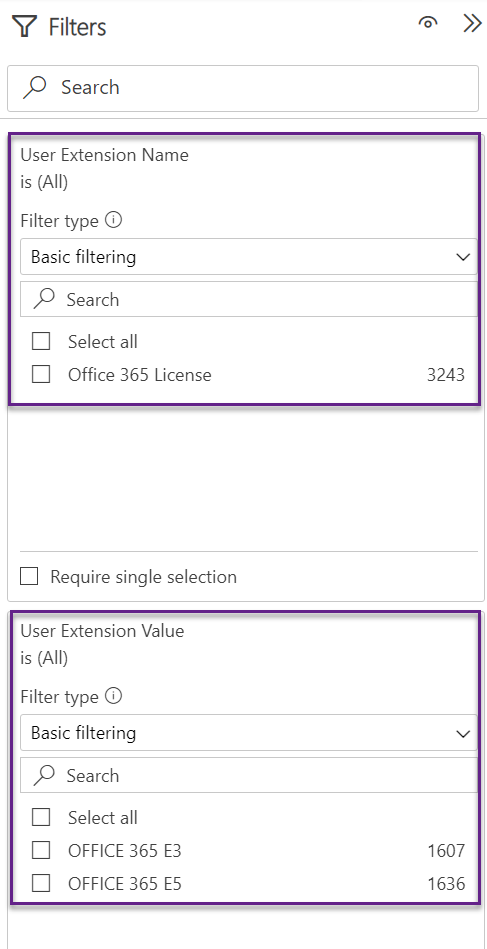
You will notice two new filters in the Filters pane, User Extension Name and User Extension Value, where you will be able to filter on the custom AD extensions.
-
Dataset Parameters
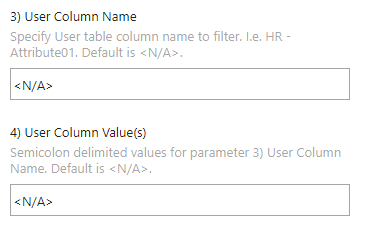
Four new parameters are now available to fine-tune the volume of data being imported into the model. If you notice that your dataset is too large or you simply need to scope the reports down to a particular user audience and timeframe, you can now specify a User Column Name to filter, such as "User Country", then specify a list of semi-colon delimited value(s) into the User Column Value(s) parameter, such as "United States; Canada"
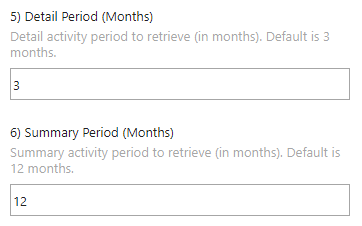
The other new parameters are related to the number of detail and summary months of data to bring in. The following two reports are driven by the Detail Period. All of the other reports are constrained by the Summary Period. The default values are 3 month of detail, and 12 months of summary.
-
Organization Adoption
-
File Activity
-