
Home > tyGraph Power BI Release Notes > tyGraph for SharePoint Power BI Release Notes > January 2022
Download this articleJanuary 2022
This release we focused on solidifying an inventory of All Sites along with adding signals to further categorize them. We also added a few new parameters to the dataset options.
- New Parameters:
In this release, we added 4 new parameters to better fine-tune the data being imported into the report. If you notice that your dataset is too large or you simply need to scope the reports down to a particular user audience and timeframe, you can now specify a User Column Name to filter, such as "User Country", then specify a list of semi-colon delimited value(s) into the User Column Value(s) parameter, such as "United States; Canada"
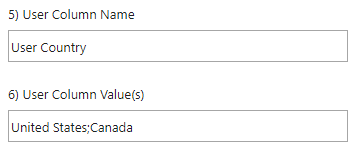
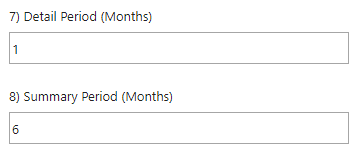
The other new parameters are related to the number of details and summary months of data to bring in. The following three reports are driven by the Summary Period. All of the other reports are constrained by the Detail Period.
The default values are 1 month of detail and 6 months of summary.
- Page View Optimization:
We reduced the query overhead of the Page View calculation and expanded the condition to consider page views against all file types not just .aspx pages. This supports the capturing of page views against a specific page file or redirecting URLs pointing to it. This includes the base URL of a site that redirects to the declared home page.
- New Site Information:
You can now identify sites based on three new attributes. This can aid in compliance, content management, and governance.
- External Detail in All User Attributes:
Sometimes users do not have attributes assigned to them like Country or Business Unit. Previously we identified these users with the text so that you could see we are still counting users just we had no categorization for them in the given attribute.
Now we have added further detail separating External Users as their category. This serves as a good reminder that External users are included in the tyGraph for SharePoint dataset, and you can even have external activity included within visuals. Also, external users will rarely have a Country, Business Unit, or Divisional association (since they're not from your tenant) so we wanted to further distinguish them from internal users that just have no HR attribute.