
Home > Get Started > Required Permissions
Download this articleRequired Permissions
The objects protected by Classic DocAve Backup must be registered through the Auto Discovery of AvePoint Online Service interface. After the objects are registered, the users who have permission to use a Classic DocAve Backup module can fully use its functionality to protect the registered objects.
Refer to the scenarios below for the permissions required by Classic DocAve Backup.
I Want AvePoint Online Services to Automatically Create Apps in My Active Directory
If you want AvePoint Online Services to automatically create apps in your Azure Active Directory, refer to the table below to select the app when you create the app profile in AvePoint Online Services. For more details on configuring app profiles, refer to the Manage App Profiles section in the AvePoint Online Services user guide.
| Mode | App Type |
|---|---|
| Classic mode | Microsoft 365 (All permissions) |
| Modern mode | Cloud Management services for Microsoft 365 |
Refer to the following sections to see the API permissions you need to accept when you authorize the apps:
The Microsoft 365 (SharePoint Online permissions) and Microsoft 365 (Exchange permissions) app profiles are upgraded from the AvePoint Online Services classic UI and they cannot be created in the new AvePoint Online Services interfaces.
I Want to Manually Create an App in My Azure Active Directory
A custom app can replace the automatically created apps for Microsoft 365. The app can be used for SharePoint Online and Exchange Online management.
If you want to manually create an app in your Azure Active Directory, refer to the permissions listed in the table below to add API permissions required by Classic DocAve Backup to the custom app.
| Module | API Name | Permission | Type | Why You Need This |
|---|---|---|---|---|
| Granular Backup and Restore | SharePoint | Sites.FullControl.All (Have full control of all site collections) | Application | Retrieve information of site collections. |
| SharePoint | User.ReadWrite.All (Read and write user profiles) | Application | Retrieve information of Microsoft 365 user profiles related to OneDrive for Business. | |
| SharePoint | TermStore.ReadWrite.All (Read and write managed metadata) | Application | Back up and restore Managed Metadata Service. | |
| Microsoft Graph | Group.Read.All (Read all groups) | Application | Scan Microsoft Group team sites by scanning Microsoft 365 Groups and Microsoft Teams in AvePoint Online Services Auto Discovery. | |
| Exchange Online Backup and Restore | Office 365 Exchange Online | full_access_as_app (Use Exchange Web Services with full access to all mailboxes) | Application | Retrieve information of Exchange Online mailboxes and Microsoft 365 Group mailboxes that are scanned by Auto Discovery. |
| Microsoft Graph | Group.Read.All (Read all groups) | Application | Scan Microsoft Group team sites by scanning Microsoft 365 Groups and Microsoft Teams in AvePoint Online Services Auto Discovery. | |
| Microsoft Graph | Directory.Read.All (Read directory data) | Application | Retrieve your Microsoft 365 tenant information. |
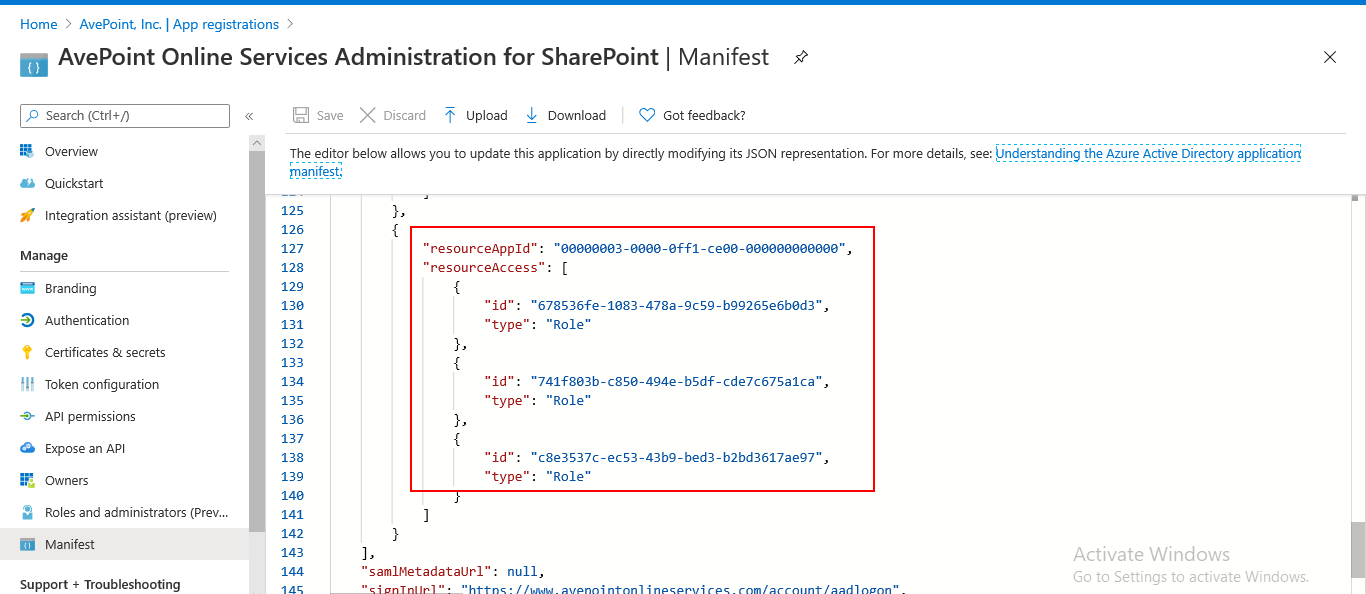
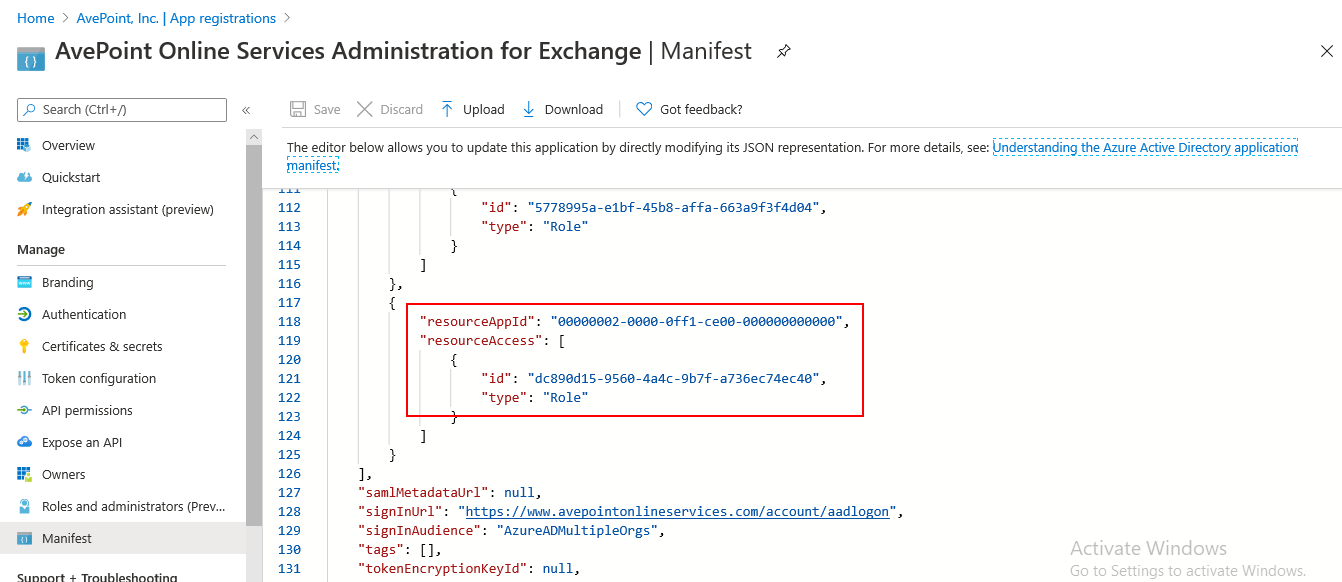
The table below lists the required information for adding SharePoint API permissions or Office 365 Exchange Online API permission to the custom app.
| API | Permission | resourceAppId | id | type |
|---|---|---|---|---|
| SharePoint | Sites.FullControl.All (Have full control of all site collections) | 00000003-0000-0ff1-ce00-000000000000 | 678536fe-1083-478a-9c59-b99265e6b0d3 | Role |
| TermStore.ReadWrite.All (Read and write managed metadata) | c8e3537c-ec53-43b9-bed3-b2bd3617ae97 | Role | ||
| User.ReadWrite.All (Read and write user profiles) | 741f803b-c850-494e-b5df-cde7c675a1ca | Role | ||
| Office 365 Exchange Online | Use Exchange Web Services with full access to all mailboxes | 00000002-0000-0ff1-ce00-000000000000 | dc890d15-9560-4a4c-9b7f-a736ec74ec40 | Role |
I Want to Use a Microsoft 365 Service Account Profile
If you have reviewed Appendix A - SharePoint Online Data Types and Appendix B - Supported and Unsupported Functionalities and decided to use the service account profile authentication method, refer to the table below to prepare a Microsoft 365 account.
For details on the SharePoint Administrator and Exchange Administrator roles, refer to the Microsoft article About admin roles.
| Module | Service Account Role | Additional Permission |
|---|---|---|
| Granular Backup and Restore | SharePoint Administrator | Term Store Administrator* |
| Exchange Online Backup and Restore | Exchange Administrator | SharePoint Administrator* |
- To restore Managed Metadata Service, the Term Store Administrator role is required. AvePoint Online Services Auto Discovery scan jobs will add the service account as the Term Store Administrator automatically.
- To use Exchange Online Backup and Restore to back up and restore Microsoft 365 Group mailbox data, apart from the Exchange Administrator role, the service account must have the SharePoint Administrator role. This is required by AvePoint Online Services Auto Discovery. Microsoft 365 Group team sites can be scanned by scanning Microsoft 365 Groups or Microsoft Teams in AvePoint Online Services.