Home > Common Codes
Download this articleCommon Codes
CO-CannotGetAPP
Issue:
The object failed in the migration with the following error:
- CO-CannotGetAPP
Details:
The source or destination app profile used for the migration does not exist in AvePoint Online Services (AOS).
Recommendations:
Check if the app profile selected in the Fly connection exists in AOS. If it is deleted, you need to create a new one and use the new app profile in the connection. Then, rerun the migration job.
CO-CannotGetDelegateApp
Issue:
The object failed in the migration with the following error:
- CO-CannotGetDelegateApp
Details:
The source or destination delegated app profile used for the migration does not exist in AvePoint Online Services.
Recommendations:
Check if the delegated app profile selected in the Fly connection exists in AOS. If it is deleted, you need to create a new one and use the new app profile in the connection. Then, rerun the migration job.
CO-CannotGetSA
Issue:
The object failed in the migration with the following error:
- CO-CannotGetSA
Details:
The source or destination service account used for the migration does not exist in AvePoint Online Services.
Recommendations:
Check if the service account selected in the connection exists in AOS. If it is deleted, you need to create a new one and use the new service account in the Fly connection. Then, rerun the migration job.
CO-ConsentUserUnavailable
Issue:
The object failed in the migration with the following error:
- CO-ConsentUserUnavailable
Details:
The error may occur in the following situations:
-
Situation 1: The username or password of the service account has been changed.
-
Situation 2: The service account has been blocked from signing in.
-
Situation 3: The delegated app profile's consent user has been blocked from signing in.
Recommendations:
For situation 1, update the service account information in AvePoint Online Services and rerun the migration job.
For situations 2 and 3, unblock the service account or consent user in Microsoft 365 admin center and rerun the migration job.
CO-DestinationIsNewerThanSourceWarning
Issue:
The object is skipped in the migration with the following information:
- CO-DestinationIsNewerThanSourceWarning
Details:
You select Overwrite by last modified time conflict resolution in the migration policy to migrate the source object. In addition, there is an object with the same name but different modified time as the source object in the destination, and the modified time of the destination object is later than that of the source file. In this case, the source object will be skipped.
Recommendations:
Choose one of the following options to resolve this issue:
-
If you do not care about this issue, you can ignore the error code in Fly.
-
If you want to migrate the source object, delete the destination object and run a "Retry error objects" migration job to resolve this issue.
-
If you do not want to migrate the source object, you can ignore the error. To ignore this error in later migration jobs, you can add the IgnoredErrorList=CO-DestinationIsNewerThanSourceWarning string to the Customized features section in the migration policy, or ignore the error code in Fly > Settings > Ignored errors.
CO-Errors
Issue:
The object failed in the migration with the following error:
- CO-Errors
Details:
This issue may be caused by a bad network, unsteady API performance, or other unknown errors in the migration.
Recommendations:
If you want to only migrate the error objects, you can rerun a "Retry error objects" migration job. If you want to migrate not only the error objects but also new changes in the source, you can rerun an incremental migration job.
If the error persists, contact Support and provide the migration mapping information and job ID to analyze the error.
CO-MapMultiLabelsByLabelMapping
Issue:
The object failed in the migration with the following error:
- CO-MapMultiLabelsByLabelMapping
Details:
There are multiple sub sensitivity labels with the same display name in the destination.
Recommendations:
Configure a sensitivity label mapping for the source label and destination sublabel, and enter the destination sublabel in the format of parent sensitivity label name/sensitivity label name. Then rerun the migration job.
CO-MatchMultipleGroup
Issue:
The group failed in the migration with the following error:
- CO-MatchMultipleGroup
Details:
There are multiple groups with the same display name/email address prefix as the source group in the destination.
Recommendations:
Configure a user mapping for the group in the migration policy, and rerun the migration job.
CO-MatchMultipleUser
Issue:
The user failed in the migration with the following error:
- CO-MatchMultipleUser
Details:
The error may occur in the following situations:
-
Situation 1: There are multiple users with the same display name/user principal name prefix as the source user in the destination.
-
Situation 2: There are multiple source users with the same display name while migrating shared calendar permissions.
-
Situation 3: The source user is hidden from the source global address list. In this case, Fly cannot retrieve the source user while migrating shared calendar permissions, even if you configure a user mapping using the email address for the user.
Recommendations:
-
For situation 1, configure a user mapping for the user in the migration policy, and rerun the migration job.
-
For situations 2 and 3, navigate to Projects > Project mappings > View migration report > Migration error tab in Fly to view the failed user in the Migration errors section. Configure a user mapping for the user using the name reported in the Migration errors section in the migration policy, and rerun the migration job.
CO-MIPAppLackPermission
Issue:
The object failed in the migration with the following error:
- CO-MIPAppLackPermission
Details:
The destination custom app profile or delegated app profile does not have sufficient permissions to manage sensitivity labels.
Recommendations:
Make sure the app profile has sufficient permissions and rerun the migration job. Refer to Required Permissions for details.
CO-MIPAppLackSuperUserPermission
Issue:
The item failed in the migration with the following error:
- CO-MIPAppLackSuperUserPermission
Details:
The source sensitivity label cannot be removed from the item, or the destination sensitivity label cannot be applied to the migrated item in the destination, since the source/destination app profile does not have sufficient permissions.
Recommendations:
Make sure the source/destination app profile has the following permissions to manage sensitivity labels:
| API | Permission | Type |
|---|---|---|
| Azure Rights Management Services | Content.DelegatedReader | Application |
| Azure Rights Management Services | Content.DelegatedWriter | Application |
| Azure Rights Management Services | Content.SuperUser | Application |
| Azure Rights Management Services | Content.Writer | Application |
| Microsoft Information Protection Sync Service | UnifiedPolicy.Tenant.Read | Application |
Then rerun the migration job.
CO-MIPConsentUserIsNotSuperUser
Issue:
The object failed in the migration with the following error:
- CO-MIPConsentUserIsNotSuperUser
Details:
The consent user of the source or destination delegated app profile does not have the super user role to manage sensitivity labels.
Recommendations:
Assign the super user role to the consent user of the source or destination delegated app profile. Refer to Assign service account as super user for details. Then, rerun the migration job.
CO-MIPDestinationLabelInactive
Issue:
The object failed in the migration with the following error:
- CO-MIPDestinationLabelInactive
Details:
The destination sensitivity label that will be applied to the migrated object in the destination contains sublabels, or is not published to anyone.
Recommendations:
Configure a label mapping to map the source label to a destination label that does not have sublabels and is published to someone, or map the source label to a sublabel in the format of parent sensitivity label name/sensitivity label name. Then, run a "Retry error objects" migration job to resolve this issue.
CO-MIPFailureResponseError
Issue:
The object failed in the migration with the following error:
- CO-MIPFailureResponseError
Details:
A network error occurred while migrating the object with the sensitivity label applied.
Recommendations:
Run an incremental or "Retry error objects" migration job later to resolve this issue. If the error persists, contact Support and provide the migration mapping information and job ID to analyze the error.
CO-MIPIRMServiceNotWork
Issue:
The object failed in the migration with the following error:
- CO-MIPIRMServiceNotWork
Details:
The error may occur in the following situations:
-
Situation 1: The Information Rights Management (IRM) service is unavailable for the destination tenant.
-
Situation 2: The Microsoft Information Protection (MIP) service is deactivated for the destination tenant by executing the Disable-AipService cmdlet via PowerShell.
In these cases, Fly cannot manage the sensitivity label of the object in the destination.
Recommendations:
-
For situation 1, make sure you have turned on the ability to process content in Office online files that have encrypted sensitivity labels applied and are stored in OneDrive and SharePoint for the destination tenant in Microsoft Purview, and sensitivity labels are available in the destination. Then, run an incremental or "Retry error objects" migration job to resolve this issue. If the error persists, contact Support and provide the migration mapping information and job ID to analyze the error.
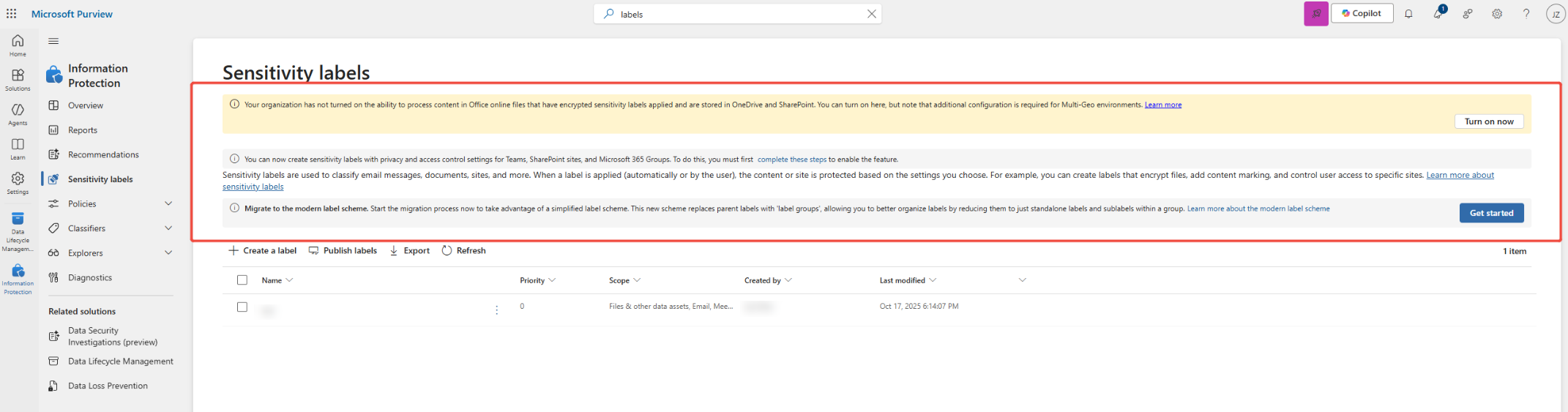
Alert message.
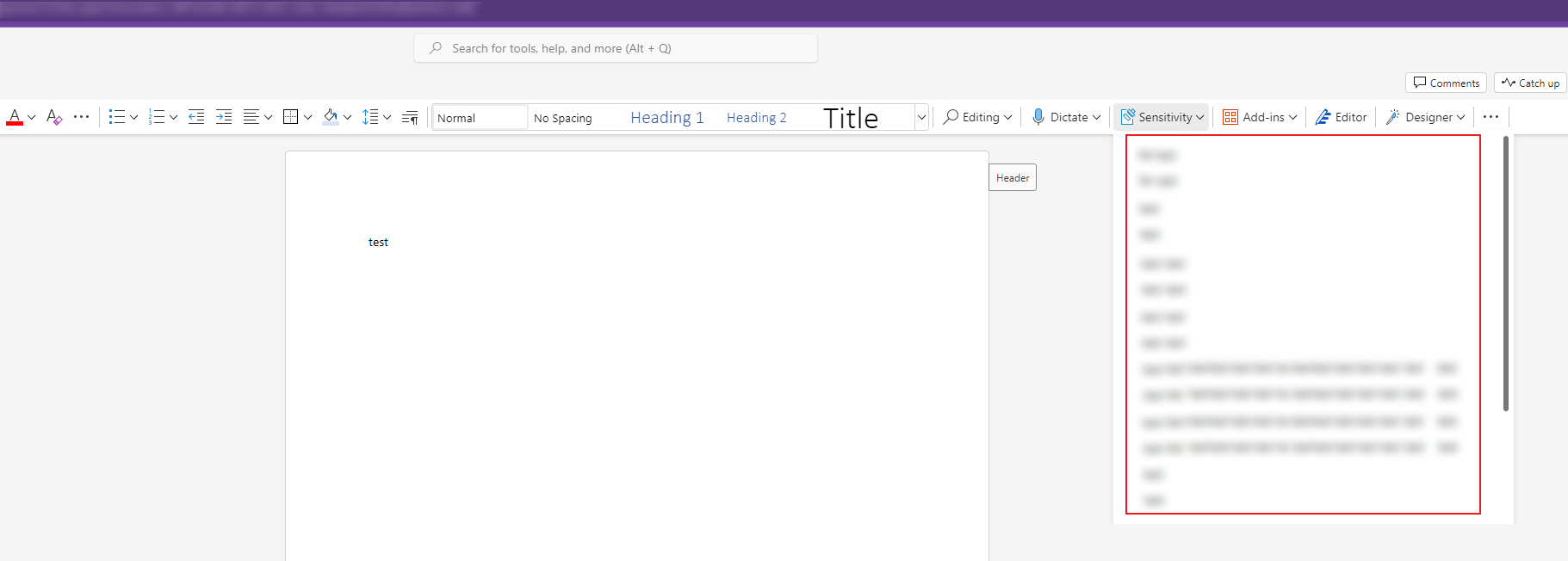
Available sensitivity labels.
-
For situation 2, execute the Enable-AipService cmdlet to activate the Microsoft Information Protection (MIP) service for the destination tenant using PowerShell. Refer to Enable-AipService for details. Then, run an incremental or "Retry error objects" migration job to resolve this issue. If the error persists, contact Support and provide the migration mapping information and job ID to analyze the error.
CO-MIPLabelNotInMapping
Issue:
The object failed in the migration with the following error:
- CO-MIPLabelNotInMapping
Details:
You configure the IsFindLabelWhenNotConfigLabelMapping=false customized feature string and a label mapping for the source object in the migration policy, but the sensitivity label (Label A) applied to the source object does not match the source sensitivity label configured in the selected label mapping. In this case, the migration of all objects with the sensitivity label (Label A) applied will fail.
Recommendations:
Here are two options to resolve this issue:
-
If you configure the label mapping for the purpose, you can ignore this issue.
-
Configure a label mapping for the source sensitivity label and the IsFindLabelWhenNotConfigLabelMapping=true customized feature string in the migration policy, and use the label mapping and customized feature to run an incremental or "Retry error objects" migration job.
CO-MIPNetworkNoConnection
Issue:
The object failed in the migration with the following error:
- CO-MIPNetworkNoConnection
Details:
The sensitivity label failed to be removed from the object since there is no network connection.
Recommendations:
Make sure the network is available and run a "Retry error objects" migration job.
CO-MIPNetworkServiceUnavailable
Issue:
The object failed in the migration with the following error:
- CO-MIPNetworkServiceUnavailable
Details:
Your requests for the MIP service are too frequent and have been throttled by Microsoft 365.
Recommendations:
You can separate the migration jobs of objects with the sensitivity label applied into multiple waves. Then, try running an incremental or a "Retry error objects" migration job later to resolve this issue.
CO-MIPNetworkThrottled
Issue:
The folder/item/file failed in the migration with the following error:
- CO-MIPNetworkThrottled
Details:
The sensitivity label failed to be removed from the object. This is because your requests are too frequent and have been throttled by Microsoft 365.
Recommendations:
Run a "Retry error objects" migration job after a few hours.
CO-MIPNetworkTimeOut
Issue:
The object failed in the migration with the following error:
- CO-MIPNetworkTimeOut
Details:
The sensitivity label failed to be removed from the object since the network connection timed out.
Recommendations:
Run a "Retry error objects" migration job later.
CO-MIPNotSupportDestination21V
Issue:
The object failed in the migration with the following error:
- CO-MIPNotSupportDestination21V
Details:
The error occurs when the source data and tenant and the destination tenant meet all the following conditions:
-
The source is not a 21Vianet tenant and sensitivity labels are applied to the source data.
-
The destination is a 21Vianet tenant.
-
You select to apply destination sensitivity labels in the migration policy.
Recommendations:
Configure a different destination or edit the migration policy to not apply destination labels. Then, run a "Retry error objects" migration job to resolve this issue.
CO-MIPServiceAccountIsNotSuperUser
Issue:
The item failed in the migration with the following error:
- CO-MIPServiceAccountIsNotSuperUser
Details:
The source sensitivity label cannot be removed from the item or the destination sensitivity label cannot be applied to the migrated item in the destination, since the source/destination service account does not have the super user role to manage sensitivity labels.
Recommendations:
Make sure the source/destination service account has the super user role to manage sensitivity labels, and rerun the migration job.
CO-MIPSourceLabelInactive
Issue:
The object failed in the migration with the following error:
- CO-MIPSourceLabelInactive
Details:
The error indicates that the sensitivity label applied to the source object contains sublabels. In this case, the sensitivity label is no longer available in the source and Fly will not migrate the label to the destination.
Recommendations:
Apply a label without sublabels to the object and run a "Retry error objects" migration job to resolve this issue.
CO-MIPStorageUnknownError
Issue:
The object failed in the migration with the following error:
- CO-MIPStorageUnknownError
Details:
An unknown error occurred while processing the sensitivity labels of the object.
Recommendations:
Try running a "Retry error objects" migration job later to resolve this issue. If the error persists, contact Support and provide the migration mapping information and job ID to analyze the error.
CO-NotMatchMipLabel
Issue:
The sensitivity label failed in the migration with the following error:
- CO-NotMatchMipLabel
Details:
The error may occur as follows:
You want to apply a destination sensitivity label to the destination Team by selecting Apply same label in the destination or configuring a label mapping for the Team in the migration policy. However, the destination sensitivity label defined in the migration policy does not exist. In this case, the destination sensitivity label failed to be applied to the Team during the migration.
Recommendations:
Create the label in the destination with a matching name and settings from the source, and rerun the migration job.
CO-SkipForSameModifiedTime
Issue:
The object is skipped in the migration with the following information:
- CO-SkipForSameModifiedTime
Details:
The object is skipped since the modified time of the destination object is the same as that of the source object.
CO-Unknown
Issue:
The object failed in the migration with the following error:
- CO-Unknown
Details:
An unknown error occurs in the migration.
Recommendations:
If you want to only migrate the error objects, you can rerun a "Retry error objects" migration job. If you want to migrate not only the error objects but also new changes in the source, you can rerun an incremental migration job.
If the error persists, contact Support and provide the migration mapping information and job ID to analyze the error.
CO-UserOrGroupNotFound
Issue:
The user or group failed in the migration with the following error:
- CO-UserOrGroupNotFound
Details:
The error indicates that there is no mapped user/group in the destination.
Recommendations:
You can configure user mappings for source users/groups in Settings > Migration policies > Mappings or configure the mapping properties to allow Fly to retrieve the users/groups in the destination.