
Home > Google Drive Related Codes
Download this articleGoogle Drive Related Codes
GD-AdminAccountPermissionInsufficient
Issue:
The migration job failed with the following error:
- GD-AdminAccountPermissionInsufficient
Details:
The admin account in the destination Google app profile does not have sufficient permissions.
Recommendations:
Grant the admin account with sufficient permissions by referring to the user guide of your migration type. Then, rerun the migration job.
GD-AttachmentPermissionCanNotBeMigrated
Issue:
The object failed in the migration with the following error:
- GD-AttachmentPermissionCanNotBeMigrated
Details:
The permissions of attachment cannot be migrated, and you can check the user details in the report for details.
GD-CannotShareSharedDriveWithNonGoogleAccounts
Issue:
The organizer of event failed in the migration with the following error:
- GD-CannotShareSharedDriveWithNonGoogleAccounts
Details:
The destination user is a not a Google user. Google does not support sharing a shared drive with non-Google users.
Recommendations:
Configure the user mapping to map the source user to a Google user. Then, run an incremental or "Retry error objects" migration job to resolve this issue.
GD-ConnectionPermissionInsufficient
Issue:
The migration job failed with the following error:
- GD-ConnectionPermissionInsufficient
Details:
The service account in the destination Google app profile does not have sufficient permissions.
Recommendations:
Grant the service account with sufficient permissions by referring to the user guide. Then, rerun the migration job.
GD-ConnectionResetByPeer
Issue:
The object failed in the migration with the following error:
- GD-ConnectionResetByPeer
Details:
The network connection is unstable and the migration may fail while retrieving a large size of data.
Recommendations:
Check the network connection and run a "Retry error objects" migration job.
GD-ContentLimit
Issue:
The Google Form file failed in the migration with the following error:
- GD-ContentLimit
Details:
The Google Form file size is greater than 10 MB. The source file cannot be downloaded since there is a 10 MB limit on exported Google content. For information on Google API limitations that can affect how Fly migrates files, see here.
Recommendations:
Manually download the source file from your Google Drive and upload it to the destination.
GD-ContentVersionBackupError
Issue:
The object failed in the migration with the following error:
- GD-ContentVersionBackupError
Details:
An error occurred while retrieving the source object versions.
Recommendations:
Navigate to Projects > Project mappings > View migration report > Migration error tab in Fly to check the number and count of error versions. Then, compare the reported number and count of versions in Fly with that of the source object. If the numbers and counts are consistent, try downloading the object from the oldest versions. If any version cannot be downloaded, configure a version filter in the migration policy to exclude these versions from the migration scope. Then, run a “Retry error objects” migration jobs to resolve this issue. If this issue persists, contact Support, and provide the migration mapping information and job ID to analyze the error.
GD-DeleteFileNotFound
Issue:
The file failed in the migration with the following error:
- GD-DeleteFileNotFound
Details:
This error occurs if you have enabled synchronize deletion in the migration, but the files to be deleted cannot be found in the destination.
Recommendations:
Check if the file exists in the destination.
GD-DestinationFileAccessDenied
Issue:
The folder/file failed in the migration with the following error:
- GD-DestinationFileAccessDenied
Details:
The destination has a folder/file with the same source ID as the source folder/file. The destination drive owner does not have the Edit permission to manage the conflicting file.
Recommendations:
Make sure the destination drive owner has the Edit permission. Then, run an "Retry error objects" migration job.
GD-DriveServiceDisabled
Issue:
The folder/file failed in the migration with the following error:
- GD-DriveServiceDisabled
Details:
The destination Drive and Docs service is disabled for users in your organization.
Recommendations:
Enable the Drive and Docs service for users and rerun the migration job.
GD-ExternalUserInviteFailed
Issue:
The object failed in the migration with the following error:
- GD-ExternalUserInviteFailed
Details:
Failed to add external users to the destination object. Users who do not exist in Google can only be added to an object when they receive email notifications. However, Fly does not support sending notifications during the migration.
Recommendations:
You can manually add the relevant external users to the destination object after the migration.
GD-FileNotDownloadable
Issue:
The file failed in the migration with the following error:
- GD-FileNotDownloadable
Details:
The file cannot be downloaded from the source due to Google API limitations.
Recommendations:
Manually download the source file from Google Drive and upload it to the destination.
GD-GoogleAPIBackendError
Issue:
The object failed in the migration with the following error:
- GD-GoogleAPIBackendError
Details:
Google has throttled your request due to frequent requests.
Recommendations:
When throttling occurs in Google, it may take minutes or hours to ease up the throttling. We recommend that you wait a bit before you run a "Retry error objects" migration job after a few hours to resolve this issue.
GD-GoogleApiInternalError
Issue:
The object failed in the migration with the following error:
- GD-GoogleApiInternalError
Details:
An unknown error occurred while migrating the object.
Recommendations:
Try running the migration job later. If the error persists, contact Support and provide the migration mapping information and job ID to analyze the error.
GD-GoogleAPIResponseFailed
Issue:
The object failed in the migration with the following error:
- GD-GoogleAPIResponseFailed
Details:
An unexpected error occurred while processing your request.
Recommendations:
Try running a "Retry error objects" migration job later to resolve this issue. If the error persists, contact Support and provide the migration mapping information and job ID to analyze the error.
GD-GoogleAPITransientError
Issue:
The object failed in the migration with the following error:
- GD-GoogleAPITransientError
Details:
An error occurred while migrating the object.
Recommendations:
Try running a "Retry error objects" migration job later to resolve this issue.
GD-GoogleAPIUnavailableTemporary
Issue:
The object failed in the migration with the following error:
- GD-GoogleAPIUnavailableTemporary
Details:
Your request has been throttled by Google due to frequent requests.
Recommendations:
Try running a "Retry error objects" migration job later to resolve this issue. If the error persists, contact Support and provide the migration mapping information and job ID to analyze the error.
GD-GoogleApiUnknownError
Issue:
The object failed in the migration with the following error:
- GD-GoogleApiUnknownError
Details:
An unknown error occurred while processing your request.
Recommendations:
Try running a "Retry error objects" migration job later to resolve this issue. If the error persists, contact Support and provide the migration mapping information and job ID to analyze the error.
GD-InsufficientLicenseToCreateSharedDrive
Issue:
The object failed in the migration with the following error:
- GD-InsufficientLicenseToCreateSharedDrive
Details:
The Admin account in the destination app profile does not have the Google Workspace Enterprise Standard license to create new shared drives.
Recommendations:
Make sure the account has the Google Workspace Enterprise Standard license, then rerun the migration job.
GD-InvalidSharedLinkPermissionExpirationTime
Issue:
The object’s permission failed in the migration with the following error:
- GD-InvalidSharedLinkPermissionExpirationTime
Details:
This error occurs when the expiration date of the object’s permission is a past date. Google Drive requires that the expiration date must be within one year from now.
Recommendations:
Check the failed permission to update it with a proper value and then run a “Migrate permissions only” job.
GD-ItemAccessDenied
Issue:
The file/folder failed in the migration with the following error:
- GD-ItemAccessDenied
Details:
The Google Drive owner does not have permission to the source file/folder.
Recommendations:
Ask the owner of the source file/folder to share the permission of the file/folder with the Google Drive owner.
GD-ListItemAttachmentUnsuccessful
Issue:
The object failed in the migration with the following error:
- GD-ListItemAttachmentUnsuccessful
Details:
The error indicates that the attachments of the list item are not migrated in the migration.
Recommendations:
Check the attachments and then run a "Retry error objects" migration job to resolve this issue.
GD-MigratePermissionFailed
Issue:
The permission failed in the migration with the following error:
- GD-MigratePermissionFailed
Details:
An error occurred while updating the permissions for the migrated folder/file in the destination.
Recommendations:
Check the security report for detailed information or contact Support for assistance.
GD-MigrationFileNoResponse
Issue:
The object failed in the migration with the following error:
- GD-MigrationFileNoResponse
Details:
No response from Google API.
Recommendations:
You can try again later. If the error persists, contact Support and provide the migration mapping information and job ID to analyze the error.
GD-ModifyInheritPermissionForbidden
Issue:
The user failed in the migration with the following error:
- GD-ModifyInheritPermissionForbidden
Details:
When migrating to the destination shared drive, subfolders/files will inherit the permissions of the parent by default. If the destination user in the user mapping already exists at the destination and has different permissions from the source user, Fly will try to update that permission. However, inherited permissions in the shared drive cannot be updated.
Recommendations:
Here are two options to resolve this issue:
-
The destination user already exists and has inherited the permissions of the parent folder. If the inherited permissions are acceptable, you can ignore this error.
-
Update the user mapping, and replace the current destination user with another user that does not exist in the destination folder. Then, run a "Retry error objects" migration job.
GD-MultipleSameNameSharedDrive
Issue:
The migration job failed with the following error:
- GD-MultipleSameNameSharedDrive
Details:
There are multiple shared drives with the same name in the destination.
Recommendations:
Make sure the destination shared drive to which you want has a unique name.
GD-ODConnectionPermissionInsufficient
Issue:
The migration job failed with the following error:
- GD-ODConnectionPermissionInsufficient
Details:
The service account in the Google app profile does not have sufficient permissions.
Recommendations:
Grant the service account with sufficient permissions by referring to the user guide. Then, rerun the migration job.
GD-GroupPermissionNumLimitExceeded
Issue:
The file failed in the migration with the following error:
- GD-GroupPermissionNumLimitExceeded
Details:
The number of groups added to the file has exceeded the limit of 100.
Recommendations:
If a file with the same source ID exists in the destination and has group permissions, ensure that the total number of existing groups in the destination and the groups mapped from the source does not exceed 100. If the destination does not have a file with the same source ID, update the user mapping to ensure that the groups added to the file do not exceed 100.
Then, rerun the migration job.
GD-PermissionMigrationWarning
Issue:
The folder/file has been migrated but has the following error:
- GD-PermissionMigrationWarning
Details:
The permissions of the folder/file have not been migrated.
Recommendations:
If the destination is a shared drive, the error is generally caused by updates to inherited permissions. If the destination is a user drive, you can check the security report for specific error information or contact Support for assistance.
GD-ParentFolderNotFound
Issue:
The folder/file failed in the migration with the following error:
- GD-ParentFolderNotFound
Details:
The parent folder of the migrated folder/file does not exist.
Recommendations:
Run a "Retry error objects" migration job to resolve this issue.
GD-PermissionNotMapWarning
Issue:
The folder/file has been migrated but has the following error:
- GD-PermissionNotMapWarning
Details:
The source user has not been mapped to the destination Google user configured in the user mapping since the destination Google user is inactive or does not exist.
Recommendations:
Update the user mapping to map the source user to an active Google user. Then, rerun the migration job.
GD-PhotosAPINotEnabled
Issue:
The Google photos failed in the migration with the following error:
- GD-PhotosAPINotEnabled
Details:
The Google Photos Library API has not been enabled.
Recommendations:
Enable the Photos Library API in Google APIs and rerun the migration job. If the Photos Library API has already been enabled, wait a few minutes and rerun the migration job.
GD-ProcessFailed
Issue:
The object failed in the migration with the following error:
- GD-ProcessFailed
Details:
In a migration job with a large size of data, some objects may fail with this error due to API instability.
Recommendations:
You can run a "Retry error objects" or incremental migration job to try to resolve this issue. If the error persists, contact Support and provide the migration mapping information and job ID to analyze the error.
GD-RequestCanceledDueToTimeOut
Issue:
The object failed in the migration with the following error:
- GD-RequestCanceledDueToTimeOut
Details:
The error indicates that the request to the SharePoint server is timed out because the SharePoint server is busy or due to a bad network.
Recommendations:
Try running a "Retry error objects" migration job to resolve this issue. If the error persists after a retry, contact Support and provide the migration mapping information and job ID to analyze the error.
GD-RiskFile
Issue:
The file failed in the migration with the following error:
- GD-RiskFile
Details:
The file is identified as malware or spam and cannot be downloaded.
Recommendations:
Manually download the source file from your Google Drive and upload it to the destination.
GD-SkipMigratePermission
Issue:
The permission is skipped with the following information:
- GD-SkipMigratePermission
Details:
The destination permission level is higher than the source permission level. The destination permission will be kept.
GD-SkipByFolderMigrationPolicy
Issue:
The object is skipped in the migration with the following information:
- GD-SkipByFolderMigrationPolicy
Details:
The object is skipped since the container level conflict resolution configured in the migration policy is Skip.
GD-SkipByFileMigrationPolicy
Issue:
The object is skipped in the migration with the following information:
- GD-SkipByFileMigrationPolicy
Details:
The object is skipped since the content level conflict resolution configured in the migration policy is Skip.
GD-SubItemsNumLimitExceeded
Issue:
The folder failed in the migration with the following error:
- GD-SubItemsNumLimitExceeded
Details:
The number of files and subfolders in the destination shared drive has exceeded Google’s allowed limit of 500000.
Recommendations:
Create multiple project mappings to map the source subfolders to different shared drives. Then, run an incremental or "Retry error objects" migration job to resolve this issue.
GD-TargetUserNeedLogin
Issue:
The permission failed in the migration with the following error:
- GD-TargetUserNeedLogin
Details:
The destination user configured in the user mapping is newly created and has not logged in to Google yet, or the user has not logged in for a long time. In this case, it is not possible to grant the user permissions higher than Viewer.
Recommendations:
Choose one of the following options and then run an incremental or "Retry error objects" migration job to resolve this issue:
-
Log in to Google using the destination user.
-
Replace the destination user in the user mapping with an active user.
-
Configure a permission mapping to map the source permission of the user to Viewer.
GD-TargetDriveHierarchyDepthLimitExceeded
Issue:
The object failed in the migration with the following error:
- GD-TargetDriveHierarchyDepthLimitExceeded
Details:
A user’s shared drive cannot contain more than 100 levels of nested folders. The number of nested folder levels has exceeded the limit. For more details about the limitation, refer to Handle errors.
Recommendations:
Map the source folders to different shared drives to make sure that the number of nested folder levels in each destination shared drive do not exceed 100. Then, run an incremental or "Retry error objects" migration job to resolve this issue.
GD-SharedDriveFileLimitExceeded
Issue:
The file failed in the migration with the following error:
- GD-SharedDriveFileLimitExceeded
Details:
The number of files created in the destination shared drive has exceeded the limit of 500,000.
Recommendations:
You can separate your files into multiple folders and then migrate them to different shared drives.
GD-ShareOutForbidden
Issue:
The migration job failed with the following error:
- GD-ShareOutForbidden
Details:
The source user is mapped to a destination external user, but external users are not allowed to access the files in the destination Google Drive.
Recommendations:
Choose one of the following options and run an incremental or "Retry error objects" migration job to resolve this issue:
-
Configure a user mapping to map the source user to a destination internal user.
-
Enable the Sharing outside of[Tenant] checkbox for the destination shared drive in Drive and Docs > Sharing settings > Sharing options.
GD-UncheckMigrateFilePermission
Issue:
The file failed in the migration with the following error:
- GD-UncheckMigrateFilePermission
Details:
You run a "Migrate permissions only" job, but the Migrate source file permissions option is deselected in the migration policy.
Recommendations:
Select the Migrate source file permissions option in the migration policy, and rerun the "Migrate permissions only" job.
GD-UncheckMigrateFolderPermission
Issue:
The folder failed in the migration with the following error:
- GD-UncheckMigrateFolderPermission
Details:
You run a "Migrate permissions only" job, but the Migrate source folder permissions option is deselected in the migration policy.
Recommendations:
Select the Migrate source folder permissions option in the migration policy, and rerun the "Migrate permissions only" job.
GD-UserEmailAddressInvalid
Issue:
The permission failed in the migration with the following error:
- GD-UserEmailAddressInvalid
Details:
The destination email address is invalid.
Recommendations:
Replace the destination email address in the user mapping with a valid one, and rerun the migration job.
GD-UserInArchived
Issue:
The user failed in the migration with the following error:
- GD-UserInArchived
Details:
The destination Google user configured in the user mapping is archived.
Recommendations:
Unarchive the destination Google user, or update the user mapping to map the source user to an active Google user. Then, rerun the migration job.
GD-UserInSuspended
Issue:
The user failed in the migration with the following error:
- GD-UserInSuspended
Details:
The destination Google user configured in the user mapping is suspended.
Recommendations:
Update the user mapping to map the source user to an active Google user. Then, rerun the migration job.
GD-UserMapToEmpty
Issue:
The user is skipped in the migration with the following information:
- GD-UserMapToEmpty
Details:
There is no destination user configured for the user in the user mapping.
GD-UserOutsideOrganization
Issue:
The user failed in the migration with the following error:
- GD-UserOutsideOrganization
Details:
The source user is mapped to a destination external user, but the destination Google Drive does not allow sharing files with external users.
Recommendations:
Choose one of the following options and run an incremental or "Retry error objects" migration job to resolve this issue:
-
Configure a user mapping to map the source user to a destination internal user.
-
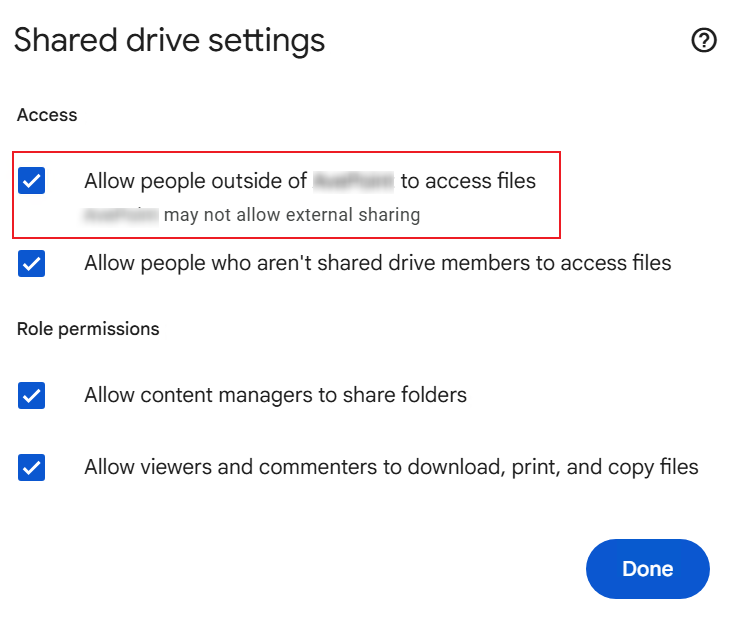
Select the Allow people outside of [Tenant] to access files checkbox for the destination shared drive.
GD-UserRateLimited
Issue:
The object failed in the migration with the following error:
- GD-UserRateLimited
Details:
Google has throttled your request due to frequent requests.
Recommendations:
When throttling occurs in Google, it may take minutes or hours to ease up the throttling. We recommend that you wait a bit before you run a "Retry error objects" migration job after a few hours to resolve this issue.