
Home > Active Directory Migration > Support Lists for Contact Attributes
Download this articleSupport Lists for Contact Attributes
Refer to the table below to view the supported and unsupported attributes for Active Directory contacts.
The attributes that are not listed in the table below are not supported. Refer to Microsoft document for details.
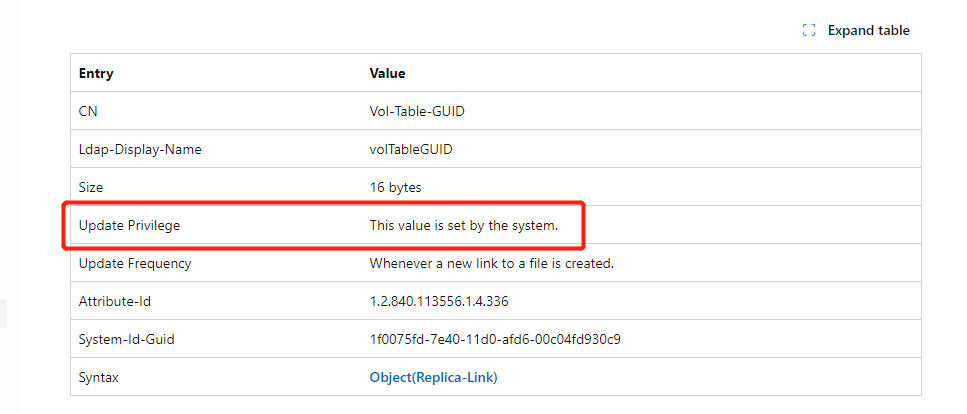
If the value of the Update Privilege entry is This value is set by the system, it means that the attribute is updated by system and is not supported in Active Directory migrations.
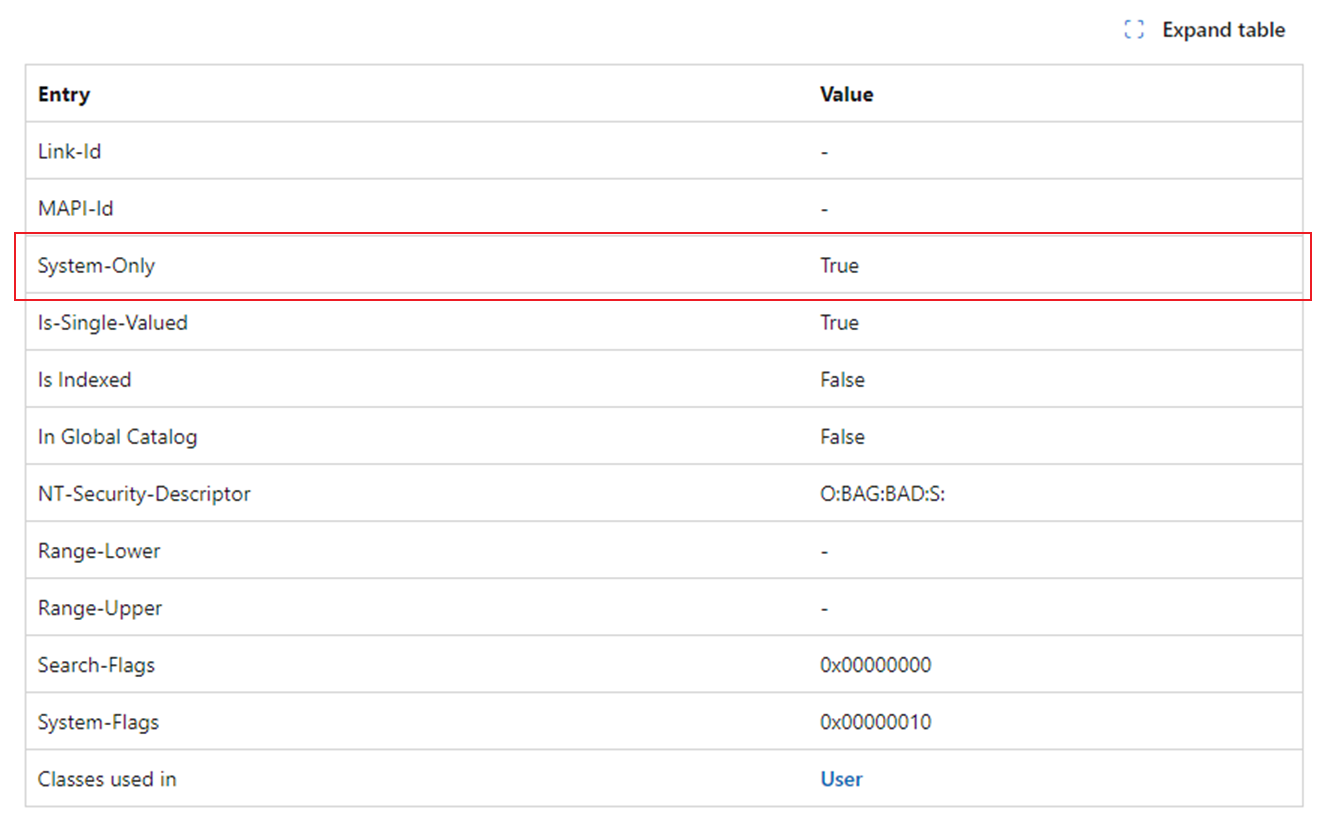
If the value of System-Only is true, it means that the attribute is not editable and is not supported in Active Directory migrations.
√ – Supported: Fly can update the attribute value in the migration.
System updated: The attribute value is updated by the Active Directory system.
| Attribute Name | Description | Supported | Comment |
|---|---|---|---|
| description | Descriptions | √ | |
| displayName | Display Name | √ | |
| dSCorePropagationData | DS-Core-Propagation-Data | √ | |
| c | Country (abbreviations) | √ | |
| cn | Common Name | √ | |
| co | Country | √ | |
| company | Company | √ | |
| countryCode | Country Code | √ | |
| department | Department | √ | |
| facsimileTelephoneNumber | Facsimile-Telephone-Number | √ | |
| givenName | First Name | √ | |
| info | Info | √ | |
| instanceType | Instance-Type | √ | |
| ipPhone | Phone-IP-Primary | √ | |
| homePhone | Home Phone | √ | |
| l | Location | √ | |
| √ | |||
| manager | Manager | √ | |
| memberOf | Group Membership | √ | |
| mobile | Mobile | √ | |
| msExchALObjectVersion | ms-Exch-AL-Object-Version | √ | Only supported when creating a new object in the destination. |
| msExchCanaryData0 | ms-Exch-Canary-Data-0 | √ | Only supported when creating a new object in the destination. |
| msExchCanaryData1 | ms-Exch-Canary-Data-1 | √ | Only supported when creating a new object in the destination. |
| msExchCanaryData2 | ms-Exch-Canary-Data-2 | √ | Only supported when creating a new object in the destination. |
| msExchDirsyncID | ms-Exch-Dirsync-ID | √ | Only supported when creating a new object in the destination. |
| msExchEdgeSyncCookies | ms-Exch-Edge-Sync-Cookies | √ | Only supported when creating a new object in the destination. |
| msExchEdgeSyncSourceGuid | ms-Exch-Edge-Sync-Source-Guid | √ | Only supported when creating a new object in the destination. |
| msExchExternalDirectoryObjectId | ms-Exch-External-Directory-Object-ID | √ | Only supported when creating a new object in the destination. |
| msExchInconsistentState | ms-Exch-Inconsistent-State | √ | Only supported when creating a new object in the destination. |
| msExchIsMSODirsynced | ms-Exch-Is-MSO-Dirsynced | √ | Only supported when creating a new object in the destination. |
| msExchLastExchangeChangedTime | ms-Exch-Last-Exchange-Changed-Time | √ | Only supported when creating a new object in the destination. |
| msExchOnPremiseObjectGuid | ms-Exch-On-Premise-Object-Guid | √ | Only supported when creating a new object in the destination. |
| msExchSetupStatus | ms-Exch-Setup-Status | √ | Only supported when creating a new object in the destination. |
| msExchVersion | ms-Exch-Version | √ | Only supported when creating a new object in the destination. |
| name | Name | √ | |
| notes | Additional-Information | √ | |
| objectCategory | Object-Category | √ | |
| objectClass | Object Class | √ | |
| otherFacsimileTelephoneNumber | Phone-Fax-Other | √ | |
| otherHomePhone | Phone-Home-Other | √ | |
| otherIpPhone | Phone-Ip-Other | √ | |
| otherMobile | Phone-Mobile-Other | √ | |
| otherPager | Phone-Pager-Other | √ | |
| otherTelephone | Phone-Office-Other | √ | |
| pager | Phone-Pager-Primary | √ | |
| postOfficeBox | Post-Office-Box | √ | |
| url | WWW-Page-Other | √ | |
| physicalDeliveryOfficeName | Address | √ | |
| postalCode | Postal Code / ZIP | √ | |
| sn | Lastname | √ | |
| st | State | √ | |
| street | Street | √ | |
| streetAddress | Address | √ | |
| telephoneNumber | Phone | √ | |
| title | Job Title | √ | |
| wWWHomePage | WWWHomePage | √ | |
| initials | initials | √ | |
| distinguishedName | Obj-Dist-Name | System updated | |
| createTimeStamp | Create-Time-Stamp | System updated | |
| modifyTimeStamp | Modify-Time-Stamp | System updated | |
| objectGUID | Object-Guid | System updated | |
| uSNChanged | USN-Changed | System updated | |
| uSNCreated | USN-Created | System updated | |
| whenChanged | When-Changed | System updated | |
| whenCreated | When-Created | System updated |
Support Lists for Other Contact Properties
Refer to the table below to view the other supported and unsupported properties for Active Directory contacts.
| Property Name | Supported | Comment |
|---|---|---|
| Contact in custom OU | √ | |
| Contact in Default Container | Partially Supported | Manually created contacts in the default Builtin and Users containers can be migrated. |
| Deleted Contacts | × | If contacts have been scanned to Fly and then you delete the contacts from the source OU, Fly will not sync the deletion to the database. |
| Manager | √ | To migrate the manager of a contact, you can run a Migrate object managers job.Note that make sure the manager has been scanned to Fly and exists in the destination. |