
Home > Exchange Online to Gmail Migration Process Guide > Preparation > 7. Throttling limits in Exchange Online to Gmail migration
Export to PDF7. Throttling limits in Exchange Online to Gmail migration
Microsoft throttling limits
Microsoft uses throttling to manage Microsoft 365 operations, and throttling limits will affect migration performance. Go to Microsoft 365 admin center to lift the throttling restrictions.
-
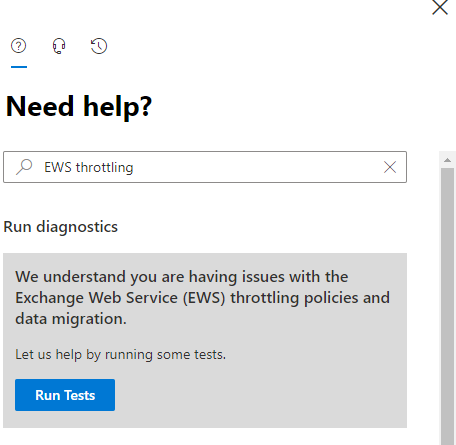
Go to the Help (?) section of the Microsoft 365 admin center.
-
Enter EWS throttling as the search phrase.
-
Click Run Tests when you are asked to check your environment. Essentially, the tests check what EWS throttling applies to the tenant.
-
-
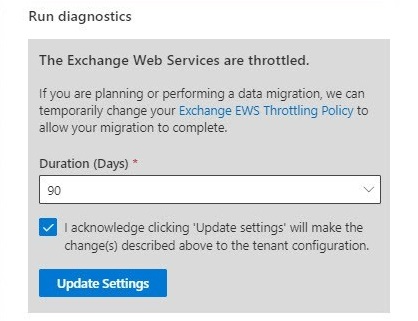
The support assistant checks the tenant settings and concludes that EWS is throttled (the normal situation). You will then be offered the chance to update the settings to the tenant EWS policy to lift throttling for 30, 60, or 90 days.
-
Select the number of days you want to adjust the policy for, and then click Update Settings.
-
-
After a short delay, the support assistant will confirm that the settings have been changed.
Google Workspace throttling limits
Google also has throttling restrictions. The more mappings you run at a time, the greater effect of throttling restrictions on the migration speed. You can contact Google Support for help.