
Home > Get Started > Enable Backup for Cosmos DB > Set Continuous Backup Policy Mode
この記事をダウンロードSet Continuous Backup Policy Mode
Follow the steps below to set the backup policy mode to Continuous for your Cosmos DB account:
-
Go to Azure portal > Azure Cosmos DB and select your account.
-
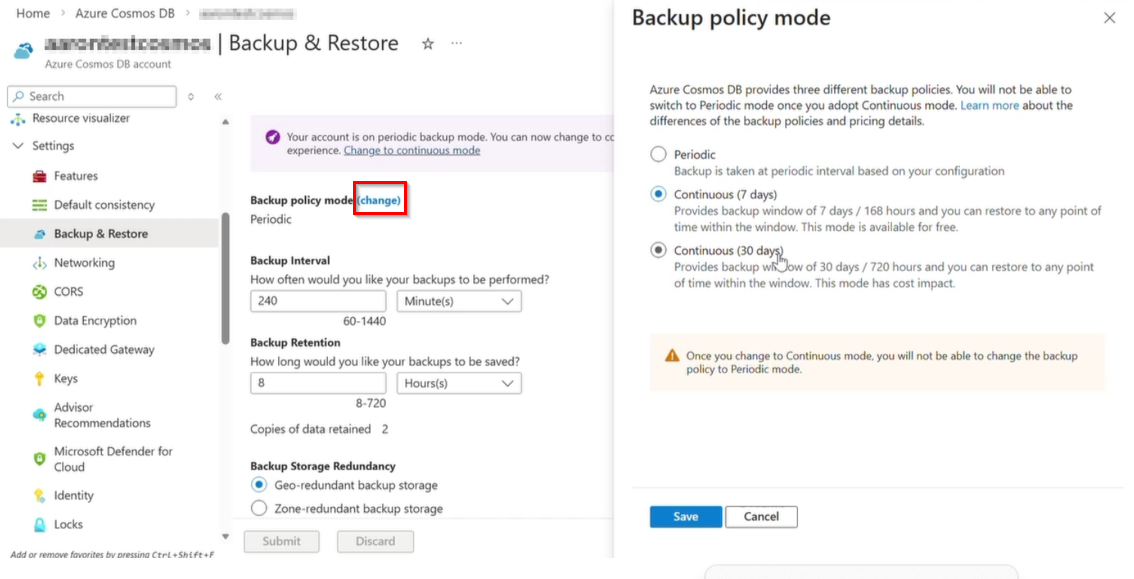
Navigate to Settings > Backup & Restore.
-
Click the Change link in the Backup policy mode field.
-
On the pop-up panel, select Continuous (7 days) or Continuous (30 days).
-
Click Save.
このページの内容