
Home > Exchange Online 移行の実行 > Exchange Online 移行の必須権限 > 移行元 Exchange Online における権限
この記事をダウンロード移行元 Exchange Online における権限
移行元に接続するには、認証方法として、サービス アカウント・Fly アプリ プロファイル・カスタム アプリ プロファイルのいずれかの使用を選択することができます。サービス アカウントと Fly アプリ プロファイルの組み合わせ、またはサービス アカウントとカスタム アプリ プロファイルの組み合わせを使用することもできます。
認証方法によって必要な権限については、以下のセクションを参照してください。
Fly アプリ プロファイル権限
テナント所有者またはサービス管理者のロールを持っている場合、AvePoint Online Services > 管理 > アプリ管理 で Fly アプリ プロファイルを作成して、Fly アプリを使用している Microsoft 365 テナントに接続することができます。
Fly アプリ プロファイルの作成方法および必須権限については、Fly アプリ プロファイル権限 を参照してください。
以下のことに注意してください。
-
Exchange Online テナントの検出または Exchange Online 移行を実行する場合、アプリを承認するアカウントがメールボックス (Exchange ライセンスの割り当てまたは PowerShell の使用のいずれかによって作成されているメールボックス) を持っていることを確認してください。
-
以下の場合に、Exchange 管理者 ロールを AvePoint Fly アプリに割り当てる必要があります。詳細については、以下の Exchange 管理者ロールのアプリへの割り当て方法 を参照してください。
-
配布リスト、動的配布リスト、メールが有効なセキュリティ グループを移行する
-
共有予定表の権限を移行する
-
メール転送を有効にする
-
メールボックス権限を移行する
アプリに Exchange 管理者 ロールを割り当てない場合は、アプリにカスタム ロールを追加して上記の機能が利用可能であることを確保します。詳細については、アプリへのカスタム役割の追加方法 を参照してください。
-
カスタム アプリ プロファイル権限
テナント所有者またはサービス管理者のロールを持っている場合、AvePoint Online Services > 管理 > アプリ管理 でカスタム アプリ プロファイルを作成して、カスタム Azure アプリを使用している Microsoft 365 テナントに接続することができます。
カスタム アプリ プロファイルを作成するには、以下の説明を参照してください。
-
Microsoft Entra ID で証明書を準備します。詳細については、カスタム Azure アプリ用の証明書の準備 を参照してください。
証明書がある場合、このステップを無視することができます。
-
Microsoft Entra IDでカスタム Azure アプリを作成します。詳細については、カスタム Azure アプリの作成 を参照してください。
-
AvePoint Online Services で カスタム Azure アプリ用アプリ プロファイルを作成 します。
アプリ プロファイルの再承認時に権限の更新がある場合、承認後、アプリ プロファイルがトークンの更新を完了するまで約 1 時間がかかります。その間、アプリ プロファイルを移行の実行に使用することはできません。
Exchange Online への移行
AvePoint Online Services は、Exchange Web Services (EWS) から Microsoft Graph への移行を実行しています。この移行の一環として、Exchange Online から Exchange Online への移行の場合、管理者は AvePoint アプリケーションを再認証して必要な Microsoft Graph アクセス許可を付与するか、以下の Microsoft Graph API アプリケーションのアクセス許可を移行元カスタム Azure アプリに追加する必要があります。
- MailboxFolder.Read.All
- MailboxItem.Read.All
- MailboxItem.Export.All
- Mail.Read
- MailboxSettings.Read
Exchange Online から Exchange Online への移行における移行先カスタム アプリの権限については、カスタム アプリ プロファイル権限 を参照してください。
以下の表の内容に従って、Exchange Online から Exchange Online への移行に必要な API アクセス許可を追加してください。
以下のことに注意してください。
-
Exchange Online テナントの検出または Exchange Online から Exchange Online への移行を実行する場合、アプリを承認するアカウントがメールボックス (Exchange ライセンスの割り当てまたは PowerShell の使用のいずれかによって作成されているメールボックス) を持っていることを確認してください。
-
以下の場合に、カスタム アプリに Exchange 管理者 ロールを割り当てる必要があります。詳細については、以下の Exchange 管理者ロールのアプリへの割り当て方法 を参照してください。
-
配布リスト、動的配布リスト、メールが有効なセキュリティ グループを移行する
-
共有予定表の権限を移行する
-
メール転送を有効にする
-
メールボックス権限を移行する
アプリに Exchange 管理者 ロールを割り当てない場合は、アプリにカスタム ロールを追加して上記の機能が利用可能であることを確保します。詳細については、アプリへのカスタム役割の追加方法 を参照してください。
-
| API | アクセス許可 | タイプ | 目的 |
|---|---|---|---|
| Azure Rights Management Services *注意: 21Vianet テナントの場合、API 名は Microsoft Rights Management Services です。 | Content.SuperUser (Read all protected content for this tenant) | アプリケーション | メールの秘密度ラベルを管理する場合にのみ必要です。 (移行に Graph API または EWS を使用している場合に必要です。) |
| Microsoft Information Protection Sync Service | UnifiedPolicy.Tenant.Read (Read all unified policies of the tenant) | アプリケーション | メールの秘密度ラベルを管理する場合にのみ必要です。 (移行に Graph API または EWS を使用している場合に必要です。) |
| Office 365 Exchange Online | Exchange.ManageAsApp (Manage Exchange As Application) | アプリケーション | Exchange PowerShell を使用してメールボックスの権限、配布リスト、動的に配布リストを移行します。 (移行に Graph API または EWS を使用している場合に必要です。) |
| Office 365 Exchange Online | full_access_as_app (Use Exchange Web Services with full access to all mailboxes) | アプリケーション | すべてのメールボックスからアイテムを取得して移行します。 *注意: この権限をアプリに追加しない場合、アプリに RBAC 割り当てを作成して、特定のメールボックスへのアクセス権のみをアプリに付与します。詳細については、ApplicationImpersonation ロールなしでのメールボックスの移行方法 セクションのオプション 3 を参照してください。 (移行に EWS を使用している場合に必要です。) |
| Microsoft Graph | OnlineMeetings.ReadWrite.All (Read and create online meetings) | アプリケーション | 移行先で置き換えられた会議リンクが、すべての出席者に利用できるようにします。 (移行に Graph API または EWS を使用している場合に必要です。) |
| Microsoft Graph | User.Read.All (Read all users’ full profiles) | アプリケーション | メールボックス タイプを取得して、会議リンクの置き換えおよびユーザー ID の取得を実行します。 (移行に Graph API または EWS を使用している場合に必要です。) |
| Microsoft Graph | MailboxFolder.Read.All (Read all the users' mailbox folders) | アプリケーション | メールボックス フォルダーを取得します。 (移行に EWS の代わりに Graph API を使用している場合に必要です。) |
| Microsoft Graph | MailboxItem.Export.All (Allows the app to perform backup and restore for all mailbox items) | アプリケーション | メールボックス アイテムをバックアップします。 (移行に EWS の代わりに Graph API を使用している場合に必要です。) |
| Microsoft Graph | MailboxItem.Read.All (Read all the users' mailbox items) | アプリケーション | メールボックス アイテムを取得します。 (移行に EWS の代わりに Graph API を使用している場合に必要です。) |
| Microsoft Graph | Mail.Read (Read mail in all mailboxes) | アプリケーション | メール アイテムを取得します。 (移行に EWS の代わりに Graph API を使用している場合に必要です。) |
| Microsoft Graph | MailboxSettings.Read (Read all user mailbox settings) | アプリケーション | 自動応答設定など、メールボックス設定を取得します。 (移行に EWS の代わりに Graph API を使用している場合に必要です。) |
| Microsoft Graph | Directory.Read.All (Read directory data) | アプリケーション | Exchange Online テナントの検出を実行する場合にのみ必要です。 (移行に EWS を使用している場合に必要です。) |
| Microsoft Graph | Group.Read.All (Read all groups) | アプリケーション | Microsoft 365 グループおよびグループ所有者を取得します。 (移行に EWS を使用している場合に必要です。) |
| Microsoft Graph | Reports.Read.All (Read all usage reports) | アプリケーション | Exchange Online テナントの検出を実行する場合にのみ必要です。 (移行に EWS を使用している場合に必要です。) |
| Microsoft Graph | ReportSettings.Read.All (Read all admin report settings) | アプリケーション | Exchange Online テナントの検出を実行する場合にのみ必要です。 (移行に EWS を使用している場合に必要です。) |
簡単に使用するため、以下のコマンドを直接使用して、マニフェスト を介して必要な API アクセス許可を Microsoft 365 テナントに追加することができます。
Gmail への移行
AvePoint Online Services は、Exchange Web Services (EWS) から Microsoft Graph への移行を実行しています。この移行の一環として、Exchange Online から Gmail への移行の場合、管理者は AvePoint アプリケーションを再認証して必要な Microsoft Graph アクセス許可を付与するか、以下の Microsoft Graph API アプリケーションのアクセス許可を移行元カスタム Azure アプリに追加する必要があります。
- Calendars.Read
- Contacts.Read
- Mail.Read
- MailboxFolder.Read.All
- MailboxItem.Read.All
- MailboxSettings.Read
- OnlineMeetings.ReadWrite.Al
- Tasks.Read.All
以下の表の内容に従って、Exchange Online から Gmail への移行に必要な API アクセス許可を追加してください。
以下のことに注意してください。
-
Exchange Online テナントの検出または Exchange Online から Gmail への移行を実行する場合、アプリを承認するアカウントがメールボックス (Exchange ライセンスの割り当てまたは PowerShell の使用のいずれかによって作成されているメールボックス) を持っていることを確認してください。
-
メールボックス権限を移行するには、カスタム アプリに Exchange 管理者 ロールを割り当てる必要があります。詳細については、以下の Exchange 管理者ロールのアプリへの割り当て方法 を参照してください。
アプリに Exchange 管理者 ロールを割り当てない場合は、アプリにカスタム ロールを追加して上記の機能が利用可能であることを確保します。詳細については、アプリへのカスタム役割の追加方法 を参照してください。
| API | アクセス許可 | タイプ | 目的 |
|---|---|---|---|
| Azure Rights Management Services *注意: 21Vianet テナントの場合、API 名は Microsoft Rights Management Services です。 | Content.SuperUser (Read all protected content for this tenant) | アプリケーション | メールの秘密度ラベルを管理する場合にのみ必要です。(移行に Graph API または EWS を使用している場合に必要です。) |
| Microsoft Information Protection Sync Service | UnifiedPolicy.Tenant.Read (Read all unified policies of the tenant) | アプリケーション | メールの秘密度ラベルを管理する場合にのみ必要です。(移行に Graph API または EWS を使用している場合に必要です。) |
| Office 365 Exchange Online | Exchange.ManageAsApp (Manage Exchange As Application) | アプリケーション | Exchange PowerShell を使用してメールボックスの権限を移行します。(移行に Graph API または EWS を使用している場合に必要です。) |
| Office 365 Exchange Online | full_access_as_app (Use Exchange Web Services with full access to all mailboxes) | アプリケーション | すべてのメールボックスからアイテムを取得して移行します。 *注意: この権限をアプリに追加しない場合、アプリに RBAC 割り当てを作成して、特定のメールボックスへのアクセス権のみをアプリに付与します。詳細については、ApplicationImpersonation ロールなしでのメールボックスの移行方法 セクションのオプション 3 を参照してください。(移行に EWS を使用している場合に必要です。) |
| Microsoft Graph | Directory.Read.All (Read directory data) | アプリケーション | Exchange Online テナント検出を実行する場合にのみ必要です。(移行に Graph API または EWS を使用している場合に必要です。) |
| Microsoft Graph | Group.Read.All (Read all groups) | アプリケーション | Microsoft グループおよびグループ所有者を取得します。(移行に Graph API または EWS を使用している場合に必要です。) |
| Microsoft Graph | Reports.Read.All (Read all usage reports) | アプリケーション | Exchange Online テナント検出を実行する場合にのみ必要です。(移行に Graph API または EWS を使用している場合に必要です。) |
| Microsoft Graph | ReportSettings.Read.All (Read all admin report settings) | アプリケーション | Exchange Online テナント検出を実行する場合にのみ必要です。(移行に Graph API または EWS を使用している場合に必要です。) |
| Microsoft Graph | User.Read.All (Read all users' full profiles) | アプリケーション | ユーザー プロファイルを取得して、ユーザー ID を取得します。(移行に Graph API または EWS を使用している場合に必要です。) |
| Microsoft Graph | Calendars.Read (Read calendars in all mailboxes) | アプリケーション | 予定表アイテムを取得します。(移行に EWS の代わりに Graph API を使用している場合に必要です。) |
| Microsoft Graph | Mail.Read (Read mail in all mailboxes) | アプリケーション | メール アイテムを取得します。(移行に EWS の代わりに Graph API を使用している場合に必要です。) |
| Microsoft Graph | MailboxFolder.Read.All (Read all the users' mailbox folders) | アプリケーション | メールボックス フォルダーを取得します。(移行に EWS の代わりに Graph API を使用している場合に必要です。) |
| Microsoft Graph | MailboxItem.Read.All (Read all the users' mailbox items) | アプリケーション | メールボックス アイテムを取得します。(移行に EWS の代わりに Graph API を使用している場合に必要です。) |
| Microsoft Graph | MailboxSettings.Read (Read all user mailbox settings) | アプリケーション | 受信トレイのルールなど、メールボックスの設定を取得します。(移行に EWS の代わりに Graph API を使用している場合に必要です。) |
| Microsoft Graph | OnlineMeetings.ReadWrite.All (Read and create online meetings) | アプリケーション | 移行先の置き換えられた会議リンクがすべての出席者に利用可能であることを確認します。(移行に EWS の代わりに Graph API を使用している場合に必要です。) |
| Microsoft Graph | Contacts.Read (Read contacts in all mailboxes) | アプリケーション | 連絡先アイテムを取得します。(移行に EWS の代わりに Graph API を使用している場合に必要です。) |
| Microsoft Graph | Tasks.Read.All (Read all users' tasks and tasklist) | アプリケーション | タスク アイテムを取得します。(移行に EWS の代わりに Graph API を使用している場合に必要です。) |
簡単に使用するため、以下のコマンドを直接使用して、マニフェスト を介して必要な API アクセス許可を Microsoft 365 テナントに追加することができます。
サービス アカウント権限
Microsoft 365 テナントに AvePoint Online Services を接続するには、テナントの所有者およびサービス管理者は Microsoft 365 に対して サービス アカウント プロファイルの作成 を実行することもできます。
多要素認証 (MFA) が有効なユーザーは、移行を実行するためのサービス アカウントとして使用することはできません。その代わりに、委任アプリ プロファイルを使用することができます。
サービス アカウントは以下の要件を満たすメールボックス (Exchange ライセンスの割り当てまたは PowerShell の使用のいずれかによって作成されているメールボックス) を持っていることを確認してください。
サービス アカウントがメールボックスを持っていることを確認するには、Microsoft 365 管理センター > ユーザー > アクティブなユーザー に移動して、サービス アカウントの ライセンスとアプリ タブで Exchange Online を選択します。
Exchange Online への移行
以下の表の内容に従って、Exchange Online から Exchange Online への移行に必要な権限を追加してください。
| 必須権限 | 注記 |
|---|---|
| 移行で移行元メールボックスに対する フル アクセス 許可 | Microsoft は、Exchange Online の ApplicationImpersonation ロールを廃止することを発表しました。詳細については、Exchange Online の ApplicationImpersonation ロール廃止の影響と対応策 を参照してください。 移行でグループ メールボックスを移行しない場合、ApplicationImpersonation ロールを追加せずに フル アクセス 許可を付与することができます。 |
| Distribution Groups ロール | 配布リストまたは動的配布リストを移行する場合に必要です。 |
| Mail Recipients ロール | メールボックス権限の移行、メールボックス エイリアスの移行、メール転送などを実行する際にメールボックスを取得します。 |
| 組織の スーパー ユーザー ロール | 詳細については、スーパー ユーザー機能の構成 を参照してください。秘密度ラベルを管理する場合に必要です。 |
アプリ プロファイルも使用する場合の必須権限
移行元 Exchange Online でサービス アカウント認証とアプリ プロファイル認証の両方を使用している場合、一部のサービス アカウント権限は必要なくなります。サービス アカウントがメールボックスおよび以下の権限を持っていることを確認してください。
サービス アカウントがメールボックスを持っていることを確認するには、Microsoft 365 管理センター > ユーザー > アクティブなユーザー に移動して、サービス アカウントの ライセンスとアプリ タブで Exchange Online を選択します。
| 移行元サービス アカウント権限 | 注記 |
|---|---|
| Distribution Groups ロール | 配布リスト / 動的配布リスト / メールが有効なセキュリティ グループに移行する場合にのみ必要です。 |
| Mail Recipients ロール | メールボックス権限の移行、メールボックス エイリアスの移行、メール転送などを実行する際にメールボックスを取得します。 |
Gmail への移行
以下の表の内容に従って、Exchange Online から Gmail への移行に必要な権限を追加してください。
| 必須権限 | 注記 |
|---|---|
| 移行で移行元メールボックスに対する フル アクセス 許可 | Microsoft は、Exchange Online の ApplicationImpersonation ロールを廃止することを発表しました。詳細については、Exchange Online の ApplicationImpersonation ロール廃止の影響と対応策 を参照してください。 移行でグループ メールボックスを移行しない場合、ApplicationImpersonation ロールを追加せずに フル アクセス 許可を付与することができます。 |
| Mail Recipients ロール | メールボックスの権限を移行する際にメールボックスを取得します。 |
| 組織の スーパー ユーザー ロール | 詳細については、スーパー ユーザー機能の構成 を参照してください。秘密度ラベルを管理する場合に必要です。 |
| Distribution Groups ロール | 配布リストまたは動的配布リストを移行する場合に必要です。 |
アプリ プロファイルも使用する場合の必須権限
移行元 Exchange Online でサービス アカウント認証とアプリ プロファイル認証の両方を使用している場合、一部のサービス アカウント権限は必要なくなります。サービス アカウントがメールボックスおよび以下の権限を持っていることを確認してください。
サービス アカウントがメールボックスを持っていることを確認するには、Microsoft 365 管理センター > ユーザー > アクティブなユーザー に移動して、サービス アカウントの ライセンスとアプリ タブで Exchange Online を選択します。
| 移行元サービス アカウント権限 | 注記 |
|---|---|
| Mail Recipients ロール | メールボックスの権限を移行する際にメールボックスを取得します。 |
| Distribution Groups ロール | 配布リストまたは動的配布リストを移行する場合に必要です。 |
委任アプリ プロファイル権限
Fly 委任アプリ プロファイルまたはカスタムの委任アプリ プロファイルを使用してワークスペースに接続することができます。
委任アプリ プロファイルを使用するには、以下のことに注意してください。
-
同意ユーザーのライセンスと権限の要件は、サービス アカウントのライセンスと権限の要件と同じです。詳細については、サービス アカウント権限 を参照してください。
-
委任アプリ プロファイルの同意ユーザーの多要素認証 (MFA) が有効になっている場合、MFA の有効化後に委任アプリ プロファイルを承認または再承認する必要があります。MFA の有効化後にアプリ プロファイルを承認または再承認しないと、委任アプリ プロファイルを使用している移行ジョブは失敗します。
-
アプリ プロファイルの再承認時に権限の更新がある場合、承認後、アプリ プロファイルがトークンの更新を完了するまで約 1 時間がかかります。その間、アプリ プロファイルを移行の実行に使用することはできません。
-
21Vianet テナントに委任アプリ プロファイルのみを使用している場合、Exchange PowerShell を使用することはできません。
必要な権限を持っているカスタム委任アプリ プロファイルを使用するには、Fly 委任アプリ プロファイルの権限 セクションを参照してください。
必要な権限を持っているカスタムの委任アプリ プロファイルを使用するには、以下の説明を参照してください。
-
Microsoft Entra ID でアプリを登録した後、アプリに必要な権限を追加します。以下のセクションには、カスタム アプリの必要な権限が表示されます。
-
アプリの画面の左側の [認証] をクリックします。
-
[プラットフォームを追加] をクリックします。
-
プラットフォームの構成 パネルで Web を選択します。
-
Web の構成 パネルで、リダイレクト URI フィールドにAvePoint Online Services URL (
https://www.avepointonlineservices.com) を入力します。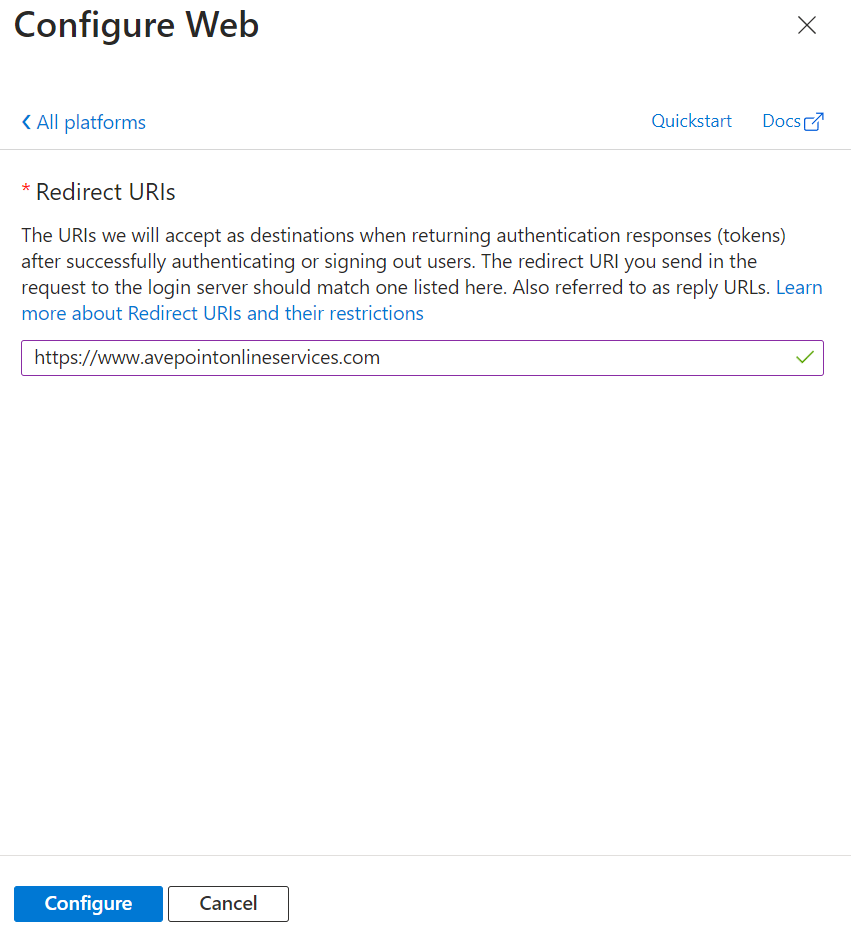
-
[構成] をクリックします。
-
認証 ページで アクセス トークン および ID トークン チェックボックスを選択します。
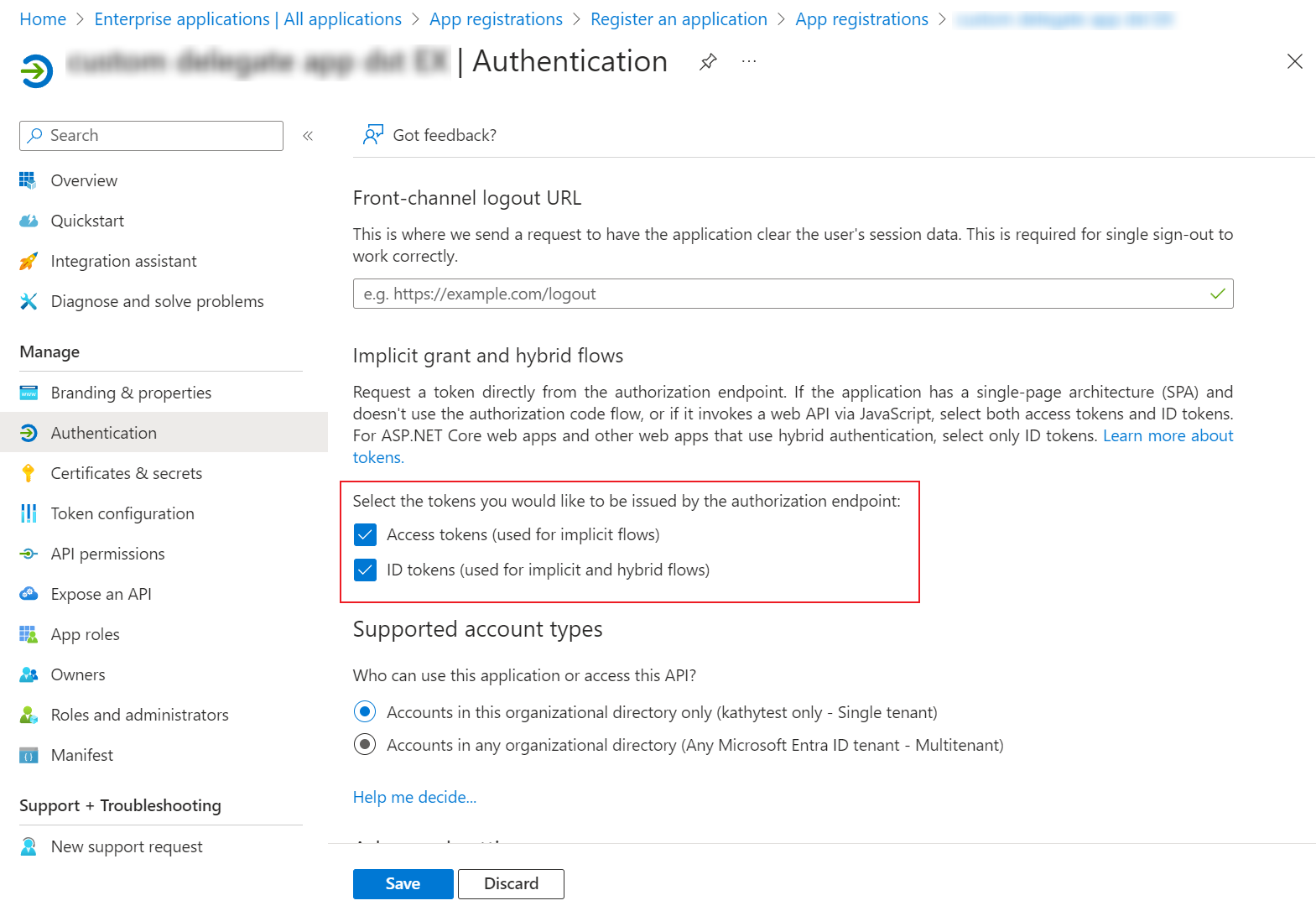
-
[保存] をクリックします。
-
AvePoint Online Services で モダン モード を使用してアプリ用のアプリ プロファイルを作成するには、委任されたアクセス許可を持つカスタム Azure アプリへの同意 を参照してください。
NOTEアプリに同意する際に、アプリに管理者の同意権限を付与し、パブリック クライアント フローを許可している場合、グローバル管理者の同意 または ユーザーの同意 方法を選択することができます。そうしない場合、グローバル管理者の同意 方法のみを使用できます。
Exchange Online への移行のカスタム委任アプリ プロファイル権限
カスタム委任アプリ プロファイルには以下の権限が付与されていることを確認してください。
| API | アクセス許可 | タイプ | 目的 |
|---|---|---|---|
| Office 365 Exchange Online | EWS.AccessAsUser.All (Access mailboxes as the signed-in user via Exchange Web Services) | 委任済み | 指定したユーザーにアクセスし、データをエクスポートします。 |
| Office 365 Exchange Online | Exchange.Manage (Manage Exchange configuration) | 委任済み | メールボックス権限、配布リスト、動的配布リストを移行する Exchange PowerShell を使用します。 |
| Microsoft Graph | Group.Read.All (Read all groups) | 委任済み | Microsoft グループおよびグループ所有者を取得します。 |
| Microsoft Graph | User.Read.All (Read all users' full profiles) | 委任済み | メールボックス タイプを取得して、会議リンクの置き換えおよびユーザー ID の取得を実行します。 |
| Microsoft Information Protection Sync Service | UnifiedPolicy.User.Read (Read all unified policies a user has access to) | 委任済み | メールの秘密度ラベルを管理する場合にのみ必要です。 |
| Azure Rights Management Services *注意: 21Vianet テナントの場合、API 名は Microsoft Rights Management Services です。 | user_impersonation (Create and access protected content for users) | 委任済み | メールの秘密度ラベルを管理する場合にのみ必要です。 |
簡単に使用するため、以下のコマンドを直接使用して、マニフェスト を介して必要な API アクセス許可を Microsoft 365 テナントに追加することができます。
Gmail への移行のカスタム委任アプリ プロファイル権限
AvePoint Online Services は、Exchange Web Services (EWS) から Microsoft Graph への移行を実行しています。この移行の一環として、Exchange Online から Gmail への移行の場合、管理者は AvePoint アプリケーションを再認証して必要な Microsoft Graph アクセス許可を付与するか、以下の Microsoft Graph API アプリケーションのアクセス許可を移行元委任アプリに追加する必要があります。
- Calendars.Read
- Contacts.Read
- Mail.Read.Shared
- MailboxFolder.Read
- MailboxItem.Read
- MailboxSettings.Read
- OnlineMeetings.Read
- Tasks.ReadWrite.Shared
カスタム委任アプリ プロファイルには以下の権限が付与されていることを確認してください。
| API | アクセス許可 | タイプ | 目的 |
|---|---|---|---|
| Office 365 Exchange Online | EWS.AccessAsUser.All (Access mailboxes as the signed-in user via Exchange Web Services) | 委任済み | 特定のユーザーにアクセスしてデータをエクスポートします。(移行に EWS を使用している場合に必要です。) |
| Office 365 Exchange Online | Exchange.Manage (Manage Exchange configuration) | 委任済み | Exchange PowerShell を使用してメールボックスの権限を移行します。(移行に Graph API または EWS を使用している場合に必要です。) |
| Microsoft Graph | Group.Read.All (Read all groups) | 委任済み | Microsoft グループおよびグループ所有者を取得します。(移行に Graph API または EWS を使用している場合に必要です。) |
| Microsoft Graph | User.Read.All (Read all users' full profiles) | 委任済み | ユーザー プロファイルを取得して、ユーザー ID を取得します。(移行に Graph API または EWS を使用している場合に必要です。) |
| Microsoft Graph | Calendars.Read.Shared (Read user and shared calendars) | 委任済み | 予定表アイテムを取得します。(移行に EWS の代わりに Graph API を使用している場合に必要です。) |
| Microsoft Graph | Contacts.Read.Shared (Read user and shared contacts) | 委任済み | 連絡先アイテムを取得します。(移行に EWS の代わりに Graph API を使用している場合に必要です。) |
| Microsoft Graph | Mail.Read.Shared (Read user and shared mail) | 委任済み | メール アイテムを取得します。(移行に EWS の代わりに Graph API を使用している場合に必要です。) |
| Microsoft Graph | MailboxFolder.Read (Read a user's mailbox folders) | 委任済み | メールボックス フォルダーを取得します。(移行に EWS の代わりに Graph API を使用している場合に必要です。) |
| Microsoft Graph | MailboxItem.Read (Read a user's mailbox items) | 委任済み | メールボックス アイテムを取得します。(移行に EWS の代わりに Graph API を使用している場合に必要です。) |
| Microsoft Graph | MailboxSettings.Read (Read user mailbox settings) | 委任済み | 受信トレイのルールなど、メールボックスの設定を取得します。(移行に EWS の代わりに Graph API を使用している場合に必要です。) |
| Microsoft Graph | OnlineMeetings.Read (Read user's online meetings) | 委任済み | 移行先の置き換えられた会議リンクがすべての出席者に利用可能であることを確認します。(移行に EWS の代わりに Graph API を使用している場合に必要です。) |
| Microsoft Graph | Tasks.ReadWrite.Shared (Read and write user and shared tasks) | 委任済み | タスク アイテムを取得します。(移行に EWS の代わりに Graph API を使用している場合に必要です。) |
| Microsoft Information Protection Sync Service | UnifiedPolicy.User.Read (Read all unified policies a user has access to) | 委任済み | メールの秘密度ラベルを管理する場合にのみ必要です。(移行に Graph API または EWS を使用している場合に必要です。) |
| Azure Rights Management Services *注意: 21Vianet テナントの場合、API 名は Microsoft Rights Management Services です。 | user_impersonation (Create and access protected content for users) | 委任済み | メールの秘密度ラベルを管理する場合にのみ必要です。(移行に Graph API または EWS を使用している場合に必要です。) |
簡単に使用するため、以下のコマンドを直接使用して、マニフェスト を介して必要な API アクセス許可を Microsoft 365 テナントに追加することができます。