
Home > Insights for Microsoft 365 Web API
この記事をダウンロードInsights for Microsoft 365 Web API
Insights for Microsoft 365 provides Web APIs to export the permission reports of site collections, access reports of users and groups, permission reports of shared links, and activity reports of users and on objects. Note that only 5 export jobs can be run simultaneously via APIs.
You can download the client-side library AvePoint.Insights.Client that is used to communicate with Insights for Microsoft 365. To learn about how to use the APIs, refer to insights-sdk-samples.
Deprecation Notice
The legacy API introduced below offers essential capabilities but is slated for deprecation. We are upgrading to a new API for better user experience, stability, and easier integration. Transitioning to the new API is recommended to ensure continued support and access to the latest features, both for Microsoft 365 and Google platforms.
Get Started
You can refer to the sections below to get started.
Register an AvePoint App
Before using the APIs, you must register an app in AvePoint Online Services > Administration > App registrations and grant permissions to the app. With the registered app, you can use the generated application (client) ID for authentication. Refer to the App Management detailed instructions on how to register an app.
Get the Access Token
Once you have the application (client) ID, get the access token via the application (client) ID to authenticate with Insights for Microsoft 365 Web API.
The following information is required to get an access token:
| Element | Description |
|---|---|
| Identity Service URL | The Identity Service URL: https://identity.avepointonlineservices.com (Commercial) https://identity-gov.avepointonlineservices.com (U.S. Government) |
| Application (Client) ID | The application (client) ID you have retrieved. |
| Scope | The permissions you have granted to the AvePoint app. For Insights, the scope is insights.graph.readwrite.all. |
| Certificate | The corresponding .pfx certificate file of the .cer certificate you used when registering the AvePoint app. |
To get the access token using the above information, create a JSON Web token using the Client ID and certificate first, and then use the JSON Web token to request an access token of the defined scope from AOS Identity Service.
Below is an example for getting the access token.
The token you get will expire in one hour, and you need to get the token again after the expiration.
Make Requests to APIs
You can use Graph Explorer, Postman, or other tools that you use to build and test requests to use the APIs provided by Insights.
Web API URL
When you use the Insights for Microsoft 365 Web API, you will need the Web API URL. The Web API URL varies with your data center. Choose the Web API URL according to your data center.
| Data center | Web API URL |
|---|---|
| Australia Southeast (Victoria) | https://graph-au.avepointonlineservices.com/insights |
| Canada Central (Toronto) | https://graph-ca.avepointonlineservices.com/insights |
| China North | https://graph-cn.avepointonlineservices.com/insights |
| East US (Virginia) | https://graph-us.avepointonlineservices.com/insights |
| France Central (Paris) | https://graph-fr.avepointonlineservices.com/insights |
| Germany West Central (Frankfurt) | https://graph-de.avepointonlineservices.com/insights |
| Japan West (Osaka) | https://graph-jp.avepointonlineservices.com/insights |
| Korea Central (Seoul) | https://graph-kr.avepointonlineservices.com/insights |
| North Europe (Ireland) | https://graph-ne.avepointonlineservices.com/insights |
| South Africa North (Johannesburg) | https://graph-za.avepointonlineservices.com/insights |
| Southeast Asia (Singapore) | https://graph-sg.avepointonlineservices.com/insights |
| Switzerland North (Zurich) | https://graph-ch.avepointonlineservices.com/insights |
| UK South (London) | https://graph-uk.avepointonlineservices.com/insights |
| US Gov Virginia (Virginia) | https://graph-gov.avepointonlineservices.com/insights |
| West Europe (Netherlands) | https://graph-we.avepointonlineservices.com/insights |
| United Arab Emirates (Dubai) | https://graph-uae.avepointonlineservices.com/insights |
| GCP for Australia Southeast (Sydney) | https://graph-gcp-au.avepointonlineservices.com/insights |
| GCP for West Europe (Eemshaven, Netherlands) | https://graph-gcp-we.avepointonlineservices.com/insights |
| GCP for Japan (Tokyo) | https://graph-gcp-jp.avepointonlineservices.com/insights |
| GCP for East US (Moncks Corner) | https://graph-gcp-us.avepointonlineservices.com/insights |
| GCP for South Korea (Seoul) | https://graph-gcp-kr.avepointonlineservices.com/insights |
Supported APIs
Refer to the following sections for the APIs supported by Insights.
-
Permission reports of site collection
-
Make requests using the POST api/v1/site/permission/export API to export the reports.
-
Make requests using the POST api/v1/Site/permission API to get the permission information of the site collections.
NOTEThe information will be responded in JSON format, and no reports will be exported.
-
-
Access report of users
You can make requests using the POST api/v1/User/summary API to get the summary information of users. Then, you can use the email addresses of the desired users from the summary information to request their access information using one of the methods below:
-
Make requests using the POST api/v1/user/permission/export API to export the reports.
-
Make requests using the POST api/v1/User/permission API to get the access information of the requested users.
NOTEThe information will be responded in JSON format and no reports will be exported.
-
-
Access report of groups with external users
You can make requests using the POST api/v1/Group/summary API to get the summary information of groups with external users. Then, you can use the IDs of the desired groups to request their access reports using the POST api/v1/group/Permission/export API. The access report of these groups will be exported.
-
Report of permissions to objects shared via links
You can make requests using the POST api/v1/link/permission/query API to get the summary information of links via which the objects in the configured scope are shared. Then, you can use the id, siteId, selfId, and linkId information from the summary information to request the report of the shared links using the POST api/v1/link/Permission/export API.
For all requests above that will have reports exported, you will get the ids from the responses, which are the unique IDs of the reports. You can use the GET api/v1/permission/export/status?id={id} API to check the export progress of reports with the ids. When the exports are completed, use the GET api/v1/permission/export/get?id={id} API to get the exported reports.
-
User activity reports or activity reports on objects
You can make requests using the POST api/v1/activity/export API to export the activity reports of specific users on specific objects, the activity reports of specific users on the configure data scope, or all users’ activity report on specific objects.
You will get the IDs from the responses, which are the unique IDs of the reports. You can use the GET api/v1/activity/export/status?id={id} API to check the export progresses of the reports with the ids. When the exports are completed, use the GET api/v1/activity/export/file?id={id} API to get the exported reports.
-
Risk analysis detailed records reports
-
Make requests using the POST api/v1/DetailRecord/querybysite API to export the detailed records per site collection. You will need the IDs of the site collections for which you want to export the report. You can use the POST api/v1/DetailRecord/getSiteIds API to get the site ID by site URL.
-
Make requests using the POST api/v1/DetailRecord/querysiteoverview API to export the risk analysis overview data of site collections.
-
Make requests using the POST api/v1/DetailRecord/query API to export all risk analysis detailed records that meet the filters.
-
POST api/v1/site/permission/export
Exports the permission reports of specific site collections.
You can only export permission reports of 100 site collections at a time.
Example
Request Information
| Elements | Description | Type | Required |
|---|---|---|---|
| siteUrls | Sets the URLs of site collections for which you want to export the permission report. 100 URLs at most. | String Array | Yes |
| language | Sets the language of the report you are about to export. | String Valid values are: en-US for English (default) ja-JP for Japanese fr-FR for French | No |
Response Information
| Element | Description | Type |
|---|---|---|
| getFileUrl | The API URL to retrieve the exported permission report file. | String |
| id | The unique ID of the exported permission report file. | Int |
Sample Reports
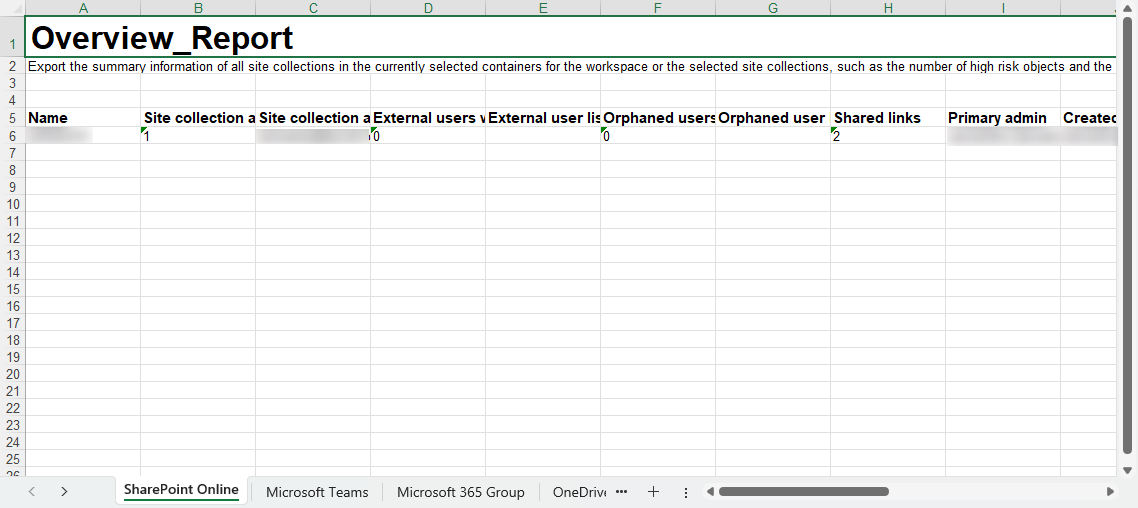
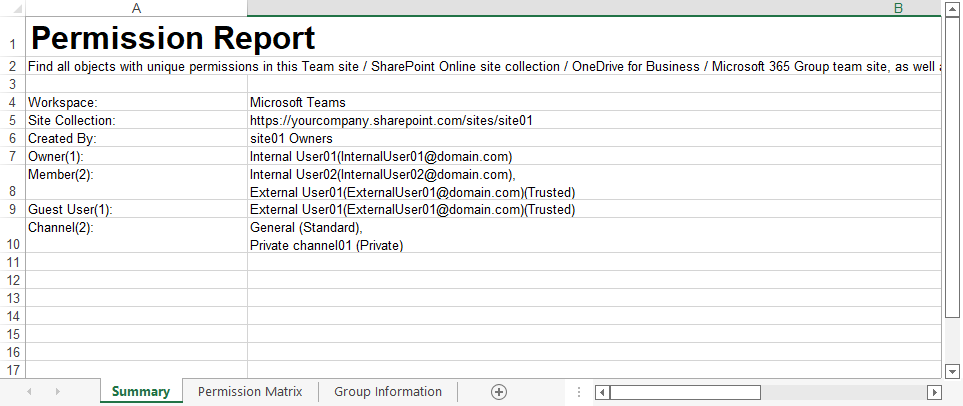
A .zip file will be exported using this API, which contains an overview report of all site collections in the export scope, and the permission reports of each site collection respectively.
The sample overview report
The sample permission report of a site collection
POST api/v1/User/summary
Gets the summary of specific users.
Request Example
Response Example
Request Information
| Elements | Description | Type | Required |
|---|---|---|---|
| Language | Sets the language of the information you are about to get. | String Valid values are: en-US for English (default) ja-JP for Japanese fr-FR for French | No |
| StartPage | Sets the start page from which you want to get the group summary. | Int The default value is 1. | Yes |
| PageSize | Sets the number of users displayed in each page of the result. The number must be no larger than 100. | Int | No |
Response Information
| Element | Element | Description | Type |
|---|---|---|---|
| results | displayName | The display name of the user. | String |
| results | loginName | The login name of the user. | String |
| results | The email address of the user. | String | |
| results | userStatus | The user’s sign-in status in Microsoft 365. Valid values are: Blocked for a user in Microsoft Entra whose sign-in to Microsoft 365 is blocked Activate for a user in Microsoft Entra whose sign in to Microsoft 365 is active | String |
| results | trustStatus | The user’s trust status in Insights for Microsoft 365. Valid values are: Trusted for a trusted user in Insights for Microsoft 365 Not Trusted for a user who is not trusted in Insights for Microsoft 365 | String |
| results | sitesWithDirectAccess | The number of site collections to which the user has been granted direct permissions. | Int |
| results | lastSignin | The user’s last sign-in time to Microsoft 365. | String |
| results | createdOn | The time when the user is created in Microsoft Entra. | DateTime |
| status | status | The HTTP response status code. | Int |
| message | message | The error message. | String |
| content | content | The remark. The element is not used for this API and responded with “null” by default. | String |
| nextToken | nextToken | The token to be used to get the remaining results of this request. The element is not used for this API and responded with “null” by default. | String |
POST api/v1/user/permission/export
Exports the access reports of specific users in different workspaces.
You can only export access reports of 100 users at a time.
Example
Request Information
| Element | Description | Type | Required |
|---|---|---|---|
| emails | Sets the logon names of users for which you want to export the permission report. 100 logon names at most. | String Array | Yes |
| dataSources | Sets the workspace in which you want to export the access report of users. Multiple values are allowed. | String Array Valid values: Microsoft Teams SharePoint Online OneDrive Microsoft 365 Group | Yes |
| siteUrls | Sets the site collections in which you want to export the access report of users. 100 site collections at most. | String Array | No |
| Language | Sets the language of the report you are about to export. | String Valid values are: en-US for English (default) ja-JP for Japanese fr-FR for French | No |
| ExportOptionType | Sets the export option of the report you are about to export. | String Array Valid values are: 1 for exporting both the summary report and site collection level Access report 2 for exporting both the summary report and Access report to all objects in the configured data scope 3 for only exporting the summary report | Yes |
Response Information
| Element | Description | Type |
|---|---|---|
| getFileUrl | The API URL to retrieve the exported access report file. | String |
| id | The unique ID of the exported access report file. | Int |
Sample Reports
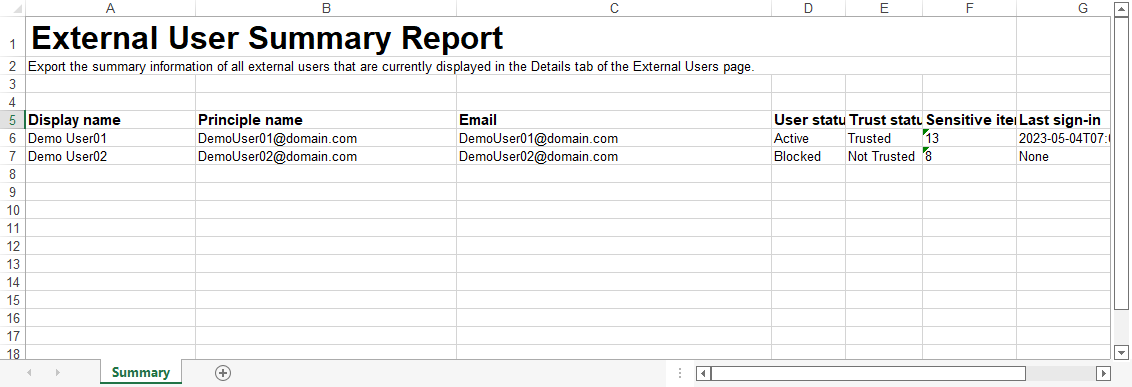
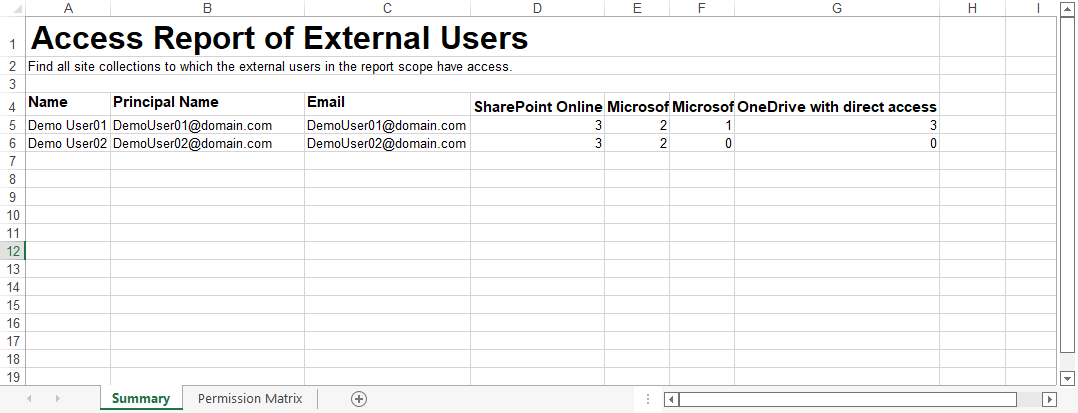
A .zip file will be exported using this API. Based on the export option you defined, the exported reports vary.
-
If you export only the summary report, the summary report of all users in the export scope will be included in the .zip file.
-
If you export both the summary report and site collection level access report, both the summary report of all users in the export scope and the access report of these users to site collections in the configured data scope are included in the .zip file.
-
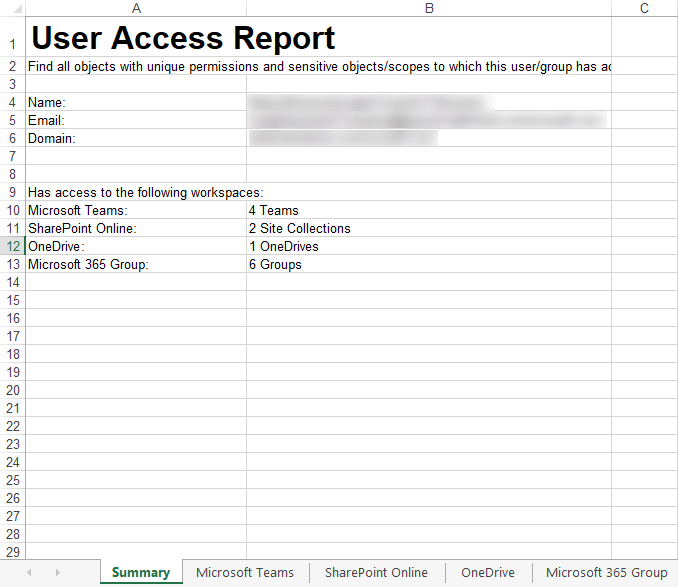
If you export both the summary report and Access report, the summary report of all users in the export scope and the access reports to all objects in each user’s configured data scope, respectively, are included in the .zip file.
The sample summary report
The sample site collection level access report
The sample user access report
POST api/v1/Group/summary
Gets the summary of specific groups.
Request Example
Response Example
Request Information
| Elements | Description | Type | Required |
|---|---|---|---|
| Language | Sets the language of the information you are about to get. | String Valid values are: en-US for English (default) ja-JP for Japanese fr-FR for French | No |
| StartPage | Sets the start page from which you want to get the group summary. | Int The default value is 1. | Yes |
| PageSize | Sets the number of groups displayed in each page of the result. The number must be no larger than 100. | Int | No |
Response Information
| Element | Element | Description | Type |
|---|---|---|---|
| results | displayName | The group name. | String |
| results | groupId | The group ID. | String |
| results | The email address of the group | String | |
| results | groupType | The type of the group. Valid values are: Microsoft 365 Group Security Group Distribution Group Mail-enabled Security Group | String |
| results | membershipType | The membership type of the group. Valid values are: Assigned Dynamic | String |
| results | externalMemberCount | The number of external users in the group. | Int |
| results | createdOn | The time when the group is created. | DateTime |
| status | status | The HTTP response status code. | Int |
| message | message | The error message. | String |
| content | content | The remark. The element is not used for this API and responded with “null” by default. | String |
| nextToken | nextToken | The token to be used to get the remaining results of this request. The element is not used for this API and responded with “null” by default. | String |
POST api/v1/group/Permission/export
Gets the .zip file from exporting the permission related information of specific groups.
Example
Request Information
| Elements | Description | Type | Required |
|---|---|---|---|
| Emails | Sets the IDs of the groups for which you are about to export reports. | String Array | Yes |
| SiteUrls | Sets the site collections in which you want to export report of groups. 100 site collections at most. | String Array | No |
| dataSources | Sets the workspace in which you want to export reports of groups. Multiple values are allowed. | String Array Valid values are: Microsoft Teams SharePoint Online OneDrive Microsoft 365 Group | Yes |
| ExportOptionType | Sets the export option of the report you are about the export. | Int Valid values are: 1 for exporting both the summary report and site collection level Access report 2 for exporting both the summary report and Access report to all objects in the configured data scope 3 for only exporting the summary report | Yes |
| Language | Sets the language of the information you are about to get. | String Valid values are: en-US for English (default) ja-JP for Japanese fr-FR for French | No |
To export report of all groups, you can leave emails empty and make sure 3 is set for exportOptionType.
Response Information
| Element | Description | Type |
|---|---|---|
| getFileUrl | The API URL to retrieve the exported permission report file. | String |
| id | The unique ID of the exported permission report file. | Int |
Sample Reports
A .zip file will be exported using this API. Based on the export option you defined, the exported reports vary.
-
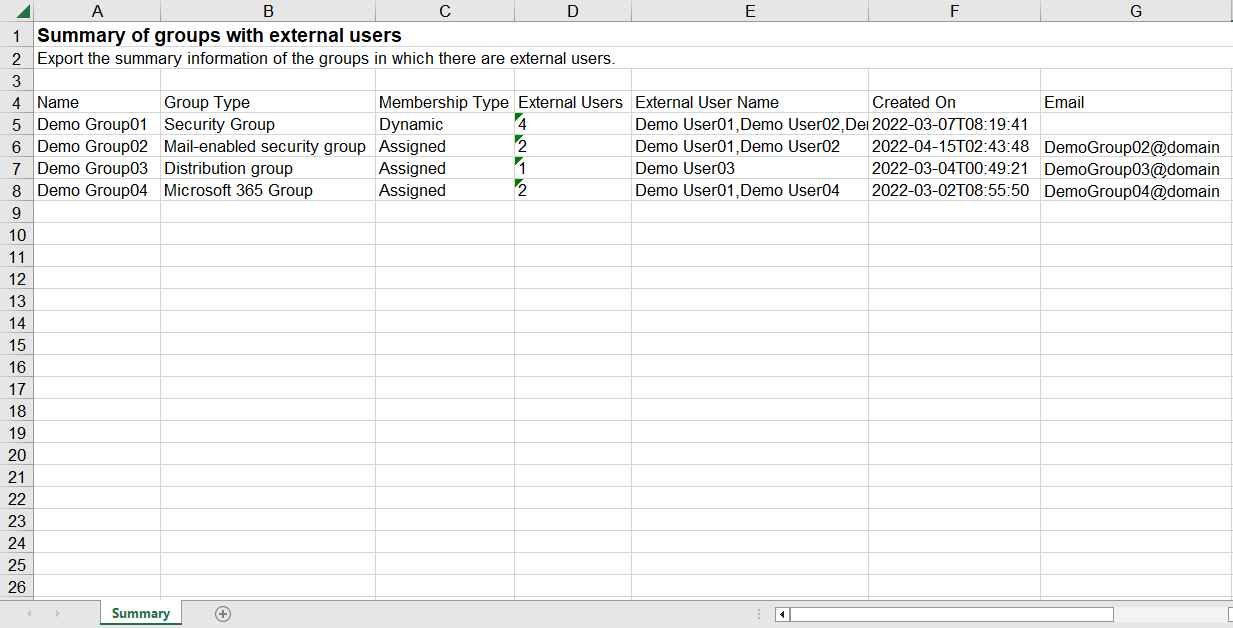
If you export only the summary report, the summary report of the groups in the export scope is included in the .zip file.
-
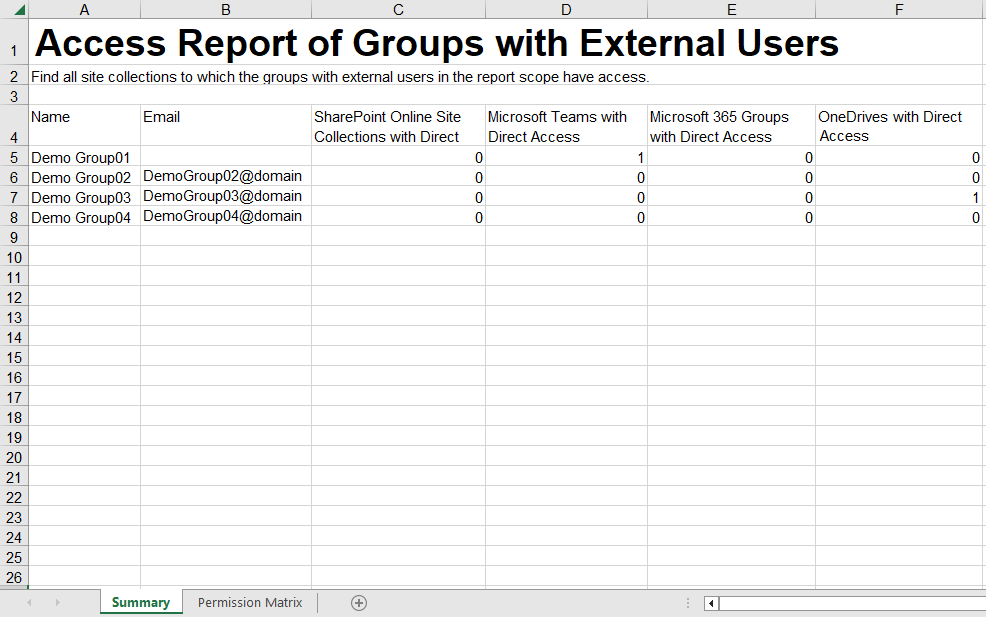
If you export both the summary report and site collection level access report, both the summary report of all groups in the export scope and the access report of these groups to site collections in the configured data scope are included in the .zip file.
-
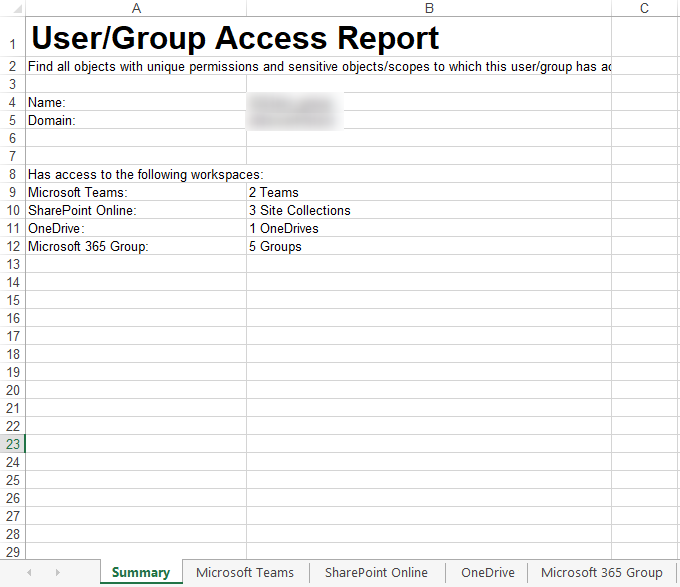
If you export both the summary report and access report, the summary report of all groups in the export scope and the access reports to all objects in each group’s configured data scope, respectively are included in the .zip file.
The sample summary report
The sample site collection level access report
The sample access report
POST api/v1/link/permission/query
Gets the summary of specific links.
Request Example
Response Example
Request Information
| Elements | Description | Type | Required |
|---|---|---|---|
| Language | Sets the language of the information you are about to get. | String Valid values are: en-US for English (default) ja-JP for Japanese fr-FR for French | No |
| SiteUrls | Sets the URLs of site collections for which you want to get the summary information. | String Array | No |
| Token | Sets whether to get the remaining results of a request of which the results are more than 100. | String | No |
| PageSize | Sets the number of links displayed in each page of the result. The number must be no larger than 100. | Int | No |
| LinkType | Sets the link types that you are about to get. | Int Valid values are: 32 for flexible link 64 for organization link 128 for anyone link | Yes |
Response Information
| Element | Element | Description | Type |
|---|---|---|---|
| results | id | The ID in the link summary. | String |
| results | siteId | The site ID in which the object is shared by the link. | String |
| results | selfId | The selfID of the object which is shared by the link. | String |
| results | linkId | The link ID. | String |
| results | loginName | The link login name. | String |
| results | createTime | The time when the link is created. | DateTime |
| results | expireTime | The time when the link is expired. This is only available for anyone links. | DateTime |
| results | name | The object name that is shared via the link. | String |
| results | objectUrl | The object URL that is shared via the link. | String |
| results | linkType | The link type. Valid values are: 32 (for flexible link) 64 (for organization link) 128 (for anyone link) | String |
| results | shareBy | The user who created the link. | String |
| results | inheritFrom | The parent from which the permission inherits. | String |
| results | inheritType | The status whether the permission is inherited. | String |
| results | shareWith | The number of users and groups with whom the link is shared. | Int |
| results | linkUrl | The link URL. | String |
| results | permission | The permission with which the link is shared. | String |
| results | fileType | The type of the object shared via the link. | String |
| results | sensitivityLevel | The sensitivity level of the object shared via the link. | String |
| status | status | The HTTP response status code. | Int |
| message | message | The error message. | String |
| content | content | The remark. The element is not used for this API and responded with “null” by default. | String |
| nextToken | nextToken | The token to be used to get the remaining results of this request. | String |
POST api/v1/link/Permission/export
Gets the .zip file from exporting the permission related information of specific links.
Example
Request Information
| Elements | Description | Type | Required |
|---|---|---|---|
| language | Sets the language of the information you are about to get. | String Valid values are: en-US for English (default) ja-JP for Japanese fr-FR for French | No |
| exportLinkType | Sets the link types that you are about to get. | Int Valid values are: 32 for flexible link 64 for organization link 128 for anyone link | Yes |
| startTime | Sets the start time of the time range in which the link is created. | DateTime | No |
| endTime | Sets the end time of the time range in which the link is created. | DateTime | No |
Response Information
| Element | Description | Type |
|---|---|---|
| getFileUrl | The API URL to retrieve the exported permission report file. | String |
| id | The unique ID of the exported permission report file. | Int |
Sample Reports
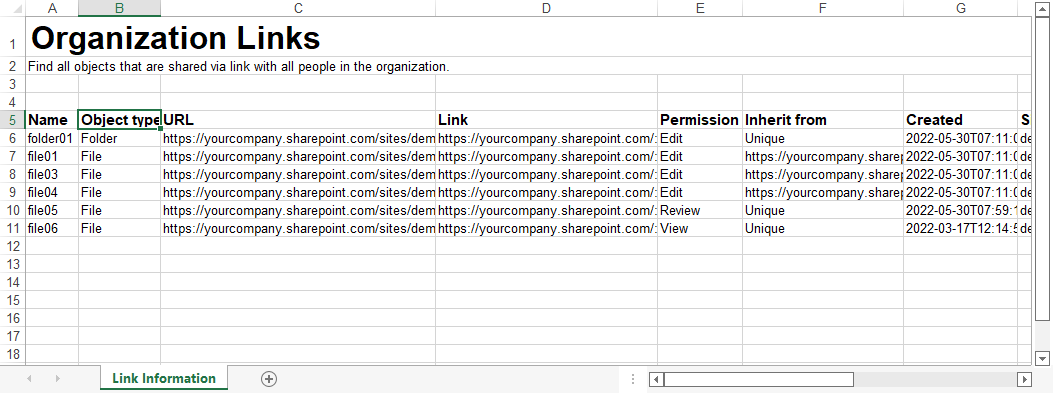
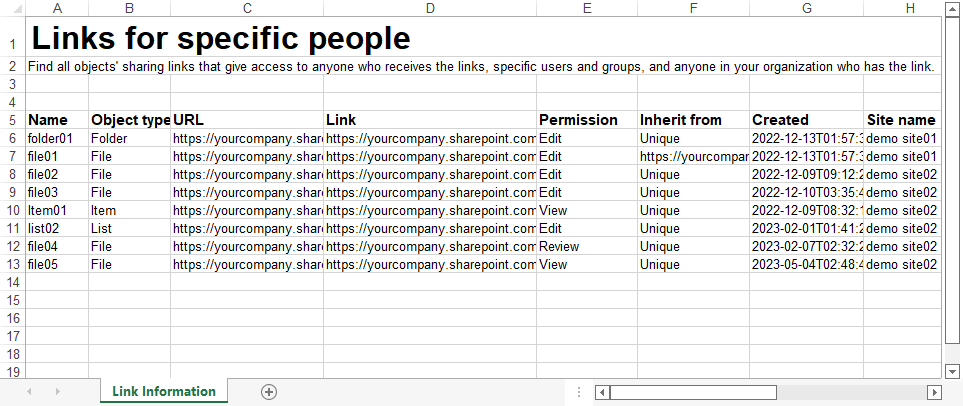
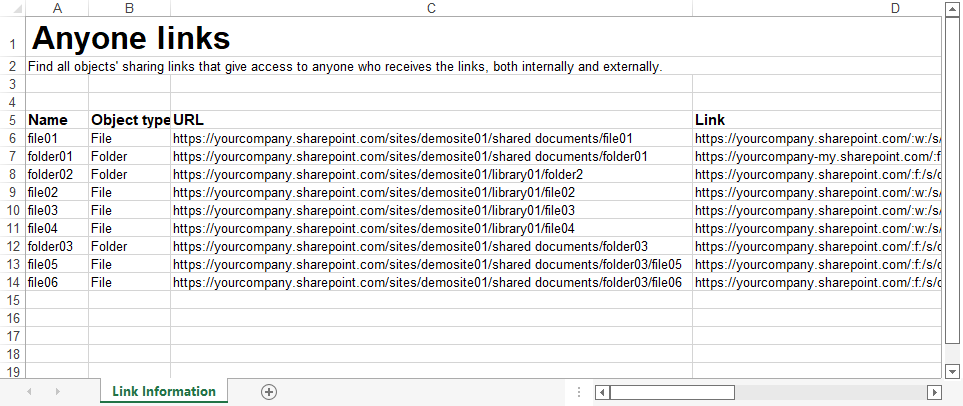
A .zip file will be exported using this API. Based on the types of links you export, the reports vary.
The sample organization links report
The sample specific links report
The sample anyone links report
GET api/v1/permission/export/status?id={id}
Gets the status for exporting the permission report or access report.
Example
Request Information
| Elements | Description | Type | Required |
|---|---|---|---|
| id | Sets the ID of the export for which you want to get the status. | Int | Yes |
Response Information
| Element | Description | Type |
|---|---|---|
| status | The status of the export. Values are: 1 for in progress 2 for successful 3 for failed | Int |
| description | The description of the status. Values are: Export in progress. Successfully exported. Failed to export. Try again later. If the issue persists, contact the AvePoint Support team for help. | String |
GET api/v1/permission/export/get?id={id}
Gets the downloaded reports.
Example
Request Information
| Elements | Description | Type | Required |
|---|---|---|---|
| id | Sets the ID of the export for which you want to get the status. | Int | Yes |
Response Information
| Element | Description | Type |
|---|---|---|
| / | The file stream of the exported permission/access report file. | File Stream |
POST api/v1/Site/permission
Gets the permission-related information of specific site collections.
The api/v1/site/permission/export API is recommended when the site collections that you are about to export are over 2,000.
Request Example
Response Example
Request Information
| Elements | Description | Type | Required |
|---|---|---|---|
| SiteUrls | Sets the URLs of site collections for which you want to get the permission related information. 100 URLs at most. | List | Yes |
| Language | Sets the language of the information you are about to get. | String Valid values are: en-US for English (default) ja-JP for Japanese fr-FR for French | No |
| Token | Sets whether to get the remaining results of a request of which the results are more than 100. | String | No |
| Top | Sets the number of results for one page. 100 results on one page at most. | Int | No |
Response Information
| Element | Element | Description | Type |
|---|---|---|---|
| results | module | The data source. | String |
| results | name | The name of the permission. | String |
| results | url | The URL of the object. | String |
| results | objectType | The object type. | String |
| results | principalName | The name of the user or group. | String |
| results | principalType | The type of the user or group. | String |
| results | permission | The permission. | String |
| results | numberOfMembers | The number of members in the group. | Int |
| results | isExternalUser | The status whether external users exist. | Bool |
| results | inheritType | The status whether the object breaks inheritance from its parent. | Bool |
| results | linkGivingAccessTo | The members that are given the permission via link. | String |
| status | status | The HTTP response status code. | Int |
| message | message | The error message. | String |
| nextToken | nextToken | The token to be used to get the remaining results of this request. | String |
POST api/v1/User/permission
Gets the permission-related information of specific users.
The api/v1/user/permission/export API is recommended when the users that you are about to export are over 2,000.
Request Example
Response Example
Request Information
| Elements | Description | Type | Required |
|---|---|---|---|
| SiteUrls | Sets the URLs of site collections for which you want to get the permission related information of the specific users. 100 URLs at most. All site collections in the configured data scope will be scanned if no URL is set. | List | No |
| Language | Sets the language of the information you are about to get. | String Valid values are: en-US for English (default) ja-JP for Japanese fr-FR for French | No |
| Emails | Sets the emails or principal names of the users for which you want to get the permission related information. 100 emails at most. | List | Yes |
| Token | Sets whether to get the remaining results of a request of which the results are more than 100. | String | No |
| Top | Sets the number of results for one page. 100 results on one page at most. | Int | No |
Response Information
| Element | Element | Description | Type |
|---|---|---|---|
| results | module | The data source. | String |
| results | siteName | The name of the site. | String |
| results | name | The name of the permission. | String |
| results | location | The URL of the object. | String |
| results | objectType | The object type. | String |
| results | inheritType | The status whether the object breaks inheritance from its parent. | Bool |
| results | permission | The permission. | String |
| results | sensitivityLevel | The sensitivity level of the object. | String |
| results | dataType | The data type of the object. | List |
| results | isDirect | The status whether the permission is directly granted. | Bool |
| results | sensitivityLabel | The sensitivity label of the object. | String |
| results | trainableClassifier | The trainable classifier contained in the object. | List |
| results | inheritedFrom | The parent from which the permission inherits. | String |
| status | status | The HTTP response status code. | Int |
| message | message | The error message. | String |
| nextToken | nextToken | The token to be used to get the remaining results of this request. | String |
POST api/v1/activity/export
Exports the activity report of users and objects.
Request Example
Response Example
Request Information
| Elements | Description | Type | Required |
|---|---|---|---|
| Sets the email addresses or UPNs of users for which you want to export the activity report. The value can be left blank if you want to export only the activity report on objects. | String | Yes | |
| path | Sets the full URLs of the objects on which you want to export the activity report. The value can be left blank if you want to export only the user activity report. | String | Yes |
| startTime | Sets the start date and time from which you want to export the activity report. | DateTime | No |
| endTime | Sets the end date and time by which you want to export the activity report. | DateTime | No |
| eventTypes | Sets the operations that users performed or that are performed to objects for export. | String | No |
| Language | Sets the language of the report you are about to export. | String Valid values are: en-US for English (default) ja-JP for Japanese fr-FR for French | No |
Response Information
| Element | Description | Type |
|---|---|---|
| getFileUrl | The API URL to retrieve the exported activity report. | String |
| id | The unique ID of the exported activity report file. The ID can be used to view the status of the export job and download the exported file. | Int |
Sample Reports
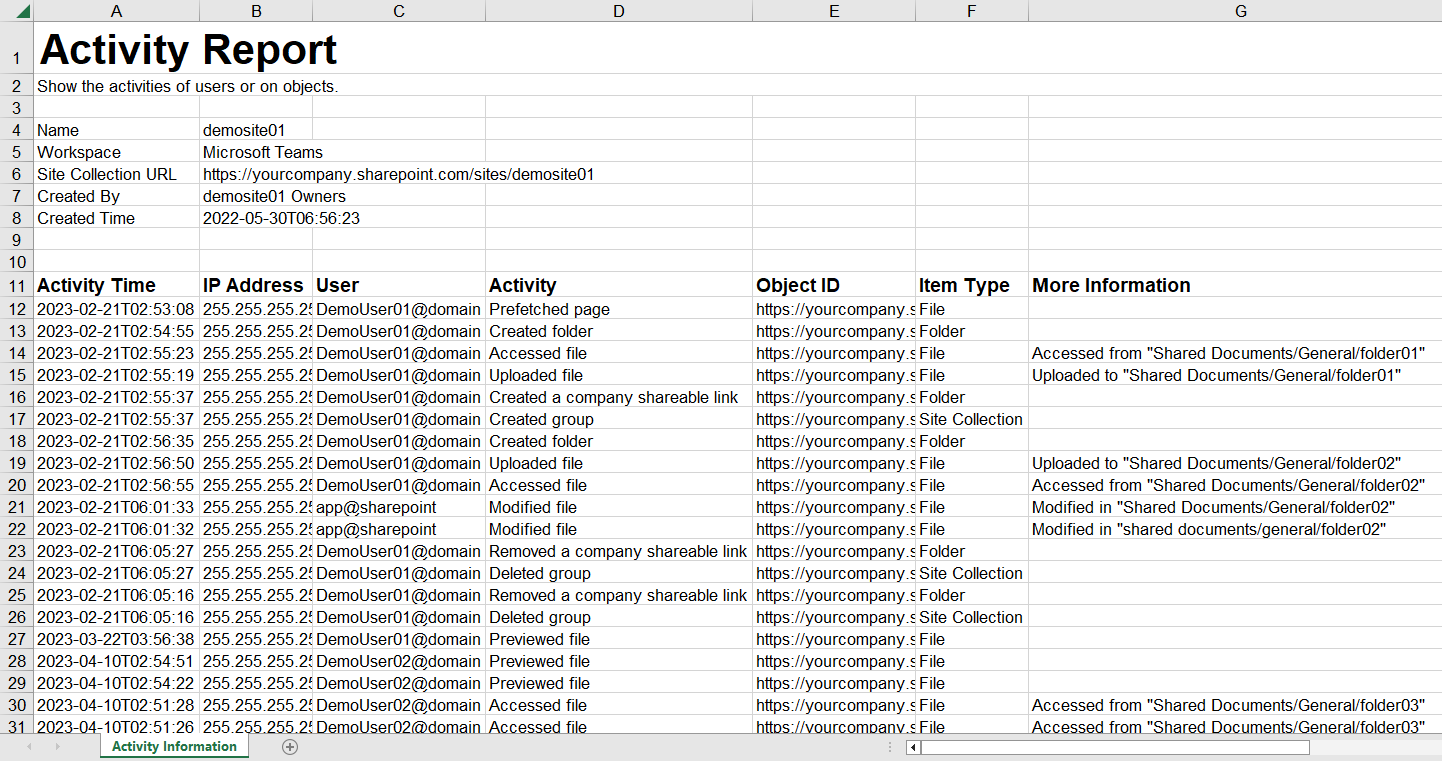
A .zip file will be exported using this API. The activity report of the user or on the object you exported will be included in the .zip file.
The sample user activity report
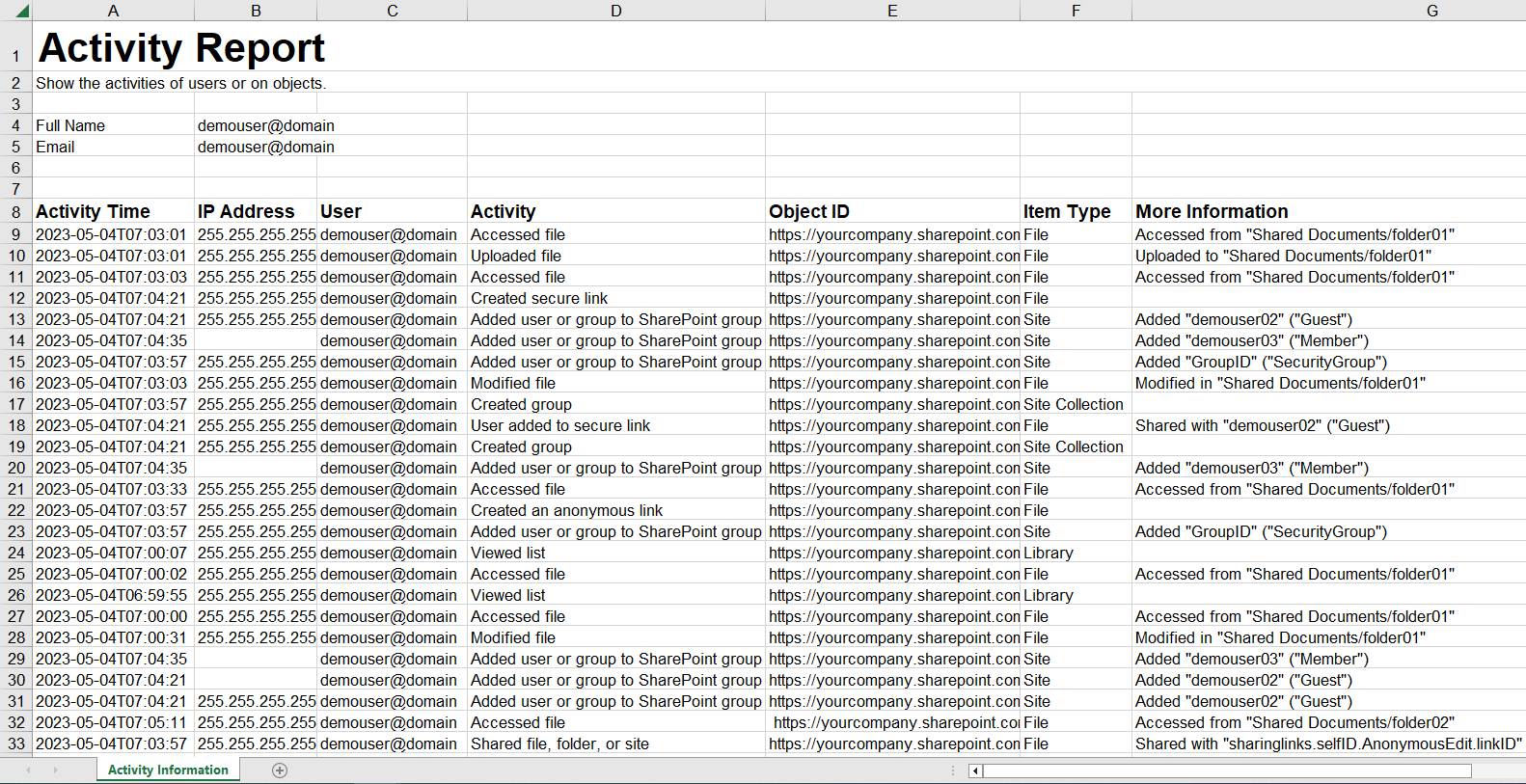
The sample activity report on object
GET api/v1/activity/export/status?id={id}
Gets the export status of the activity report.
Request Example
Response Example
Request Information
| Elements | Description | Type | Required |
|---|---|---|---|
| id | Sets the unique ID of the exported activity report file. The unique ID can be obtained with POST api/v1/Activity/export. | Int | Yes |
Response Information
| Element | Description | Type |
|---|---|---|
| status | The status of the export job. Values are: 1 for in progress 2 for successful 3 for failed | Int |
| description | The description of the status. Values are: Export in progress. Successfully exported. Failed to export. Try again later. If the issue persists, contact the AvePoint Support team for help. | String |
GET api/v1/activity/export/file?id={id}
Gets the file ID of the exported activity report.
Request Example
Request Information
| Elements | Description | Type | Required |
|---|---|---|---|
| id | Sets the unique ID of the exported activity report file. The unique ID can be obtained with POST api/v1/Activity/export. | Int | Yes |
POST api/v1/DetailRecord/querybysite
Exports the risk analysis detailed records per site collection. This is the recommended API to export risk analysis detailed records.
Request Example
Response Example
Request Information
| Elements | Elements | Description | Type | Required |
|---|---|---|---|---|
| filters | objectType | Sets the object types. | Int Valid values are: 1 for Folder 2 for File 3 for Item 11 for Site Collection 12 for Site 13 for List 14 for Library | Yes |
| filters | tagName | Sets the tag names that exist in Insights. | String | Yes |
| filters | sensitivityLevel | Sets the sensitivity level. | Int Valid values are: 0 for Not sensitive 1 for Low 2 for Medium 3 for High -2 for No sensitivity definition applied | Yes |
| filters | exposureLevel | Sets the exposure level. | Int Valid values are: 1 for Low 2 for Medium 3 for High | Yes |
| filters | riskLevel | Sets the risk level. | Int Valid values are: 0 for No risk 1 for Low 2 for Medium 3 for High -2 for No sensitivity definition applied | Yes |
| filters | createdBy | Sets the user who created the item. | String | Yes |
| filters | modifiedTime | Sets the time when the item is last modified. At most two values can be set. | Datetime | Yes |
| token | token | Sets whether to get the remaining results of a request of which the results are more than 100. | String | No |
| language | language | Sets the language of the report you are about to export. | String Valid values are: en-US for English (default) ja-JP for Japanese fr-FR for French | No |
| pageSize | pageSize | Sets the number of results displayed in each page. The number must be no larger than 100. | Int | Yes |
| siteId | siteId | Sets the ID of the site collection where the detailed records you are about to export. | String | Yes |
Response Information
| Element | Element | Description | Type |
|---|---|---|---|
| results | id | The unique ID of the object. | String |
| results | name | The object name. | String |
| results | location | The full URL of the object. | String |
| results | objectType | The object type. | Int |
| results | createdBy | The creator of the object. | Int |
| results | module | The workspace of the site where the object resides. | Int |
| results | inheritance | The inheritance status of the object. | Int |
| results | siteName | The name of the site where the object resides. | String |
| results | sensitivityLevel | The sensitivity level of the object. | Int |
| results | exposureLevel | The exposure level of the object. | Int |
| results | scannedTime | The scanned time of the object. | String |
| results | createdTime | The created time of the object. | String |
| results | modifiedTime | The modified time of the object. | String |
| results | channelName | The name of the channel to which the object belongs. | String |
| results | riskLevel | The risk level of the object. | String |
| results | privacy | The privacy of the Team or Microsoft Group to which the object belongs. | String |
| results | dataType | The data type that the object matches. | List |
| results | trainableClassifier | The trainable classifier that the object matches. | List |
| results | sensitivityLabel | The sensitivity label applied to the object. | String |
| results | tagName | The name of the tag applied to the object. | String |
| results | retentionLabel | The retention label applied to the object. | String |
| results | creatorEmail | The email of the user who created the object. | String |
| results | webUrl | The URL of the site where the object resides. | String |
| status | status | The HTTP response status code. | Int |
| message | message | The error message. | String |
| content | content | The remark. The element is not used for this API and responded with “null” by default. | String |
| nextToken | nextToken | The token to be used to get the remaining results of this request. | String |
POST api/v1/DetailRecord/getSiteIds
Gets the site ID by site URL.
Request Example
Response Example
Request Information
| Elements | Description | Type | Required |
|---|---|---|---|
| siteUrls | Sets the URLs of site collections for which you want to get the ID. 100 URLs at most. | List | Yes |
POST api/v1/DetailRecord/querysiteoverview
Exports the risk analysis overview data of site collections.
Request Example
Response Example
Request Information
| Elements | Elements | Description | Type | Required |
|---|---|---|---|---|
| filters | module | Sets the workspaces from where you want to export the risk analysis overview data. | Int Valid values are: 1 for Microsoft Teams 2 for SharePoint Online 3 for OneDrive 4 for Microsoft 365 Group | No |
| filters | sensitivityLevel | Sets the sensitivity level. | Int Valid values are: 0 for Not sensitive 1 for Low 2 for Medium 3 for High -2 for No sensitivity definition applied | No |
| filters | exposureLevel | Sets the exposure level. | Int Valid values are: 1 for Low 2 for Medium 3 for High | No |
| filters | riskLevel | Sets the risk level. | Int Valid values are: 0 for No risk 1 for Low 2 for Medium 3 for High -2 for No risk definition applied | No |
| filters | location | Sets the object URLs. | String | No |
| filters | createdBy | Set the user who created the object. | String | No |
| token | token | Sets whether to get the remaining results of a request of which the results are more than 100. | String | No |
| pageSize | pageSize | Sets the number of results displayed in each page. The number must be no larger than 100. | Int | Yes |
Response Information
| Element | Element | Description | Type |
|---|---|---|---|
| results | siteName | The site name. | String |
| results | siteUrl | The site URL. | String |
| results | riskItemCount | The number of risk items. | Int |
| results | sensitiveItemCount | The number of sensitive items. | Int |
| results | exposureItemCount | The number of items with High, Medium, or Low exposure level. | Int |
| status | status | The HTTP response status code. | Int |
| message | message | The error message. | String |
| content | content | The remark. The element is not used for this API and responded with “null” by default. | String |
| nextToken | nextToken | The token to be used to get the remaining results of this request. | String |
POST api/v1/DetailRecord/query
Exports the risk analysis detailed records that meet the filters.
Request Example
Response Example
Request Information
| Elements | Elements | Description | Type | Required |
|---|---|---|---|---|
| filters | module | Sets the workspaces from where you want to export detailed records. | Int Valid values are: 1 for Microsoft Teams 2 for SharePoint Online 3 for OneDrive 4 for Microsoft 365 Group | No |
| filters | objectType | Sets the object types. | Int Valid values are: 1 for Folder 2 for File 3 for Item 11 for Site Collection 12 for Site 13 for List 14 for Library | No |
| filters | tagName | Sets the tag names that exist in Insights. | String | No |
| filters | username | Sets the email address of the user that has been configured in user management of Insights. | String | No |
| filters | sensitivityLevel | Sets the sensitivity level. | Int Valid values are: 0 for Not sensitive 1 for Low 2 for Medium 3 for High -2 for No sensitivity definition applied | No |
| filters | exposureLevel | Sets the exposure level. | Int Valid values are: 1 for Low 2 for Medium 3 for High | No |
| filters | riskLevel | Sets the risk level. | Int Valid values are: 0 for No risk 1 for Low 2 for Medium 3 for High -2 for No risk definition applied | No |
| filters | location | Sets the object URLs. | String | No |
| filters | siteName | Sets the names of sites where the detailed records reside. | String | No |
| token | token | Sets whether to get the remaining results of a request of which the results are more than 100. | String | No |
| language | language | Sets the language of the report you are about to export. | String Valid values are: en-US for English (default) ja-JP for Japanese fr-FR for French | No |
| pageSize | pageSize | Sets the number of links displayed in each page of the result. The number must be no larger than 100. | Int | Yes |
Response Information
| Element | Element | Description | Type |
|---|---|---|---|
| results | id | The unique ID of the object. | String |
| results | name | The object name. | String |
| results | location | The full URL of the object. | String |
| results | objectType | The object type. | Int |
| results | createdBy | The creator of the object. | Int |
| results | module | The workspace of the site where the object resides. | Int |
| results | inheritance | The inheritance status of the object. | Int |
| results | siteName | The name of the site where the object resides. | String |
| results | sensitivityLevel | The sensitivity level of the object. | Int |
| results | exposureLevel | The exposure level of the object. | Int |
| results | scannedTime | The scanned time of the object. | String |
| results | createdTime | The created time of the object. | String |
| results | modifiedTime | The modified time of the object. | String |
| results | channelName | The name of the channel to which the object belongs. | String |
| results | riskLevel | The risk level of the object. | String |
| results | privacy | The privacy of the Team or Microsoft Group to which the object belongs. | String |
| results | dataType | The data type that the object matches. | List |
| results | trainableClassifier | The trainable classifier that the object matches. | List |
| results | sensitivityLabel | The sensitivity label applied to the object. | String |
| results | tagName | The name of the tag applied to the object. | String |
| results | retentionLabel | The retention label applied to the object. | String |
| results | creatorEmail | The email of the user who created the object. | String |
| results | webUrl | The URL of the site where the object resides. | String |
| status | status | The HTTP response status code. | Int |
| message | message | The error message. | String |
| content | content | The remark. The element is not used for this API and responded with “null” by default. | String |
| nextToken | nextToken | The token to be used to get the remaining results of this request. | String |